

Google Analytics 4 handles referral traffic differently from Universal Analytics, and those differences matter when you are trying to measure the real-world impact of a link building campaign. This guide explains how GA4 records referral sessions, where to find backlink-driven traffic in the platform, how to use UTM parameters to add precision, and what the data can and cannot tell you about your backlinks’ contribution to organic growth.
Key Takeaways
- GA4 records backlink-driven visits under the Referral traffic channel, but some referring domains may be misclassified or excluded by default channel grouping rules.
- The Traffic Acquisition and Page and Screen reports are the primary places to identify which referring domains are sending sessions to your site.
- UTM parameters added to backlink URLs give you campaign-level attribution that GA4’s automatic referral detection cannot provide on its own.
- Referral traffic volume is one useful signal for evaluating a link building campaign, but it should be read alongside organic search data, conversion events, and ranking changes rather than in isolation.
- GA4’s session-scoped and event-scoped attribution models can produce different numbers; understanding which model you are viewing prevents misreading the data.
How GA4 Classifies Referral Traffic
When a user clicks a backlink on an external website and arrives on your site, GA4 records the source domain as the session source and assigns the session to the Referral default channel group, provided the referring domain is not on GA4’s internal referral exclusion list and the link does not carry a UTM parameter that overrides the automatic classification. GA4 uses a last non-direct click attribution model by default for session-level reporting, meaning the most recent non-direct touchpoint before a session begins receives credit for that session.
This classification matters for link building measurement because a backlink that drives a click will appear in GA4 as a referral session with the publisher’s domain as the source. If the same user later returns directly or via organic search, those subsequent sessions are attributed to their own sources. You are therefore measuring the direct click-through value of a backlink, not its indirect influence on organic rankings or brand awareness, which are separate effects that GA4 cannot isolate on its own.
GA4 also maintains a list of domains that are excluded from referral attribution by default, typically payment processors and certain third-party platforms. If a referring domain appears on that exclusion list, sessions from it will be attributed to direct traffic rather than referral. You can review and edit this list in Admin > Data Streams > Configure Tag Settings > List Unwanted Referrals.
Finding Referral Traffic in GA4 Reports
The most direct route to backlink referral data in GA4 is the Traffic Acquisition report, found under Reports > Acquisition > Traffic Acquisition. This report shows sessions grouped by the default channel group. To see individual referring domains, change the primary dimension from Session default channel group to Session source or Session source / medium. You can then filter the table to show only rows where the medium is referral, which isolates sessions that arrived via external links.

Each row in the filtered table represents a referring domain. The columns show sessions, engaged sessions, engagement rate, average engagement time, events, conversions, and total revenue if e-commerce tracking is configured. This gives you a practical view of which backlinks are generating visits and whether those visits result in meaningful on-site behaviour. A backlink from a high-traffic publisher may send hundreds of sessions; a backlink from a niche editorial site may send fewer but more engaged visitors. Both data points are useful when evaluating a link building campaign’s direct traffic contribution.
The Page and Screen report, found under Reports > Engagement > Pages and Screens, shows which pages on your site receive the most sessions. By adding a secondary dimension of Session source / medium and filtering for referral medium, you can identify which landing pages are receiving referral visits and from which domains. This is particularly useful when you have built links to specific product pages, service pages, or blog posts and want to confirm that the traffic is reaching the intended destination.
Using Explorations for Deeper Referral Analysis
GA4’s standard reports have limited customisation options. For more granular analysis, the Explore section allows you to build free-form reports that combine dimensions and metrics not available together in the standard interface. A useful exploration for backlink tracking combines the dimensions Session source, Session medium, Landing page + query string, and Event name, with metrics including sessions, conversions, and engaged sessions. This lets you see, in a single table, which referring domains sent traffic to which pages and whether those sessions resulted in goal completions.
To build this exploration, navigate to Explore, select Blank, add the dimensions and metrics listed above to the Variables panel, and drag them into the Tab Settings rows and values fields. Apply a filter where Session medium exactly matches referral. The resulting table gives you a more complete picture of referral traffic behaviour than the standard Traffic Acquisition report alone.
Adding UTM Parameters to Backlinks
GA4’s automatic referral detection identifies the referring domain but cannot tell you which specific campaign, content piece, or outreach effort produced a given backlink. UTM parameters solve this problem by embedding campaign information directly in the destination URL. When a user clicks a UTM-tagged link, GA4 reads the parameter values and uses them as the session source, medium, campaign, content, and term, overriding the automatic referral classification.
A standard UTM-tagged URL for a guest post backlink might look like this: https://yoursite.com/target-page/?utm_source=publisherdomain.com&utm_medium=referral&utm_campaign=guest-post-q3&utm_content=anchor-text-variant. The utm_source value identifies the publisher, utm_medium confirms the traffic type, utm_campaign groups the placement within a campaign, and utm_content distinguishes between different anchor text variants or placements on the same domain.
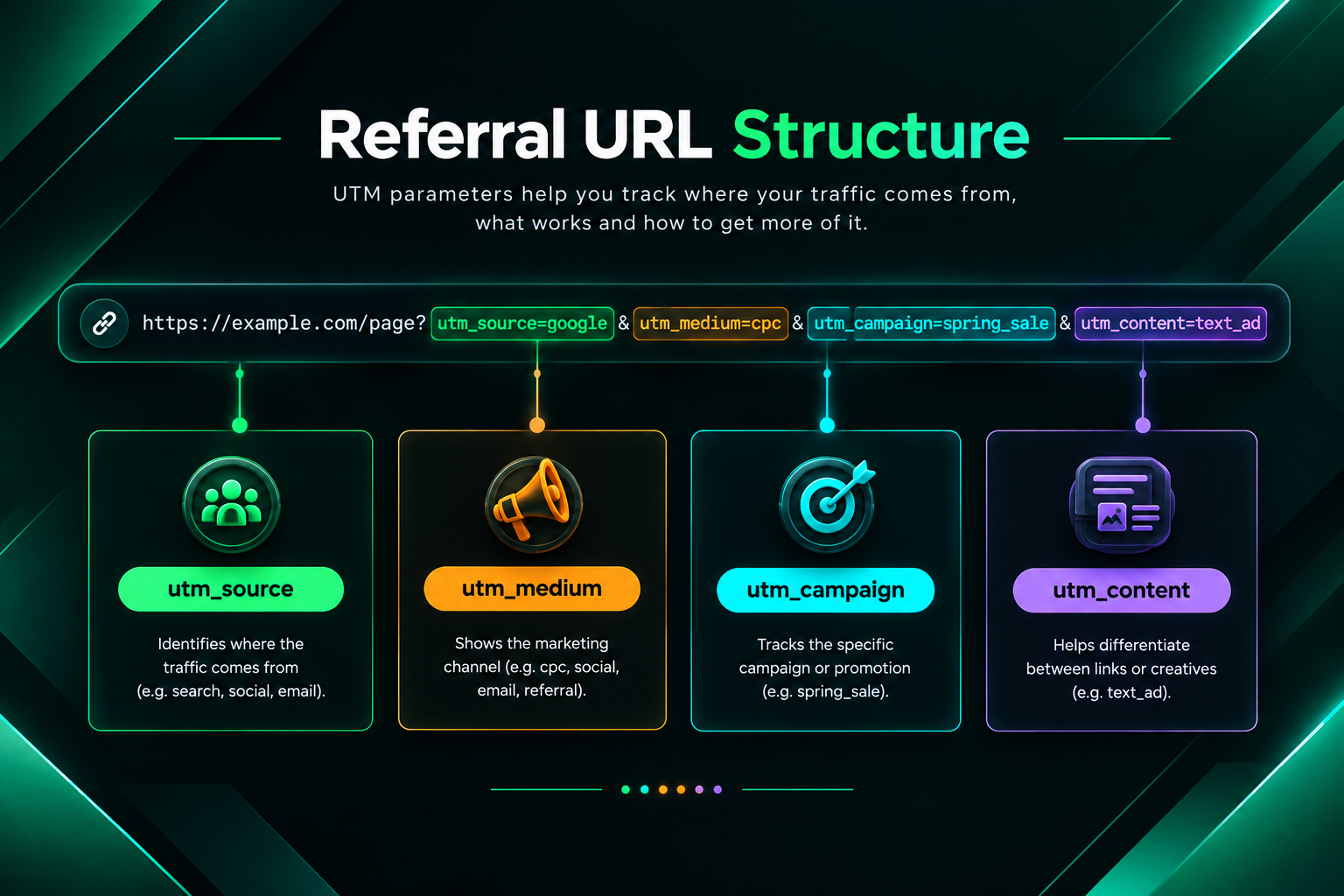
Using UTM parameters on backlinks has practical trade-offs worth understanding. On the positive side, UTM tagging gives you precise campaign-level attribution in GA4, making it straightforward to compare the direct traffic performance of different link placements. On the cautionary side, UTM parameters are visible in the URL, which means users and search engines can see them. Some SEO practitioners prefer not to use UTM parameters on editorial backlinks because the parameters may look unnatural in certain contexts, though there is no documented evidence that UTM parameters on inbound links affect how search engines evaluate the link itself. The decision depends on your measurement priorities and the type of placement involved.
Referral Traffic vs Organic Search: Understanding the Difference in GA4
A common source of confusion when measuring link building campaigns is the relationship between referral traffic and organic search traffic in GA4. These are distinct traffic types that reflect different user behaviours, and conflating them leads to inaccurate campaign evaluation.
Referral traffic in GA4 represents sessions where a user clicked a link on an external website and arrived on your site directly from that click. The session source is the referring domain. This measures the direct click-through value of a backlink.
Organic search traffic represents sessions where a user found your site through a search engine results page and clicked a listing. The session source is the search engine, such as google or bing. Backlinks may contribute to improved organic search rankings over time, which could increase organic search sessions, but GA4 does not attribute organic search sessions to the backlinks that may have influenced those rankings. That causal relationship, if it exists, is not visible in GA4 and requires separate analysis using tools such as Google Search Console, Ahrefs, or Semrush alongside ranking data.
When evaluating a link building campaign in GA4, it is therefore important to track both referral traffic from specific referring domains and organic search traffic trends over the same period, while recognising that changes in organic traffic may have multiple contributing causes beyond backlink acquisition, including content updates, technical SEO improvements, competitor activity, and algorithm changes.
Setting Up Conversion Tracking for Referral Sessions
Counting referral sessions is useful, but understanding whether those sessions result in meaningful actions is more valuable for assessing a link building campaign’s business contribution. GA4 uses events as the foundation of its measurement model, and any event can be marked as a conversion. Common conversion events relevant to link building measurement include form submissions, demo requests, product purchases, newsletter sign-ups, file downloads, and phone number clicks.
To evaluate referral traffic quality, navigate to the Traffic Acquisition report, filter for referral medium, and review the Conversions and Total revenue columns alongside sessions. A referring domain that sends a modest number of sessions but generates a disproportionate share of conversions may indicate a highly relevant audience alignment between the publisher’s readership and your offer. Conversely, a referring domain sending large session volumes with near-zero conversions may indicate a traffic quality mismatch, which is worth investigating before prioritising further placements on that domain.
If your site does not yet have conversion events configured in GA4, setting them up before a link building campaign begins gives you a cleaner baseline and makes post-campaign attribution more reliable. Retroactive conversion event configuration in GA4 does not backfill historical data, so events only count from the point they are enabled.
Comparing Referral Traffic Across Time Periods
GA4’s date comparison feature allows you to compare referral traffic performance across two time periods, which is useful for measuring the incremental impact of a link building campaign. To use this feature, open the Traffic Acquisition report, click the date range selector in the top right, enable the comparison toggle, and select a comparable prior period. The table will then show the percentage change in sessions, engaged sessions, and conversions for each referring domain.
When interpreting period-over-period referral data, account for seasonal variation, campaign timing, and the publication lag between when a backlink is placed and when it begins generating traffic. A guest post published mid-month may not appear in GA4 referral data until the publisher’s page is indexed and begins receiving its own organic traffic, which can take days to several weeks depending on the publisher’s crawl frequency and domain authority. Niche edits placed within existing indexed content may generate referral clicks more quickly, though the volume depends on the traffic the host page already receives.
Identifying Which Backlinks Are Sending Traffic
Not all backlinks send measurable referral traffic to GA4. A backlink on a page with very low organic traffic or minimal direct visitors will generate few or no referral sessions, even if the link is editorially placed and technically sound. This is an important distinction: a backlink’s value for search engine optimisation, specifically its potential contribution to your site’s authority and rankings, is separate from its direct referral traffic value. Both matter, but they are measured differently.
To identify which specific backlinks are generating referral sessions, cross-reference your GA4 referral source data with your backlink profile data from a tool such as Google Search Console, Ahrefs, or Semrush. Google Search Console’s Links report shows which external domains link to your site, but it does not show traffic data. By matching the referring domains visible in GA4’s Traffic Acquisition report against your known backlink profile, you can identify which placements are actively driving clicks and which are contributing primarily through their potential SEO signal value.
This cross-referencing process is particularly useful for agencies and in-house SEO teams managing ongoing link building campaigns, as it helps prioritise publisher relationships and content formats that generate both referral traffic and editorial link placements on relevant, traffic-bearing pages.
Common GA4 Referral Tracking Issues and How to Address Them
Several technical issues can cause referral traffic from backlinks to be misattributed or undercounted in GA4. Being aware of these issues helps you interpret your data more accurately.
- Referral exclusions: If a referring domain is on your referral exclusion list, sessions from it will appear as direct traffic. Review the exclusion list in Admin > Data Streams > Configure Tag Settings to ensure legitimate referring domains are not excluded.
- Cross-domain tracking gaps: If your site uses multiple domains or subdomains and cross-domain measurement is not configured correctly, internal traffic between your own properties may appear as referral traffic, inflating referral session counts.
- Redirect chains: If a backlink points to a URL that redirects to your final destination page, GA4 may record the intermediate redirect domain as the referral source rather than the original publisher domain, depending on how the redirect is implemented.
- Bot and spam traffic: Some referral sessions in GA4 may originate from bots or spam crawlers rather than genuine users. GA4 applies some automated filtering, but reviewing unusually high-volume referral sources with very low engagement rates can help identify non-human traffic that should be excluded from campaign analysis.
- Session timeout and direct attribution: If a user clicks a backlink, leaves the page, and returns later in a new session without a referral source, the second session is attributed to direct traffic. GA4’s default session timeout is 30 minutes of inactivity.
What Referral Traffic Data Can and Cannot Tell You About Link Building
GA4 referral traffic data is a useful but partial measure of a link building campaign’s impact. Understanding its limitations prevents over-reliance on a single metric when evaluating campaign performance.
Referral traffic data in GA4 can tell you which referring domains are sending sessions, how many sessions those domains generate, how engaged those sessions are, and whether referral visitors are completing conversion events. This information is directly observable and relatively reliable, subject to the tracking issues described above.
What GA4 referral traffic data cannot tell you is whether a specific backlink contributed to an improvement in your organic search rankings, how much of an increase in organic sessions may be attributable to your backlink profile, or whether a backlink’s presence on a given domain influenced how search engines evaluate your site’s authority. These effects, if they exist, operate through mechanisms that are not directly observable in GA4 and require separate analysis using ranking tracking tools, backlink profile analysis, and careful interpretation of organic traffic trends over time.

A link building campaign that generates minimal referral traffic in GA4 is not necessarily ineffective from an SEO perspective. A backlink on a low-traffic but highly relevant editorial page may contribute meaningfully to your site’s topical authority and ranking potential without sending a single measurable referral session. Conversely, a high referral traffic source may have limited SEO signal value if the referring page lacks topical relevance or editorial quality. Evaluating link building campaigns requires combining GA4 referral data with backlink profile metrics, ranking data, and organic traffic trends rather than relying on any single data source.
Frequently Asked Questions
Why does GA4 show fewer referral sessions than I expected from a new backlink?
Several factors can reduce visible referral sessions. The referring page may have low organic traffic of its own, meaning few users see the link. The link may be positioned below the fold or in a section with low click-through rates. GA4’s referral exclusion list may be filtering out the domain. Or the referring page may not yet be indexed and receiving traffic. Cross-referencing the referring page’s estimated traffic in a tool like Ahrefs or Semrush can help set realistic expectations for click volume.
Can I track referral traffic from backlinks without UTM parameters?
Yes. GA4 automatically records the referring domain for sessions that arrive via external links, provided the domain is not on the referral exclusion list. You will see the referring domain in the Traffic Acquisition report under Session source. UTM parameters add campaign-level detail that automatic detection cannot provide, but they are not required for basic referral domain tracking.
How do I separate referral traffic from different link building campaigns in GA4?
UTM parameters are the most reliable method. By assigning a consistent utm_campaign value to all backlinks placed as part of a specific campaign, you can filter GA4 reports by campaign name and compare performance across different outreach efforts, guest posting campaigns, or niche edit placements.
Does GA4 show referral traffic from nofollow backlinks?
Yes. The rel=”nofollow” attribute is an instruction to search engines about how to treat the link for ranking purposes. It does not prevent users from clicking the link, and it does not prevent GA4 from recording the resulting session as referral traffic. A nofollow backlink on a high-traffic page can generate substantial referral sessions even though its SEO signal value may differ from a followed link.
How long after a backlink is placed should I expect to see referral traffic in GA4?
This depends on the referring page’s own traffic levels and how quickly users encounter the link. A backlink placed in a popular newsletter or a high-traffic blog post may generate referral sessions within hours. A backlink on a newly published guest post may take days or weeks to appear in GA4 referral data as the post gains its own organic traffic. There is no universal timeline; monitoring GA4 referral data weekly in the weeks following a placement gives a reasonable view of click-through performance.
Should I use GA4 referral traffic as the primary metric for evaluating link building ROI?
Referral traffic is one useful input but should not be the sole metric. A more complete evaluation combines GA4 referral sessions and conversions, organic search traffic trends, keyword ranking changes tracked in Google Search Console or a dedicated rank tracker, and backlink profile quality metrics from tools such as Ahrefs or Semrush. Link building campaigns may influence organic performance over months, and that influence is not directly visible in GA4 referral data alone.
Using GA4 Referral Data to Inform Your Link Building Strategy
Tracking referral traffic from backlinks in GA4 is most valuable when the data actively informs decisions about where to build links, which content formats attract clicks, and which publisher relationships are worth developing further. If your GA4 data consistently shows that backlinks from a particular type of publisher, such as industry news sites or comparison pages in your niche, generate engaged sessions and conversion events, that pattern is worth factoring into your outreach prioritisation. Similarly, if certain landing pages receive referral traffic but show poor engagement metrics, that may indicate a mismatch between the referring content’s audience and the landing page’s offer or messaging.
For businesses working with an outsourced link building provider or managing campaigns in-house, building a simple GA4 referral tracking dashboard that monitors referring domains, landing pages, engaged sessions, and conversions on a monthly basis creates a practical feedback loop between link acquisition activity and measurable traffic outcomes. This does not replace the need to track organic rankings and backlink profile quality separately, but it adds a direct traffic dimension to campaign reporting that is often underused.
If you are planning a link building campaign and want to ensure your GA4 setup is configured to capture referral data accurately before outreach begins, reviewing your referral exclusion list, confirming conversion events are active, and establishing a baseline reporting period are practical preparation steps. A qualified SEO provider can help assess whether your current analytics configuration will give you reliable campaign measurement data from the outset.