

When you add a link to a webpage, two small attributes — noopener and noreferrer — can have meaningful consequences for security, analytics data, and how search engines interpret your link profile. Many website owners and SEO practitioners use these attributes interchangeably or apply them without fully understanding what each one does. This article explains what noopener and noreferrer actually mean, how they differ, when each is appropriate, and what their combined or individual use means for your backlink strategy and referral tracking.
Key Takeaways
- noopener is a security attribute that prevents a newly opened tab from accessing the originating page via the
window.openerJavaScript property, without affecting referral data passed to analytics tools. - noreferrer does everything noopener does, and additionally suppresses the HTTP Referer header, meaning the destination site and your analytics platform will not see where the visitor came from.
- Neither attribute converts a followed link into a nofollow link; they do not directly instruct search engines to ignore a link for ranking purposes.
- Using noreferrer on outbound links causes referral traffic to appear as direct traffic in tools such as Google Analytics, which can distort channel attribution reporting.
- Choosing between the two depends on your priorities: use noopener when security matters but referral data should be preserved; use noreferrer when you also want to suppress the referring URL.
What noopener and noreferrer Actually Do
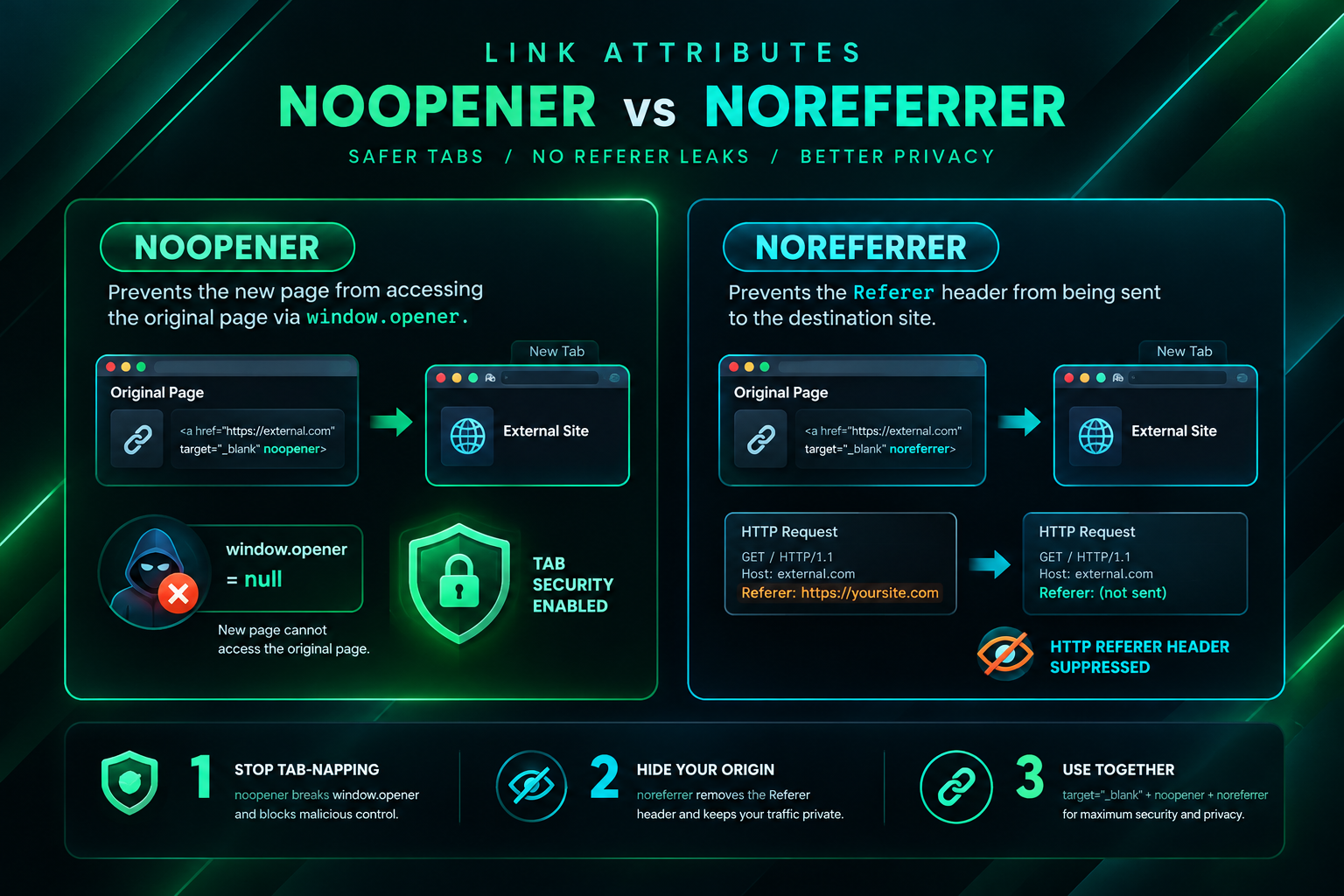
Both attributes are values applied to the rel attribute of an HTML anchor element. A typical link using both might look like this: <a href="https://example.com" target="_blank" rel="noopener noreferrer">Link text</a>. They are most commonly used together on links that open in a new browser tab or window, indicated by target="_blank". Understanding what each one does independently is essential before deciding which to apply.
What noopener Does
noopener closes a specific browser security vulnerability. When a link opens in a new tab using target="_blank", the newly opened page can, by default, access the original page through a JavaScript property called window.opener. A malicious destination page could exploit this to redirect the original tab to a phishing page without the user noticing. Adding rel="noopener" severs this connection: the new tab opens normally, but it cannot reference or manipulate the page that opened it. Importantly, noopener does not affect the HTTP Referer header. The destination website and any analytics platform tracking that destination will still receive referral information showing where the visitor came from.
What noreferrer Does
noreferrer performs two functions simultaneously. First, it implicitly applies the same security protection as noopener, preventing the new tab from accessing window.opener. Second, it instructs the browser to omit the HTTP Referer header when the link is followed. This means the destination website’s server logs and analytics tools will not receive information about the referring page. In Google Analytics and similar platforms, traffic arriving via a noreferrer link typically appears as direct traffic rather than referral traffic, because no referring URL is passed. This distinction has practical consequences for anyone monitoring referral traffic sources or measuring the value of outbound links placed on other websites.
Quick Comparison
| Attribute | Blocks window.opener access | Suppresses HTTP Referer header | Affects nofollow status | Impact on referral analytics | Typical use case |
|---|---|---|---|---|---|
| noopener | Yes | No | No | Referral data preserved | Security on target=”_blank” links where referral tracking matters |
| noreferrer | Yes (implicitly) | Yes | No | Traffic may appear as direct | Security plus privacy; suppressing referring URL |
| noopener noreferrer | Yes | Yes | No | Traffic may appear as direct | Default in many CMS platforms for all external links in new tabs |
| nofollow | No | No | Yes (signals to search engines) | Referral data preserved | Signalling to search engines not to pass ranking credit |
The SEO Implications of noopener and noreferrer
A common source of confusion is whether noopener or noreferrer affects how search engines treat a link. The short answer is that neither attribute is a substitute for rel="nofollow", rel="sponsored", or rel="ugc". Google’s documented guidance on link attributes focuses on nofollow, sponsored, and ugc as signals for ranking purposes. noopener and noreferrer are browser-level instructions related to security and privacy, not directives to search engine crawlers about link equity or ranking signals.
That said, there is an indirect SEO consideration worth understanding. When noreferrer suppresses the Referer header, it affects how referral traffic from external links is attributed in analytics. If a publisher places a link to your website and uses noreferrer, visits from that link may be recorded as direct traffic in your analytics platform rather than as referral traffic from that publisher’s domain. This does not mean the link has no value for search engine crawling or potential ranking influence — it simply means the traffic attribution in your reporting tool will be incomplete. For businesses and SEO teams trying to measure the value of earned or placed links, this distinction matters when evaluating campaign performance.
From a crawling and indexing perspective, search engine bots generally do not follow links in the same way a browser does, and they do not send Referer headers in the same manner. The presence of noopener or noreferrer on a link is unlikely to prevent a search engine crawler from discovering and evaluating the linked URL. However, if a link also carries rel="nofollow" alongside noopener or noreferrer, the nofollow signal is what instructs the crawler regarding ranking credit — the other two attributes remain browser-level instructions.
How CMS Platforms Handle These Attributes by Default
Many content management systems, including WordPress, automatically add rel="noopener noreferrer" to any link that uses target="_blank". This default behaviour was introduced primarily for security reasons following widespread awareness of the window.opener vulnerability. The practical consequence is that a large proportion of outbound links on the web now carry noreferrer by default, even when the site owner did not consciously choose to suppress referral data.
For website owners and SEO practitioners, this means that referral traffic data in analytics tools is often understated. If you are building links to a client’s website and those links are placed on WordPress-powered publishers, a portion of the resulting traffic may be recorded as direct rather than referral, depending on how the publisher’s CMS handles the link attributes. This is worth accounting for when reporting on link campaign outcomes and when setting expectations about measurable referral traffic from placements.
Some CMS platforms allow administrators to modify this default behaviour through settings or plugins, enabling noopener without noreferrer when referral tracking is a priority. Whether this is appropriate depends on the specific platform, the publisher’s editorial policies, and the technical implementation.
noopener, noreferrer, and Referral Traffic Tracking
Referral traffic attribution is one of the more practically significant consequences of noreferrer for anyone involved in link building or digital marketing. When a user clicks a link on an external website and arrives at your site, analytics platforms such as Google Analytics identify the source using the HTTP Referer header. If that header is absent — because the linking page used noreferrer — the session is typically classified as direct traffic.
This creates a measurement gap. A link placed on a high-traffic publisher may generate meaningful visits to your website, but if those visits are recorded as direct traffic, the contribution of that specific placement becomes difficult to isolate in standard analytics reporting. One practical approach to address this is to use UTM parameters on the destination URLs used in link placements. UTM parameters are appended to the URL itself rather than relying on the Referer header, so they survive noreferrer suppression and allow the traffic source to be identified correctly in analytics. This approach requires coordination between the party placing the link and the website owner, but it provides more reliable attribution data regardless of how the publisher’s CMS handles link attributes.

It is worth noting that the Referer header can also be suppressed by other factors unrelated to link attributes, including browser privacy settings, HTTPS-to-HTTP transitions, and certain browser extensions. noreferrer is one contributor to referral data gaps, but not the only one.
Security Context: Why These Attributes Were Introduced
The security rationale for noopener is well-documented. When a webpage opens a new tab using target="_blank", the browser historically maintained a reference between the two tabs through the window.opener JavaScript object. A destination page with malicious intent could use this reference to execute JavaScript that redirects the original tab — the one the user is still looking at — to a different URL, such as a convincing phishing page. The user, now focused on the new tab, might return to the original tab and encounter a fake login page without realising the original page had been replaced.
Adding rel="noopener" prevents this by nullifying the window.opener reference in the new tab. The new tab opens normally, but it has no programmatic access to the originating page. This is a meaningful security improvement for any website that includes outbound links opening in new tabs, particularly those linking to third-party content that the site owner does not fully control.
Modern browsers have also introduced changes to their default handling of target="_blank" links. Chromium-based browsers, for example, began implicitly applying noopener behaviour to target="_blank" links by default in certain versions, reducing the practical security risk even without the explicit attribute. However, explicitly including rel="noopener" remains a recommended practice for cross-browser compatibility and clarity of intent.
When to Use noopener, noreferrer, or Both
Choosing the right attribute depends on what you are trying to achieve. The following guidance covers the most common scenarios.
Use noopener when security matters but referral data should be preserved
If you are adding outbound links that open in a new tab and you want to protect against the window.opener vulnerability without suppressing referral information, use rel="noopener" on its own. This is appropriate when the destination website’s analytics team or your own reporting depends on accurate referral attribution, and when you have no specific reason to hide the referring URL.
Use noreferrer when you also want to suppress the referring URL
If privacy is a priority — for example, if you do not want the destination website to know which page on your site the visitor came from — use rel="noreferrer". Because noreferrer implicitly includes noopener behaviour in most modern browsers, you may not need to add both explicitly, though including both is common practice for compatibility. Be aware that this choice will affect referral traffic attribution at the destination.
Use both together as a safe default for external links in new tabs
Using rel="noopener noreferrer" together is the most widely adopted convention for external links that open in new tabs. It provides security protection and is the default in many CMS environments. If referral tracking is not a concern for a particular link, this combination is a reasonable default. If accurate referral attribution matters, consider whether noreferrer is necessary or whether UTM parameters can compensate for the suppressed Referer header.
Do not use noopener or noreferrer as a substitute for nofollow
If your goal is to signal to search engines that a link should not pass ranking credit — for example, on paid placements, sponsored content, or user-generated links — use rel="nofollow", rel="sponsored", or rel="ugc" as appropriate. These are separate attributes with distinct purposes. Applying noopener or noreferrer does not communicate anything to search engine crawlers about how to treat the link for ranking purposes.
Implications for Link Building Campaigns
For businesses and SEO teams managing link acquisition campaigns, understanding how noopener and noreferrer interact with referral tracking and link attributes has practical consequences at several stages of a campaign.
When evaluating the performance of placed links, referral traffic from publisher sites may be underreported in analytics if those publishers use noreferrer by default. This does not mean the links are without value — search engine crawlers may still discover and evaluate the links, and any potential ranking influence operates independently of the Referer header. However, it does mean that referral traffic alone is an incomplete measure of a link placement’s contribution. Combining referral traffic data with organic ranking changes, direct traffic trends, and UTM-tagged campaign URLs provides a more complete picture.
When assessing the quality of a potential linking domain, the presence of noopener or noreferrer on that domain’s outbound links is not itself a quality signal. Publisher quality assessment for link building purposes is better informed by factors such as topical relevance, editorial standards, organic traffic estimates from third-party tools, the site’s existing backlink profile, and whether the content surrounding a potential placement is genuinely useful to readers.
Link attribute choices — including nofollow, sponsored, ugc, noopener, and noreferrer — are worth reviewing during a link audit. A link marked nofollow carries a different signal to search engines than one without it, regardless of whether noopener or noreferrer is also present. Understanding the full rel attribute value on any given link helps clarify what that link may or may not contribute to a backlink profile.
Common Misconceptions
Several misconceptions about noopener and noreferrer circulate in SEO discussions. Addressing them directly helps avoid decisions based on inaccurate assumptions.
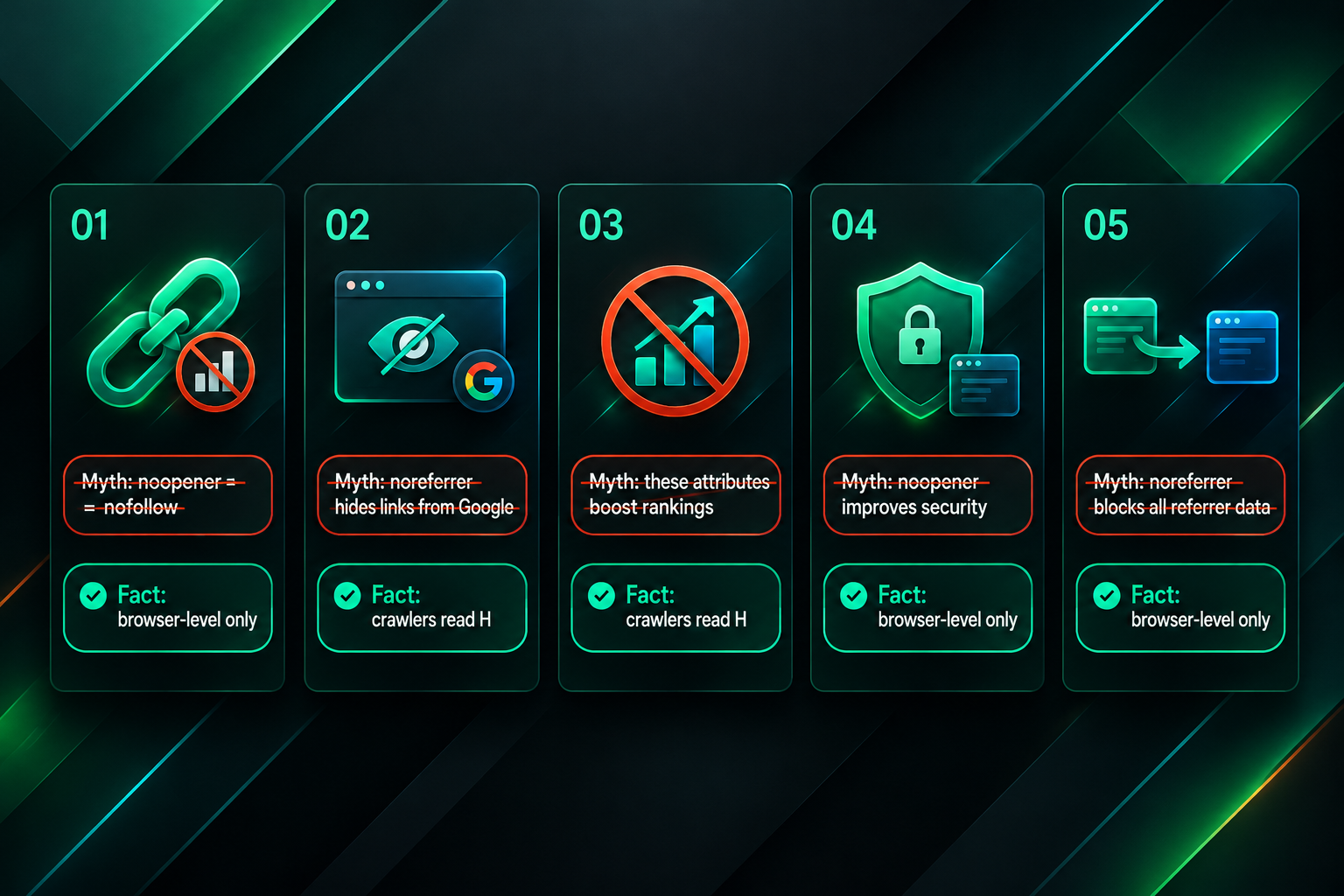
- noopener and noreferrer do not make a link nofollow. They are browser-level security and privacy attributes, not search engine directives. A followed link with noopener or noreferrer is still a followed link from a search engine perspective unless nofollow or another qualifying attribute is also present.
- noreferrer does not hide a link from search engines. Search engine crawlers discover links by parsing HTML, not by following Referer headers. A link with noreferrer is still crawlable and indexable.
- Using these attributes is not a ranking strategy. Neither noopener nor noreferrer is documented by Google or other search engines as a ranking factor. Their purpose is security and privacy, not SEO optimisation.
- The absence of these attributes does not make a link more valuable for SEO. Link value for ranking purposes is influenced by factors such as topical relevance, the authority of the linking domain, anchor text, placement context, and the presence or absence of nofollow — not by whether noopener or noreferrer is present.
- noreferrer does not prevent all referral tracking. UTM parameters appended to destination URLs can identify traffic sources even when the Referer header is suppressed, providing an alternative attribution method.
Frequently Asked Questions
Does noreferrer affect Google’s ability to crawl a link?
No. Google’s crawler discovers links by reading HTML source code, not by relying on the HTTP Referer header. A link with rel="noreferrer" remains crawlable. The noreferrer attribute affects browser behaviour when a human user clicks the link, not how search engine bots process the link’s HTML.
If a link has noopener but not noreferrer, will referral traffic be tracked correctly?
Yes, in most cases. noopener does not suppress the HTTP Referer header. When a user clicks a link with only rel="noopener", the browser still sends the referring URL to the destination, and analytics platforms should record the visit as referral traffic from the originating domain.
Should I remove noreferrer from all my outbound links to improve referral tracking?
This depends on your priorities. Removing noreferrer from outbound links will allow referral data to pass to destination sites, which may improve your own analytics if you are tracking outbound click behaviour, but it also means destination sites will see your referring URLs. If your CMS adds noreferrer by default and referral attribution matters for specific links, you may be able to override the default on a per-link basis or use UTM parameters on destination URLs as an alternative tracking method.
Does WordPress automatically add noopener noreferrer to all links?
WordPress adds rel="noopener noreferrer" to links that use target="_blank", not to all links. Links that open in the same tab are not automatically given these attributes. The behaviour can vary depending on the WordPress version, theme, and any plugins that modify link output.
Can I use noopener and nofollow together on the same link?
Yes. Multiple values can be included in the rel attribute, separated by spaces. For example, rel="nofollow noopener" is valid HTML. The nofollow value signals to search engines, while noopener addresses browser security. They serve different purposes and do not conflict.
Does noreferrer affect affiliate link tracking?
It can. Affiliate networks that rely on the HTTP Referer header to attribute conversions may not correctly record the source if noreferrer suppresses that header. Many affiliate tracking systems use URL parameters or cookies rather than the Referer header, which reduces this risk, but it is worth verifying with the specific affiliate platform being used.
Choosing the Right Attribute for Your Links
noopener and noreferrer are not interchangeable, and understanding the distinction helps you make deliberate choices rather than relying on CMS defaults without awareness of the consequences. noopener addresses a specific browser security concern without affecting referral data. noreferrer adds referral suppression on top of that security protection, which has measurable consequences for analytics attribution and for the destination site’s ability to identify its traffic sources.
For most outbound links that open in new tabs, using both attributes together is a reasonable and widely adopted default. Where referral tracking accuracy is important — such as when measuring the traffic contribution of specific link placements in an SEO campaign — it is worth considering whether noreferrer is necessary for a given link, or whether UTM parameters can provide reliable attribution regardless of the Referer header’s presence or absence.
Neither attribute should be confused with nofollow or other search-engine-directed link attributes. If you are managing a link building campaign and want to understand how link attributes on your placements may affect both search engine signals and analytics reporting, a review of the full rel attribute values across your backlink profile can provide useful clarity. An SEO professional with experience in link auditing and campaign measurement can help interpret what those attributes mean in the context of your specific goals and reporting requirements.