
If your link building outreach emails are disappearing into spam folders instead of reaching editors and webmasters, the problem is rarely a single mistake. Spam placement is usually the result of several overlapping technical, content, and sender-reputation issues working together. Understanding each cause separately makes it much easier to diagnose what is happening with your own campaigns and to apply fixes that actually hold up over time.
Key Takeaways
- Spam placement in outreach campaigns is almost always caused by a combination of technical configuration gaps, poor sender reputation, and email content patterns that trigger filters.
- Domain authentication records — SPF, DKIM, and DMARC — are foundational requirements; missing any one of them significantly increases the chance of spam placement.
- Sending volume, sending speed, and the ratio of new domains to warmed-up domains all affect how inbox providers assess your outreach infrastructure.
- Email content factors such as spammy subject lines, excessive links, and template-heavy formatting contribute to filter triggers even when technical setup is correct.
- Fixing deliverability is an ongoing process, not a one-time configuration change; sender reputation can recover but it takes consistent, measured effort.
What Spam Filters Are Actually Evaluating
Modern spam filters used by providers such as Gmail, Outlook, and corporate mail servers do not rely on a single signal. They evaluate a combination of sender reputation, domain history, technical authentication, message content, and recipient engagement patterns simultaneously. An outreach email that fails on two or three of these dimensions is very likely to be filtered, even if the remaining signals look clean. Understanding this multi-factor evaluation is important because it explains why fixing only one problem — for example, rewriting subject lines — often produces little improvement if the underlying technical setup or sending infrastructure is still flagged.
Spam filters also learn from recipient behaviour. If previous outreach emails from your domain or IP address were marked as spam by recipients, that negative signal is stored and applied to future messages. This means deliverability problems can compound over time if they are not addressed early in a campaign. Conversely, positive engagement signals — opens, replies, and link clicks — can gradually improve a sender’s standing with inbox providers, which is one reason why email warm-up processes matter for new outreach domains.
Missing or Misconfigured Email Authentication Records
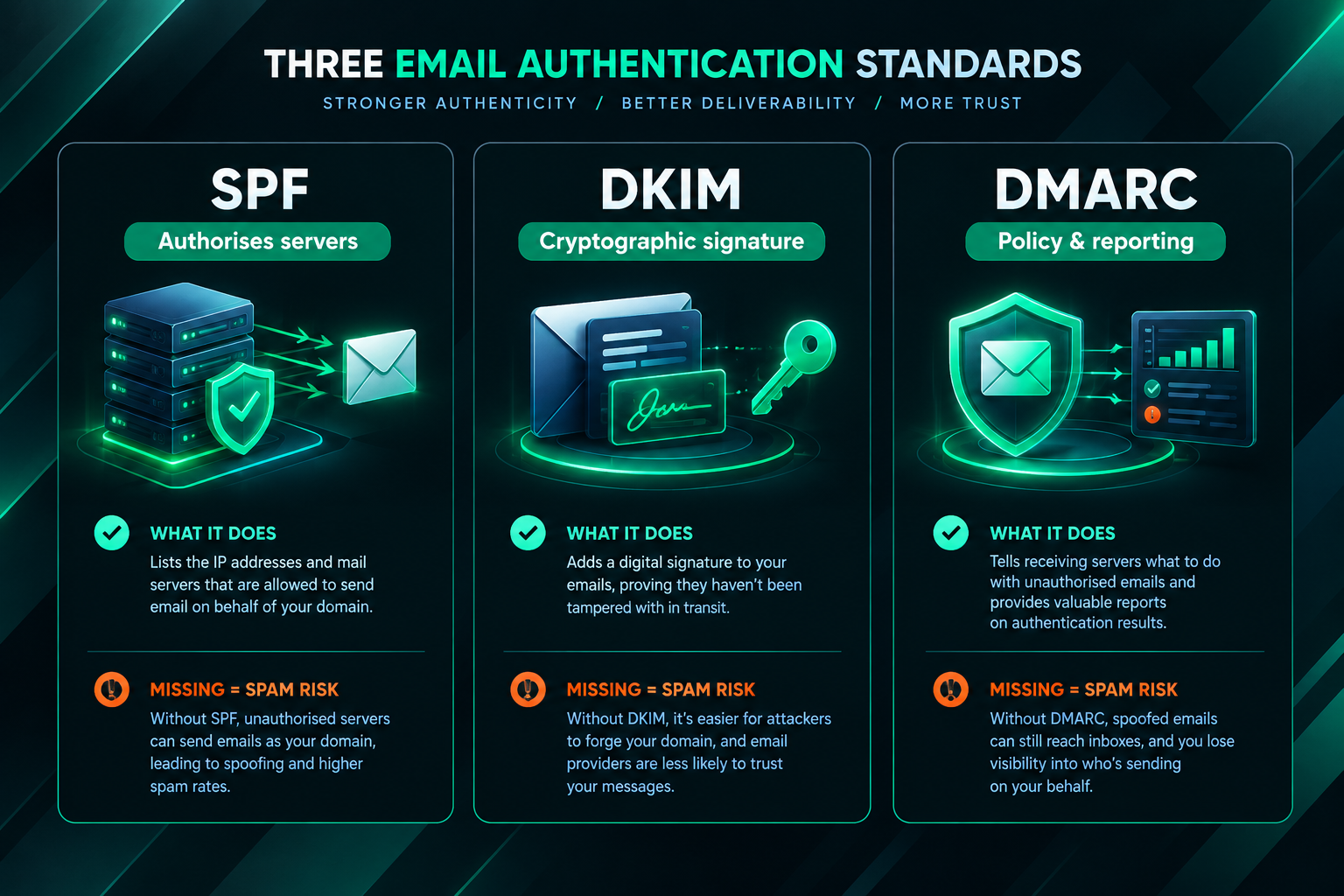
The most common technical reason that link building outreach emails go to spam is incomplete or incorrectly configured email authentication. The three core authentication standards are SPF (Sender Policy Framework), DKIM (DomainKeys Identified Mail), and DMARC (Domain-based Message Authentication, Reporting and Conformance). Each serves a distinct purpose, and inbox providers treat the absence of any one of them as a warning signal.
SPF specifies which mail servers are authorised to send email on behalf of your domain. Without a valid SPF record, receiving servers cannot verify that your outreach email genuinely originated from your domain, which raises the probability of spam classification. DKIM adds a cryptographic signature to outgoing messages, allowing the receiving server to confirm that the message content has not been altered in transit. DMARC builds on both SPF and DKIM by telling receiving servers what to do when authentication checks fail — whether to quarantine the message, reject it, or allow it through — and it enables reporting so you can monitor authentication failures. Outreach campaigns that lack a DMARC record, or that have a DMARC policy set to none without monitoring, are missing a layer of protection that major inbox providers increasingly expect.
Misconfiguration is as problematic as absence. A common SPF error is including too many DNS lookup mechanisms, which causes the record to exceed the ten-lookup limit and fail silently. DKIM key length below 1024 bits is another configuration weakness that some filters flag. Before launching any outreach campaign, verifying all three records using a dedicated email authentication checker is a practical first step that costs nothing and can immediately identify gaps.
Sender Reputation and Domain Age
Inbox providers assign a reputation score to both the sending IP address and the sending domain. A domain that was registered recently and immediately used for high-volume outreach has no established sending history, which makes it inherently less trusted. This is one reason why outreach campaigns launched from brand-new domains — even with perfect authentication records — frequently experience poor deliverability in the early weeks.
Domain warm-up is the process of gradually increasing sending volume from a new domain over several weeks, starting with small daily send counts and slowly scaling upward while maintaining positive engagement rates. The goal is to build a sending history that inbox providers can evaluate positively before the domain is used for full-scale outreach. Skipping this process and sending hundreds of outreach emails from a new domain on day one is one of the most reliable ways to trigger spam placement at scale.
Shared IP addresses present a related risk. If your outreach emails are sent through a shared mail server or a bulk email platform where other senders have poor practices, their negative reputation can affect your deliverability even if your own sending behaviour is clean. Dedicated sending IPs, where available, reduce this exposure, though they require their own warm-up process and are not always practical for smaller outreach operations.
Previous spam complaints are another significant reputation factor. If a meaningful proportion of recipients from earlier campaigns marked your emails as spam, that complaint rate is recorded and can suppress deliverability for subsequent campaigns sent from the same domain or IP. Monitoring complaint rates through tools such as Google Postmaster Tools — which provides domain and IP reputation data for Gmail delivery — can help identify when reputation has deteriorated and needs active recovery work.
Email Content Patterns That Trigger Spam Filters
Even when technical authentication is correctly configured and sender reputation is acceptable, the content of the outreach email itself can cause spam placement. Spam filters analyse message content using a combination of rule-based scoring and machine learning, and certain patterns consistently raise filter scores.
Subject lines that use urgency language, excessive capitalisation, or phrases commonly associated with commercial spam — such as “limited time”, “act now”, or “free” in certain contexts — can increase spam scores before the message body is even evaluated. For link building outreach, subject lines that are overly promotional or that make the commercial intent of the email immediately obvious may also perform poorly, both with filters and with human recipients who choose to mark unsolicited emails as spam.
Within the message body, several content factors contribute to filter triggers. A high ratio of links to text is a common issue in outreach templates that include multiple anchor links, signature links, social media icons, and unsubscribe links all within a short message. Spam filters treat link density as a risk signal, particularly when the linked domains have low trust scores. HTML-heavy formatting — including tables, multiple font colours, background colours, and embedded images — is another pattern associated with bulk commercial email rather than genuine personal correspondence, and it can raise spam scores accordingly.
Template repetition is a subtler but important factor. When the same outreach template is sent to hundreds of recipients with only the name and website URL changed, the structural similarity between messages can be detected by filters that compare message fingerprints across a sending domain’s history. Personalising outreach emails beyond simple name insertion — for example, referencing a specific article on the recipient’s website or a recent topic they have covered — reduces template similarity and also tends to improve genuine reply rates, which in turn generates positive engagement signals for the sending domain.
Sending Volume, Frequency, and Infrastructure
The speed at which outreach emails are sent matters as much as the total volume. Sending a large batch of emails within a short window — sometimes called a sending spike — is a behaviour pattern strongly associated with spam campaigns, and inbox providers respond by increasing scrutiny of messages from that sender. For link building outreach, this means that even a legitimate campaign targeting real webmasters can be filtered if the sending rate is too aggressive relative to the domain’s established history.
Practical sending limits vary depending on the domain’s age, warm-up history, and the inbox provider being targeted. As a general principle, outreach campaigns benefit from spreading sends across the working day rather than batching them, and from maintaining consistent daily volumes rather than alternating between high-volume days and silence. Sudden changes in sending pattern — either a large spike or a long gap followed by a spike — can both trigger increased filtering.
The choice of sending infrastructure also affects deliverability. Outreach sent through a standard business email account on a reputable provider such as Google Workspace or Microsoft 365 typically benefits from the shared positive reputation of those platforms’ IP ranges, provided the account itself has a clean history. Outreach sent through third-party bulk email platforms may be subject to different filtering treatment depending on the platform’s own reputation and the shared IP pools it uses. Some outreach tools offer dedicated sending infrastructure with warm-up features built in, which can be worth evaluating for campaigns that require sustained high-volume sending.
The Role of Recipient Engagement in Deliverability
Inbox providers do not only evaluate what you send — they also evaluate how recipients respond to it. High open rates, replies, and positive interactions signal to providers that your emails are wanted and relevant. Low open rates, high delete-without-open rates, and spam complaints signal the opposite. Over time, these engagement signals shape the sender reputation that determines where future messages are placed.
For link building outreach, this creates a practical feedback loop. Poorly targeted outreach sent to irrelevant websites or to contacts who have no interest in the topic is more likely to be ignored or marked as spam, which damages deliverability for subsequent sends. More carefully targeted outreach — sent to websites with genuine topical relevance to the content being promoted — tends to generate better engagement, which supports deliverability over time. This is one reason why list quality matters beyond the obvious goal of reaching the right publishers: it also directly affects the technical health of the outreach campaign.
Maintaining a clean contact list by removing hard bounces promptly is another engagement-related factor. A high bounce rate signals to inbox providers that the sender is not maintaining their list responsibly, which is a pattern associated with low-quality bulk email operations. Removing invalid addresses after each campaign and verifying new contacts before adding them to outreach sequences reduces bounce rates and protects sender reputation.
Outreach Practices That Compound Spam Placement Risk
Several outreach practices that are common in lower-quality link building campaigns reliably worsen spam placement over time. Purchasing email lists from third-party data brokers introduces contacts who have not opted in to receive communication from your domain, which increases the probability of spam complaints and also raises legal compliance risks depending on the jurisdiction. Sending to generic contact addresses such as info@ or contact@ rather than named individuals tends to produce lower engagement and higher filter scores. Using free email domains — such as Gmail or Outlook personal accounts — for outreach at scale can also trigger filters, as this pattern is associated with low-effort spam operations rather than professional correspondence.
Aggressive follow-up sequences that send multiple emails within a short period to the same recipient, particularly when the recipient has not opened the first message, can also contribute to spam placement. Some outreach automation tools allow follow-up emails to be sent regardless of whether the previous message was delivered or opened, which means a recipient who never saw the first email may receive several follow-ups in quick succession — a pattern that increases the likelihood of a spam complaint.
Diagnosing Where Your Outreach Emails Are Going
Before attempting to fix spam placement, it is useful to understand exactly where in the delivery process the problem is occurring. There are several practical diagnostic steps that can help narrow down the cause.
- Check authentication records using a tool such as MXToolbox or a dedicated email header analyser to verify that SPF, DKIM, and DMARC are correctly configured and passing for your sending domain.
- Review Google Postmaster Tools if a significant portion of your outreach targets Gmail addresses. This free tool from Google provides domain reputation data, spam rate data, and authentication pass rates specifically for Gmail delivery.
- Send test messages to seed accounts across different inbox providers — Gmail, Outlook, Yahoo — and check whether they arrive in the inbox, promotions tab, or spam folder. Tools such as Mail-Tester or GlockApps can automate this process and provide a spam score breakdown.
- Analyse bounce and complaint data from your sending platform to identify whether hard bounces or spam complaints are elevated, which would indicate list quality or reputation issues rather than purely content-related problems.
- Review message headers on emails that do reach recipients to check whether any intermediate servers are adding spam flags or modifying authentication results.
Combining these diagnostic steps usually makes it possible to identify whether the primary issue is technical configuration, sender reputation, content scoring, or list quality — each of which requires a different remediation approach.
Practical Steps to Improve Outreach Email Deliverability
Improving deliverability for link building outreach is a process that typically requires changes across several areas simultaneously. The following steps address the most common causes of spam placement and can be applied progressively depending on what the diagnostic process reveals.
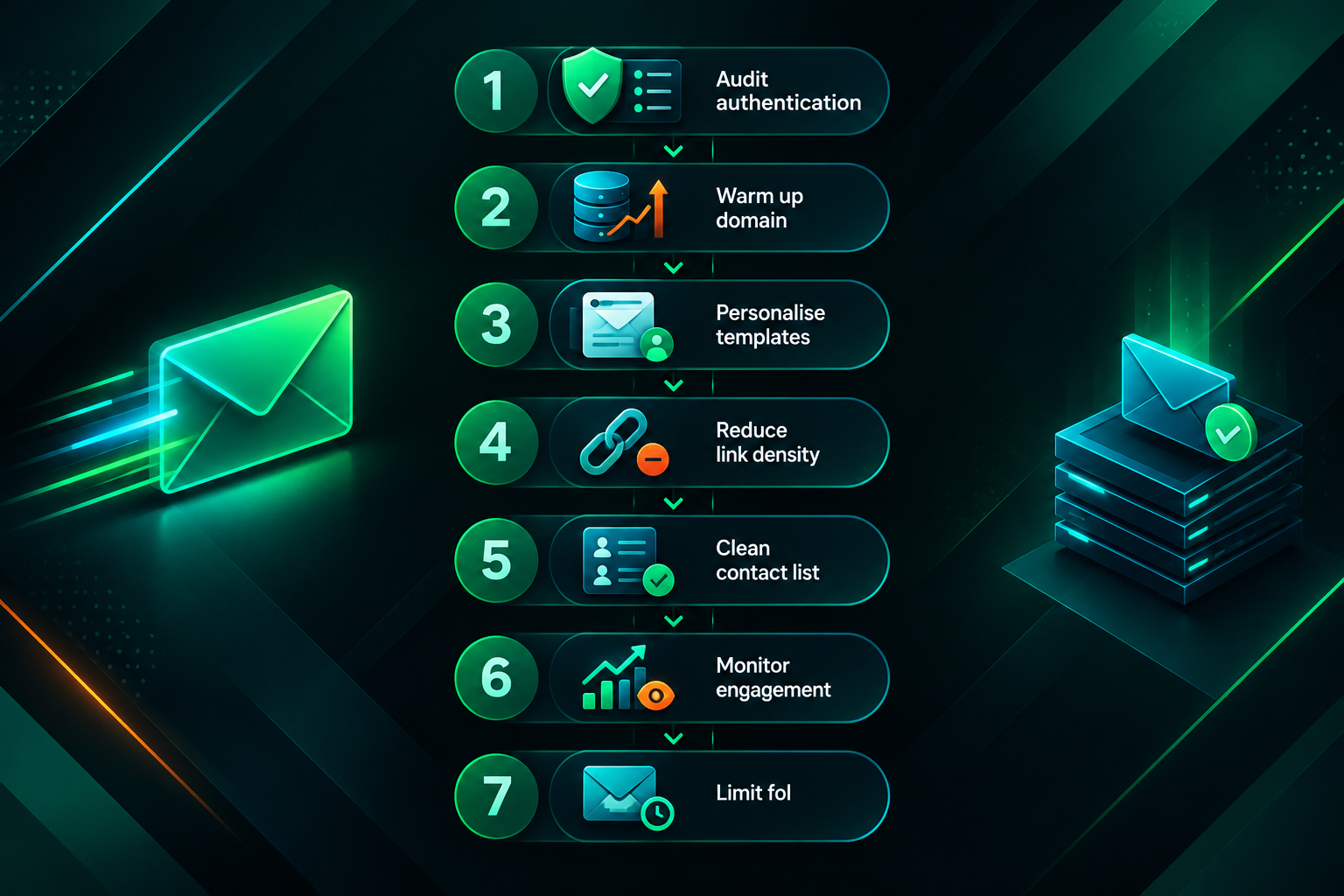
- Audit and correct authentication records. Verify SPF, DKIM, and DMARC for every domain used in outreach. Set DMARC to at least a monitoring policy (p=none with a reporting address) so you receive data on authentication failures, and move toward a stricter policy once you have confirmed that legitimate sending sources are all authenticated.
- Warm up new sending domains gradually. If you are using a dedicated outreach domain, follow a structured warm-up schedule over four to eight weeks before scaling to full campaign volume. Start with ten to twenty sends per day and increase incrementally while monitoring engagement rates.
- Reduce template similarity. Personalise outreach emails with specific references to the recipient’s website, recent content, or relevant topic. Even moderate personalisation reduces message fingerprint similarity and tends to improve reply rates.
- Reduce link density in message bodies. Limit the number of hyperlinks in each outreach email, including signature links. Where possible, use plain-text signatures rather than HTML signatures with multiple linked icons.
- Clean your contact list before each campaign. Remove hard bounces, verify new addresses, and avoid sending to generic contact addresses where named contacts are available.
- Monitor engagement and complaint rates continuously. Use available reporting tools to track open rates, reply rates, bounce rates, and spam complaints across campaigns. Declining engagement is an early warning sign that deliverability is deteriorating before it becomes a serious problem.
- Avoid aggressive follow-up sequences. Limit follow-up emails to one or two per contact, space them at least five to seven days apart, and stop the sequence if the recipient has not engaged after the second follow-up.
How Spam Placement Affects Link Building Campaign Outcomes
The practical consequence of poor outreach deliverability is straightforward: if your emails are not reaching editors and webmasters, your campaign cannot generate placements regardless of how strong your content or link targets are. Spam placement effectively reduces the real reach of an outreach campaign to a fraction of the intended contact list, which means that response rates, placement rates, and ultimately the number of links acquired per campaign are all suppressed.
This has a compounding effect on campaign economics. If a campaign is designed around an expected response rate that assumes inbox delivery, and actual delivery is significantly lower due to spam placement, the cost per acquired link increases substantially. Campaigns that appear to be underperforming may in some cases be suffering primarily from a deliverability problem rather than from weak content, poor targeting, or insufficient outreach volume — which is why diagnosing deliverability separately from other campaign variables is worth doing before drawing conclusions about campaign effectiveness.
For agencies managing outreach on behalf of clients, deliverability issues can also affect client relationships if the root cause is not identified and communicated clearly. A campaign that is technically well-structured but experiencing spam placement may show low activity metrics that are difficult to explain without understanding the deliverability context.
Frequently Asked Questions
Does using a custom domain for outreach help with deliverability?
Using a custom domain — rather than a free email service — is generally better for professional outreach, but a custom domain alone does not guarantee inbox placement. The domain still needs correct SPF, DKIM, and DMARC configuration, a warm-up period if it is new, and a clean sending history. A custom domain that has been used for high-volume or poorly targeted outreach in the past may have worse reputation than a carefully managed account on a reputable platform.
How long does it take to recover sender reputation after spam placement?
Recovery timelines vary depending on the severity of the reputation damage, the inbox provider, and the consistency of improved sending behaviour. In cases where reputation has declined due to high complaint rates or sending spikes, a structured recovery process — reducing volume, improving list quality, and maintaining positive engagement — may show measurable improvement over four to twelve weeks. There is no fixed timeline, and recovery is not guaranteed if the underlying practices that caused the problem are not changed.
Should outreach emails be sent as plain text or HTML?
Plain-text emails or emails with minimal HTML formatting generally perform better in spam filter scoring than heavily formatted HTML messages, because plain text more closely resembles genuine personal correspondence. However, the most important factor is the overall combination of authentication, sender reputation, content, and list quality. A plain-text email from a domain with poor reputation will still be filtered; a lightly formatted HTML email from a domain with strong reputation and good authentication may deliver reliably.
Can the same outreach template be used for hundreds of contacts?
Sending an identical or near-identical template to a large number of recipients increases the risk that spam filters will detect the message fingerprint and classify it as bulk email. It also tends to produce lower reply rates because recipients can recognise generic outreach. Varying the message structure, personalising key elements, and splitting large lists across multiple template variations can reduce both the filter risk and the perception of mass outreach.
Does the domain authority of the target website affect whether my outreach email is filtered?
The domain authority or quality of the website you are contacting does not directly affect whether your outreach email is filtered. Spam filtering decisions are made by the recipient’s inbox provider based on your sending domain’s reputation, authentication, and message content — not based on the recipient’s website characteristics. However, targeting higher-quality, more relevant websites tends to produce better engagement rates, which indirectly supports sender reputation over time.
Is it worth using a separate domain for outreach to protect the main business domain?
Using a dedicated outreach domain — separate from the primary business domain — is a common practice that protects the main domain’s email reputation from any negative effects of outreach campaigns. If the outreach domain develops a poor reputation due to spam complaints or aggressive sending, the primary business domain’s email deliverability is not directly affected. This approach requires its own warm-up process and authentication setup, and the outreach domain should still be managed carefully to maintain its own reputation.
What to Do When Outreach Deliverability Is Holding Back Your Link Building
Spam placement is a solvable problem, but it requires a systematic approach rather than a single quick fix. The most effective starting point is a deliverability audit that covers authentication records, sender reputation data, message content scoring, and list quality — because the combination of issues present in a specific campaign determines which remediation steps will have the most impact. Applying fixes in the wrong order, or addressing only one factor while ignoring others, often produces limited improvement.
For businesses and agencies running link building outreach at scale, maintaining deliverability is an ongoing operational requirement rather than a one-time setup task. Sender reputation can shift as campaigns evolve, contact lists grow, and sending volumes change. Building regular deliverability monitoring into campaign management — rather than only investigating when response rates drop — makes it easier to catch problems early before they compound into serious reputation damage.
If your outreach campaigns are consistently underperforming and deliverability has been identified as a contributing factor, it may be worth reviewing whether the current outreach infrastructure, sending practices, and list management processes are suited to the scale and frequency of the campaigns you are running. In some cases, working with an experienced outreach team that manages sending infrastructure, warm-up processes, and deliverability monitoring as part of campaign delivery can reduce the operational burden and improve placement rates more reliably than attempting to resolve complex deliverability issues in-house without specialist experience.