

Sitemaps come in two distinct formats, and while both help search engines and users navigate a website, they serve different purposes and audiences. An HTML sitemap is a page designed for human visitors, while an XML sitemap is a structured file intended for search engine crawlers. Understanding how each format works, what it contributes to crawlability and indexation, and when each is genuinely useful can help you make better decisions about your site architecture and technical SEO strategy.
Quick Comparison
| Characteristic | HTML Sitemap | XML Sitemap |
|---|---|---|
| Primary audience | Human visitors | Search engine crawlers |
| Format | Standard HTML web page | Structured XML file |
| Typical location | Accessible via browser, often linked in footer | Submitted via Google Search Console or robots.txt |
| Content | Organised links to key pages, often grouped by category | List of URLs with optional metadata such as last modified date and priority |
| SEO role | Supports internal linking and user navigation; indirect crawl benefit | Directly signals crawlable URLs to search engines |
| Crawl budget impact | Indirect; adds internal links that crawlers may follow | Direct; helps crawlers discover and prioritise URLs |
| Indexation | The HTML sitemap page itself can be indexed | Not a web page; not indexed as content |
| Maintenance effort | Moderate; may require manual updates on smaller sites | Low to moderate; often auto-generated by CMS plugins |
| Suitability | Large sites with complex navigation; user experience focus | All websites; especially large, frequently updated, or newly launched sites |
| Search engine requirement | Not required; optional | Not required but strongly recommended by Google |
What Is an XML Sitemap?
An XML sitemap is a structured file, written in Extensible Markup Language, that lists the URLs on a website along with optional metadata. That metadata can include the date a page was last modified, how frequently the page changes, and a relative priority value compared to other pages on the same site. The file is not a web page in the conventional sense; it is a machine-readable document intended to be read by search engine crawlers rather than displayed in a browser.
Google’s documentation describes XML sitemaps as a way to communicate to search engines which pages exist on a site and when they were last updated. Submitting an XML sitemap through Google Search Console gives Googlebot a direct signal about the URLs you want crawled and considered for indexation. This is particularly useful for large websites with thousands of pages, newly launched sites that have few inbound links, sites with complex URL structures, or pages that are not easily discoverable through internal linking alone.
A standard XML sitemap entry looks like this in practice: a URL element containing the page address, an optional lastmod element with the date of the most recent update, and an optional changefreq element suggesting how often the page changes. The priority element, ranging from 0.0 to 1.0, indicates relative importance within the site, though Google has stated publicly that it treats this value as a weak signal rather than a firm instruction. Most content management systems, including WordPress with plugins such as Yoast SEO or Rank Math, generate XML sitemaps automatically and update them when new content is published.
It is important to understand that submitting an XML sitemap does not guarantee that every listed URL will be crawled or indexed. Google treats the sitemap as a suggestion, not a directive. Pages with thin content, duplicate content issues, or crawl restrictions in the robots.txt file may still be excluded from the index regardless of their presence in the sitemap.
What Is an HTML Sitemap?
An HTML sitemap is a standard web page that presents an organised list of links to the important pages on a website. Unlike an XML sitemap, it is designed to be read and used by human visitors. HTML sitemaps are typically structured hierarchically, grouping pages by category, topic, or section, making it easier for a visitor to find content that is not immediately visible in the main navigation menu.
From a user experience perspective, HTML sitemaps were more commonly used in the early days of the web when site navigation was less sophisticated. On large websites with deep page hierarchies, an HTML sitemap can still serve a practical purpose by giving visitors a single location where they can browse the full scope of available content. E-commerce sites with many product categories, large publishers with extensive content archives, and enterprise websites with multiple service areas are among the site types where an HTML sitemap may still provide genuine navigational value.
From an SEO perspective, an HTML sitemap contributes to internal linking. Every link on the HTML sitemap page passes a crawlable path to the linked page, which means search engine crawlers following internal links may discover pages through the sitemap that they might otherwise miss. This is an indirect crawl benefit rather than a direct signal to search engines in the way an XML sitemap is. The HTML sitemap page itself can also be indexed and may appear in search results, though this is rarely a primary SEO goal.
How Each Sitemap Type Affects Crawlability and Indexation
Crawlability refers to a search engine’s ability to access and follow the links on a website. Indexation refers to whether a crawled page is added to the search engine’s index and made eligible to appear in search results. Both XML and HTML sitemaps can influence these processes, but through different mechanisms.
An XML sitemap directly supports crawlability by providing search engines with a structured list of URLs. When Googlebot or another crawler processes an XML sitemap, it receives a clear inventory of pages to visit. This is especially valuable for pages that sit deep within a site’s architecture and may not receive many internal links pointing to them. Without a sitemap, a crawler relies entirely on following links from page to page, which means deeply buried pages may be crawled infrequently or not at all.
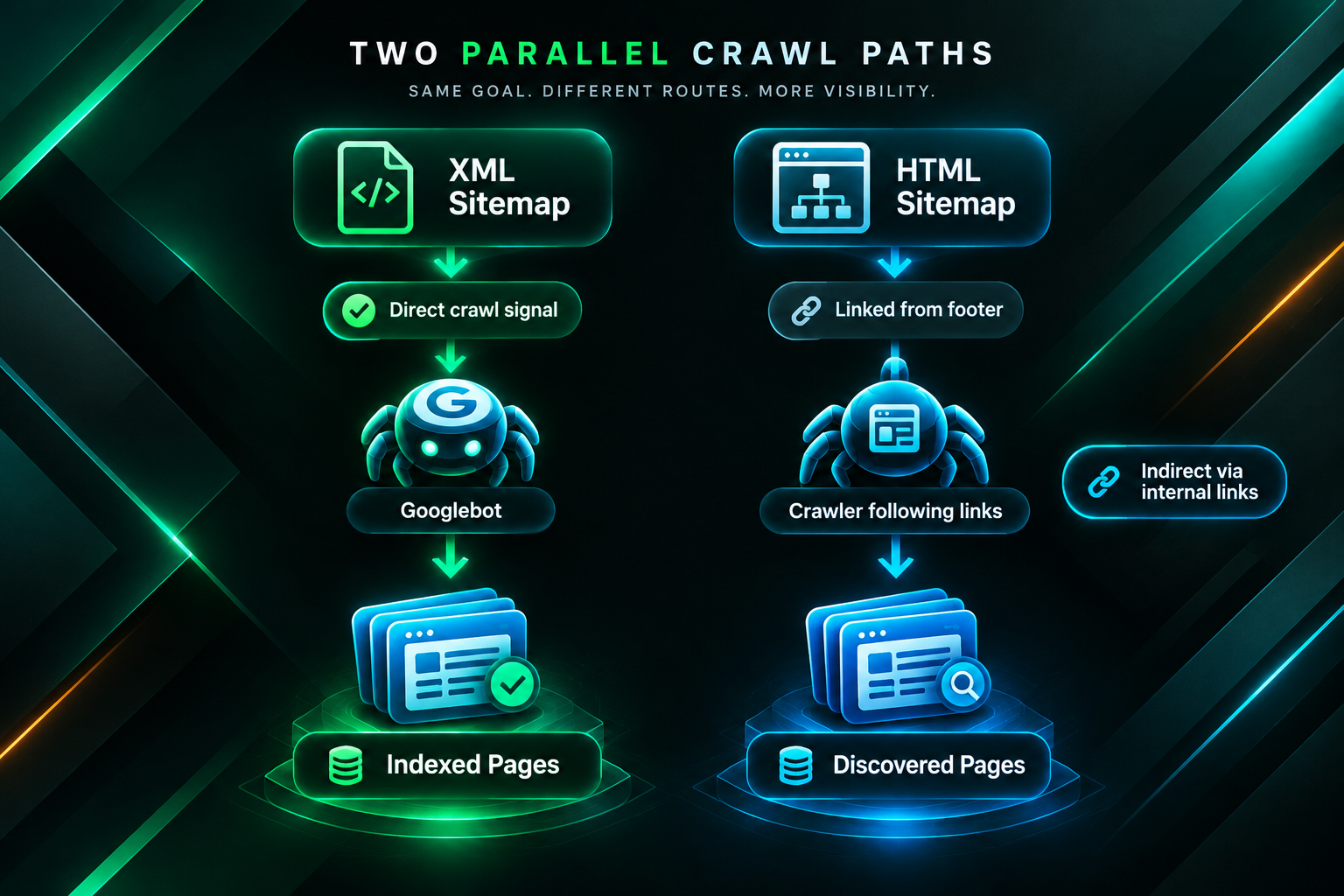
An HTML sitemap supports crawlability indirectly. Because it is a web page containing links, a crawler that visits the HTML sitemap page will follow those links to the destination pages. This can help surface pages that are otherwise poorly linked internally. However, the HTML sitemap approach depends on the crawler actually visiting the sitemap page in the first place, which is not guaranteed unless the page is itself well-linked from other parts of the site, such as the footer.
Neither sitemap format guarantees indexation. Google’s indexation decisions are based on a range of quality and relevance signals, including content quality, duplicate content detection, canonical tag directives, and the overall authority of the domain. A page listed in an XML sitemap or linked from an HTML sitemap may still be excluded from the index if it does not meet Google’s quality thresholds or if it conflicts with other technical directives on the site.
XML Sitemap Best Practices
Maintaining an accurate and well-structured XML sitemap is a straightforward but important part of technical SEO. Several practices are broadly recommended based on Google’s published guidance and established SEO knowledge.
- Include only canonical URLs. If a page has a canonical tag pointing to a different URL, include the canonical version in the sitemap rather than the duplicate. Including non-canonical URLs can create confusion for crawlers.
- Exclude pages you do not want indexed. Pages blocked by robots.txt, pages with noindex directives, or low-quality pages that you do not want in the search index should generally be omitted from the XML sitemap. Including them sends a mixed signal.
- Keep the sitemap up to date. When new pages are published or existing pages are removed, the sitemap should reflect those changes promptly. Most CMS plugins handle this automatically.
- Use sitemap index files for large sites. A single XML sitemap file can contain up to 50,000 URLs and must not exceed 50 MB uncompressed. Larger sites should use a sitemap index file that references multiple individual sitemap files, often split by content type such as posts, pages, products, and images.
- Submit the sitemap in Google Search Console. Submitting the sitemap URL directly in Search Console allows Google to process it and report any errors, such as URLs that returned a 404 status or pages that were crawled but not indexed.
- Reference the sitemap in robots.txt. Adding a Sitemap directive to the robots.txt file helps all crawlers, not just Googlebot, locate the sitemap without needing a manual submission.
HTML Sitemap Best Practices
If an HTML sitemap is appropriate for a website, its structure and content should be considered carefully to ensure it provides genuine value rather than becoming a cluttered or neglected page.
- Organise links logically. Group pages by topic, category, or section so that a visitor can scan the sitemap and quickly identify the area they are looking for. A flat, unorganised list of hundreds of links is difficult to use and provides limited navigational value.
- Prioritise important pages. An HTML sitemap does not need to include every URL on the site. Focus on the pages that matter most to users and to the business, such as key service pages, main product categories, and important informational content.
- Use descriptive anchor text. The link text used in an HTML sitemap should describe the destination page clearly. Descriptive anchor text helps both users and search engines understand what the linked page covers.
- Keep the page accessible. Link to the HTML sitemap from a consistent location, typically the site footer, so that both users and crawlers can find it reliably.
- Avoid excessive links on a single page. While there is no hard limit on the number of links a page can contain, a very large number of links on a single HTML sitemap page may dilute the crawl value passed to each linked page and may also create a poor user experience.
Do You Need Both an HTML Sitemap and an XML Sitemap?
For most websites, an XML sitemap is the higher priority of the two. Google’s own documentation recommends XML sitemaps for sites that are large, newly launched, have many pages with few external links pointing to them, or use rich media content such as video and images that benefit from dedicated media sitemaps. An XML sitemap is a direct communication channel with search engine crawlers and is the format that Google Search Console is designed to process.
An HTML sitemap is not required by search engines and is not a ranking factor in itself. Its value depends on the specific characteristics of the website. For a small website with clear navigation and a limited number of pages, an HTML sitemap may add little practical benefit. For a large e-commerce site, a content-heavy publisher, or an enterprise website where users may struggle to find specific pages through the main navigation, an HTML sitemap can improve the user experience and provide a secondary internal linking benefit.
Having both formats is not harmful and may be appropriate for larger or more complex sites. The two formats are complementary rather than competing. An XML sitemap communicates directly with crawlers, while an HTML sitemap serves visitors and adds internal links that crawlers can also follow. The decision to maintain both should be based on the actual navigational needs of the site’s users and the scale of the site’s content, rather than on the assumption that more sitemaps automatically produce better SEO outcomes.
Sitemaps and Link Building: Understanding the Connection
Sitemaps and link building address different aspects of SEO, but they interact in ways that are worth understanding, particularly for websites running active link acquisition campaigns.
When a link building campaign earns backlinks to specific pages on a website, those pages need to be crawlable and indexable for the links to contribute to organic visibility. If a target page is not included in the XML sitemap, is blocked by robots.txt, or has a noindex directive, the backlinks pointing to it may have limited impact because the page itself may not be indexed. Ensuring that the pages targeted by a link building campaign are correctly included in the XML sitemap and are free from technical crawl barriers is a basic but important step in campaign preparation.
For websites with large content archives, an accurate XML sitemap also helps ensure that newly published content, such as blog posts or landing pages created to support a link building campaign, is discovered and crawled promptly. Delays in crawling and indexation can slow the point at which any SEO benefit from newly acquired backlinks becomes measurable. While sitemaps do not accelerate indexation in a guaranteed way, they reduce the risk of pages being overlooked by crawlers during the initial discovery phase.
HTML sitemaps can also play a supporting role in link building contexts. If a website’s internal linking structure is weak, an HTML sitemap that links to key target pages can help distribute link equity from the domain’s existing backlink profile more effectively across those pages. This is not a substitute for a well-structured internal linking strategy, but it can be a useful supplementary measure on sites where deep pages receive little internal link support.
Common Misconceptions About Sitemaps and SEO
Several misconceptions about sitemaps circulate in SEO discussions, and it is worth addressing the most common ones directly.
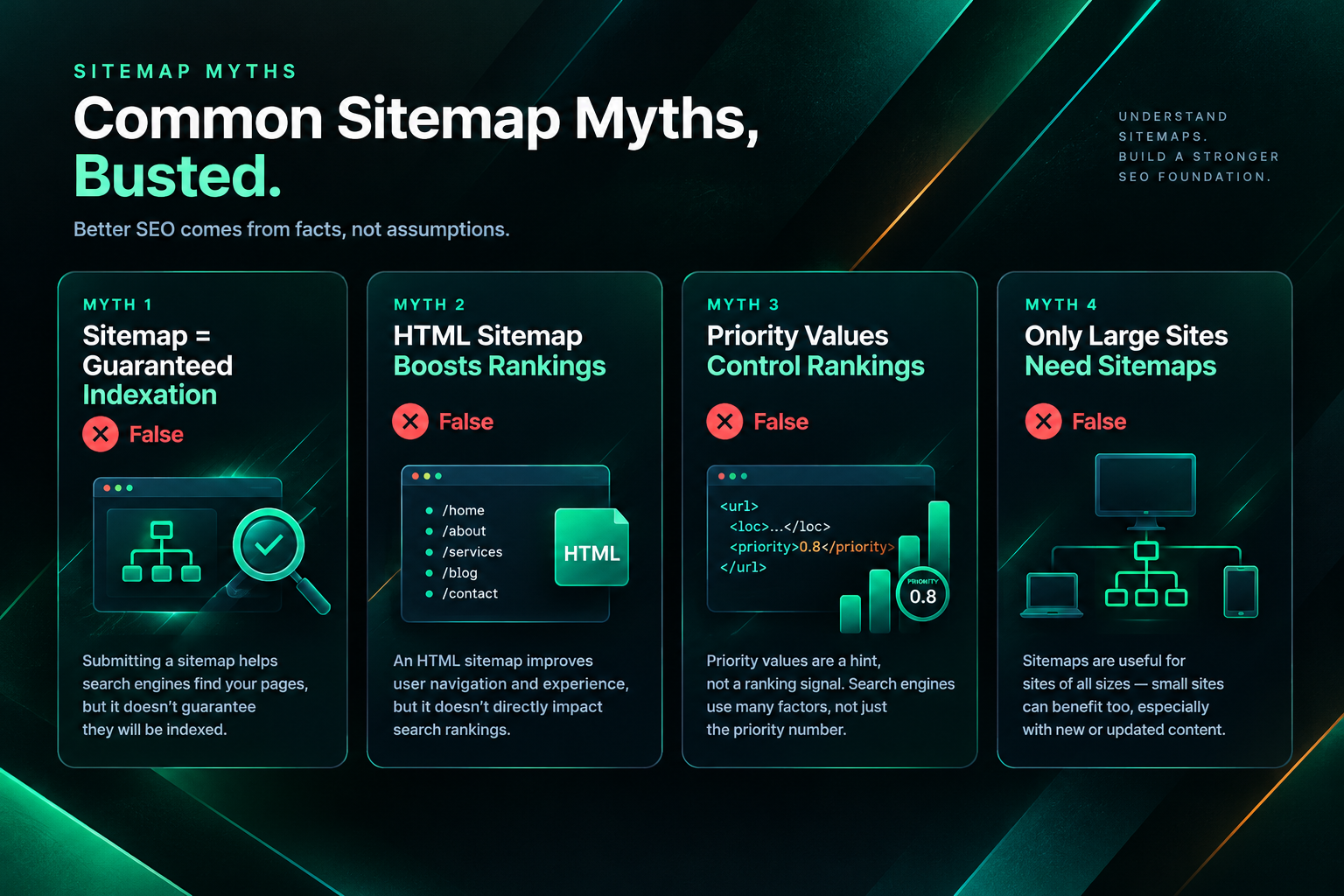
Submitting an XML sitemap will get all pages indexed. This is not accurate. Google treats sitemap submissions as a signal, not an instruction. Pages that do not meet Google’s quality standards, that have duplicate content issues, or that conflict with other technical directives may not be indexed regardless of their presence in the sitemap. Google Search Console’s Coverage report can help identify which submitted URLs were indexed and which were excluded, along with the reasons for exclusion.
An HTML sitemap improves rankings directly. An HTML sitemap does not directly influence rankings. Its potential SEO contribution comes from the internal links it creates, which can support crawlability and help distribute link equity. The ranking impact of this is indirect and depends on many other factors, including the quality and relevance of the content on the linked pages.
Priority values in XML sitemaps tell Google which pages to rank higher. The priority element in an XML sitemap is a relative indicator of importance within the site, not a ranking instruction. Google has stated that it uses this value as a weak signal and that it does not directly influence how pages are ranked in search results.
A sitemap is only needed for large websites. While sitemaps are especially valuable for large sites, Google recommends them for newly launched sites and sites with few external links regardless of size. A small site with limited backlinks and a shallow internal linking structure may benefit from an XML sitemap to ensure all pages are discovered promptly.
Frequently Asked Questions
Does Google require an XML sitemap?
Google does not require an XML sitemap, but it strongly recommends one for sites that are large, newly launched, have limited external links, or contain pages that are not easily discoverable through internal linking. For small, well-linked sites, Google may be able to discover all pages without a sitemap, but submitting one is generally considered good practice.
Can an HTML sitemap replace an XML sitemap?
An HTML sitemap cannot replace an XML sitemap for the purpose of communicating directly with search engine crawlers. An HTML sitemap is a web page that crawlers may follow, but it does not provide the structured URL inventory and metadata that an XML sitemap delivers. For most websites, an XML sitemap is the more important of the two formats from a technical SEO perspective.
How often should an XML sitemap be updated?
An XML sitemap should reflect the current state of the website. Most CMS plugins update the sitemap automatically when pages are added, modified, or removed. For sites without automatic generation, the sitemap should be updated whenever significant changes are made to the site’s URL structure or content inventory.
Should I include every page on my site in the XML sitemap?
No. The XML sitemap should include only the pages you want search engines to crawl and index. Pages with noindex directives, pages blocked by robots.txt, low-quality or thin content pages, and duplicate pages should generally be excluded. Including pages you do not want indexed can send conflicting signals to search engines.
Does having an HTML sitemap improve user experience?
It depends on the site. For large websites with complex navigation structures, an HTML sitemap can help users find content that is not easily accessible through the main menu. For small sites with straightforward navigation, an HTML sitemap may add little practical value for visitors. The decision should be based on the actual navigational needs of the site’s audience.
Will fixing my XML sitemap improve my rankings?
Correcting errors in an XML sitemap, such as removing non-canonical URLs, excluding noindex pages, or ensuring all important pages are listed, may help search engines crawl and index the site more efficiently. Whether this leads to measurable ranking improvements depends on many other factors, including content quality, backlink profile, and competition. A sitemap fix alone is unlikely to produce significant ranking changes if other SEO issues are present.
Do image and video sitemaps work differently from standard XML sitemaps?
Yes. Image sitemaps and video sitemaps are extensions of the standard XML sitemap format that provide additional metadata about media content. They help search engines discover and index images and videos that might not be easily found through standard crawling. Google’s documentation provides specific guidance on the required and optional elements for each media sitemap type.
Choosing the Right Sitemap Format for Your Website
For the majority of websites, an XML sitemap is the foundational format to prioritise. It provides a direct communication channel with search engine crawlers, integrates with Google Search Console for monitoring and error reporting, and is the format most clearly supported by Google’s published guidance. Whether a site has ten pages or ten thousand, maintaining an accurate and well-structured XML sitemap is a straightforward technical SEO measure that reduces the risk of important pages being overlooked during crawling.
An HTML sitemap is a supplementary option that may add genuine value for larger or more complex websites where users benefit from a navigational overview of the site’s content. It also contributes to internal linking, which can support the distribution of link equity across key pages, a consideration that becomes more relevant when a site is actively building its backlink profile. For smaller sites with clear navigation and a limited number of pages, the investment in maintaining an HTML sitemap may not be justified by the benefit it provides.
If your website is preparing for or currently running a link building campaign, it is worth reviewing your XML sitemap as part of the technical preparation. Ensuring that target pages are correctly included, free from conflicting directives, and accessible to crawlers helps create the conditions in which newly acquired backlinks can contribute to organic visibility as efficiently as possible. A qualified SEO professional or technical SEO audit can identify sitemap issues alongside other crawlability and indexation factors that may be affecting the site’s performance.