
Choosing between absolute and relative URLs for internal links is a technical decision that affects how search engines crawl your site, how your internal link equity flows, and how resilient your site structure is to common configuration errors. While the choice may seem minor, it has practical implications for SEO, site migrations, and content management at scale. This article explains both URL formats clearly, compares their SEO and technical trade-offs, and helps you decide which approach is more appropriate for your website.
Key Takeaways
- Absolute URLs include the full domain and path, making them unambiguous for search engines and more resilient to duplicate content issues caused by staging environments or scrapers.
- Relative URLs omit the domain and are resolved by the browser relative to the current page, which can create crawling or canonicalization problems if your site is accessible from multiple origins.
- For most production websites, absolute URLs in internal links are the safer default from an SEO perspective, particularly for larger or more complex sites.
- Relative URLs can work well in controlled environments, but they require careful configuration to avoid unintended indexing of staging or development versions of your content.
- The choice of URL format for internal links is one factor in a broader internal linking strategy; link relevance, anchor text, and crawl depth matter equally or more for SEO outcomes.
What Are Absolute and Relative URLs?
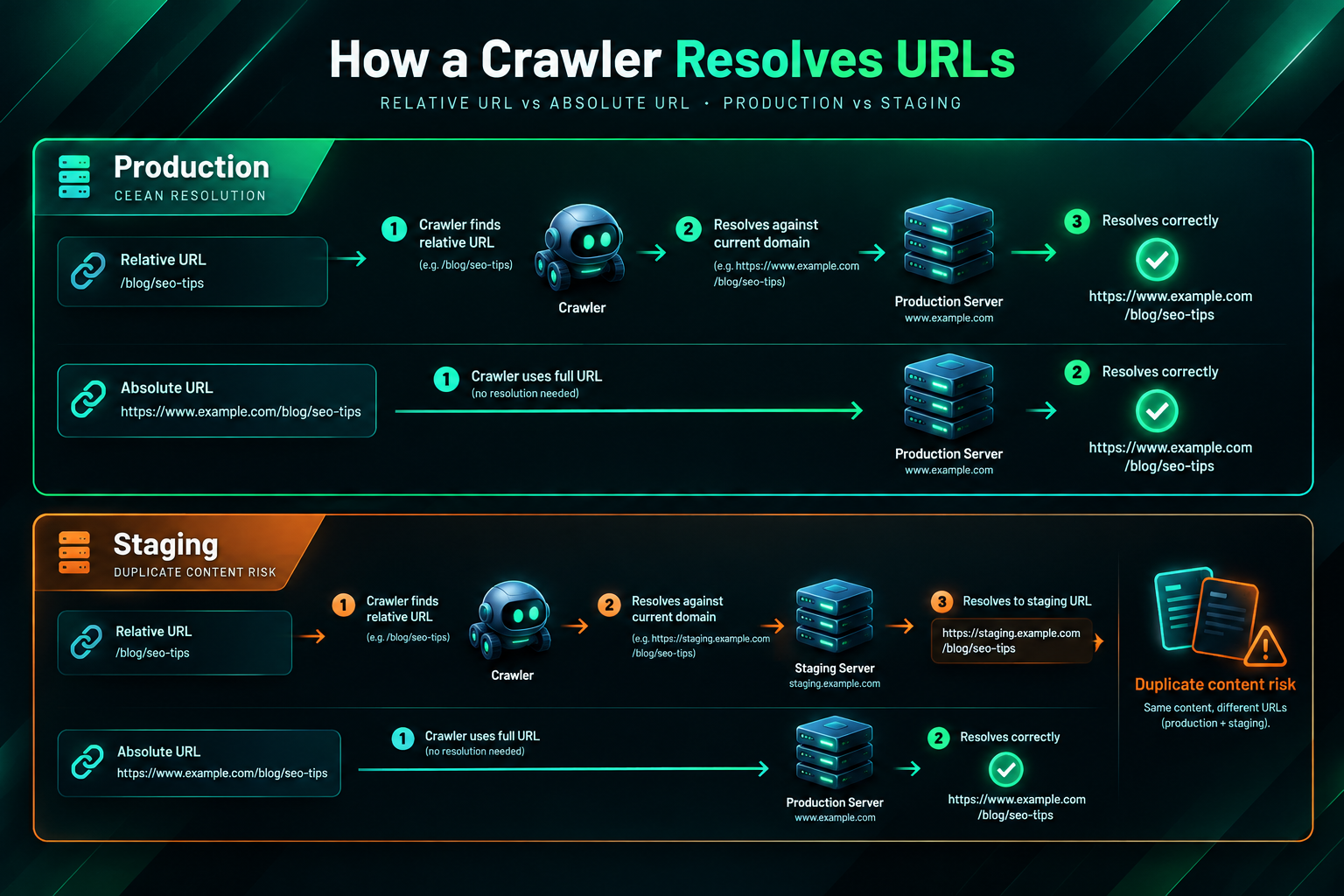
An absolute URL contains every component needed to locate a resource on the web: the protocol (such as https://), the domain name, and the full path to the page. For example, https://www.example.com/blog/seo-tips/ is an absolute URL. No matter where this link appears — on your own site, on an external site, or in a scraped copy of your content — a browser or crawler can resolve it to exactly one location without needing any additional context.
A relative URL omits the protocol and domain and specifies only the path relative to the current document or the site root. For example, /blog/seo-tips/ is a root-relative URL, while ../seo-tips/ is a document-relative URL. When a browser or crawler encounters a relative URL, it constructs the full address by combining the relative path with the base URL of the page it is currently reading. This means the same relative link can resolve to different absolute addresses depending on where it is encountered.
Both formats are valid HTML and both are widely used. The difference lies in how they behave across different environments, configurations, and access points — and those differences have meaningful consequences for SEO and site management.
How Search Engines Handle Each URL Format
Search engine crawlers such as Googlebot resolve relative URLs using the same logic as a browser: they combine the relative path with the base URL of the page being crawled. In a straightforward single-domain setup with no staging environment, no subdomain variations, and no content syndication, this process works reliably. The crawler visits a page, finds a relative internal link, constructs the absolute URL, and follows it.
The complication arises when your content is accessible from more than one origin. If your staging environment uses a different subdomain or domain — for example, https://staging.example.com/ — and that environment is not properly blocked from crawling, relative internal links on staging pages will resolve to staging URLs rather than production URLs. If Googlebot indexes those staging pages, it may treat the staging and production versions as separate, potentially duplicate content. Absolute URLs prevent this because they always point to the production domain regardless of where the page is being served from.
Content scraping presents a similar risk. When a third party copies your content and publishes it on their domain, relative internal links within that scraped content will resolve to the scraper’s domain rather than yours. Absolute URLs in your internal links mean that scraped copies still contain links pointing back to your domain, which can be a minor benefit for link attribution and makes it clearer to search engines which version is the original.
Google’s own documentation and guidance from its search relations team have historically recommended absolute URLs as the more robust choice, particularly for canonical URL management and for avoiding unintended duplicate content. While Google is generally capable of resolving relative URLs correctly on well-configured sites, absolute URLs reduce the margin for error.
Quick Comparison
| Characteristic | Absolute URLs | Relative URLs |
|---|---|---|
| Format example | https://www.example.com/page/ | /page/ or ../page/ |
| Domain included | Yes | No |
| Crawler resolution | Unambiguous; always resolves to one location | Context-dependent; resolved relative to current base URL |
| Duplicate content risk (staging) | Lower; links always point to production domain | Higher if staging is crawlable and uses a different origin |
| Scraped content behaviour | Links still point to original domain | Links resolve to scraper’s domain |
| Domain migration complexity | Higher; all internal links must be updated on domain change | Lower; root-relative links survive domain changes without updates |
| CMS and template management | Slightly more complex in some CMS configurations | Simpler in some templating systems |
| Canonicalization support | Stronger; reinforces canonical signals | Weaker if base URL varies across environments |
| Recommended for most production sites | Yes | Situational |
SEO Implications of Each Approach
Internal Link Equity and Crawl Paths
Internal links serve two primary SEO functions: they help search engine crawlers discover pages, and they distribute link equity (sometimes called PageRank) across your site. The URL format used in internal links does not directly change how much equity is passed or how crawlers prioritise pages. What matters is that the links resolve correctly and consistently to the intended canonical URLs. If relative URLs resolve correctly in your environment, they pass equity in the same way absolute URLs do. The risk with relative URLs is not that they pass less equity, but that they may resolve to unintended URLs under certain conditions, effectively misdirecting that equity.
For sites with a clear, single-origin production environment and no staging or subdomain complications, relative URLs are unlikely to cause measurable SEO problems. For larger sites, sites undergoing migration, or sites with complex hosting configurations, absolute URLs provide a more predictable crawl path and reduce the likelihood of equity being distributed to unintended URL variants.
Canonicalization and Duplicate Content
Canonical tags (rel=canonical) are the primary mechanism for telling search engines which version of a page is the preferred one. Absolute URLs in internal links reinforce canonical signals by consistently pointing to the canonical version of each page. If your internal links use relative URLs and those links are encountered in a context where the base URL differs from your canonical domain — such as a staging environment or a cached version — the resolved URLs may conflict with your canonical tags, creating ambiguity for crawlers.
This is particularly relevant for e-commerce sites and large content sites where parameter-based URL variants (such as filtered category pages or session IDs) are common. Absolute URLs that consistently point to the clean, canonical version of each page help reinforce your canonicalization strategy across the site.
Site Migrations and Domain Changes
One practical disadvantage of absolute URLs is the additional work required during a domain migration. If you move from https://www.old-domain.com/ to https://www.new-domain.com/, every absolute internal link in your content must be updated to reflect the new domain. Root-relative URLs such as /page/ do not contain the domain and therefore do not need updating when the domain changes — only the base URL of the site changes, and the relative links continue to resolve correctly.
For sites that anticipate domain changes, rebranding, or multi-environment deployments, root-relative URLs can reduce migration complexity. However, this advantage needs to be weighed against the canonicalization and duplicate content risks described above. In practice, most CMS platforms and migration tools can perform a bulk find-and-replace on absolute URLs during a migration, which reduces the practical burden of updating them.
Protocol-Relative URLs: A Third Option Worth Understanding
A third URL format — the protocol-relative URL — was historically used to handle HTTP and HTTPS variations. A protocol-relative URL omits the protocol and begins with //, for example //www.example.com/page/. The browser or crawler supplies the protocol based on the current page’s protocol. This format was once useful during transitions from HTTP to HTTPS, but it is now largely considered outdated. Since HTTPS is the standard for production websites and HTTP-to-HTTPS redirects are routine, protocol-relative URLs offer no meaningful advantage and introduce unnecessary complexity. They are not recommended for new implementations.
Practical Considerations for CMS and Template Management
The URL format used in internal links is often determined by your content management system or templating framework rather than by a deliberate per-link decision. WordPress, for example, stores absolute URLs in its database by default and generates absolute internal links in most contexts. Platforms such as Jekyll or Hugo, which are commonly used for static site generation, may generate root-relative links depending on configuration. Custom-built sites and headless CMS implementations vary widely.
Understanding how your CMS generates internal links is more important than manually specifying URL formats for individual links. If your CMS generates absolute URLs by default and those URLs consistently point to your canonical production domain, you are unlikely to need to change anything. If your CMS generates relative URLs and your site is accessible from multiple origins, reviewing your staging environment’s crawl accessibility and your canonical tag implementation is a sensible precaution.
For sites managed through a CMS with a visual editor, content authors rarely interact with raw URL formats. The practical implication is that developers and SEO teams should audit the URL format generated by templates and plugins, particularly for navigation menus, breadcrumbs, pagination links, and programmatically generated internal links — all of which can affect crawl efficiency and link equity distribution at scale.
Internal Linking Strategy Beyond URL Format
The absolute versus relative URL decision is a technical hygiene consideration rather than a primary driver of SEO performance. Once your internal links resolve correctly and consistently to canonical URLs, the more impactful factors in internal linking strategy are the relevance of the linked pages, the anchor text used, the crawl depth of important pages, and the overall link architecture of the site.
Pages that are important for organic search — such as key service pages, product category pages, or high-value content — benefit from receiving internal links from multiple relevant pages across the site. Anchor text should be descriptive and contextually relevant without being over-optimised. Orphan pages (pages with no internal links pointing to them) are at risk of being crawled infrequently or not at all, regardless of whether your site uses absolute or relative URLs.
A well-structured internal linking strategy also supports the distribution of external link equity. When a page earns backlinks from external sites, that equity flows into the site and can be distributed to other pages through internal links. Ensuring that your most important pages are well-connected internally means they are more likely to benefit from external link acquisition efforts. This is why internal link architecture is often reviewed as part of a broader link building assessment, alongside the external backlink profile.
Auditing Your Internal Links for URL Format Issues
If you are unsure which URL format your site uses for internal links, a crawl using a tool such as Screaming Frog SEO Spider, Sitebulb, or a similar site auditing tool will identify the format of every internal link on your site. These tools can flag mixed usage (some absolute, some relative), links resolving to non-canonical URLs, and links pointing to redirected or broken destinations.
Key things to check during an internal link audit include:
- Whether internal links consistently resolve to the canonical version of each page (HTTPS, preferred domain, no trailing slash inconsistencies).
- Whether any internal links point to HTTP versions of pages that have been migrated to HTTPS.
- Whether staging or development URLs appear in any internal links on the production site.
- Whether important pages (key service pages, product pages, cornerstone content) receive sufficient internal links from relevant pages.
- Whether any pages are orphaned — receiving no internal links from the rest of the site.
- Whether anchor text across internal links is varied, descriptive, and contextually appropriate.
Addressing these issues is generally more impactful for SEO than switching from one URL format to another, unless the format itself is causing specific canonicalization or crawling problems.
When the URL Format Choice Actually Matters Most
For the majority of straightforward websites — a single domain, HTTPS throughout, a well-configured CMS, and no accessible staging environment — the choice between absolute and relative URLs for internal links is unlikely to produce a measurable difference in SEO performance. Both formats can work correctly in this context.
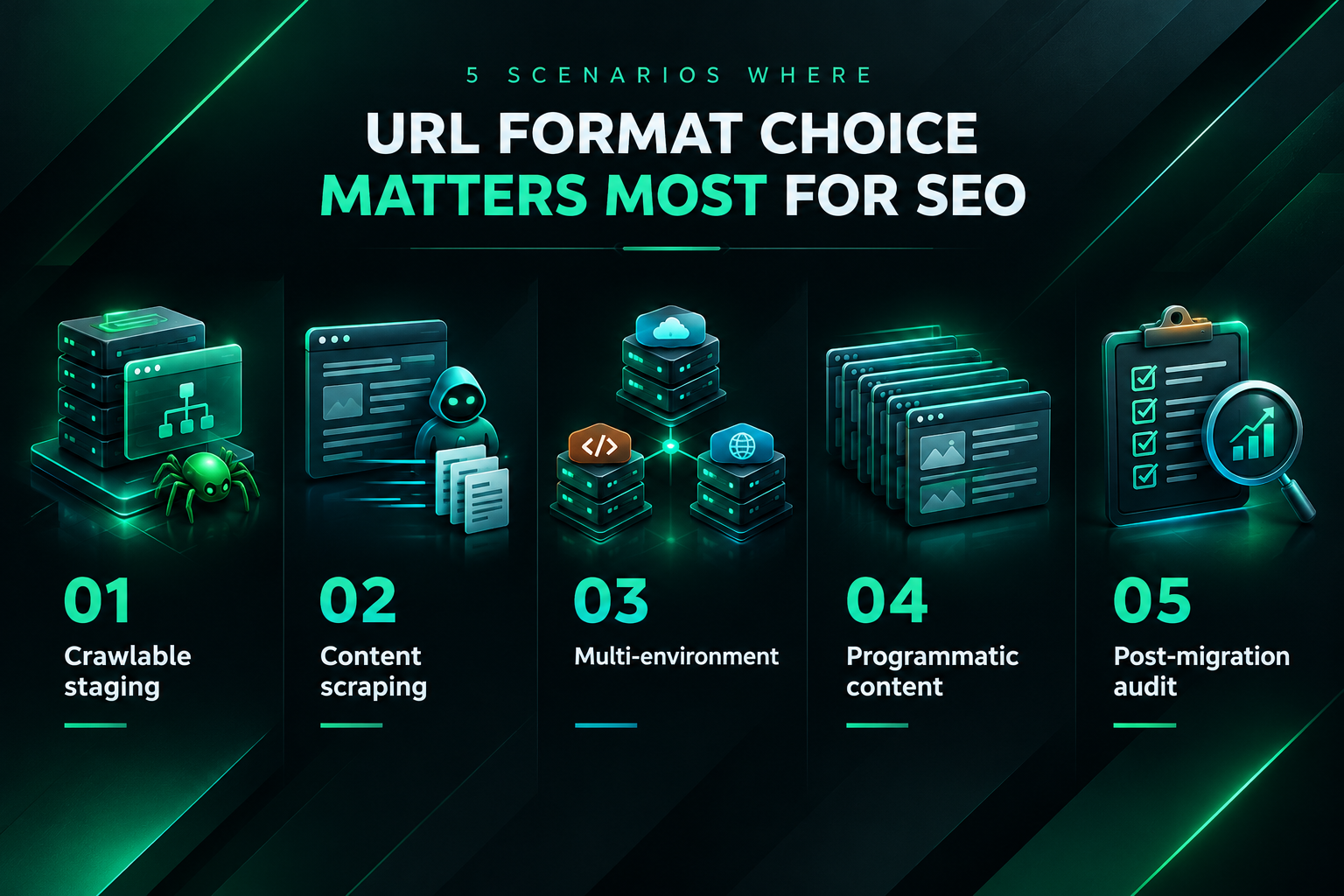
The choice becomes more consequential in the following situations:
- Staging environments accessible to crawlers: If your staging site is not blocked via robots.txt, password protection, or noindex tags, relative internal links on staging pages will resolve to staging URLs, potentially creating duplicate content that competes with your production pages.
- Content syndication or scraping: If your content is frequently republished or scraped, absolute URLs in internal links help preserve attribution signals pointing back to your domain.
- Multi-environment or headless deployments: Sites served from multiple origins or through a headless architecture may encounter base URL ambiguity that makes absolute URLs the safer choice.
- Large-scale programmatic content: Sites with thousands of programmatically generated pages benefit from consistent, predictable URL resolution to avoid canonicalization complexity at scale.
- Post-migration audits: After a domain migration, checking that all internal links have been updated to the new absolute URLs (or that relative links resolve correctly under the new domain) is an important step in preventing residual crawl issues.
Frequently Asked Questions
Does Google prefer absolute URLs over relative URLs for internal links?
Google’s crawlers can resolve both absolute and relative URLs. Google has historically indicated that absolute URLs are the more robust choice, particularly for avoiding duplicate content issues in multi-environment setups. For a well-configured single-domain site, the practical difference is minimal, but absolute URLs are generally the safer default for production environments.
Can relative URLs cause duplicate content problems?
Relative URLs can contribute to duplicate content issues if your site is accessible from multiple origins — for example, if a staging environment is crawlable and uses a different domain or subdomain. In that case, relative internal links on staging pages resolve to staging URLs rather than production URLs, potentially creating indexed duplicates. Absolute URLs prevent this by always pointing to the production domain.
Do I need to update all my internal links if I switch from relative to absolute URLs?
Switching from relative to absolute URLs across an existing site requires updating internal links in your CMS database, templates, and any hardcoded HTML. Most CMS platforms support bulk database updates or have plugins that can handle this. It is worth testing the change in a staging environment first and running a post-change crawl to confirm that all links resolve correctly before and after the update.
Does the URL format affect how link equity is passed through internal links?
The URL format itself does not change how link equity is passed. What matters is that the link resolves correctly to the intended canonical page. If a relative URL resolves to the correct canonical URL, it passes equity in the same way an absolute URL would. The risk is that relative URLs may resolve to unintended URLs under certain conditions, misdirecting equity rather than reducing it.
Are protocol-relative URLs still a good option?
Protocol-relative URLs (beginning with //) are largely obsolete for production websites. Since HTTPS is now standard and HTTP-to-HTTPS redirects are routine, there is no practical benefit to omitting the protocol. Absolute HTTPS URLs are the recommended format for production sites.
How does URL format relate to my broader link building strategy?
URL format is a technical hygiene factor rather than a link building strategy. Ensuring your internal links resolve correctly to canonical URLs supports the efficient distribution of link equity earned through external link acquisition. A well-structured internal linking architecture helps important pages benefit from backlinks earned elsewhere on the site, but the URL format itself is not a primary driver of link building outcomes.
Choosing the Right URL Format for Your Site’s SEO Needs
For most production websites, absolute URLs in internal links are the more reliable choice from an SEO perspective. They eliminate ambiguity for search engine crawlers, reinforce canonical signals, and reduce the risk of duplicate content arising from staging environments or content scraping. The additional complexity they introduce during domain migrations is manageable with modern CMS tools and bulk update processes.
Relative URLs — particularly root-relative URLs — can work well in controlled, single-origin environments and offer a practical advantage during domain migrations. If your site uses relative URLs and you have not encountered crawling, indexing, or canonicalization problems, switching to absolute URLs may not be a priority. The more important question is whether your internal links consistently resolve to the correct canonical versions of your pages and whether your most important pages are well-connected within your site’s link architecture.
If you are planning a site migration, launching a new CMS, or auditing an existing site’s technical SEO, reviewing your internal URL format as part of that process is worthwhile. A site crawl will quickly reveal whether your current approach is causing any practical issues. Where technical SEO questions intersect with link acquisition strategy — such as ensuring that pages targeted by external link building campaigns are well-supported by internal links — a qualified SEO professional or agency can help assess the full picture and prioritise the changes most likely to support your organic search goals.