
If your outreach emails are landing in spam folders or going unanswered, email authentication is one of the first technical areas worth reviewing. DKIM — DomainKeys Identified Mail — is a widely supported email authentication standard that helps receiving mail servers verify that a message genuinely came from your domain and was not altered in transit. Setting it up correctly is a practical prerequisite for any sustained outreach campaign, whether you are running manual link building outreach, guest post prospecting, or digital PR at scale.
Key Takeaways
- DKIM is an email authentication protocol that signs outgoing messages with a cryptographic key, allowing receiving servers to verify the sender’s identity and message integrity.
- Without DKIM, outreach emails face a higher risk of being filtered as spam, which directly reduces response rates and campaign effectiveness.
- DKIM works best alongside SPF and DMARC; deploying all three creates a layered authentication framework that major inbox providers now expect.
- The setup process involves generating a key pair, publishing a DNS TXT record, and enabling signing in your email sending platform — steps that vary slightly by provider but follow the same underlying logic.
- Correct DKIM configuration is a technical foundation, not a guarantee of inbox placement; content quality, sender reputation, and list hygiene also affect deliverability.
What DKIM Is and Why It Matters for Outreach
DKIM stands for DomainKeys Identified Mail. It is an email authentication method that attaches a digital signature to each outgoing message. The signature is generated using a private cryptographic key held by the sending mail server. A corresponding public key is published in the domain’s DNS records. When a receiving mail server gets the message, it retrieves the public key from DNS and uses it to verify the signature. If the signature is valid, the server can confirm that the email came from the claimed domain and that the message content was not modified after it was signed.
For outreach campaigns — including link building outreach, guest post pitches, and partnership requests — this matters for a straightforward reason: inbox providers such as Gmail and Outlook use authentication signals as one input when deciding whether to deliver a message to the inbox, the spam folder, or not at all. A domain sending outreach without DKIM is more likely to be treated with suspicion, particularly when sending at volume or from a relatively new domain. Reduced inbox placement means fewer editors and webmasters see your pitch, which directly limits the effectiveness of any outreach-based link acquisition effort.
DKIM also contributes to sender reputation over time. Consistent, authenticated sending from a domain builds a positive history with inbox providers, whereas unauthenticated sending or failed authentication checks can erode that reputation. For agencies and in-house teams running ongoing outreach campaigns, this makes DKIM configuration a foundational step rather than an optional extra.
How DKIM Works: The Core Mechanism
DKIM uses asymmetric cryptography — a public and private key pair. The private key is stored securely on the sending mail server or within the email sending platform. The public key is published as a DNS TXT record under a specific subdomain of the sending domain, typically in the format selector._domainkey.yourdomain.com, where “selector” is a label you choose to identify the key.
When an email is sent, the mail server uses the private key to generate a hash of selected message headers and the message body. This hash is encoded and added to the email as a DKIM-Signature header. The receiving server reads the selector from that header, looks up the corresponding public key in DNS, and uses it to decrypt and verify the hash. If the computed hash matches the one in the signature, authentication passes. If the message was altered in transit — even by a single character — the hash will not match and the check will fail.
The selector mechanism allows a domain to use multiple DKIM keys simultaneously, which is useful when sending through more than one platform. For example, a domain might have one selector for its primary email provider and a separate selector for a dedicated outreach tool. Each platform signs messages with its own key, and each key is published independently in DNS.
DKIM, SPF, and DMARC: Understanding the Authentication Stack
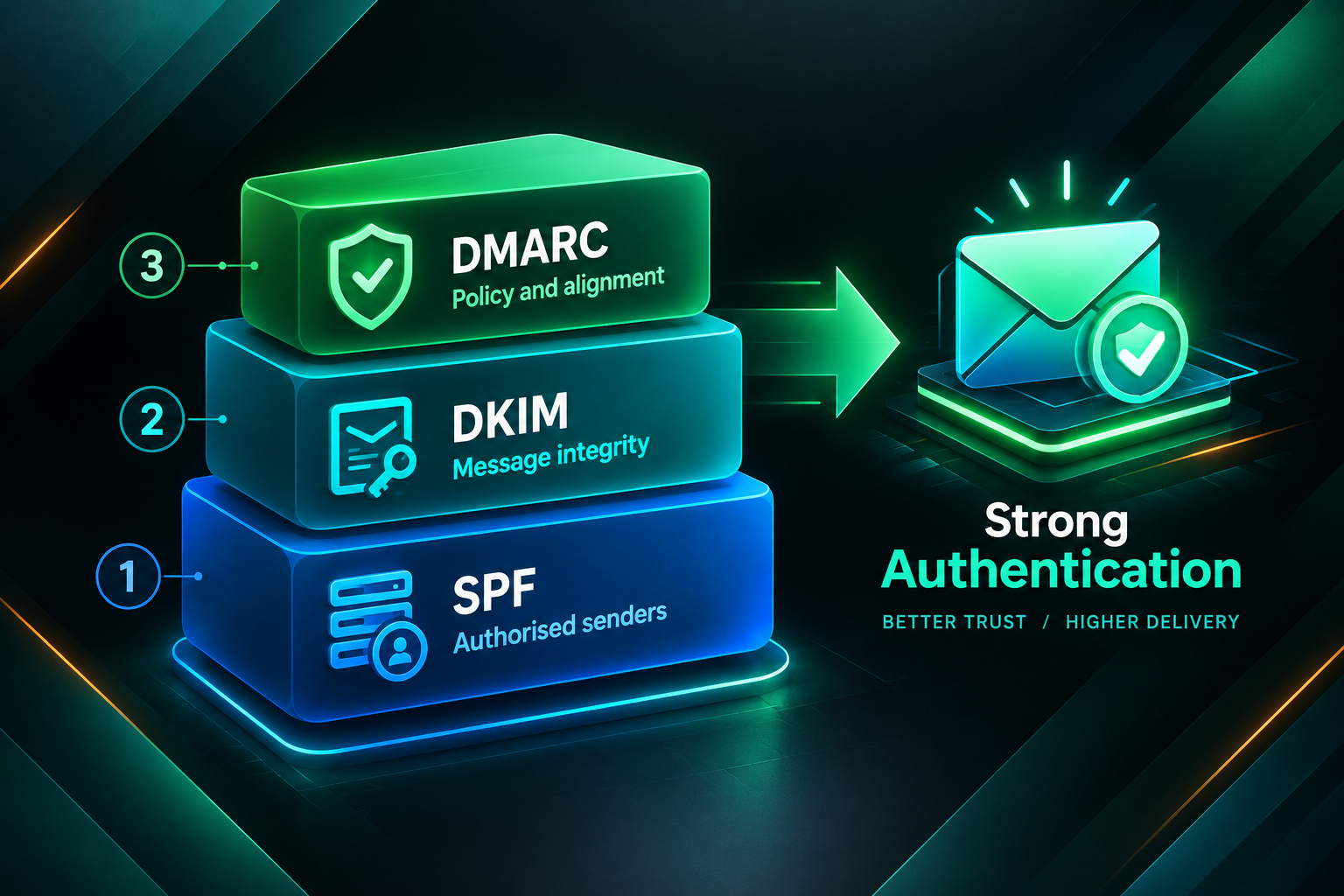
DKIM is one component of a broader email authentication framework. The other two primary standards are SPF and DMARC, and understanding how they relate to each other helps clarify why DKIM alone is not sufficient for a robust outreach setup.
SPF (Sender Policy Framework) is a DNS record that lists the mail servers authorised to send email on behalf of a domain. It allows receiving servers to check whether the sending server’s IP address is on the approved list. SPF validates the envelope sender — the address used during the SMTP handshake — rather than the From header visible to the recipient.
DMARC (Domain-based Message Authentication, Reporting and Conformance) builds on both SPF and DKIM. A DMARC policy, also published as a DNS TXT record, tells receiving servers what to do when an email fails authentication checks — options include doing nothing (monitoring mode), quarantining the message, or rejecting it outright. DMARC also requires alignment: the domain in the From header must match the domain authenticated by SPF or DKIM. This alignment requirement is what closes the gap that either standard leaves open on its own.
For outreach email, the practical implication is that deploying all three — SPF, DKIM, and DMARC — provides the strongest authentication signal. Major inbox providers, including Google and Microsoft, have increasingly emphasised authentication requirements for bulk and commercial senders. As of early 2024, Google and Yahoo introduced stricter requirements for senders sending more than 1,000 messages per day to their platforms, explicitly requiring DKIM and DMARC alongside SPF. Even for lower-volume outreach, meeting these standards reduces friction with inbox filters.
Step-by-Step: How to Set Up DKIM for Outreach Email
The exact steps vary depending on your email sending platform and DNS provider, but the underlying process follows the same sequence regardless of which tools you use.
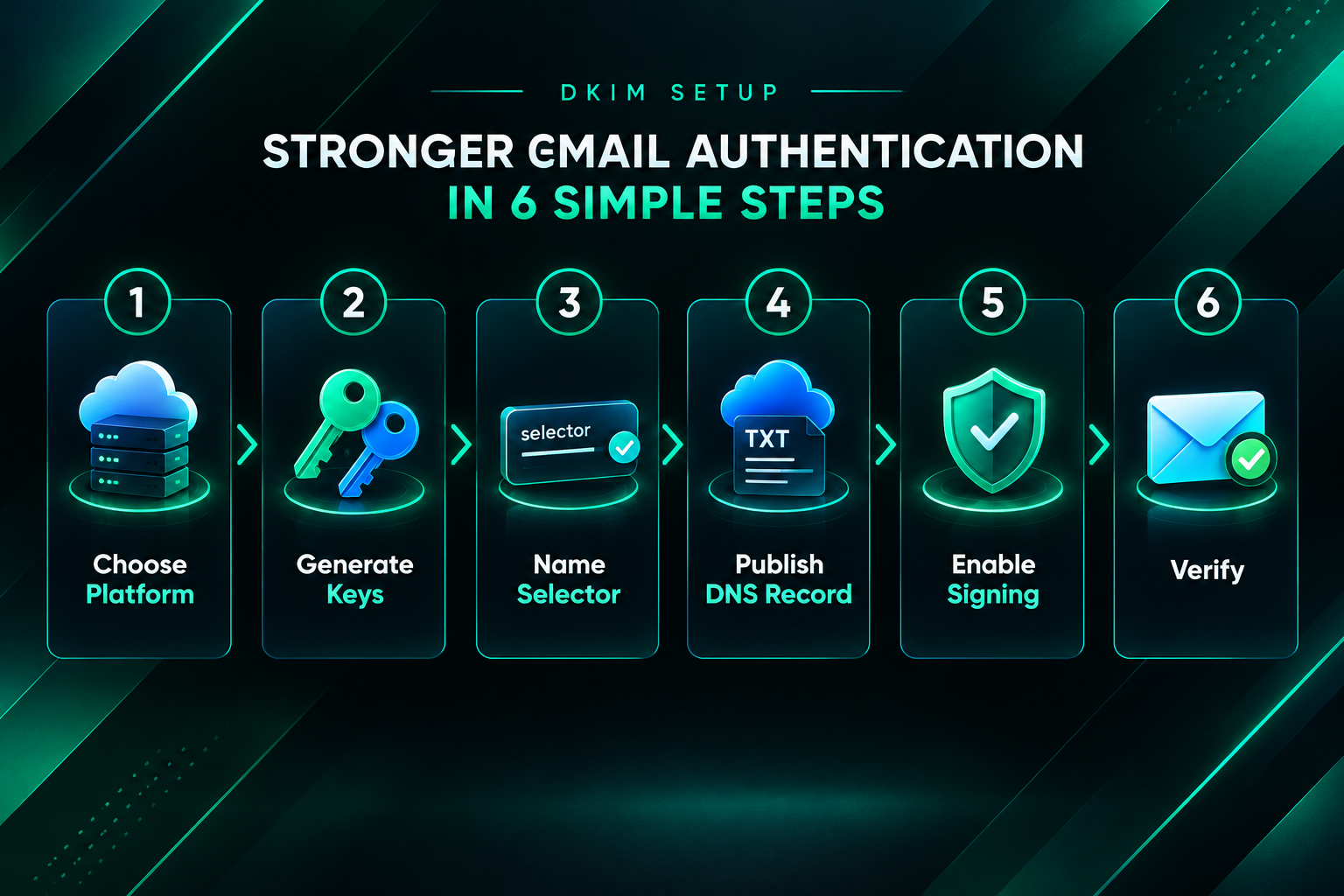
Step 1: Choose Your Email Sending Platform and Identify Its DKIM Settings
Before generating any keys, confirm which platform will be sending your outreach emails. Common options include Google Workspace, Microsoft 365, dedicated outreach tools such as Lemlist, Instantly, or Mailshake, and transactional email services such as SendGrid or Mailgun. Each platform has its own DKIM configuration section, usually found in the domain authentication, email settings, or sending domains area of the admin panel. Locate this section first, as the platform will either generate the key pair for you or provide instructions for generating it externally.
Step 2: Generate the DKIM Key Pair
Most modern email platforms generate the DKIM key pair automatically when you initiate domain authentication. The platform retains the private key and presents you with the public key value to publish in DNS. If you are configuring DKIM on a self-managed mail server such as Postfix or Exim, you will need to generate the key pair manually using a tool such as OpenDKIM or a command-line utility, then configure the server to use the private key for signing.
When generating keys, a 2048-bit RSA key is the current recommended minimum. Some older systems default to 1024-bit keys, which are considered insufficiently secure by current standards. If your platform offers a choice, select 2048-bit or higher. Some platforms also support Ed25519 keys, which are shorter but considered cryptographically strong; however, Ed25519 is not yet universally supported by all receiving servers, so RSA 2048-bit remains the safer default for broad compatibility.
Step 3: Choose a Selector Name
The selector is a label that identifies which DKIM key was used to sign a message. It can be any alphanumeric string. Many platforms assign a default selector automatically — Google Workspace uses “google”, for example — but you can often customise it. If you are managing multiple sending platforms, use distinct selectors for each so that the DNS records do not conflict and you can rotate or revoke individual keys without affecting others.
Step 4: Publish the Public Key as a DNS TXT Record
Log in to your DNS provider — this is typically your domain registrar or a dedicated DNS management service such as Cloudflare, Route 53, or Namecheap. Create a new TXT record with the following structure:
- Name/Host: selector._domainkey (replace “selector” with your chosen selector name)
- Type: TXT
- Value: The public key string provided by your email platform, formatted as a DKIM TXT record (it will begin with v=DKIM1; k=rsa; p= followed by the encoded public key)
- TTL: 3600 seconds (one hour) is a common default; lower values allow faster propagation of future changes
Save the record and allow time for DNS propagation. Propagation typically completes within a few minutes to a few hours, though in some cases it can take up to 48 hours depending on the DNS provider and TTL settings.
Step 5: Enable DKIM Signing in Your Sending Platform
Return to your email platform’s domain authentication settings. Most platforms include a verification step where they check that the DNS TXT record is live and correctly formatted before activating DKIM signing. Once the record is detected, enable signing. From this point, outgoing messages from that domain through that platform will include a DKIM-Signature header.
Step 6: Verify the Configuration
After enabling DKIM signing, send a test email to a personal Gmail or Outlook account. In Gmail, open the message, click the three-dot menu, and select “Show original”. Look for the DKIM-Signature header and check that the authentication results show dkim=pass. You can also use free online tools such as MXToolbox, Mail-Tester, or Google’s Admin Toolbox to check your DKIM record and test message authentication without sending to a live inbox.
Confirm that SPF is also passing and, if you have a DMARC record in place, that the DMARC result shows alignment. If DKIM fails, the most common causes are a DNS record that has not yet propagated, a formatting error in the TXT record value, or a mismatch between the selector referenced in the email header and the selector published in DNS.
Common DKIM Setup Mistakes and How to Avoid Them
Several recurring errors can prevent DKIM from working correctly or reduce its effectiveness for outreach campaigns.
- Truncated DNS records: Some DNS providers impose character limits on TXT record values. Long DKIM public keys may need to be split into multiple quoted strings within the same TXT record. If the key is truncated, authentication will fail. Check your DNS provider’s documentation for the correct method of entering long TXT values.
- Using a 1024-bit key: Older key lengths are considered weak by current security standards and may be flagged by some receiving servers. Generate a 2048-bit key where possible.
- Selector conflicts: If you publish two TXT records with the same selector name, DNS may return unpredictable results. Use unique selectors for each sending platform.
- Forgetting to enable signing after publishing the DNS record: Publishing the public key in DNS is necessary but not sufficient. The sending platform must also be configured to sign outgoing messages with the corresponding private key.
- Not verifying after setup: Always test authentication after configuration. A record that appears correct in the DNS management interface may still contain formatting errors that cause failures.
- Neglecting key rotation: DKIM keys should be rotated periodically — commonly every six to twelve months — to limit the impact of a potential key compromise. Most platforms make this straightforward, but it requires updating the DNS record each time.
DKIM for Outreach-Specific Sending Scenarios
Outreach campaigns often involve sending from multiple domains or through multiple platforms simultaneously, which introduces additional configuration considerations.
Sending from a Subdomain or Dedicated Outreach Domain
Many outreach practitioners use a dedicated sending domain — separate from the main business domain — to protect the primary domain’s sender reputation. If you are sending from a subdomain such as outreach.yourdomain.com or from a separate domain entirely, DKIM must be configured for that specific domain. The public key DNS record must be published under the sending domain, not the root domain, unless the sending domain is the root domain itself.
Using a dedicated outreach domain is a reasonable practice for high-volume campaigns, but it requires the same authentication setup as a primary domain. A dedicated domain with no sending history also needs a warm-up period — gradually increasing sending volume over several weeks — before it can reliably reach inboxes at scale. Authentication alone does not substitute for a positive sending history.
Sending Through Multiple Outreach Platforms
If your team uses more than one outreach tool — for example, one platform for initial prospecting emails and another for follow-up sequences — each platform needs its own DKIM selector and corresponding DNS record. Confirm that each platform is authorised in your SPF record as well. Sending through a platform not listed in SPF, even with DKIM passing, can create DMARC alignment issues depending on your DMARC policy configuration.
Agency and White-Label Outreach Setups
Agencies managing outreach on behalf of clients need to ensure that client domains are correctly authenticated for any sending platform used in the campaign. This typically means the client’s DNS administrator needs to add the relevant TXT records. Clear documentation of the required records — including selector names, record values, and the purpose of each — makes this process smoother and reduces the risk of configuration errors. Some outreach platforms support custom tracking domains and branded sending infrastructure, which may require additional DNS records beyond the core DKIM, SPF, and DMARC setup.
What DKIM Does Not Fix
DKIM is a technical authentication standard, not a deliverability solution on its own. Understanding its limitations helps set realistic expectations for outreach campaign performance.
DKIM does not improve the quality of your outreach copy, the relevance of your targeting, or the strength of your link building proposition. A correctly authenticated email that contains a generic, low-effort pitch will still be ignored or marked as spam by recipients. Inbox providers also use engagement signals — open rates, reply rates, spam complaints, and unsubscribes — as inputs to deliverability decisions. High complaint rates from recipients can damage sender reputation regardless of authentication status.
DKIM does not prevent your domain from being blacklisted if you send unsolicited bulk email. Authentication confirms identity; it does not confer permission to send. Responsible outreach practices — personalised messaging, relevant targeting, reasonable sending volumes, and easy opt-out mechanisms — remain essential alongside technical authentication.
Finally, DKIM does not guarantee inbox placement. Deliverability is influenced by a combination of factors including sender reputation, IP reputation, content filtering, recipient engagement history, and the policies of individual inbox providers. DKIM is one important signal among many, and its absence is more likely to cause harm than its presence is to guarantee success.
Maintaining DKIM Over Time
Once DKIM is configured and verified, ongoing maintenance is relatively low-effort but should not be ignored entirely.
Rotate DKIM keys periodically. The recommended interval varies by security policy, but rotating every six to twelve months is a common practice. When rotating, publish the new public key under a new selector before switching the sending platform to use the new private key. This ensures there is no gap in authentication during the transition. After confirming the new key is working correctly, the old DNS record can be removed.
Monitor DMARC reports. If you have a DMARC record in place with a reporting address configured, you will receive aggregate reports from inbox providers showing authentication pass and fail rates for your domain. These reports can surface unexpected authentication failures — for example, if a new sending platform was added without updating SPF or DKIM — before they cause significant deliverability problems.
Re-verify authentication after any changes to your email infrastructure, including switching outreach platforms, migrating DNS providers, or changing the sending domain. DNS changes can inadvertently overwrite or conflict with existing authentication records.
Frequently Asked Questions
Do I need DKIM if I am only sending a small number of outreach emails per day?
Yes. While stricter bulk sender requirements from providers like Google and Yahoo apply above certain volume thresholds, DKIM is beneficial regardless of sending volume. Even low-volume outreach from an unauthenticated domain can face inbox filtering, particularly if the domain is relatively new or has limited sending history. Authentication is a baseline expectation for professional email sending.
Can I set up DKIM without access to my domain’s DNS records?
No. Publishing the DKIM public key requires adding a TXT record to the domain’s DNS zone. If you do not have DNS access, you will need to coordinate with whoever manages the domain’s DNS — typically the domain registrar, a hosting provider, or an IT administrator. Provide them with the exact record name and value from your email platform.
How long does DKIM setup take?
The configuration steps themselves — generating the key, publishing the DNS record, and enabling signing — typically take between 15 and 45 minutes for someone familiar with DNS management. DNS propagation adds additional time, ranging from a few minutes to a few hours in most cases. Allow at least a few hours before concluding that a record is not propagating correctly.
Will DKIM stop my outreach emails from going to spam?
DKIM reduces one risk factor that can contribute to spam filtering, but it does not eliminate all causes of poor inbox placement. Content quality, sender reputation, list hygiene, sending volume, and recipient engagement all influence deliverability. DKIM is a necessary foundation, not a complete solution.
What happens if my DKIM check fails?
A DKIM failure means the receiving server could not verify the signature. Depending on the DMARC policy in place, the message may be delivered anyway (if DMARC is in monitoring mode or if SPF passes with alignment), quarantined, or rejected. Even without a strict DMARC policy, repeated DKIM failures can negatively affect sender reputation over time. Investigate failures promptly using a tool such as MXToolbox or by reviewing DMARC aggregate reports.
Should I use a different DKIM key for each outreach platform?
Yes. Using a separate selector and key pair for each sending platform allows you to manage, rotate, or revoke individual keys without affecting other platforms. It also makes it easier to identify which platform is responsible if an authentication issue arises.
Is DKIM the same as email encryption?
No. DKIM provides authentication and integrity verification — it confirms who sent the message and that it was not altered in transit — but it does not encrypt the message content. The email body and headers remain readable by mail servers along the delivery path. For content confidentiality, separate encryption standards such as TLS (for transport encryption) or S/MIME and PGP (for end-to-end encryption) are relevant, though these are rarely required for standard outreach campaigns.
Getting Your Outreach Email Infrastructure Right Before You Scale
DKIM setup is a practical prerequisite for any outreach campaign that depends on emails actually reaching their intended recipients. The configuration process is manageable for most teams with DNS access and a modern email sending platform, and the ongoing maintenance burden is low once the initial setup is complete. The more significant risk is treating authentication as optional or deferring it until deliverability problems become visible — by which point sender reputation may already be affected.
For link building campaigns specifically, where outreach to editors, webmasters, and content managers is central to acquiring placements, inbox placement directly influences campaign output. A well-authenticated sending domain — with DKIM, SPF, and DMARC all correctly configured — removes a preventable technical obstacle from the outreach process. It does not replace the need for relevant targeting, personalised messaging, and a credible link building proposition, but it ensures that those efforts are not undermined by avoidable deliverability failures.
If you are planning to scale outreach as part of a link acquisition strategy and want to ensure the technical foundations are in place before launching, reviewing your full email authentication setup — including DKIM, SPF, DMARC, and sending domain warm-up — is a sensible starting point. For teams managing outreach on behalf of clients, documenting and standardising this setup across campaigns reduces configuration errors and protects both the client’s domain reputation and the campaign’s effectiveness.