
No single backlink tool captures every link pointing to a website. Ahrefs, Semrush, Moz, Majestic, and Google Search Console each crawl the web independently, maintain different link indexes, and surface different subsets of a site’s backlink profile. If you rely on only one tool, you are almost certainly working with an incomplete picture. Merging backlink exports from multiple tools into a single, deduplicated dataset gives you broader coverage, more reliable data for audits, and a stronger foundation for link building decisions.
Key Takeaways
- Each major backlink tool maintains its own crawler and index, so combining exports from two or more tools typically reveals significantly more unique referring domains than any single source alone.
- The core workflow involves exporting raw data, standardising column formats, deduplicating by URL or domain, and enriching the merged file with quality metrics before analysis.
- Google Search Console data is a useful complement because it reflects links Google has actually processed, though it does not expose all the metrics available in third-party tools.
- A merged backlink dataset is most valuable when used alongside content quality assessment and technical SEO review, not as a standalone ranking signal.
- Keeping a documented, repeatable merge process saves time across recurring audits and makes it easier to track changes in a backlink profile over time.
Why No Single Tool Gives You the Full Picture
Backlink tools discover links by crawling the web, processing third-party data feeds, and indexing what their bots find. Because each tool prioritises different crawl paths, refresh frequencies, and data sources, their indexes overlap but never match perfectly. A 2021 study by Aira found meaningful variation in the number of referring domains reported across major tools for the same websites, and practitioners routinely observe that combining Ahrefs and Semrush alone can surface 20–40% more unique referring domains than either tool individually, though the exact figure varies by site and niche.
Google Search Console adds a further dimension. Because it reflects links that Google’s own crawler has encountered and associated with your property, it can surface links that third-party tools have not yet indexed, particularly from smaller or less frequently crawled domains. However, Search Console does not provide the domain-level authority metrics, anchor text breakdowns, or link attribute data that tools like Ahrefs or Majestic offer. Using Search Console data alongside third-party exports gives you a more complete view without over-relying on any proprietary metric.
For link building campaigns, an incomplete backlink profile can lead to missed opportunities, inaccurate gap analysis, and flawed outreach targeting. For audits, it can mean overlooking toxic or low-quality links that warrant disavowal consideration. Merging exports is not a technical luxury; it is a practical step toward more reliable analysis.
What You Need Before You Start
Before combining exports, it helps to be clear about your goal. Are you conducting a full backlink audit, preparing a competitor gap analysis, building a disavow file, or benchmarking your link profile against a competitor’s? The goal determines which tools to prioritise, which columns to retain, and how granular your deduplication needs to be.
At minimum, you will need exports from at least two tools. The most commonly combined sources are:
- Ahrefs – widely regarded as having one of the largest and most frequently updated link indexes; exports include referring domain, source URL, target URL, anchor text, DR (Domain Rating), UR (URL Rating), link type, and first/last seen dates.
- Semrush – provides Authority Score alongside referring domain, source URL, anchor text, link type, and toxicity indicators; useful for identifying potentially harmful links.
- Moz – exports include Domain Authority, Page Authority, spam score, anchor text, and link source; the index is smaller than Ahrefs or Semrush but can surface unique links.
- Majestic – offers Trust Flow and Citation Flow, which are distinct proprietary metrics not available in other tools; particularly useful for assessing link neighbourhood quality.
- Google Search Console – provides a list of links Google has processed, downloadable as a CSV; no authority metrics but high signal value for confirmed crawled links.
You will also need a spreadsheet application capable of handling large datasets. Microsoft Excel works for smaller exports, but Google Sheets or Python (using the pandas library) is more practical when combining exports that each contain tens of thousands of rows. For very large sites or agency-scale audits, a database approach or a dedicated tool such as Screaming Frog’s link analysis features may be more efficient.
Step-by-Step: How to Merge Backlink Exports
Step 1: Export Raw Data from Each Tool
Export the full backlink report from each tool for the target domain. Most tools allow you to filter by dofollow or nofollow status, date range, and link type before exporting. For a comprehensive merge, export all link types initially and apply filters after deduplication, so you do not inadvertently exclude links that may be relevant to your analysis. Save each export as a separate CSV file with a clear filename that identifies the source tool and export date, for example ahrefs-backlinks-2024-06.csv.
Pay attention to export limits. Free and entry-level tool plans often cap exports at a few thousand rows. If your site has a large backlink profile, you may need to export in batches by filtering on date ranges or link attributes, then combine those batches before proceeding to the cross-tool merge.
Step 2: Standardise Column Headers and Data Formats
Each tool uses different column names for the same data points. Before combining files, rename columns to a consistent schema. A practical standard set of columns for a merged backlink file includes:
- source_url – the full URL of the page containing the link
- referring_domain – the root domain of the linking page
- target_url – the page on your site being linked to
- anchor_text – the visible or alt text of the link
- link_type – dofollow, nofollow, UGC, sponsored
- first_seen – date the link was first detected
- last_seen – date the link was most recently confirmed
- data_source – which tool the row came from (add this as a new column before merging)
Metric columns such as DR, Authority Score, Trust Flow, and Domain Authority should be retained but kept in separate tool-specific columns rather than merged into a single field, because these metrics are not interchangeable. Treating Ahrefs DR and Moz DA as equivalent values in the same column would produce misleading analysis.
Step 3: Add a Source Identifier Column
Before stacking the files, add a data_source column to each export and populate it with the tool name. This allows you to filter by source after merging, which is useful for understanding which tools contributed which links and for diagnosing coverage gaps. It also makes it easier to re-run the merge when you update exports from individual tools.
Step 4: Stack the Files into One Dataset
Once all exports share the same column structure, stack them vertically into a single file. In Excel or Google Sheets, this means copying all rows from each export (excluding the header row from the second file onward) into a single sheet. In Python with pandas, the pd.concat() function handles this efficiently across multiple DataFrames. At this stage, the combined file will contain many duplicate rows because the same link may appear in two or three tool exports.
Step 5: Deduplicate the Combined Dataset
Deduplication is the most important step in the merge process. The correct deduplication key depends on your analysis goal:
- Deduplicate by source URL + target URL to identify unique link instances (the same page linking to the same destination page).
- Deduplicate by referring domain + target URL to count unique referring domains per target page, which is the metric most commonly used in link building analysis.
- Deduplicate by referring domain only to assess the total number of unique domains linking to the site, regardless of which page they link to.
When deduplicating, decide which row to keep when duplicates exist. A common approach is to keep the row from the tool with the richest metric data for that link, or to keep all rows but flag duplicates so you can review them. In Excel, the Remove Duplicates function works for straightforward cases. In Google Sheets, the UNIQUE function or a helper column with COUNTIFS can identify duplicates. In Python, DataFrame.drop_duplicates() with a specified subset of columns gives precise control.
After deduplication, add a column that records how many tools detected each link. Links confirmed by two or more tools are generally more reliable data points than links appearing in only one source, which may reflect crawl lag or index differences rather than a genuine discrepancy.
Step 6: Enrich and Validate the Merged Dataset
With a clean, deduplicated file, you can now enrich the data for analysis. Useful enrichment steps include:
- Pulling fresh metric values for referring domains using a tool’s API or bulk upload feature, so all rows have current authority data rather than values from exports taken at different dates.
- Checking whether target URLs are still live and returning a 200 status code, since links pointing to redirected or broken pages may need attention.
- Flagging links by attribute (dofollow vs nofollow) to understand the proportion of followed links in the profile.
- Grouping by target URL to identify which pages on your site attract the most referring domains, which informs internal linking and content strategy decisions.
Handling Google Search Console Data in the Merge
Google Search Console exports backlink data in a slightly different format from third-party tools. The Links report provides a list of external links grouped by linking site, with the option to download the top linking sites or the latest links as a CSV. These exports do not include authority metrics, link attributes, or anchor text in the same structured way as Ahrefs or Semrush exports.
The most practical approach is to treat Search Console data as a separate verification layer. After completing your main merge from third-party tools, import the Search Console referring domains list and use a VLOOKUP, INDEX-MATCH, or a pandas merge to identify which domains in the Search Console list are already present in your merged dataset and which are new. Domains that appear in Search Console but not in any third-party tool export represent links that Google has processed but the tools have not yet indexed. These are worth investigating, particularly if they come from relevant or authoritative sources.

Because Search Console reflects Google’s own crawl data, it carries a different kind of signal value compared to third-party indexes. A link confirmed by Search Console is one that Google has at least encountered, though this does not guarantee it influences rankings or that Google treats it as a quality signal.
Common Problems and How to Avoid Them
Several issues commonly arise when merging backlink exports, and most are avoidable with a consistent process.
Inconsistent URL formats are one of the most frequent causes of false duplicates or missed deduplication. The same referring domain may appear as http://example.com, https://example.com, https://www.example.com, or with a trailing slash in different exports. Normalising URLs before deduplication, by stripping protocol prefixes, standardising www vs non-www, and removing trailing slashes, prevents these variations from being treated as separate domains.
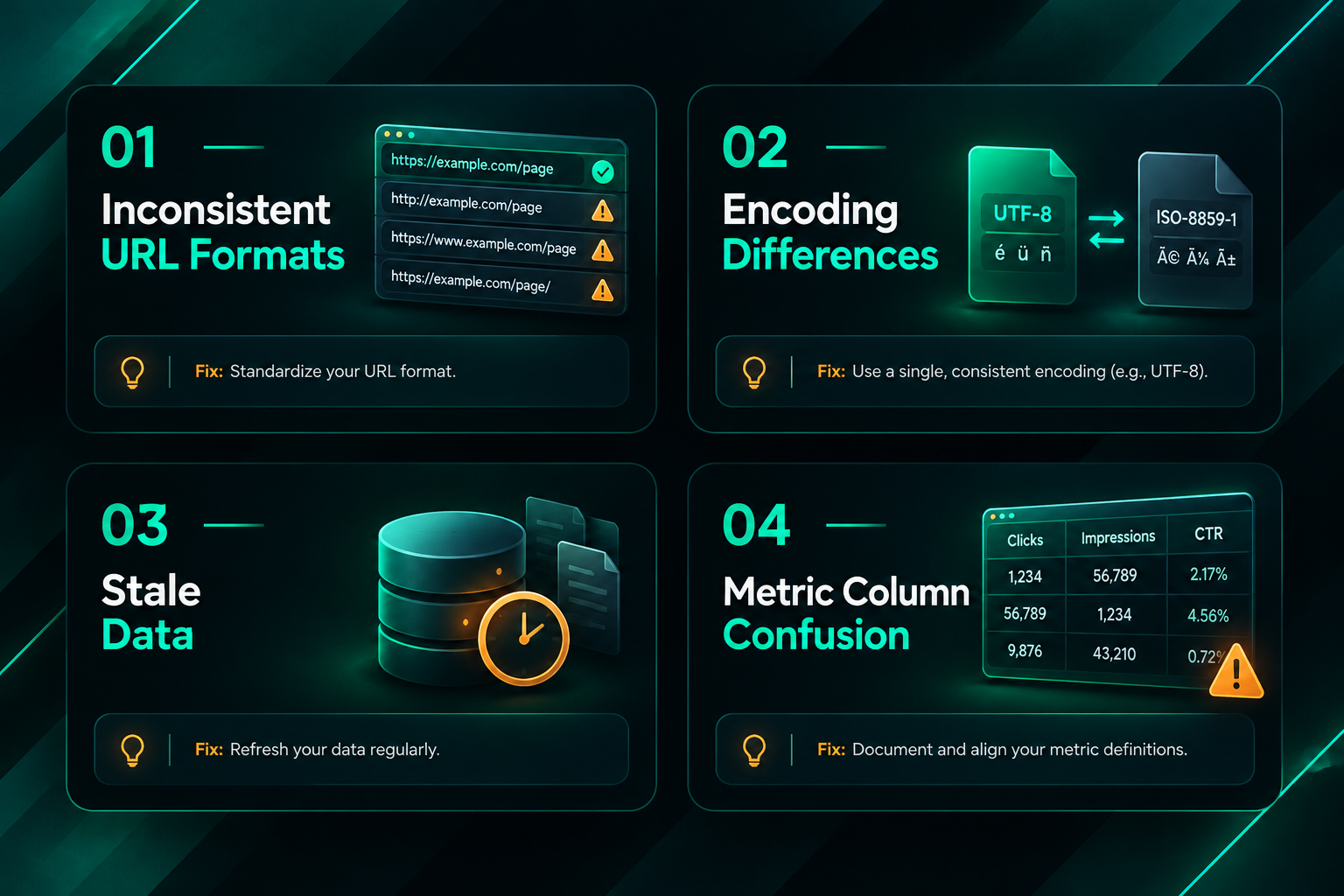
Encoding differences in CSV files can cause character errors when combining exports from different tools, particularly for anchor text containing non-Latin characters or special symbols. Opening all files with the same encoding (UTF-8 is the safest default) before processing reduces this risk.
Stale data is another concern. If one export is several months old and another is from this week, the merged dataset reflects different points in time. Where possible, refresh all exports within the same short window before merging, especially for audits where recency matters.
Metric column confusion occurs when analysts average or combine proprietary metrics across tools as if they measure the same thing. Ahrefs DR, Semrush Authority Score, Moz DA, and Majestic Trust Flow are each calculated differently, reflect different aspects of a domain’s link profile, and should not be treated as interchangeable. Keep them in separate columns and use them as complementary signals rather than a single composite score.
Using the Merged Dataset for Link Building and Audits
A merged backlink dataset has several practical applications beyond simply knowing how many links a site has.
Competitor gap analysis becomes more reliable when you merge exports for two or three competitor domains and compare their referring domain lists against your own merged profile. Domains that link to multiple competitors but not to your site represent prospecting opportunities for outreach campaigns. The accuracy of this analysis depends directly on the completeness of the underlying data, which is why merging tool exports matters.
Link audit and disavow preparation benefits from a merged dataset because potentially harmful links that appear in only one tool’s index are less likely to be missed. When assessing link quality, look at a combination of signals: low Trust Flow relative to Citation Flow, high spam scores in Moz, very low DR combined with irrelevant anchor text, and links from domains with no organic traffic. No single metric is a reliable standalone indicator of a harmful link, and disavow decisions should be made carefully, ideally with input from an experienced SEO professional, because incorrectly disavowing legitimate links can remove positive signals from your profile.
Anchor text distribution analysis across a merged dataset gives a more accurate picture of how your backlink profile looks to search engines. Over-optimised anchor text patterns, where a high proportion of followed links use exact-match commercial keywords, can be a risk factor worth monitoring, though the appropriate response depends on the site’s history, niche, and existing profile rather than a universal threshold.
Tracking link building campaign results is more accurate when you compare merged snapshots taken before and after a campaign period. Because individual tools may index new links at different speeds, a merged dataset reduces the chance of concluding that a link has not been indexed when it simply has not yet appeared in one tool’s index.
Automating the Merge Process
For teams running recurring audits or managing multiple client campaigns, manually merging exports each time is time-consuming and error-prone. A documented, repeatable process reduces both problems. The most practical automation options include:
- Python scripts using pandas can be written once and reused, accepting new CSV exports as inputs and producing a clean merged output with consistent column names, deduplication logic, and source flagging. This approach scales well for agency use.
- Google Sheets with Apps Script can automate parts of the merge for teams that prefer a spreadsheet environment, though performance degrades with very large datasets.
- Dedicated SEO platforms such as Screaming Frog (for crawl-based link data), LinkResearchTools, or agency reporting platforms sometimes offer built-in multi-source backlink aggregation, though these typically require additional subscriptions and may not offer the same flexibility as a custom script.
Whichever approach you use, document the exact steps, column mappings, deduplication keys, and any filtering decisions so that the process can be reproduced consistently by different team members or revisited months later without ambiguity.
Frequently Asked Questions
How many tools should I combine for a backlink merge?
Two tools, typically Ahrefs and Semrush, cover a large proportion of the available link data for most sites. Adding Majestic is worthwhile when Trust Flow data is relevant to your analysis. Moz can add incremental coverage. Google Search Console should be included as a verification layer regardless of which third-party tools you use. Beyond four or five sources, the marginal gain in new unique links tends to diminish, and the additional processing time may not be justified for routine audits.
Should I deduplicate by source URL or by referring domain?
It depends on your goal. For counting unique linking pages, deduplicate by source URL and target URL. For assessing referring domain diversity, which is the metric most relevant to link building strategy, deduplicate by referring domain and target URL. Many analysts produce both views from the same merged dataset.
Can I compare DR, DA, and Trust Flow in the same column?
No. Ahrefs DR, Moz DA, and Majestic Trust Flow are calculated using different methodologies and different underlying data. Placing them in the same column and treating them as equivalent values will produce misleading analysis. Keep each metric in its own labelled column and use them as complementary signals.
How do I handle links that appear in one tool but not others?
Links appearing in only one tool are not necessarily invalid. They may reflect crawl timing differences, index freshness, or the tool’s specific crawl priorities. Flag single-source links in your dataset and treat them with slightly more caution during quality assessment, but do not automatically exclude them. If a link appears in Search Console but not in any third-party tool, it is worth investigating as a potentially valuable but under-indexed link.
How often should I refresh and re-merge backlink exports?
For active link building campaigns, a monthly refresh is a reasonable baseline. For sites in competitive niches or those recovering from a link-related issue, more frequent refreshes may be warranted. For stable sites with less active campaigns, quarterly merges may be sufficient. The key is consistency: refreshing all tool exports within the same short window before each merge produces more comparable snapshots over time.
Does merging backlink data help with disavow file preparation?
Yes. A merged dataset reduces the risk of missing potentially harmful links that appear in only one tool’s index. However, disavow decisions should be made carefully and conservatively. Incorrectly disavowing legitimate links can remove positive signals from your profile. If you are preparing a disavow file following a manual action or as part of a link audit, working with an experienced SEO professional is advisable.
Building a Reliable Backlink Analysis Workflow
Merging backlink exports from multiple tools is a foundational step in any serious link analysis workflow, but it is a means to an end rather than an end in itself. The value of a merged dataset comes from what you do with it: identifying genuine link building opportunities, assessing the quality and diversity of your existing profile, tracking the results of outreach campaigns, and making informed decisions about which pages to prioritise for link acquisition.
A clean, deduplicated, multi-source backlink file gives you a more accurate baseline than any single tool can provide. It reduces the risk of acting on incomplete data, whether that means missing a competitor’s link source during prospecting or overlooking a low-quality link cluster during an audit. The process does require time and a consistent methodology, but once documented, it becomes a repeatable asset for ongoing SEO work.
If your team manages link building campaigns across multiple clients or domains, or if you are considering outsourcing link acquisition to a specialist provider, having a reliable backlink analysis process in place makes it significantly easier to set meaningful benchmarks, evaluate campaign results accurately, and communicate progress to stakeholders. A provider experienced in backlink profile assessment and campaign reporting can help you interpret merged data in the context of your specific goals, competitive landscape, and site history.