
Extracting outbound links from a webpage with Python is a practical skill for SEO professionals, link builders, and developers who need to audit backlink profiles, identify linking patterns, or gather data for outreach campaigns. Using Python libraries such as requests and BeautifulSoup, you can parse HTML, isolate anchor tags, filter external URLs, and build structured datasets that support informed link building decisions — all without relying on expensive third-party tools for every task.
Key Takeaways
- Python’s requests and BeautifulSoup libraries provide a straightforward way to fetch a webpage and extract all anchor tag href attributes, which can then be filtered to isolate outbound (external) links.
- Filtering logic typically compares each extracted URL against the source domain, keeping only those that point to a different domain — these are the outbound links.
- For SEO and link building purposes, extracted outbound link data can reveal linking patterns, anchor text distribution, nofollow usage, and potential outreach targets.
- Python-based extraction has practical limitations: JavaScript-rendered pages require additional tools such as Selenium or Playwright, and large-scale crawling raises ethical and legal considerations.
- Outbound link analysis is one input into a broader link building or site audit workflow; it does not replace a full backlink profile assessment or a site-specific SEO audit.
What Are Outbound Links and Why Extract Them?
An outbound link is any hyperlink on a webpage that points to a domain other than the one hosting that page. From an SEO perspective, outbound links signal topical associations, editorial relationships, and the broader linking ecosystem surrounding a piece of content. For link builders and SEO analysts, knowing which external domains a page links to — and how those links are attributed — can inform competitor research, prospecting for guest post opportunities, and quality assessments of potential link placements.
Manually reviewing outbound links on individual pages is feasible for small audits, but it becomes impractical at scale. Automating the extraction process with Python allows you to process dozens or hundreds of URLs efficiently, export structured data for analysis, and integrate link extraction into larger SEO workflows. The resulting datasets can feed into outreach lists, anchor text audits, or content gap analyses without requiring a paid crawl tool for every project.
Tools and Libraries You Will Need
Two Python libraries handle the majority of outbound link extraction tasks: requests for fetching webpage HTML over HTTP, and BeautifulSoup (from the bs4 package) for parsing that HTML and navigating its structure. Both are widely used, well-documented, and installable via pip. A third library, urllib.parse, is part of Python’s standard library and provides utilities for parsing and comparing URLs — essential for distinguishing internal from external links.
For pages that load content dynamically through JavaScript, the requests-plus-BeautifulSoup approach will only capture what is present in the initial HTML response. In those cases, Selenium or Playwright can render the page in a headless browser before extraction, though they add complexity and are slower. For most standard editorial pages — blog posts, resource pages, and article content — the static HTML approach is sufficient and considerably faster.
Install the required libraries with:
pip install requests beautifulsoup4
Step-by-Step: Extracting Outbound Links with Python
The extraction process follows a clear sequence: fetch the page, parse the HTML, collect all anchor tags, extract their href attributes, resolve relative URLs, and filter for links that point to external domains. Each step is straightforward, and the complete workflow can be written in under thirty lines of readable Python code.
Step 1 — Fetch the Webpage HTML
Use the requests library to send an HTTP GET request to the target URL. It is good practice to include a User-Agent header that identifies your script, which reduces the likelihood of the request being blocked by basic bot-detection measures. Always check the HTTP response status code before proceeding; a 200 status indicates a successful response, while 4xx or 5xx codes signal errors that should be handled gracefully.
Example:
import requests
url = ‘https://example.com/some-page’
headers = {‘User-Agent’: ‘Mozilla/5.0 (compatible; LinkExtractor/1.0)’}
response = requests.get(url, headers=headers, timeout=10)
response.raise_for_status()
Step 2 — Parse the HTML with BeautifulSoup
Pass the response content to BeautifulSoup along with a parser. The built-in html.parser requires no additional installation and works reliably for most pages. The lxml parser is faster and more lenient with malformed HTML if you install it separately.
Example:
from bs4 import BeautifulSoup
soup = BeautifulSoup(response.text, ‘html.parser’)
Step 3 — Extract All Anchor Tags and href Attributes
BeautifulSoup’s find_all(‘a’) method returns every anchor element in the parsed HTML. For each anchor tag, retrieve the href attribute. Some anchor tags will have no href, or their href will be a fragment identifier (starting with #), a mailto link, or a relative path. Filter these out before proceeding to the domain comparison step.
Example:
links = []
for tag in soup.find_all(‘a’, href=True):
href = tag[‘href’].strip()
if href and not href.startswith(‘#’) and not href.startswith(‘mailto:’):
links.append(href)
Step 4 — Resolve Relative URLs
Many internal links on a page are written as relative paths such as /about or ../contact rather than full absolute URLs. Use urllib.parse.urljoin to resolve these against the base URL of the page being crawled. This step ensures that every link in your list is a fully qualified URL before you compare domains.
Example:
from urllib.parse import urljoin, urlparse
absolute_links = [urljoin(url, link) for link in links]
Step 5 — Filter for Outbound (External) Links
Parse the source page’s domain using urlparse, then compare each resolved link’s domain against it. Links whose domain differs from the source domain are outbound links. Using netloc from urlparse captures the full hostname including subdomains, which is usually the appropriate level of comparison for outbound link filtering.
Example:
source_domain = urlparse(url).netloc
outbound_links = [
link for link in absolute_links
if urlparse(link).netloc and urlparse(link).netloc != source_domain
]
Step 6 — Enrich the Data with Anchor Text and Link Attributes
For SEO analysis, the raw URL alone is rarely sufficient. Capturing the anchor text associated with each link, and whether the link carries a rel=”nofollow”, rel=”sponsored”, or rel=”ugc” attribute, adds meaningful context. These attributes reflect how the linking page signals the editorial nature of the link to search engines, which is relevant when assessing the potential SEO value of a placement or auditing a site’s outbound linking practices.
Example:
outbound_data = []
for tag in soup.find_all(‘a’, href=True):
href = urljoin(url, tag[‘href’].strip())
parsed = urlparse(href)
if parsed.netloc and parsed.netloc != source_domain:
outbound_data.append({
‘url’: href,
‘anchor_text’: tag.get_text(strip=True),
‘rel’: tag.get(‘rel’, [])
})
Scaling to Multiple Pages
Extracting outbound links from a single page is useful for spot checks, but most SEO and link building workflows require processing lists of URLs. Wrapping the extraction logic in a function and iterating over a list of target URLs is straightforward. Adding a short delay between requests — using time.sleep — reduces the risk of overloading a server and is considered good practice for respectful crawling.
For larger datasets, consider exporting results to a CSV file using Python’s built-in csv module or the pandas library. A structured CSV with columns for source URL, outbound URL, anchor text, and rel attributes can be imported directly into spreadsheet tools or SEO platforms for further analysis. If you are processing hundreds of pages, libraries such as Scrapy provide a more robust crawling framework with built-in rate limiting, error handling, and output pipelines, though they require more setup than the requests-plus-BeautifulSoup approach.
When crawling pages you do not own, always review the site’s robots.txt file and terms of service before running automated requests. Disregarding crawl restrictions can result in IP blocks and may raise legal or ethical concerns depending on the jurisdiction and the nature of the data being collected.
Handling JavaScript-Rendered Pages
A significant limitation of the requests-plus-BeautifulSoup approach is that it only processes the HTML delivered in the initial server response. Many modern websites — particularly those built with React, Vue, or Angular — render their content client-side using JavaScript. On these pages, anchor tags and their href attributes may not be present in the raw HTML response, meaning a static extraction script will return an incomplete or empty link list.
To handle JavaScript-rendered pages, Selenium can control a real browser instance, wait for the page to fully render, and then pass the resulting HTML to BeautifulSoup for parsing. Playwright offers a similar capability with a more modern API and is generally faster. Both tools add dependencies and increase execution time per page, so they are best reserved for pages where static extraction is confirmed to be insufficient rather than applied universally.
An alternative for some use cases is to inspect the network requests made by the browser’s developer tools and identify whether the page fetches link data from an API endpoint that returns JSON. If so, querying that endpoint directly with requests may be more efficient than rendering the full page.
SEO and Link Building Applications
Outbound link extraction with Python supports several practical SEO and link building workflows. Understanding how these applications connect to broader campaign goals helps prioritize which data points to collect and how to structure the output.
Competitor Outbound Link Analysis
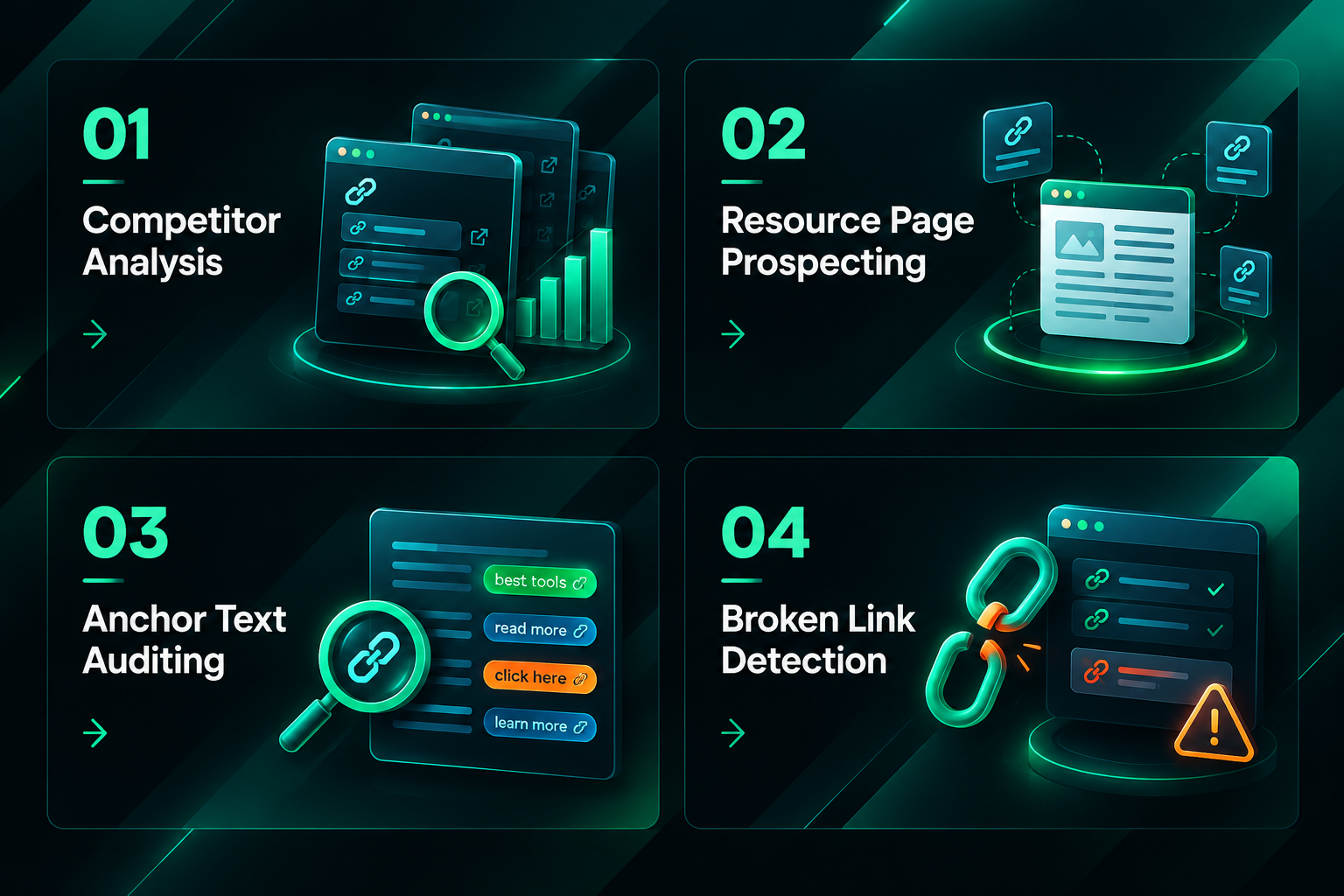
Analyzing the outbound links on competitor pages — particularly resource pages, roundup posts, and link-heavy editorial content — can reveal which external domains they cite and endorse. This information is useful for identifying authoritative sources in a niche, understanding the topical associations competitors are building, and finding domains that may be receptive to outreach because they already attract links from similar content. Outbound link data from competitor pages is a starting point for prospecting, not a guarantee of placement success.
Identifying Guest Post and Resource Page Opportunities
Resource pages and curated link lists often contain outbound links to multiple external domains. Extracting these links programmatically across a set of target pages can quickly surface which domains are frequently cited in a niche, which may indicate editorial authority or community recognition. For manual outreach campaigns, this data can help prioritize which publishers to approach and what type of content is likely to earn a placement.
Anchor Text and Nofollow Auditing
Collecting anchor text alongside outbound URLs allows you to audit how a page describes its external links. For link building quality assessment, understanding whether a potential placement site uses descriptive, keyword-relevant anchor text or generic phrases such as “click here” provides context about editorial standards. Similarly, identifying the proportion of outbound links carrying rel=”nofollow” or rel=”sponsored” attributes is relevant when evaluating whether a site’s outbound links are likely to pass link equity, though the precise effect of these attributes on rankings depends on search engine interpretation and is not guaranteed.
Broken Outbound Link Detection
Extracted outbound link lists can be checked for broken links by sending HEAD or GET requests to each URL and recording the HTTP status code. Pages with broken outbound links represent an outreach opportunity: contacting the publisher to suggest a replacement link to relevant content on your own site is a well-established link acquisition tactic. Python makes it straightforward to automate this check across a list of target pages, though response codes alone do not always confirm whether a page is genuinely useful or editorially appropriate as a replacement.
Limitations and Practical Considerations
Python-based outbound link extraction is a useful tool, but it has meaningful limitations that affect how the results should be interpreted and used in SEO decision-making.
- Static HTML only: As noted, JavaScript-rendered content requires additional tooling. Assuming static extraction is complete when a page uses client-side rendering will produce misleading results.
- No authority or quality signals: Extracting a URL tells you a link exists; it does not tell you whether the linking page has meaningful authority, whether the link is editorially placed, or whether it is likely to influence rankings. Assessing link quality requires additional data from tools such as Ahrefs, Semrush, Majestic, or Google Search Console, combined with manual editorial review.
- Crawl rate and server load: Sending requests too quickly to a server can trigger rate limiting or IP blocks. Responsible crawling requires appropriate delays and respect for robots.txt directives.
- Data freshness: A snapshot of outbound links reflects the page at the moment of crawling. Pages change; links are added, removed, or modified. For ongoing monitoring, extraction needs to be repeated at appropriate intervals.
- Legal and ethical boundaries: Automated crawling of websites you do not own may be subject to terms of service restrictions or, in some jurisdictions, legal constraints. Always verify that your intended use is permissible before running large-scale extraction scripts.
- Interpretation requires context: Outbound link data is one input into a broader analysis. Drawing conclusions about a site’s SEO value, editorial quality, or link building potential from outbound link counts alone is insufficient without considering content quality, traffic, topical relevance, and other factors.
Integrating Outbound Link Data into Link Building Workflows
For SEO teams and link building campaigns, Python-extracted outbound link data is most valuable when it feeds into a structured workflow rather than being treated as an end in itself. A typical integration might involve extracting outbound links from a curated list of target pages, deduplicating and cleaning the URL list, cross-referencing with a backlink analysis tool to assess domain authority metrics, and then prioritizing outreach targets based on topical relevance, editorial standards, and the likelihood of a successful placement.
Outbound link extraction can also support white-label link building operations where agencies need to audit publisher sites at scale before approving them for client campaigns. Automating the initial data collection step reduces manual review time and allows human judgment to focus on the qualitative assessment that automated tools cannot reliably perform — evaluating content quality, editorial tone, audience relevance, and the appropriateness of a placement for a specific client’s goals.
It is worth noting that outbound link analysis is one component of a broader site quality assessment. A page that links to many authoritative external sources is not automatically a high-quality placement; the page’s own content quality, traffic, topical focus, and the context in which a link would appear all matter when evaluating suitability for a link building campaign.
Frequently Asked Questions
Can I extract outbound links from any webpage with Python?
You can extract outbound links from most standard HTML pages using requests and BeautifulSoup. Pages that rely heavily on JavaScript to render their content may require Selenium or Playwright to capture all links. Some websites also block automated requests through bot detection, rate limiting, or CAPTCHA systems, which can prevent extraction regardless of the tool used.
What is the difference between outbound links and backlinks?
Outbound links are links on a given page that point to external domains — they are outgoing from the perspective of the page being analyzed. Backlinks are links pointing to a specific page from other domains — they are incoming from the perspective of the target page. When you extract outbound links from a competitor’s page, those same links are backlinks to the domains being linked to.
Does extracting outbound links tell me whether those links pass SEO value?
Not directly. Extraction tells you a link exists and whether it carries a nofollow, sponsored, or ugc rel attribute. Whether a link passes meaningful link equity depends on factors including the linking page’s authority, the relevance of the content, how the link is placed editorially, and how search engines interpret the rel attributes — none of which can be determined from the raw HTML alone.
How do I handle pagination or multi-page content when extracting links?
If a site paginates its content across multiple URLs, you need to identify and crawl each page separately. This may involve detecting pagination links (often marked with rel=”next” or numbered URL patterns) and adding them to your crawl queue. Scrapy’s built-in crawling logic handles this more elegantly than a simple requests loop for large-scale projects.
Is it legal to scrape outbound links from websites I do not own?
The legality of web scraping varies by jurisdiction, the nature of the data collected, and the website’s terms of service. In many cases, scraping publicly available HTML for non-commercial research or SEO analysis is tolerated, but it is not universally permitted. Always review the target site’s robots.txt and terms of service, and seek legal advice if you are uncertain about your specific use case or jurisdiction.
How accurate is Python-based outbound link extraction compared to dedicated SEO tools?
For static HTML pages, Python extraction can be highly accurate at capturing the links present in the page source. Dedicated SEO crawl tools such as Screaming Frog or Sitebulb offer additional features including JavaScript rendering, structured reporting, and integration with authority metrics, which make them more practical for comprehensive site audits. Python scripts are better suited to custom, targeted extraction tasks where flexibility and integration with other data pipelines are priorities.
Deciding When Python Extraction Fits Your Link Building Workflow
Python-based outbound link extraction is a practical, cost-effective option for SEO teams and link builders who need flexible, scriptable access to link data from specific pages. It works well for targeted competitor analysis, broken link prospecting, anchor text auditing, and building custom outreach datasets — particularly when the pages in question deliver their content in standard HTML. The approach requires some Python familiarity and careful attention to crawl ethics, but the core extraction logic is accessible to anyone comfortable with basic scripting.
Where Python extraction has clear limits — JavaScript-heavy pages, large-scale crawls requiring robust infrastructure, or workflows that need integrated authority metrics — dedicated crawl tools or professional SEO platforms may be more appropriate. For link building campaigns that require not just data collection but also publisher outreach, content creation, placement negotiation, and quality control, the extraction step is only the beginning of a much larger process.
If your team is evaluating whether to build custom extraction tooling, invest in a crawl platform, or outsource the data collection and outreach components of a link building campaign entirely, the right answer depends on your internal technical resources, campaign scale, and the specific goals you are trying to achieve. A qualified SEO provider can help assess which approach — or combination of approaches — is likely to be most efficient for your situation.