
Click tracking is a standard feature in most email outreach platforms, but it comes with a trade-off that many link builders and SEO teams overlook: the same mechanism that tells you whether a prospect opened your email or clicked your link can also reduce the likelihood that the email reaches the inbox in the first place. Understanding how click tracking works, why it can affect deliverability, and when disabling it may be the better choice is practical knowledge for anyone running manual outreach campaigns at scale.
Key Takeaways
- Click tracking rewrites outgoing links through a third-party redirect domain, which can trigger spam filters if that domain has a poor reputation or is shared with other senders.
- Open tracking pixels are small images that can be blocked by email clients or flagged by privacy-focused filters, reducing the accuracy of open-rate data.
- Disabling click and open tracking often improves inbox placement for cold outreach, particularly when using shared tracking infrastructure.
- Sender reputation, authentication records, and email content quality have a larger overall influence on deliverability than tracking alone, but tracking is a contributing factor worth managing.
- For link building outreach specifically, the primary goal is a reply, not a click metric, which makes disabling tracking a reasonable default for many campaigns.
How Click Tracking Works in Outreach Emails
When click tracking is enabled in an outreach platform, every hyperlink in your email is replaced with a redirect URL hosted on a tracking domain. When the recipient clicks the link, their browser first visits the tracking server, which records the click event, and then redirects them to the original destination. This process is nearly instantaneous from the user’s perspective, but it means that every link in your email now points to a domain that is not your own.
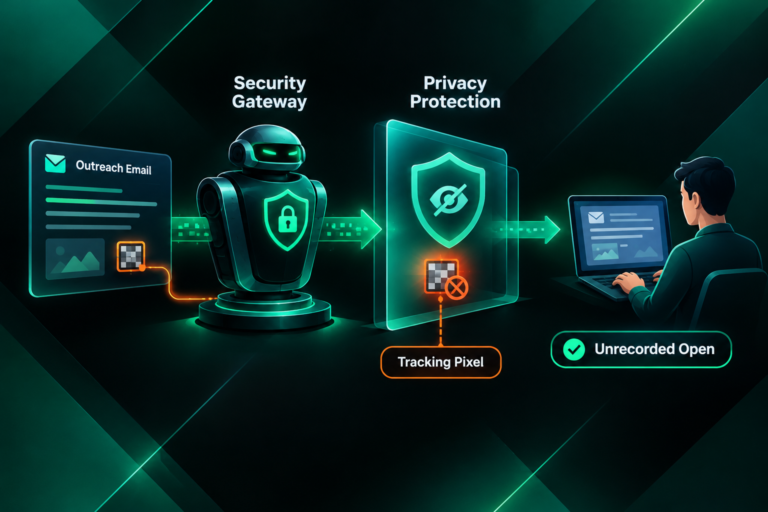
Open tracking works differently. A tiny, transparent image — often called a tracking pixel — is embedded in the email body. When the recipient’s email client loads images, a request is sent to the tracking server, which logs the open event. Many modern email clients, including Apple Mail with Mail Privacy Protection enabled, pre-fetch images regardless of whether the recipient actually opens the email, which inflates open-rate figures and reduces their reliability as a signal.
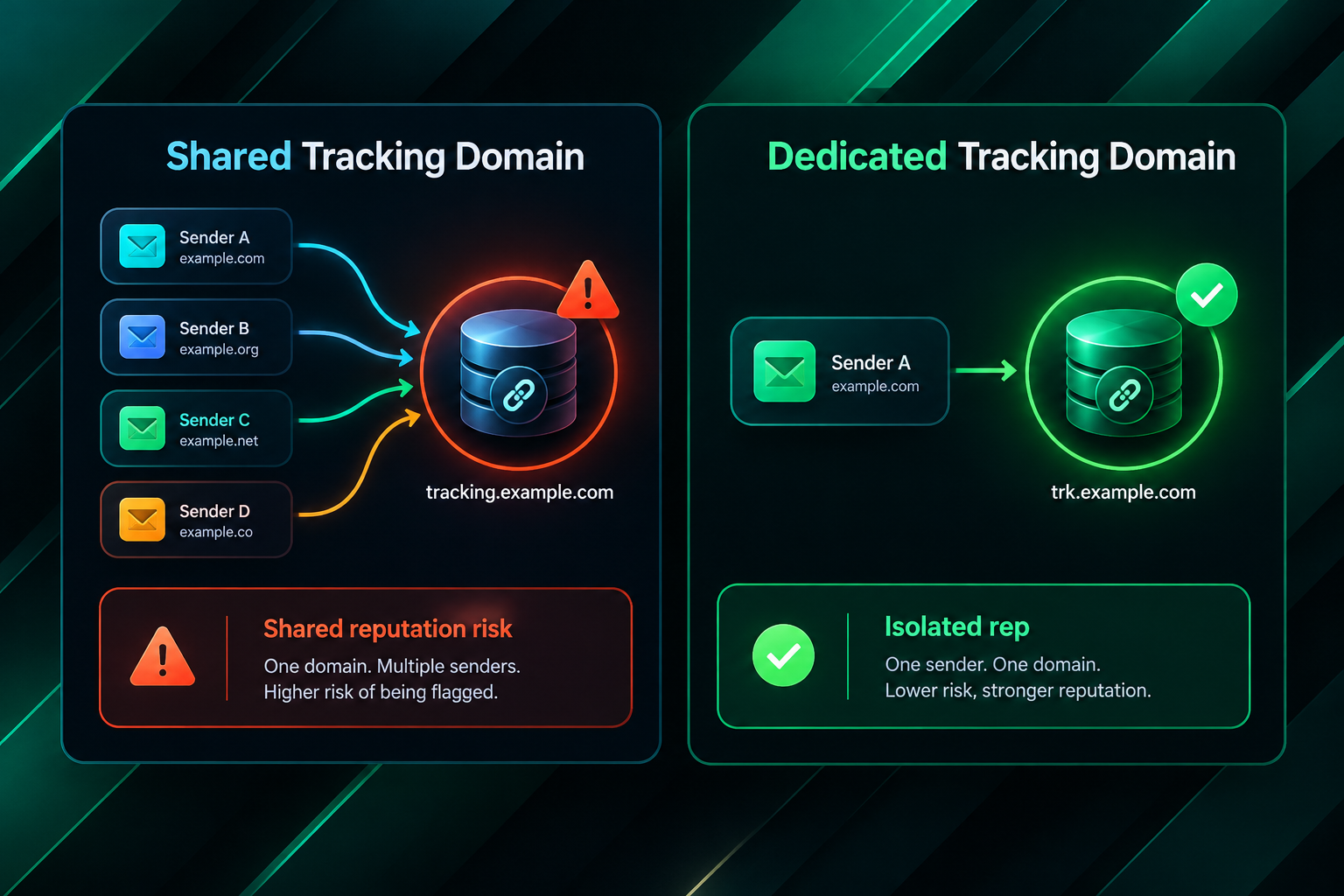
Both mechanisms depend on external infrastructure. If that infrastructure is shared across many users of the same platform, the reputation of the tracking domain is influenced by the behaviour of every sender using it — not just yours.
Why Click Tracking Can Reduce Inbox Placement
Spam filters evaluate incoming emails using a combination of signals, and the domains referenced inside an email are among them. When your outreach email contains a redirect link pointing to a shared tracking domain, the filter checks that domain’s reputation. If other senders using the same tracking infrastructure have sent spam or generated high complaint rates, the tracking domain may appear on blocklists or carry a lower trust score, and your email can be penalised as a result — even if your own sending domain has a clean record.
This is the core deliverability risk associated with click tracking: your inbox placement becomes partially dependent on the behaviour of other users sharing the same tracking domain. Platforms that offer dedicated tracking domains, or that allow you to configure a custom tracking subdomain on your own sending domain, reduce this risk significantly because your tracking reputation is isolated from other senders.
A secondary concern is that redirect chains and unfamiliar link structures can look suspicious to both automated filters and human recipients. A prospect who hovers over a link and sees a long redirect URL rather than your actual website address may be less likely to click, and some corporate email environments automatically strip or quarantine emails containing certain redirect patterns.
Open tracking pixels carry a smaller but related risk. Some enterprise email security gateways scan embedded images and flag emails that contain tracking pixels from known marketing platforms. Privacy-focused filters may also treat pixel-heavy emails as promotional rather than personal, which can affect where the email is delivered within a recipient’s inbox.
The Difference Between Shared and Dedicated Tracking Domains
The deliverability impact of click tracking is not uniform across all outreach tools. The key variable is whether the tracking domain is shared or dedicated.
A shared tracking domain is used by all customers of a given platform. If one sender on that platform runs a high-volume spam campaign or generates a spike in complaint rates, the tracking domain’s reputation can deteriorate for every other sender using it. This is a meaningful risk for cold outreach campaigns where inbox placement is already more challenging than for opted-in marketing lists.
A dedicated tracking domain — either provided exclusively to your account or configured as a custom subdomain of your own sending domain — means your tracking reputation is separate. Your deliverability is not affected by other senders’ behaviour. Some outreach platforms offer this as a paid feature; others allow you to set up a CNAME record pointing a subdomain of your domain to their tracking infrastructure.
If your outreach platform supports custom tracking domains and you are running campaigns at meaningful volume, configuring one is generally worth the setup effort. It removes the shared-reputation risk while preserving your ability to collect click and open data.
Sender Authentication and Its Relationship to Tracking
Click tracking is one deliverability factor among several, and it is rarely the dominant one. Sender authentication records — specifically SPF, DKIM, and DMARC — have a more fundamental influence on whether your emails reach the inbox. An email that fails DKIM authentication or is sent from a domain without a valid SPF record is likely to be filtered regardless of whether click tracking is enabled.
SPF (Sender Policy Framework) specifies which mail servers are authorised to send email on behalf of your domain. DKIM (DomainKeys Identified Mail) adds a cryptographic signature that receiving servers use to verify the email has not been tampered with in transit. DMARC (Domain-based Message Authentication, Reporting and Conformance) tells receiving servers what to do when SPF or DKIM checks fail, and it provides reporting so you can monitor authentication failures.
Before adjusting click tracking settings, it is worth confirming that all three authentication records are correctly configured for your sending domain. A well-authenticated domain with click tracking enabled will generally outperform a poorly authenticated domain with tracking disabled. Authentication is the foundation; tracking configuration is a refinement on top of it.
Sending domain age and history also matter. A newly registered domain used for outreach has no established reputation, which makes it more susceptible to filtering. Warming a sending domain gradually — starting with low daily volumes and increasing over several weeks — is standard practice before running any significant outreach campaign, and it applies regardless of tracking settings.
How This Applies Specifically to Link Building Outreach
Link building outreach has characteristics that make the tracking trade-off particularly worth considering. Unlike marketing newsletters or promotional sequences, cold link building emails are sent to people who have not opted in to receive them. Inbox placement is therefore more competitive, and the margin for deliverability errors is smaller.
The primary conversion event in a link building outreach campaign is a reply — a webmaster, editor, or site owner responding to discuss a guest post, a resource link, or a niche edit opportunity. A click on a link inside the email is rarely the goal. This means that click tracking data, while potentially interesting, does not directly measure the outcome that matters. If disabling click tracking improves the probability that the email reaches the inbox and receives a reply, the loss of click data is a reasonable trade-off.
Open tracking is more debatable. Knowing whether a prospect opened your email can inform follow-up timing and help identify whether a low reply rate is caused by poor inbox placement or by weak email copy. However, as noted earlier, open-rate data has become less reliable due to image pre-fetching by privacy-focused email clients. Many experienced outreach practitioners now treat open rates as directional rather than precise, and some disable open tracking entirely to reduce any marginal deliverability risk.
For agencies managing link building campaigns on behalf of clients, the sending infrastructure matters as much as the tracking configuration. Campaigns sent from a client’s own domain or a dedicated outreach subdomain, with proper authentication and a warmed sending history, are better positioned than campaigns sent from a generic agency domain with shared tracking. White-label outreach setups that use client-branded sending domains can also help maintain a consistent sender identity across campaigns.
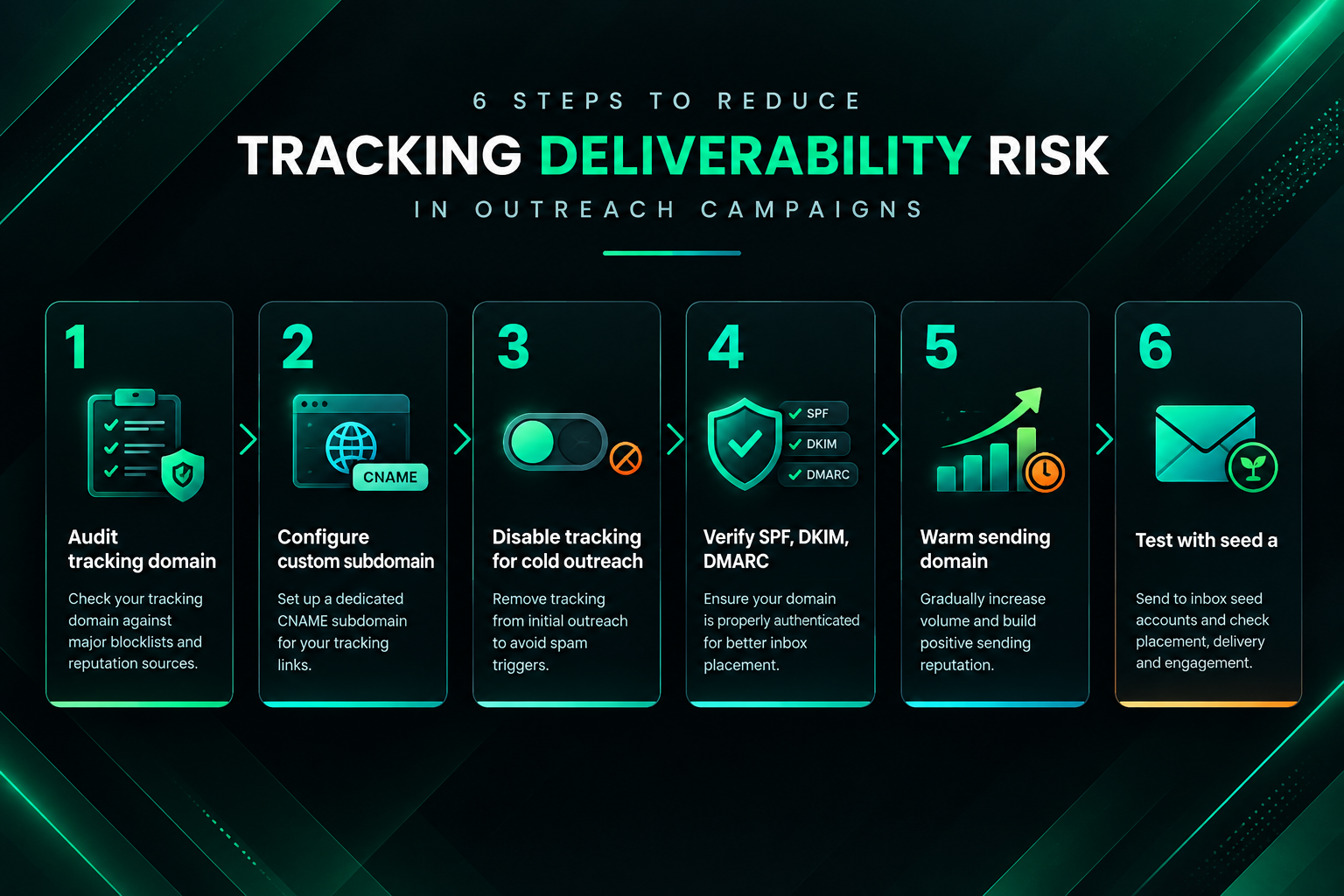
Practical Steps to Reduce Tracking-Related Deliverability Risk
The following steps address the most common tracking-related deliverability issues in outreach campaigns. They are not a guarantee of inbox placement, and results will vary depending on your sending domain, email content, target audience, and the email security infrastructure used by your recipients.
- Audit your tracking domain: Check whether your outreach platform uses a shared tracking domain. If it does, look up that domain in a blocklist checker such as MXToolbox to see whether it appears on any major lists. A listed tracking domain is a clear signal to switch to a dedicated or custom option.
- Configure a custom tracking subdomain: If your platform supports it, set up a CNAME record pointing a subdomain of your sending domain to the platform’s tracking infrastructure. This isolates your tracking reputation and makes redirect links appear to originate from your own domain.
- Disable click tracking for cold outreach sequences: If a custom tracking domain is not available and you are using a shared infrastructure, consider disabling click tracking for cold outreach. Reserve tracking for warmer sequences where the recipient has already replied or expressed interest.
- Verify authentication records before launching: Use a tool such as Google’s MX record checker or a dedicated email authentication validator to confirm that SPF, DKIM, and DMARC are correctly configured for your sending domain.
- Warm new sending domains gradually: Do not send high volumes from a new domain immediately. Start with small daily batches and increase volume over several weeks to build a positive sending reputation before scaling outreach.
- Test deliverability with seed accounts: Send test emails to accounts across different providers — Gmail, Outlook, and others relevant to your target audience — and check whether they land in the inbox, promotions tab, or spam folder. Tools such as GlockApps or Mail-Tester can automate this process.
- Keep email content natural and personalised: Spam filters evaluate content as well as technical signals. Emails that read as mass templates, contain excessive links, or use promotional language patterns are more likely to be filtered regardless of tracking configuration.
When Tracking Data Is Still Worth Collecting
Disabling tracking is not always the right answer. There are situations where the data click and open tracking provides is genuinely useful and where the deliverability trade-off is acceptable or manageable.
If you are running outreach to a warm list — for example, following up with contacts who have previously replied, or reaching out to publishers you have worked with before — the deliverability risk is lower because the recipient’s email client is more likely to have your sending domain in a trusted contacts list. In these cases, tracking data can help you understand engagement patterns and optimise follow-up timing.
At campaign scale, aggregate open and click data can help identify whether a particular email template is underperforming relative to others, even if individual data points are noisy. If one sequence consistently shows near-zero open rates across a large sample, that may indicate a deliverability problem worth investigating rather than a copy problem.
Tracking is also more defensible when you have configured a dedicated tracking domain, because the shared-reputation risk is removed. In that configuration, the remaining deliverability considerations are the pixel-blocking behaviour of email clients and the link structure visible to spam filters — both of which are generally less significant than the shared-domain risk.
Frequently Asked Questions
Does disabling click tracking guarantee better inbox placement?
No. Disabling click tracking removes one potential deliverability risk, but inbox placement depends on many factors including sender authentication, domain reputation, sending volume, email content, and the spam filter configuration of the recipient’s email provider. Tracking is a contributing factor, not the sole determinant.
Is open tracking more or less risky than click tracking for deliverability?
Open tracking pixels generally carry a smaller deliverability risk than click tracking redirect links, but they are less reliable as a measurement tool due to image pre-fetching by privacy-focused email clients. Click tracking introduces a more direct risk through shared tracking domain reputation. Both can be disabled independently in most outreach platforms.
What is a custom tracking domain and how does it help?
A custom tracking domain is a subdomain of your own sending domain — for example, track.yourdomain.com — configured via a CNAME record to point to your outreach platform’s tracking infrastructure. Because the tracking links appear to originate from your domain rather than a shared platform domain, your tracking reputation is isolated from other senders. This reduces the shared-reputation risk while preserving tracking functionality.
How do spam filters detect tracking links?
Spam filters check the reputation of every domain referenced in an email, including redirect domains used for click tracking. If a tracking domain appears on a blocklist or has a low trust score due to abuse by other senders, emails containing links to that domain may be penalised. Filters also evaluate link structure and redirect patterns, which can flag emails that contain unusual or unfamiliar redirect chains.
Should link building outreach campaigns disable tracking by default?
For cold outreach campaigns using shared tracking infrastructure, disabling click tracking is a reasonable default because the primary goal is a reply rather than a click, and the shared-domain risk is a real deliverability concern. Open tracking can be retained if it provides useful directional data, but its accuracy has declined due to privacy features in modern email clients. The right configuration depends on your platform, sending domain setup, and campaign goals.
Does email content affect deliverability more than tracking settings?
Generally, yes. Email content quality, personalisation, and the absence of promotional language patterns have a significant influence on spam filter decisions. Sender authentication and domain reputation are also more fundamental than tracking configuration. Tracking is a refinement worth managing, but it should not be the first deliverability issue you address if authentication records are incomplete or email copy reads as a mass template.
Can tracking affect deliverability differently across email providers?
Yes. Gmail, Outlook, and other major providers use different spam filter algorithms and update them regularly. A tracking domain that is not blocklisted today may be flagged in the future if abuse increases. Corporate email environments often use stricter security gateways that may treat redirect links or tracking pixels differently from consumer email clients. Testing deliverability across multiple providers before scaling a campaign is a practical way to identify provider-specific issues.
Making an Informed Decision About Tracking in Your Outreach Campaigns
Click tracking does affect outreach email deliverability, but the degree of impact depends on how your tracking infrastructure is configured. The shared-domain risk is the most significant and most controllable factor: if your outreach platform routes tracking through a domain shared with other senders, your inbox placement is partially dependent on their behaviour. Configuring a custom tracking domain or disabling click tracking for cold sequences removes that dependency.
For link building outreach specifically, the case for disabling or limiting tracking is stronger than for opted-in marketing campaigns. The goal is a reply from a webmaster or editor, not a click metric, and cold outreach already faces a more challenging deliverability environment than permission-based email. Prioritising inbox placement over tracking data is a reasonable trade-off in most cold outreach scenarios.
That said, tracking configuration is one layer of a broader deliverability stack. Sender authentication, domain warming, email content quality, and sending volume management all have a larger baseline influence on whether your emails reach the inbox. Addressing those fundamentals first, then refining tracking settings, is the more effective sequence.
If you are managing outreach campaigns at scale — whether in-house or through an outsourced link building partner — it is worth reviewing the tracking infrastructure your platform uses, testing deliverability across major email providers, and making tracking decisions based on your specific campaign goals rather than platform defaults. A qualified outreach specialist can help assess your current setup and identify where deliverability improvements are most likely to have a meaningful effect on campaign performance.