

If you run outreach email campaigns for link building or guest posting, your messages need to reach the inbox before any conversation can happen. Google Postmaster Tools is a free diagnostic platform that gives senders visibility into how Gmail treats their outgoing mail, including domain reputation, spam rates, and authentication status. Understanding how to use it can help you identify deliverability problems early, protect your sender reputation, and make informed adjustments to your outreach process before small issues become campaign-ending ones.
Key Takeaways
- Google Postmaster Tools provides sender-side data on domain reputation, spam rates, and email authentication for mail sent to Gmail addresses, which make up a significant share of most outreach contact lists.
- A high spam rate or poor domain reputation in Postmaster Tools is a signal that your outreach process, sending infrastructure, or list quality may need attention before continuing a campaign.
- Postmaster Tools does not show individual recipient actions or open rates; it provides aggregate signals that help you diagnose systemic deliverability problems rather than track individual outreach threads.
- Authentication protocols such as SPF, DKIM, and DMARC are prerequisites for healthy deliverability and are directly visible within the Postmaster Tools dashboard.
- Monitoring Postmaster Tools is one part of a broader outreach hygiene practice that also includes list quality, sending volume management, and message relevance.
What Is Google Postmaster Tools?
Google Postmaster Tools is a free web-based platform provided by Google that allows verified domain owners to monitor how Gmail handles email sent from their domain. It is designed for bulk and transactional senders, but it is equally relevant for anyone running consistent outreach email campaigns, including link builders, digital PR practitioners, and SEO agencies conducting manual outreach at scale. The platform surfaces aggregate data across several dimensions: domain reputation, IP reputation, spam rate, authentication results, encryption status, and delivery errors. Each metric is presented as a time-series graph, allowing senders to spot trends and correlate changes in deliverability with changes in their sending behaviour.
Postmaster Tools does not give access to individual recipient data, open rates, or click-through information. It operates at the domain level and only reflects mail sent to Gmail and Google Workspace accounts. This is an important limitation to understand: if your outreach list contains a high proportion of non-Gmail addresses, the data in Postmaster Tools will represent only a subset of your sending activity. Despite this, Gmail’s share of business and personal email addresses is large enough that the signals it provides are practically meaningful for most outreach campaigns.
Setting Up Google Postmaster Tools for Your Sending Domain
To access data in Google Postmaster Tools, you need to verify ownership of the domain you send outreach from. The setup process involves signing in with a Google account, adding your sending domain, and completing a DNS-based verification step. Google provides a TXT record that you add to your domain’s DNS settings through your registrar or hosting provider. Once the record propagates, typically within a few hours, Google confirms ownership and begins collecting data for that domain.
One practical consideration for outreach campaigns is domain selection. Many link builders and agencies use a dedicated sending domain rather than their primary business domain. This is a common practice intended to protect the main domain’s reputation if outreach volumes are high or if the campaign involves cold contact with publishers who have not previously engaged with the sender. If you use a dedicated outreach domain, that is the domain you should verify and monitor in Postmaster Tools. If you send from your primary domain, verify that one instead. The dashboard will only show data once a sufficient volume of mail has been sent to Gmail addresses; very low-volume senders may see limited or no data in some metrics.
Understanding the Key Metrics in the Dashboard
The Postmaster Tools dashboard organises data into several distinct report sections. Each one provides a different signal about your sending health, and interpreting them together gives a more complete picture than looking at any single metric in isolation.
Domain Reputation
Domain reputation is one of the most important signals in the dashboard. Google classifies sending domains into four reputation tiers: High, Medium, Low, and Bad. A High reputation means Gmail is delivering your mail reliably to the inbox. A Medium reputation suggests some mail may be filtered. Low and Bad reputations indicate that a significant proportion of your outreach is likely being routed to spam or blocked entirely. For outreach campaigns, maintaining at least a Medium reputation is a practical minimum; a Low or Bad rating will severely limit your ability to reach publishers and editors regardless of how well-crafted your outreach messages are.
Spam Rate
The spam rate metric shows the proportion of your messages that Gmail users have marked as spam. Google’s own guidance for bulk senders recommends keeping the spam rate below 0.10% and treating anything above 0.30% as a serious problem requiring immediate action. For outreach campaigns, spam complaints can accumulate quickly if you are sending to unverified lists, using overly promotional language, or contacting recipients who have no reasonable expectation of receiving your messages. A rising spam rate in Postmaster Tools is a clear signal to review your list quality, your message content, and your targeting criteria before sending further volume.
Authentication Results: SPF, DKIM, and DMARC
The authentication section of Postmaster Tools shows the pass rates for three email authentication protocols: SPF (Sender Policy Framework), DKIM (DomainKeys Identified Mail), and DMARC (Domain-based Message Authentication, Reporting, and Conformance). These protocols verify that your outgoing mail is genuinely sent from your domain and has not been tampered with in transit. Gmail and other major providers treat authentication as a baseline requirement for inbox delivery. If your SPF or DKIM pass rates are below 100%, there is likely a configuration problem with your sending infrastructure that needs to be resolved with your email service provider or IT team. DMARC alignment adds an additional layer of protection and is increasingly expected by receiving mail servers. Postmaster Tools makes it straightforward to confirm whether these records are working correctly without needing to analyse raw email headers manually.
IP Reputation
If you send outreach through a dedicated IP address rather than a shared sending pool, Postmaster Tools also shows the reputation of that IP. Shared IP reputation is managed by your email service provider, so if you use a platform such as a dedicated outreach tool or a transactional email service, the IP reputation data may reflect the behaviour of other senders on the same infrastructure. Senders with high outreach volumes sometimes move to dedicated IPs to isolate their reputation, though this requires a warm-up period during which sending volume is gradually increased to establish a positive sending history.
Delivery Errors
The delivery errors report shows the rate at which Gmail is rejecting or temporarily deferring your messages. Persistent delivery errors can indicate that your domain or IP has been rate-limited or blocked by Gmail’s filters. For outreach campaigns, a sudden spike in delivery errors often correlates with a rapid increase in sending volume, a deteriorating domain reputation, or a technical problem with your sending configuration. Monitoring this metric alongside domain reputation helps you distinguish between a temporary infrastructure issue and a more serious reputation problem.
How Postmaster Tools Fits Into an Outreach Email Workflow
Google Postmaster Tools is most useful when it is treated as a monitoring layer within a broader outreach workflow rather than a standalone fix. The data it provides is retrospective and aggregate, meaning it tells you what has already happened across a volume of sent mail rather than predicting what will happen with a specific message. Integrating it into your process means checking the dashboard regularly, particularly after changes to your sending volume, list sources, or message templates.
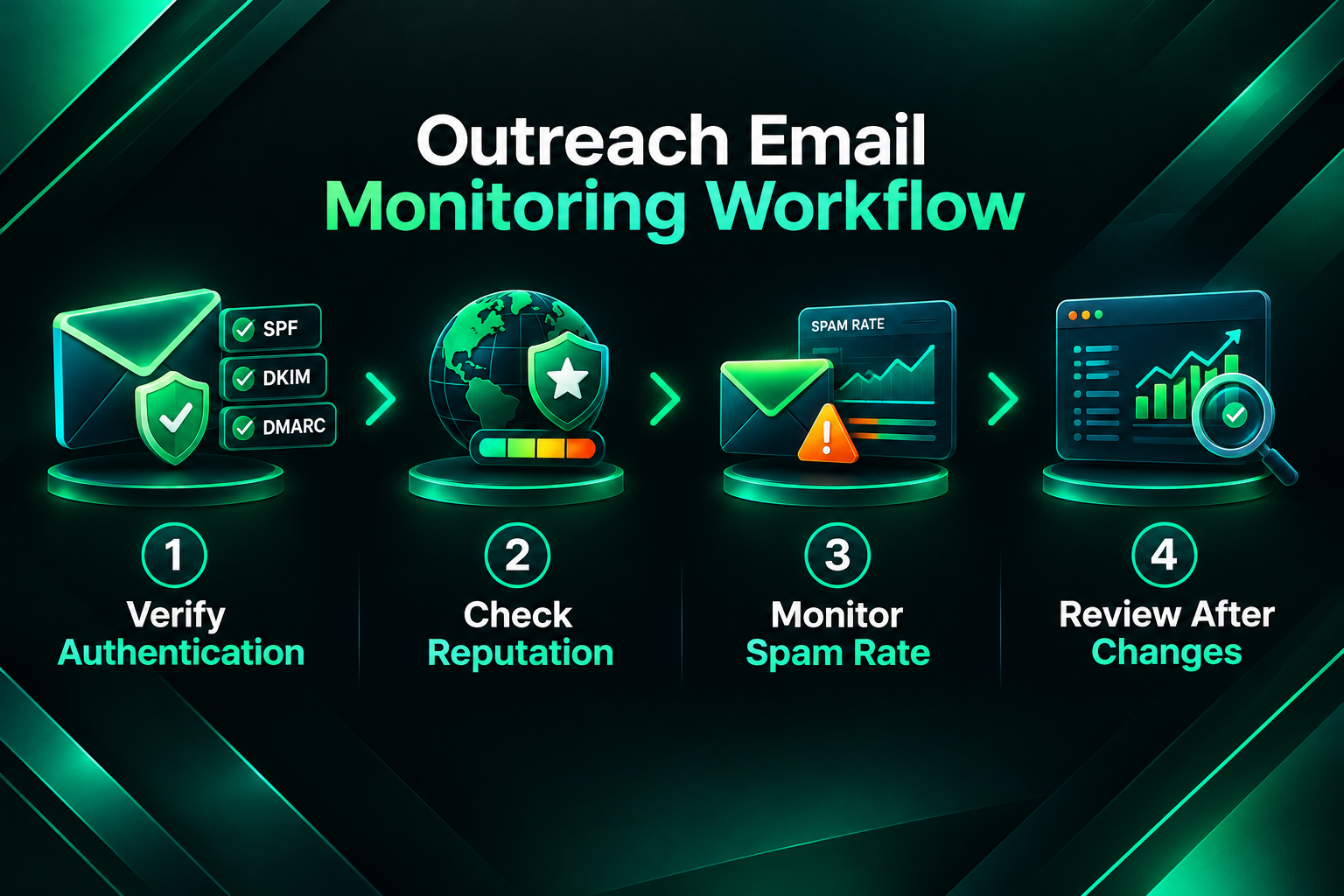
A practical outreach workflow that incorporates Postmaster Tools monitoring might look like this. Before launching a campaign, confirm that SPF, DKIM, and DMARC are correctly configured and showing 100% pass rates in the dashboard. Verify that your sending domain has at least a Medium reputation before scaling volume. During the campaign, monitor spam rate trends weekly and pause or reduce volume if the rate approaches 0.10%. After any significant change to your outreach approach, such as a new template, a new list source, or a higher daily sending volume, check the dashboard for any corresponding change in reputation or spam rate signals. This kind of regular monitoring allows you to catch problems early rather than discovering them after a campaign has already been significantly damaged.
Common Outreach Email Problems That Postmaster Tools Can Help Identify
Several deliverability problems that affect link building outreach campaigns are visible in Postmaster Tools before they become severe. Understanding what each signal suggests helps you take proportionate action rather than making unnecessary changes to a campaign that is performing well.
- Declining domain reputation with no change in spam rate: This can indicate that Gmail’s filters are responding to engagement signals such as low open rates or high delete-without-reading rates, rather than explicit spam complaints. It may suggest that your outreach messages are not relevant enough to the recipients you are targeting, or that your sending volume has increased faster than your domain’s reputation can support.
- Spam rate above 0.10%: This is a direct signal that recipients are marking your messages as unwanted. Common causes include purchased or scraped contact lists, overly promotional message content, sending to addresses that have previously unsubscribed or bounced, or a mismatch between the recipient’s expectations and the nature of your outreach.
- Authentication failures: If SPF or DKIM pass rates drop below 100%, this usually indicates a configuration change in your sending infrastructure, such as a new sending IP or domain that has not been added to your SPF record, or a DKIM key rotation that was not completed correctly. Authentication failures can cause otherwise well-crafted outreach messages to be filtered regardless of their content.
- Sudden spike in delivery errors: A rapid increase in delivery errors often follows a significant jump in daily sending volume. Gmail applies rate limits to senders, and exceeding them can cause temporary deferrals. Reducing daily volume and gradually increasing it over time is the standard approach to resolving this.
Limitations of Google Postmaster Tools for Outreach Monitoring
Google Postmaster Tools provides genuinely useful signals, but it has meaningful limitations that are worth understanding before relying on it as your only deliverability monitoring tool. The platform only reflects mail sent to Gmail and Google Workspace addresses. If your outreach list is heavily weighted toward corporate domains running Microsoft 365 or other mail providers, Postmaster Tools will not capture the deliverability experience for those recipients. Separate tools or inbox placement testing services may be needed to assess deliverability across a broader range of mail providers.
The data in Postmaster Tools is also aggregated and delayed. It does not show real-time delivery status for individual messages, and the spam rate figures are based on a sample of Gmail users rather than every recipient. This means small campaigns with low sending volumes may not generate enough data to populate all metrics, and the signals that do appear may not be statistically representative of your full outreach activity. For very low-volume outreach, such as highly targeted manual campaigns with fewer than a few hundred messages per week, Postmaster Tools may show limited or no data in some report sections.
Additionally, Postmaster Tools does not diagnose the content quality, relevance, or persuasiveness of your outreach messages. A domain with a High reputation and a low spam rate can still produce a campaign with poor response rates if the messages are not relevant to the recipients, the value proposition is unclear, or the targeting is misaligned with the publisher’s content focus. Deliverability and outreach effectiveness are related but distinct problems; Postmaster Tools addresses the former, not the latter.
Outreach Email Best Practices That Support Healthy Postmaster Metrics
Maintaining healthy signals in Google Postmaster Tools is largely a function of following established outreach email best practices. These practices are not specific to Postmaster Tools; they reflect the broader requirements of responsible bulk email sending and are consistent with Google’s published guidance for senders.
List quality is one of the most significant factors. Outreach lists built from verified, relevant contacts who have a reasonable expectation of receiving your messages will generate lower spam complaint rates than lists assembled from scraped or purchased sources. For link building outreach specifically, this means targeting publishers and editors whose sites are genuinely relevant to the content you are proposing, rather than sending high volumes to broad, unqualified lists. Verifying email addresses before sending, using tools that check for invalid or inactive addresses, reduces bounce rates and helps maintain domain reputation over time.
Sending volume management is also important. Rapidly scaling from a low daily volume to a high one without a gradual warm-up period is a common cause of reputation problems for newer sending domains. Increasing volume incrementally over several weeks allows Gmail’s systems to build a positive sending history for your domain before you reach higher volumes. This is particularly relevant for agencies or link builders launching campaigns from a new dedicated outreach domain.
Message content and relevance affect engagement signals that Gmail’s filters observe, even if those signals are not directly visible in Postmaster Tools. Personalised, relevant outreach messages that clearly explain the purpose of the contact and provide genuine value to the recipient are less likely to be marked as spam than generic, templated messages sent at high volume. This is not only a deliverability consideration; it is also a practical requirement for achieving meaningful response rates in link building outreach.
Google Postmaster Tools and Outreach at Scale
For agencies and in-house SEO teams running outreach campaigns at scale, the monitoring discipline that Postmaster Tools enables becomes more important as volume increases. At low volumes, individual deliverability problems may not be visible in aggregate data. At higher volumes, even a small percentage of spam complaints or authentication failures can have a measurable effect on domain reputation and, consequently, on the proportion of outreach messages that reach the inbox.
Agencies managing outreach on behalf of multiple clients sometimes use separate sending domains for each client campaign to isolate reputation risk. In this model, each domain would ideally be verified and monitored in Postmaster Tools independently. This adds operational overhead but provides cleaner data and prevents a problem with one client’s campaign from affecting another’s. Whether this level of separation is practical depends on the agency’s infrastructure, the volume of campaigns being managed simultaneously, and the risk tolerance of the clients involved.
White-label link building providers and outreach specialists who manage campaigns on behalf of other agencies face similar considerations. The sending domain’s reputation is a shared asset across all campaigns run from that domain, and monitoring it consistently is a basic operational requirement for maintaining campaign quality over time.
Frequently Asked Questions
Does Google Postmaster Tools work for all email providers, or only Gmail?
Google Postmaster Tools only reflects data for mail sent to Gmail and Google Workspace accounts. It does not provide deliverability data for Microsoft 365, Yahoo Mail, or other mail providers. If your outreach contacts use a range of providers, you may need additional inbox placement testing tools to assess deliverability across the full list.
How long does it take for data to appear in Google Postmaster Tools after setup?
Data typically begins appearing within 24 to 48 hours of completing domain verification, provided you are sending a sufficient volume of mail to Gmail addresses. Very low-volume senders may see limited data or find that some metrics are not populated. Google requires a minimum threshold of daily messages to generate statistically meaningful signals.
What spam rate should I aim for in outreach campaigns?
Google’s published guidance recommends keeping the spam rate below 0.10% and treating rates above 0.30% as requiring immediate corrective action. For outreach campaigns, staying well below 0.10% is a reasonable operational target. If your rate is consistently above this threshold, reviewing list quality, message content, and targeting criteria is the appropriate first step.
Can I use Google Postmaster Tools to monitor a dedicated outreach domain?
Yes. You can verify any domain you own in Postmaster Tools, including a dedicated sending domain used exclusively for outreach. Verifying and monitoring a dedicated outreach domain separately from your primary business domain is a common practice among agencies and link builders who want to isolate reputation risk.
Will fixing my Postmaster Tools metrics improve my outreach response rates?
Improving deliverability metrics means more of your messages are likely to reach the inbox, which is a prerequisite for receiving replies. However, inbox placement does not guarantee responses. Response rates also depend on the relevance of your targeting, the quality of your message content, the value of your proposal to the recipient, and the competitiveness of your niche. Postmaster Tools addresses deliverability, not persuasiveness or targeting quality.
What should I do if my domain reputation drops to Low or Bad?
A Low or Bad domain reputation in Postmaster Tools indicates that Gmail is filtering a significant proportion of your outreach. The recommended response is to pause or significantly reduce sending volume, audit your list for invalid or unengaged addresses, review your message content for spam-triggering characteristics, confirm that authentication records are correctly configured, and gradually rebuild sending volume once the reputation begins to recover. Recovery timelines vary and are not guaranteed; in some cases, switching to a new sending domain with a proper warm-up process may be more practical than attempting to rehabilitate a severely damaged one.
Using Postmaster Tools as Part of a Responsible Outreach Practice
Google Postmaster Tools is a practical, free resource for anyone running outreach email campaigns who wants visibility into how Gmail is treating their messages. For link building campaigns, where inbox placement directly affects the ability to initiate conversations with publishers and editors, monitoring domain reputation, spam rates, and authentication status on a regular basis is a straightforward way to catch problems before they undermine a campaign’s effectiveness.
The tool works best when it is integrated into a broader outreach hygiene practice that includes careful list building, gradual volume scaling, correct authentication configuration, and message content that is genuinely relevant to the recipients being contacted. None of these elements alone guarantees strong deliverability, and Postmaster Tools data alone does not guarantee strong outreach results. But used consistently, the signals it provides can help you make more informed decisions about when to scale, when to pause, and when to investigate a technical or process problem before it becomes a serious obstacle.
If you are managing outreach campaigns at scale, working with a provider who understands sending infrastructure and deliverability requirements alongside link acquisition strategy may help ensure that the operational side of your campaigns supports rather than undermines the editorial work involved in earning quality placements. A well-monitored sending domain is a foundational requirement for any outreach-based link building programme, and Postmaster Tools is one of the clearest windows into that foundation that Google makes available to senders.