
If your outreach emails are landing in spam folders or being rejected outright, missing email authentication records are often a contributing factor. DMARC — Domain-based Message Authentication, Reporting, and Conformance — is a DNS-level policy that tells receiving mail servers how to handle messages that fail authentication checks. Setting it up correctly, alongside SPF and DKIM, can meaningfully improve deliverability for link building outreach, guest post pitches, and any other campaign that depends on editors and webmasters actually reading your emails.
Key Takeaways
- DMARC works alongside SPF and DKIM; all three records need to be configured correctly before a DMARC policy can function as intended.
- Starting with a p=none monitoring policy lets you collect data without risking legitimate email being rejected or quarantined.
- DMARC alone does not guarantee inbox placement, but missing or misconfigured authentication records are a known deliverability risk for outreach campaigns.
- Major inbox providers including Google and Yahoo have made sender authentication requirements stricter for bulk senders, making proper setup increasingly important.
- DMARC aggregate reports help you identify authentication failures before tightening your policy to quarantine or reject.
What DMARC Is and Why It Matters for Outreach
DMARC is a DNS TXT record that instructs receiving mail servers to check whether an incoming message passes SPF (Sender Policy Framework) or DKIM (DomainKeys Identified Mail) authentication, and whether the authenticated domain aligns with the domain in the visible From address. If a message fails both checks, the DMARC policy tells the receiving server what to do: monitor and deliver it anyway (p=none), send it to the spam folder (p=quarantine), or reject it entirely (p=reject).
For link building outreach, this matters for two practical reasons. First, inbox providers use authentication signals as one input when deciding whether to deliver a message to the inbox, the spam folder, or not at all. A domain with no DMARC record, or one with SPF and DKIM misconfigured, may be treated with more suspicion by receiving servers. Second, DMARC protects your sending domain from being spoofed by third parties, which helps preserve the domain’s sending reputation over time. A spoofed domain that generates spam complaints can damage deliverability for your legitimate outreach campaigns.
Google and Yahoo announced updated sender requirements in 2024 that include mandatory SPF or DKIM authentication and a published DMARC record for bulk senders — broadly defined as those sending 5,000 or more messages per day to Gmail addresses. Even for smaller-volume outreach campaigns, following these standards is considered good practice because inbox providers apply similar signals at lower volumes.
Understanding SPF, DKIM, and DMARC Together
DMARC cannot function correctly without SPF or DKIM being in place first. Understanding how the three records relate to each other prevents the most common setup mistakes.
SPF (Sender Policy Framework)
An SPF record is a DNS TXT record published on your domain that lists the mail servers and IP addresses authorised to send email on your domain’s behalf. When a receiving server gets a message claiming to be from your domain, it checks whether the sending server’s IP address is listed in your SPF record. If it is not, the message fails SPF. For outreach campaigns that use third-party sending tools — such as Lemlist, Instantly, Mailshake, or a dedicated SMTP provider — those services’ sending IPs or hostnames must be included in your SPF record.
DKIM (DomainKeys Identified Mail)
DKIM adds a cryptographic signature to outgoing messages. The sending server signs each email using a private key, and the corresponding public key is published as a DNS TXT record on your domain. Receiving servers retrieve the public key and use it to verify that the message content has not been altered in transit and that it genuinely originated from an authorised sender. Most outreach platforms and email providers generate DKIM keys for you and provide the DNS record values to publish. The key step is ensuring the DKIM selector and public key are correctly added to your domain’s DNS.
DMARC Alignment
DMARC introduces the concept of alignment. For a message to pass DMARC, it must pass either SPF or DKIM, and the authenticated domain must align with the domain in the visible From header. Alignment can be relaxed (subdomains are accepted) or strict (an exact domain match is required). Most outreach setups use relaxed alignment, which is the default. A common misconfiguration is having SPF pass on a subdomain used by a sending tool while the From address shows the root domain — if strict alignment is set, this will fail DMARC even though SPF technically passed.
How to Set Up DMARC for Outreach Email: Step by Step
The following process applies to most outreach setups. The exact steps for accessing DNS records vary depending on your domain registrar or DNS provider, but the record values follow a standard format regardless of where your domain is hosted.
Step 1: Verify or Create Your SPF Record
Log in to your DNS provider and check whether a TXT record starting with v=spf1 already exists for your root domain. If one exists, you need to edit it rather than create a second one — having two SPF records on the same domain causes SPF to fail. Add the sending sources used by your outreach platform. For example, if you send through Google Workspace, the include mechanism is include:_spf.google.com. If you also use a dedicated outreach tool with its own sending infrastructure, add its include mechanism as specified in that tool’s documentation. End the record with ~all (softfail) or -all (hardfail). A typical SPF record for an outreach setup might look like: v=spf1 include:_spf.google.com include:sendgrid.net ~all. Avoid adding too many include mechanisms, as SPF has a limit of ten DNS lookups; exceeding this limit causes SPF to fail.
Step 2: Configure DKIM for Your Sending Domain
In your email sending platform or email provider’s settings, locate the DKIM configuration section. The platform will generate a public key and provide you with a DNS TXT record to publish. The record is typically published as a subdomain of your domain in the format selector._domainkey.yourdomain.com, where selector is a label chosen by the platform. Copy the record name and value exactly as provided and add it to your DNS. After publishing, use the platform’s built-in verification tool or a third-party DNS lookup tool to confirm the record is resolving correctly. DKIM records can take up to 48 hours to propagate, though propagation is usually faster.
Step 3: Publish Your DMARC Record
Once SPF and DKIM are in place and verified, create a DNS TXT record for the hostname _dmarc.yourdomain.com. A minimal starting DMARC record looks like this:
v=DMARC1; p=none; rua=mailto:[email protected]
The v=DMARC1 tag identifies the record as a DMARC policy. The p=none tag sets the policy to monitoring mode, meaning failing messages are delivered normally but reports are generated. The rua tag specifies an email address where aggregate reports should be sent. Use a real mailbox you can access, or a dedicated DMARC reporting service, because these reports contain useful data about which sources are sending email on your domain’s behalf and whether they are passing authentication.
Step 4: Monitor Aggregate Reports Before Tightening Policy
DMARC aggregate reports (also called RUA reports) are sent by participating mail providers as XML files, usually once per day. They show which IP addresses sent email claiming to be from your domain, whether those messages passed SPF and DKIM, and whether they passed DMARC alignment. Running on p=none for at least two to four weeks before moving to a stricter policy gives you time to identify any legitimate sending sources that are not yet authenticated. Common sources that are missed include marketing automation tools, CRM platforms, helpdesk software, and third-party outreach tools added by team members.
Step 5: Move to a Stricter Policy When Ready
Once your aggregate reports show that the overwhelming majority of legitimate email is passing DMARC, you can consider moving to p=quarantine or p=reject. The p=quarantine policy instructs receiving servers to send failing messages to the spam or junk folder rather than the inbox. The p=reject policy instructs receiving servers to refuse delivery of failing messages entirely. For outreach domains, moving to p=reject provides the strongest protection against domain spoofing and signals a well-maintained sending domain to inbox providers. However, moving too quickly without reviewing reports first risks legitimate outreach emails being rejected if any sending source is not yet properly authenticated.
An optional pct tag allows you to apply the policy to a percentage of failing messages rather than all of them, which can be useful during a gradual rollout. For example, pct=25 applies the quarantine or reject action to 25% of failing messages, letting you test the impact before full enforcement.
Common DMARC Setup Mistakes for Outreach Campaigns
Several configuration errors appear frequently in outreach setups and are worth checking before assuming your authentication is working correctly.
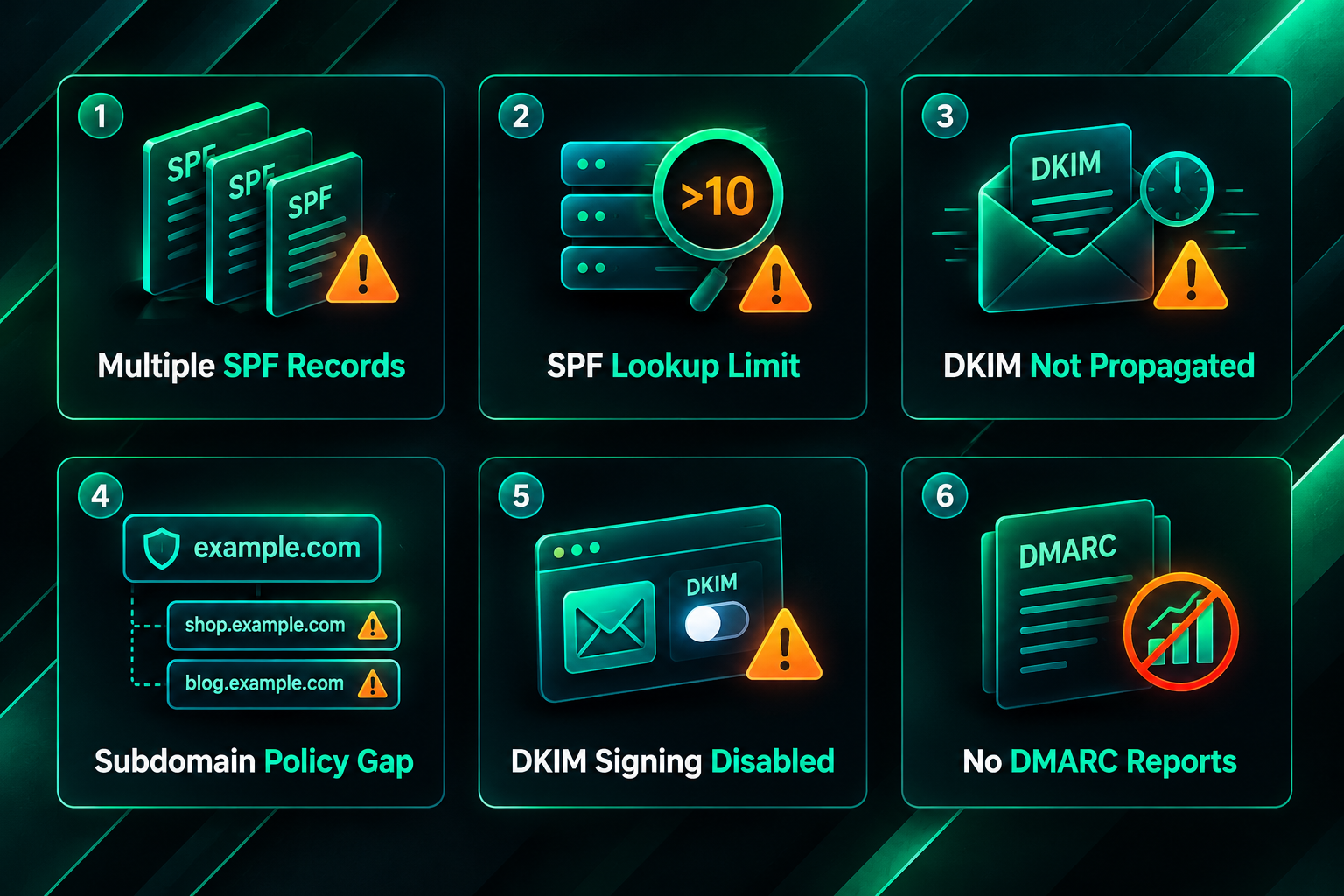
- Multiple SPF records: Publishing two or more TXT records starting with v=spf1 on the same domain causes SPF to fail. Combine all authorised senders into a single SPF record.
- Exceeding the SPF lookup limit: SPF allows a maximum of ten DNS lookups during evaluation. Each include, a, and mx mechanism that requires a DNS lookup counts toward this limit. Exceeding it causes a permanent SPF error. Use SPF flattening tools if you have many sending sources.
- DKIM record not propagated: Publishing a DKIM record and immediately testing it may show a failure simply because DNS propagation is not yet complete. Wait and retest before assuming the record is wrong.
- Sending from a subdomain without a subdomain DMARC record: If your outreach emails are sent from a subdomain such as outreach.yourdomain.com, the root domain’s DMARC policy applies by default, but you can also publish a separate DMARC record for the subdomain. If the subdomain’s sending sources are different from the root domain’s, a separate record may be appropriate.
- Using a third-party outreach tool without enabling DKIM signing: Many outreach platforms support custom DKIM signing but require you to publish the DKIM record in your DNS and enable the feature in the platform’s settings. If DKIM signing is not enabled in the platform, messages may be signed with the platform’s own domain rather than yours, causing DMARC alignment to fail.
- Ignoring DMARC reports: Publishing a DMARC record with p=none and no rua address means you receive no reports and gain no visibility into authentication failures. Always include a reporting address.
DMARC and Outreach Deliverability: What It Can and Cannot Do
Correct DMARC configuration removes a known authentication barrier that can contribute to spam folder placement or message rejection. However, DMARC is one factor among many that influence whether an outreach email reaches the inbox. Inbox providers evaluate sender reputation, sending volume and consistency, engagement signals, message content, and the quality of the recipient list alongside authentication records. A domain with a perfect DMARC setup but a poor sending reputation, high bounce rates, or spam-triggering content will still face deliverability problems.
For link building outreach specifically, deliverability also depends on the quality and relevance of the contact list, the personalisation of the message, and the sending behaviour of the outreach tool being used. Sending large volumes of identical messages from a newly warmed domain, even with correct authentication, is likely to trigger spam filters. Authentication records establish that you are who you claim to be; they do not override content or reputation signals.
It is also worth noting that DMARC does not encrypt email content, prevent phishing attacks that use lookalike domains, or guarantee that a message will be read. Its primary function is to give domain owners control over how unauthenticated messages claiming to be from their domain are handled, and to provide visibility through reporting.
Outreach Email Infrastructure: Beyond DMARC
A complete outreach email setup involves several components working together. DMARC, SPF, and DKIM handle authentication. Additional considerations that affect deliverability and campaign performance include the following.
Domain and Mailbox Warm-Up
New domains and new mailboxes need a warm-up period before being used for outreach at scale. Sending a gradually increasing volume of emails over several weeks, starting with low volumes to engaged contacts, helps establish a positive sending reputation with inbox providers. Skipping warm-up and immediately sending hundreds of outreach emails from a new domain is a common cause of deliverability problems that authentication records alone cannot resolve.
Dedicated Sending Domains
Many outreach practitioners use a dedicated subdomain or a separate domain for outreach campaigns rather than the primary business domain. This approach isolates the sending reputation of outreach campaigns from the main domain’s email reputation. If the outreach domain develops a poor reputation due to high bounce rates or spam complaints, the primary domain’s email deliverability is not directly affected. If you use a dedicated outreach domain, DMARC, SPF, and DKIM need to be configured for that domain specifically.
Bounce Rate and List Quality
High hard bounce rates — caused by sending to invalid or non-existent email addresses — damage sender reputation with inbox providers. Verifying contact email addresses before adding them to an outreach sequence reduces bounce rates and helps maintain deliverability. Several email verification tools are available that check whether an address is likely to be valid before you send to it.
Unsubscribe and Complaint Management
Google’s 2024 sender requirements include a one-click unsubscribe requirement for bulk senders and a spam complaint rate threshold below 0.10% as a guideline, with 0.30% cited as a level that will impact deliverability. Monitoring spam complaint rates through Google Postmaster Tools and honouring unsubscribe requests promptly are part of maintaining a healthy sending domain for ongoing outreach campaigns.
Using DMARC Reports to Improve Your Outreach Setup
DMARC aggregate reports are a practical diagnostic tool that many outreach practitioners overlook. Each report shows the sending IP addresses that used your domain in the From header during the reporting period, the volume of messages from each source, and whether those messages passed SPF, DKIM, and DMARC. Reviewing these reports regularly — particularly in the first few weeks after publishing a DMARC record — helps you identify sending sources that are not yet authenticated and catch any unauthorised use of your domain.
Because aggregate reports arrive as XML files, they can be difficult to read directly. Several free and paid DMARC reporting services parse these reports into readable dashboards. Examples include DMARC Analyzer, Postmark’s DMARC reporting tool, and dmarcian, among others. Using one of these services makes it practical to monitor your authentication status without needing to parse XML manually. Once you are confident that all legitimate sending sources are passing DMARC, you have the information needed to move from p=none to a stricter enforcement policy.
Frequently Asked Questions
Do I need DMARC if I only send a small number of outreach emails?
Even at low volumes, missing authentication records can contribute to spam folder placement. Google and Yahoo’s 2024 requirements apply specifically to senders of 5,000 or more daily messages to Gmail, but inbox providers apply authentication signals more broadly. Publishing a DMARC record with p=none costs nothing and provides useful visibility into how your domain is being used, making it worthwhile regardless of sending volume.
Will setting up DMARC fix my outreach emails going to spam?
DMARC addresses one specific deliverability factor: authentication. If your emails are going to spam due to content issues, poor sender reputation, high bounce rates, or a newly created domain without warm-up, DMARC alone will not resolve those problems. A complete deliverability review should consider authentication, sending infrastructure, list quality, message content, and sending behaviour together.
Can I set up DMARC if I use a third-party outreach tool?
Yes. Most outreach platforms support custom DKIM signing and provide the DNS records you need to publish. You will need to add the platform’s sending IPs or include mechanisms to your SPF record and publish the DKIM record the platform provides. Check the platform’s documentation for the specific records required, as these vary between providers.
What is the difference between p=quarantine and p=reject?
A p=quarantine policy instructs receiving mail servers to deliver failing messages to the spam or junk folder rather than the inbox. A p=reject policy instructs receiving servers to refuse delivery entirely, meaning the sender receives a bounce notification. For outreach domains where you have verified all legitimate sending sources are authenticated, p=reject provides the strongest protection against spoofing.
How long does it take for DMARC to take effect?
DNS records typically propagate within a few hours, though full propagation can take up to 48 hours. Once the record is live, inbox providers that support DMARC will begin applying your policy to incoming messages and sending aggregate reports to the address specified in your rua tag. The first reports usually arrive within 24 hours of the record going live.
Should I use a separate domain for outreach campaigns?
Using a dedicated outreach domain or subdomain is a common practice that isolates outreach sending reputation from the primary business domain. If you do this, DMARC, SPF, and DKIM must be configured for the outreach domain specifically. The primary domain’s authentication records do not automatically apply to a separate outreach domain.
What happens if I skip the monitoring phase and go straight to p=reject?
Moving directly to p=reject without first reviewing aggregate reports risks legitimate emails being rejected if any sending source — such as a CRM, marketing tool, or outreach platform — is not yet properly authenticated. The monitoring phase exists to identify these gaps before enforcement. Skipping it is a common cause of disrupted email delivery for businesses that implement DMARC quickly without reviewing their full sending infrastructure.
Is Your Outreach Domain Ready for Stricter Authentication Standards?
Setting up DMARC for outreach email is a practical, low-cost step that addresses a genuine deliverability risk. The process — verifying SPF, configuring DKIM, publishing a DMARC record, monitoring reports, and gradually tightening policy — is methodical rather than technically complex, but it does require attention to detail at each stage. Skipping steps or moving too quickly to a strict enforcement policy without reviewing reports are the most common causes of problems.
For link building outreach, where campaign success depends on editors and webmasters receiving and reading your pitches, authentication is part of the foundation. It does not replace the need for relevant, personalised outreach to quality contacts, but it removes a barrier that can prevent even well-crafted messages from reaching the inbox. If your outreach campaigns are managed by an external team or agency, confirming that they are sending from a properly authenticated domain — with DMARC, SPF, and DKIM all correctly configured — is a reasonable question to ask as part of any campaign setup discussion.