

Combining backlink data with keyword rankings in Google Sheets gives SEO teams a practical way to see which pages are earning links, how those pages rank, and where gaps in link coverage may be holding performance back. This guide walks through the data sources, joining methods, and analysis techniques that make this workflow useful for ongoing link building decisions.
Key Takeaways
- Backlink data and ranking data live in separate tools; joining them in Google Sheets requires a shared key, usually the page URL.
- VLOOKUP and INDEX MATCH are the most practical formulas for merging the two datasets; each has trade-offs depending on your data structure.
- A joined dataset lets you identify high-ranking pages with weak link profiles and low-ranking pages that may benefit from targeted link acquisition.
- Data freshness matters: backlink crawl dates and ranking snapshots should be aligned as closely as possible to avoid misleading conclusions.
- The analysis can inform link building priorities, but ranking changes depend on many factors beyond backlinks alone.
Why Joining Backlink and Ranking Data Is Useful
Backlink reports from tools such as Ahrefs, Semrush, or Google Search Console show which pages have earned referring domains and how many links point to each URL. Ranking reports show which keywords a page appears for and at what position. Viewed separately, these datasets answer different questions. Viewed together in a single spreadsheet, they allow you to ask more useful ones: does the page ranking in position eight have fewer referring domains than the pages above it? Are your highest-traffic pages also the most linked? Which pages rank well despite having almost no backlinks, and could those pages rank even higher with additional link support?
For link building campaigns, this kind of joined view helps prioritise which pages to target for outreach. Rather than building links to pages at random, you can focus acquisition efforts on URLs where the ranking data suggests opportunity and the backlink data confirms a gap. This is a more evidence-based approach than relying on gut feel or tool scores alone, and it keeps campaign decisions grounded in your own site’s actual data rather than generic benchmarks.
Preparing Your Data Sources
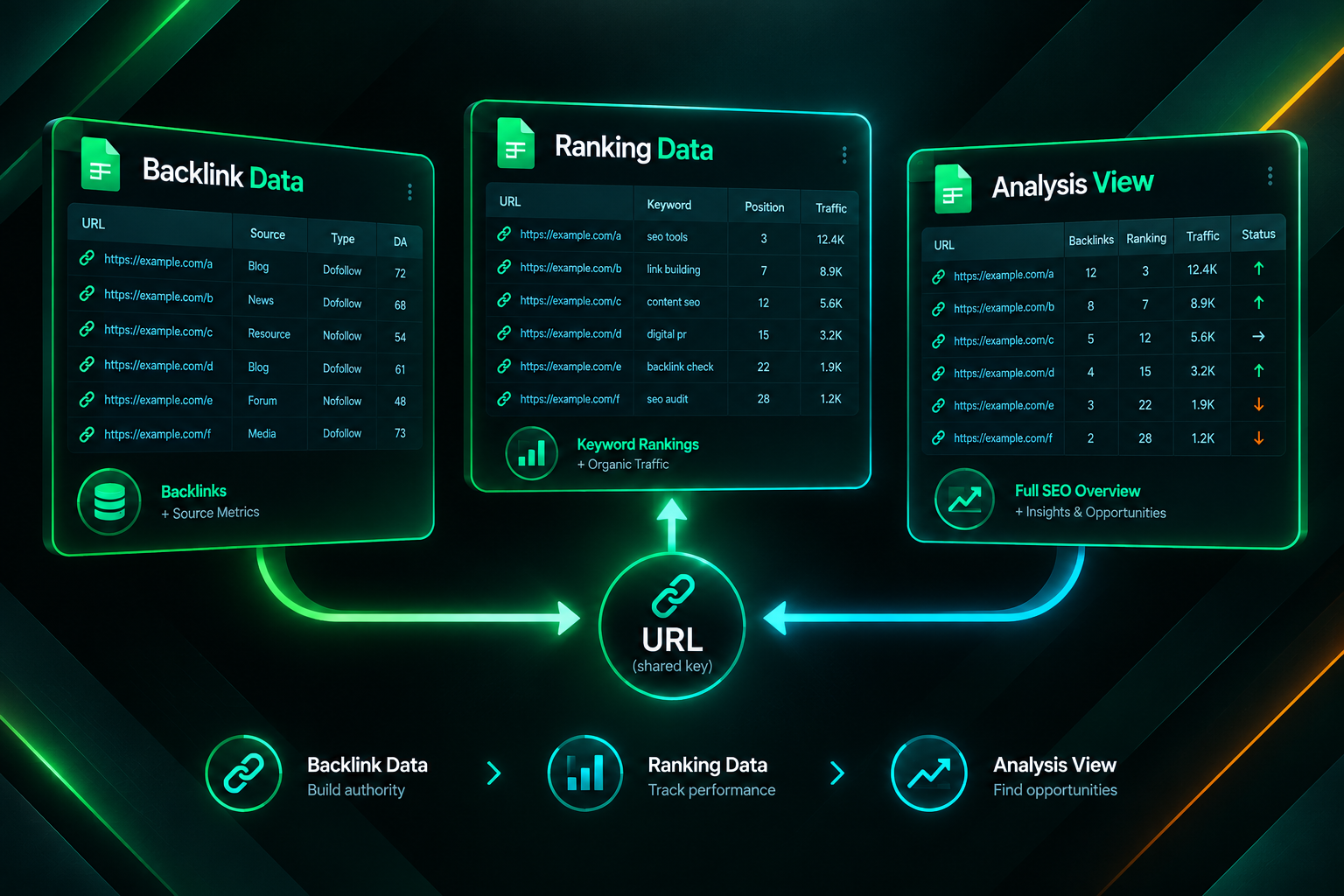
Before any joining formula can work, both datasets need to be exported and structured consistently. The shared key between a backlink report and a ranking report is almost always the page URL, so URL formatting must match exactly across both sheets.
Exporting Backlink Data
Most SEO tools allow you to export a referring domains or backlinks report as a CSV file. From Ahrefs, the Best by Links report under Site Explorer gives you a list of pages sorted by referring domain count. From Semrush, the Backlink Analytics section provides a similar export. Google Search Console does not export referring domain counts directly, but its Links report can be downloaded and used as a supplementary source. When exporting, include at minimum: the target URL, the number of referring domains, and the number of total backlinks. Additional columns such as domain rating, anchor text distribution, or dofollow versus nofollow counts can be added later once the join is working.
Exporting Ranking Data
Ranking data can come from Google Search Console’s Performance report, which shows queries, pages, clicks, impressions, and average position. Export the Pages view filtered to your target date range. Alternatively, tools such as Ahrefs, Semrush, or dedicated rank trackers can export keyword-level ranking data with columns for keyword, URL, position, search volume, and estimated traffic. If you are using keyword-level data, you will need to decide whether to join at the keyword level or aggregate to the page level first. Aggregating to the page level — taking the best ranking position or average position per URL — usually makes the join simpler and the analysis more actionable for link building purposes.
Cleaning URLs Before Joining
URL inconsistencies are the most common reason a join formula returns errors or blank results. Common mismatches include trailing slashes present in one dataset but not the other, HTTP versus HTTPS prefixes, www versus non-www variants, and URL parameters appended to some rows. Before writing any formula, standardise both columns. A simple approach is to use a helper column with a formula that strips trailing slashes and forces lowercase. In Google Sheets, =LOWER(TRIM(A2)) handles whitespace and case. For trailing slashes, =REGEXREPLACE(LOWER(TRIM(A2)),”/$”,””) removes a trailing slash if present. Apply the same cleaning formula to both the backlink URL column and the ranking URL column, then use the cleaned columns as your join keys.
Setting Up the Joined Sheet
The cleanest approach is to create a third sheet that serves as your analysis view, pulling data from the backlink sheet and the ranking sheet without modifying either source. This keeps your raw exports intact and makes it easy to refresh the data later by pasting new exports into the source sheets.
Using VLOOKUP to Join the Datasets
VLOOKUP is the most familiar joining formula in Google Sheets and works well when your lookup column is the leftmost column in the range you are searching. If your ranking sheet has the cleaned URL in column A and you want to bring in the referring domain count from the backlink sheet, the formula in your analysis sheet would look like this:
=VLOOKUP(A2, BacklinkSheet!$A:$C, 2, FALSE)
Here, A2 is the URL from your ranking data, BacklinkSheet!$A:$C is the range containing the URL and backlink columns, 2 is the column index of the value you want to return (referring domains), and FALSE forces an exact match. Wrap the formula in IFERROR to handle pages that appear in your ranking data but have no entry in the backlink export: =IFERROR(VLOOKUP(A2, BacklinkSheet!$A:$C, 2, FALSE), 0). Returning zero rather than an error makes it easier to sort and filter the joined dataset later.
Using INDEX MATCH as an Alternative
INDEX MATCH is more flexible than VLOOKUP because the lookup column does not need to be the leftmost column in the range, and it handles large datasets more efficiently. The equivalent formula for the same join would be:
=IFERROR(INDEX(BacklinkSheet!$B:$B, MATCH(A2, BacklinkSheet!$A:$A, 0)), 0)
MATCH finds the row where the URL in BacklinkSheet column A matches the URL in your analysis sheet cell A2. INDEX then returns the value from column B of that row. This approach is particularly useful when your backlink export has the URL in a middle column rather than the first column, or when you need to pull multiple columns from the same lookup without rewriting the range reference each time.
Pulling Multiple Columns at Once
If you want to bring in several backlink metrics — referring domains, total backlinks, and domain rating, for example — you can either write separate VLOOKUP or INDEX MATCH formulas for each column, or use a single QUERY formula to pull the entire matching row. For most practical purposes, writing individual INDEX MATCH formulas for each metric is easier to audit and maintain. Label each column clearly in your header row so the analysis sheet is readable without needing to trace formulas back to their source sheets.
Structuring the Analysis View
Once the join is working, your analysis sheet should have one row per page URL and columns covering at minimum: the page URL, average ranking position (or best position for a target keyword), organic clicks or impressions from Search Console, number of referring domains, and total backlinks. From this structure, several useful analyses become straightforward.
Identifying Pages with Strong Rankings but Few Links
Sort the joined sheet by ranking position ascending (best rankings first) and then scan the referring domain column. Pages ranking in positions one through five with very few referring domains may be ranking on the strength of content relevance, internal linking, or low competition rather than a strong external link profile. These pages may represent an opportunity: additional high-quality links could help consolidate or improve their position, particularly if competing pages have stronger backlink profiles. However, it is worth checking whether the keyword has low competition before investing heavily in link acquisition for pages already performing well.
Identifying Pages with Many Links but Weak Rankings
The reverse pattern — pages with a relatively strong referring domain count but poor rankings — is often more informative. If a page has accumulated referring domains over time but still ranks outside the top twenty for its target keyword, the issue may not be link quantity. Possible explanations include content that does not match search intent, thin or outdated content, technical issues such as slow page speed or poor mobile experience, internal linking that dilutes rather than concentrates authority, or a competitive landscape where the top-ranking pages have significantly stronger topical authority. A joined dataset surfaces this pattern quickly, but diagnosing the root cause requires looking beyond the spreadsheet.
Spotting Link Building Priorities Across the Site
Filter the joined sheet to show pages ranking between positions six and twenty — sometimes called the ranking opportunity zone — and sort by referring domain count ascending. Pages in this range that have few referring domains are often the strongest candidates for a targeted link building campaign, because they have already demonstrated some relevance to the query but may lack the external authority signals needed to move into the top five. This filter-and-sort approach gives link building teams a prioritised list grounded in actual ranking and backlink data rather than assumptions.
Using Pivot Tables for Deeper Segmentation
Google Sheets pivot tables allow you to segment the joined data by page type, content category, or URL subfolder without writing additional formulas. If your URLs follow a consistent structure — for example, /blog/, /product/, /services/ — you can add a helper column that extracts the subfolder using a formula such as =REGEXEXTRACT(A2, “https?://[^/]+(/[^/]+)”) and then use that column as a pivot row grouping. This lets you compare average referring domain counts and average ranking positions across different sections of the site, which can be useful for identifying whether a particular content type is systematically under-linked relative to its ranking performance.
Pivot tables also make it easier to spot outliers. A single page with an unusually high referring domain count that ranks poorly stands out immediately when you can see the distribution across the whole site. Similarly, a content category where every page ranks well despite low link counts may indicate that the topic has low competition, which is useful context when planning where to invest link building resources.
Keeping the Data Fresh and Aligned
One practical limitation of this workflow is that backlink data and ranking data are both snapshots taken at a specific point in time, and the two snapshots may not align. A backlink export from Ahrefs reflects the state of the crawl database at the time of export, which may lag real-world link acquisition by days or weeks. A ranking export from Google Search Console reflects average position over the selected date range, which may span thirty or ninety days. If you are comparing a backlink snapshot from one month with ranking data from a different period, the joined analysis may not accurately reflect the current relationship between links and rankings.
To reduce this misalignment, export both datasets on the same day and use the shortest practical date range for the ranking data — typically the most recent twenty-eight days in Search Console. Document the export dates in the spreadsheet so that anyone reviewing the analysis later understands the time frame it represents. When you refresh the data, paste new exports into the source sheets and the analysis sheet formulas will update automatically, provided the column structure has not changed.
Limitations of This Approach
Joining backlink and ranking data in Google Sheets is a useful analytical technique, but it has meaningful limitations that are worth understanding before drawing conclusions from the output.
- Correlation is not causation. A relationship between referring domain count and ranking position in your dataset does not prove that the links caused the rankings. Many other factors influence where a page ranks, including content quality, topical authority, user engagement signals, technical SEO, and the competitive landscape for each keyword.
- Backlink tool coverage varies. No third-party tool indexes every backlink on the web. Ahrefs, Semrush, and Majestic each have different crawl frequencies and database sizes, so the referring domain counts you export are estimates rather than complete counts. Google Search Console’s Links report reflects links Google has discovered, but it does not show domain authority metrics or link attributes in the same way.
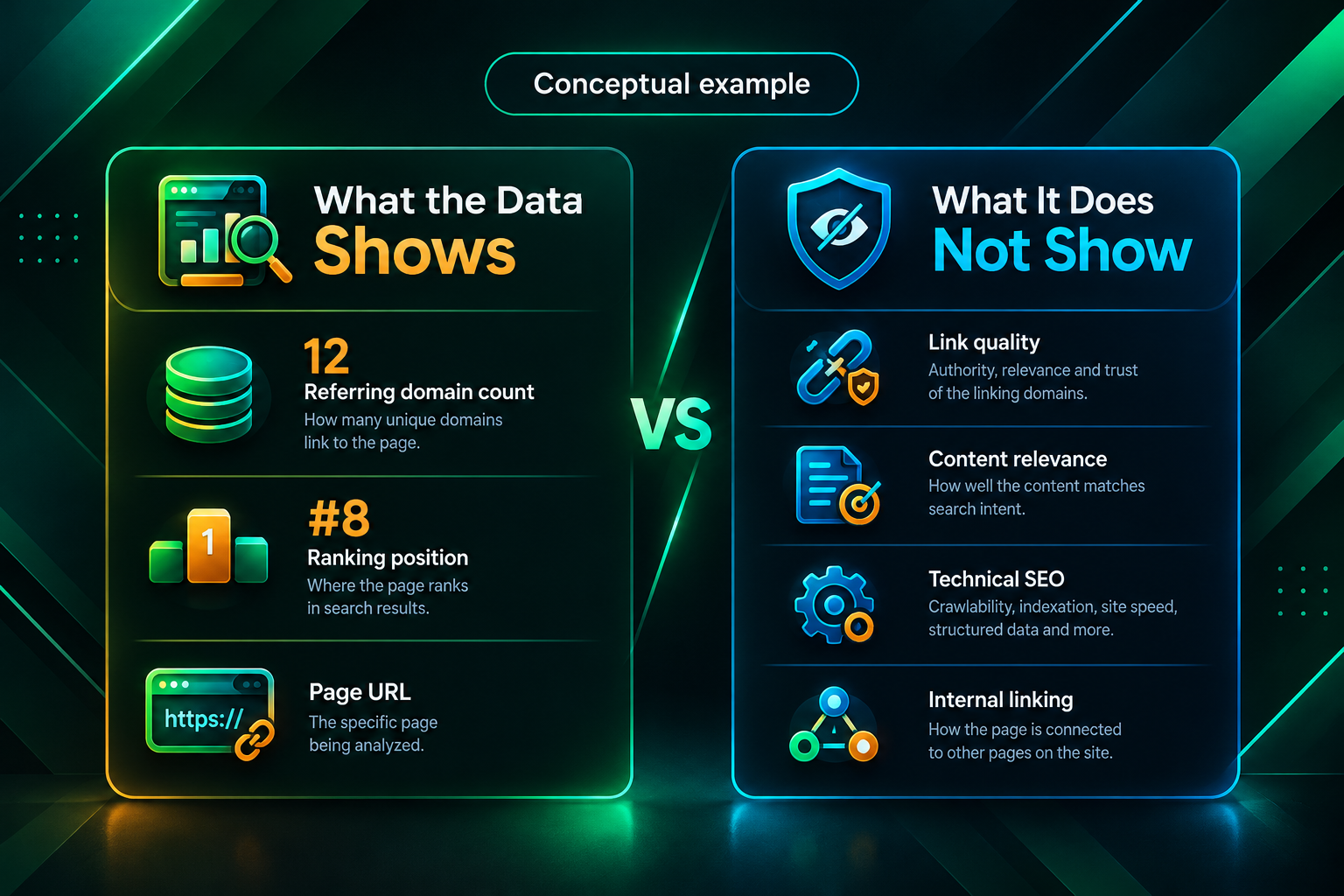
- Link quality is not captured by count alone. A page with ten referring domains from highly relevant, editorially placed sources may outperform a page with fifty referring domains from low-quality or topically unrelated sites. The joined dataset shows quantity; assessing quality requires manual review or additional filtering by domain-level metrics.
- Rankings fluctuate. Average position data from Search Console smooths out daily fluctuations, but rankings for competitive keywords can shift significantly within a short period. A snapshot analysis may not reflect the current ranking situation accurately.
- The analysis does not account for internal linking. Internal links distribute authority across a site and can influence rankings independently of external backlinks. A page with few external referring domains may rank well partly because it receives strong internal link support from high-authority pages on the same site.
Extending the Workflow for Link Building Campaigns
Once you have a working joined dataset, it can serve as the foundation for a more structured link building workflow. The prioritised list of pages in the ranking opportunity zone can be shared with an outreach team or a link building partner as a target page list. Each target page can be annotated with its current referring domain count, its target keyword, and its current ranking position, giving the outreach team clear context for why each page has been selected.
As new links are acquired, you can track them in a separate sheet and use a similar join to monitor whether the referring domain count for each target page increases over time. Comparing ranking position before and after a link building campaign — using Search Console data for the relevant date ranges — gives you a practical way to assess whether the campaign may have contributed to ranking changes, while acknowledging that other factors may also have influenced the outcome. This kind of structured tracking is more informative than simply checking whether rankings went up or down without any record of what changed.
For agencies managing link building campaigns on behalf of clients, a shared Google Sheets dashboard built on this joined structure can serve as a transparent reporting tool. Clients can see which pages were targeted, how many referring domains each page has gained, and how rankings have moved over the campaign period, all in a format that does not require access to paid SEO tools.
Frequently Asked Questions
What is the best formula for joining backlink and ranking data in Google Sheets?
INDEX MATCH is generally more flexible and reliable than VLOOKUP for this use case, particularly when datasets are large or when the URL column is not the leftmost column in the backlink export. Both formulas work well for smaller datasets. Wrap either formula in IFERROR to handle pages that appear in one dataset but not the other.
Why does my VLOOKUP return blank or error results even though the URL exists in both sheets?
The most common cause is a URL formatting mismatch. Check for trailing slashes, HTTP versus HTTPS differences, www versus non-www variants, and extra whitespace. Apply a cleaning formula such as LOWER and TRIM to both URL columns before using them as join keys.
Should I join at the keyword level or the page level?
For link building prioritisation, joining at the page level is usually more practical. Aggregate ranking data to one row per URL — using best position or average position — before joining with backlink data. Keyword-level joins are more useful for content gap analysis or anchor text planning, but they produce much larger datasets that are harder to work with in Sheets.
Can I use Google Search Console data instead of a third-party tool for backlink data?
Google Search Console’s Links report shows which pages have the most links and which sites link to them most often, but it does not provide referring domain counts per page in a format that is easy to export and join. Third-party tools such as Ahrefs or Semrush provide more structured per-URL backlink data that is easier to work with in this workflow. Using both sources together gives a more complete picture.
How often should I refresh the joined dataset?
For active link building campaigns, refreshing monthly is usually sufficient to track meaningful changes. Backlink profiles and rankings both change gradually, and weekly refreshes rarely reveal enough new information to justify the time. Document the export date each time you refresh so the analysis remains interpretable over time.
Does a higher referring domain count always mean better rankings?
No. Referring domain count is one signal among many that may influence rankings. Content relevance, topical authority, technical SEO, user experience, and the competitive landscape for each keyword all play a role. The joined dataset helps identify patterns and priorities, but it should inform decisions rather than replace a broader SEO assessment.
Can this workflow replace a full SEO audit?
No. Joining backlink and ranking data surfaces useful patterns but does not account for technical issues, content quality, internal linking structure, crawl and indexing problems, or search intent alignment. It is a useful analytical layer within a broader SEO process, not a substitute for a comprehensive site audit.
Turning the Joined Dataset into Actionable Link Building Decisions
A Google Sheets workflow that joins backlink data with ranking data is most valuable when it leads to specific, prioritised actions rather than general observations. The pages that emerge from the ranking opportunity zone filter — those sitting between positions six and twenty with relatively few referring domains — give link building teams a concrete starting point for outreach planning, whether that outreach is handled in-house or through an external partner.
The analysis also helps set realistic expectations. If a page ranks poorly despite having a reasonable number of referring domains, the data suggests that additional links alone may not resolve the ranking issue, and that a content or technical review may be warranted first. Conversely, if a page ranks well with very few links, it may be a candidate for consolidating its position rather than a priority for immediate link acquisition investment.
Building this kind of evidence-based view of your site’s backlink and ranking relationship does not require advanced technical skills or expensive tools beyond what most SEO teams already use. The formulas involved — VLOOKUP, INDEX MATCH, IFERROR, and basic pivot tables — are accessible to anyone comfortable working in spreadsheets. The discipline of keeping the data clean, aligned, and regularly refreshed is what makes the analysis reliable over time. If you are planning a link building campaign and want support identifying the right target pages and acquiring relevant, editorially placed links, discussing your data with a specialist link building team can help translate the spreadsheet analysis into a structured acquisition strategy.