
Choosing between plain text and HTML for outreach emails is a practical decision that affects deliverability, reply rates, and how recipients perceive your message. For link building campaigns, where a single well-placed reply can lead to a valuable editorial placement, the format you choose deserves more thought than most practitioners give it. This article compares both approaches across the factors that matter most: spam filter behavior, personalization, visual presentation, and the specific contexts where each format tends to perform better.
Quick Comparison
| Characteristic | Plain Text Email | HTML Email |
|---|---|---|
| Deliverability risk | Generally lower — fewer spam triggers | Higher — images, links, and code can trigger filters |
| Perceived authenticity | Reads like a personal message | Can appear promotional or automated |
| Visual branding | None | Logos, colors, formatted layout |
| Personalization ease | High — natural to customize | Moderate — templates can feel rigid |
| Rendering consistency | Consistent across all clients | Variable — depends on email client and settings |
| Tracking capability | Limited — open tracking unreliable | Full — open, click, and image-load tracking |
| Typical use case | Cold outreach, guest post pitches, link requests | Newsletters, product announcements, follow-up sequences |
| Reply rate tendency | Often higher for cold outreach | Often lower for cold outreach |
| Setup complexity | Low | Moderate to high |
| Suitable for link building outreach | Yes — widely preferred | Situational — better for warm or branded contexts |
What Plain Text and HTML Emails Actually Are
A plain text email contains only unformatted characters — no images, no styled fonts, no clickable buttons, and no HTML markup. It looks exactly like a message typed directly into a basic text editor and sent. An HTML email, by contrast, uses HyperText Markup Language to structure and style the content, allowing for formatted headings, images, brand colors, call-to-action buttons, and multi-column layouts. Most modern email clients support both, and many senders use a multipart MIME format that delivers both versions simultaneously, letting the recipient’s email client choose which to render.
For outreach purposes — particularly cold outreach aimed at securing guest post placements, niche edits, or editorial links — the distinction matters because the two formats create very different first impressions and interact differently with spam filtering systems. Understanding those differences helps outreach teams make deliberate choices rather than defaulting to whichever format their tool uses by default.
How Email Format Affects Deliverability
Deliverability refers to whether your email reaches the recipient’s primary inbox rather than being filtered into spam or promotions folders. Plain text emails generally carry a lower deliverability risk in cold outreach contexts because they contain fewer elements that spam filters flag. HTML emails introduce several potential triggers: embedded images with tracking pixels, multiple hyperlinks, large blocks of code relative to visible text, and certain formatting patterns associated with bulk commercial email.
Spam filtering systems such as those used by Gmail, Outlook, and corporate mail servers evaluate a combination of sender reputation, authentication records (SPF, DKIM, DMARC), content signals, and engagement history. An HTML email sent from a new or low-reputation domain with several links and an image is more likely to be filtered than a plain text message from the same sender. This does not mean HTML emails always land in spam — sender reputation and authentication matter far more than format alone — but format does contribute to the overall spam score, particularly for cold outreach where the sender has no prior relationship with the recipient.
One practical consideration is the text-to-HTML ratio. Spam filters often penalize emails where the HTML code significantly outweighs the visible text content. A well-coded HTML email with substantial body copy may perform acceptably, while a poorly coded template with minimal text and several images may not. Plain text emails sidestep this issue entirely.
Perceived Authenticity and Reply Rates
In link building outreach, the goal of the first email is almost always to start a conversation, not to showcase a brand. Publishers, editors, and website owners receive large volumes of outreach, and they have become skilled at identifying templated, automated, or promotional messages. A plain text email that reads like a genuine personal message from one professional to another tends to generate more replies in cold outreach contexts than an HTML email that visually resembles a marketing newsletter.
This is not a universal rule, and reply rates depend heavily on the quality of the pitch, the relevance of the target, the sender’s domain reputation, and the personalization level of the message. However, the format itself sends a signal. An HTML email with a logo header, formatted sections, and a styled call-to-action button communicates that the sender is running a campaign. A plain text email with a specific reference to the recipient’s recent content communicates that the sender took time to read their site. For cold outreach to independent publishers and bloggers, that distinction can influence whether the recipient engages or deletes.
Some outreach practitioners report meaningfully higher reply rates with plain text for cold link building campaigns, though controlled, independently verified data on this specific question is limited. The pattern is consistent enough across practitioner experience that plain text has become the default recommendation for cold outreach in most link building workflows, but teams should test both formats against their own target audiences rather than assuming one will always outperform the other.
Personalization and Scalability
Effective outreach personalization goes beyond inserting a first name into a greeting. It involves referencing a specific article the recipient published, noting a gap their content has, or explaining precisely why a particular resource would benefit their readers. Plain text emails support this kind of personalization naturally because the format itself has no visual structure to maintain. Writers can vary sentence length, paragraph structure, and tone without breaking a template layout.
HTML email templates, by contrast, impose a visual structure that can make genuine personalization feel awkward. When a personalized sentence is inserted into a rigid template block, the result can look inconsistent or forced, which undermines the authenticity the personalization was meant to create. This is one reason why outreach teams that invest in genuine, research-based personalization often find plain text a more practical format.
Scalability is a separate consideration. HTML templates are easier to replicate at volume with consistent branding, which makes them more suitable for warm email sequences, newsletter-style follow-ups, or outreach to an existing audience that already recognizes the sender’s brand. For cold outreach at scale, plain text templates with variable personalization fields are generally easier to manage and less likely to trigger bulk-sending filters.
Tracking and Measurement
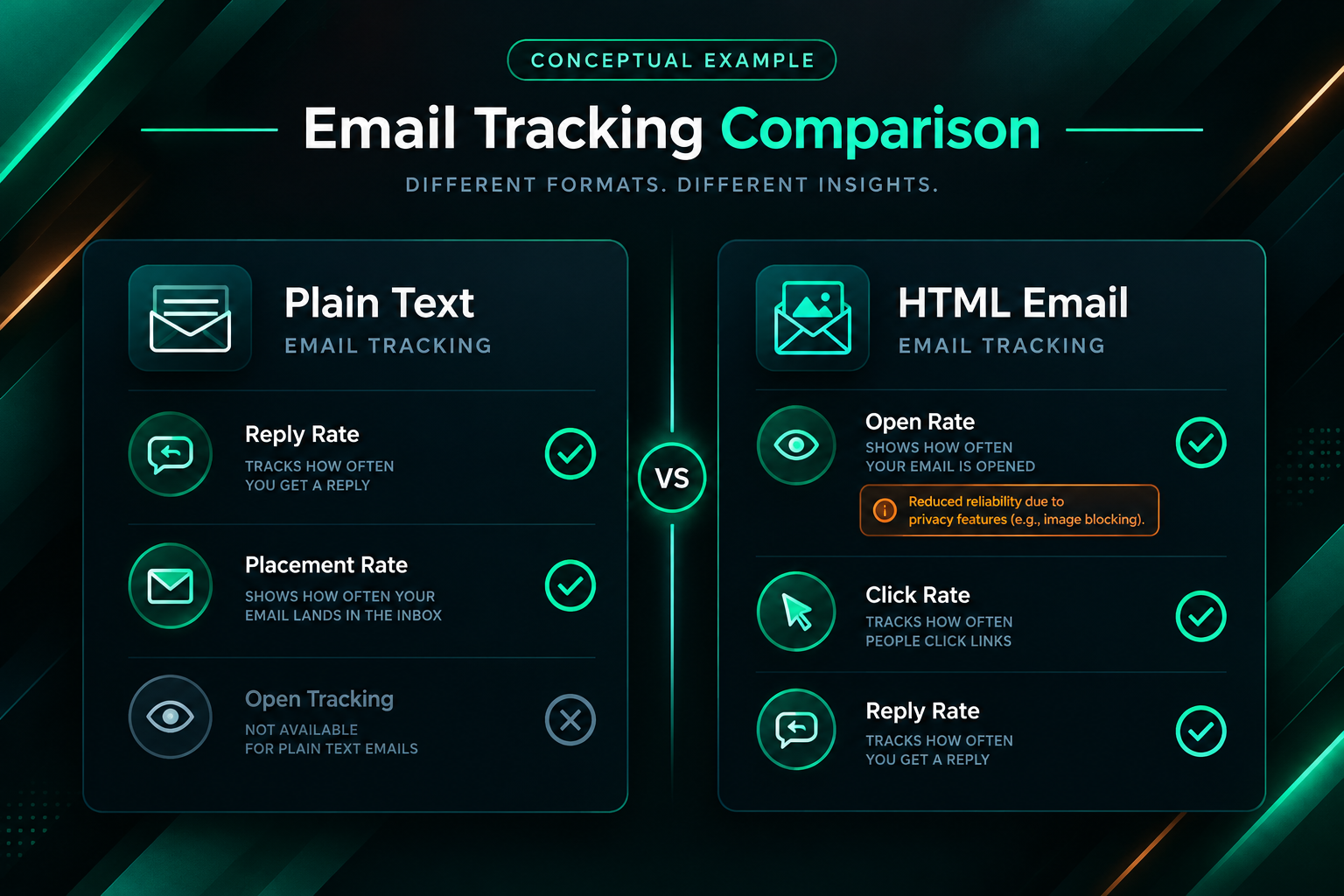
HTML emails offer significantly more tracking capability than plain text. Open tracking relies on a small invisible image (a tracking pixel) embedded in the HTML; when the recipient’s email client loads the image, the open is recorded. Click tracking works by routing links through a tracking redirect. Neither mechanism functions reliably in plain text emails, because plain text cannot embed images and links are not wrapped in tracking code.
This creates a genuine measurement trade-off. Teams running HTML outreach campaigns can see open rates, click rates, and which links recipients engaged with. Teams using plain text must rely primarily on reply rates and conversion metrics — which are arguably more meaningful for link building purposes, since a reply or a live placement is the actual goal, not an email open. Open rate data from HTML campaigns can also be misleading: many email clients now block tracking pixels by default (Apple Mail’s Mail Privacy Protection being a notable example), which inflates recorded open rates and reduces their reliability as a performance signal.
For link building outreach specifically, reply rate and placement rate are the metrics that matter most. If plain text generates more replies and ultimately more placements, the loss of open-rate tracking is unlikely to be a meaningful disadvantage. Teams that need detailed engagement data for reporting or optimization purposes may find HTML’s tracking capabilities more useful, provided deliverability is not significantly compromised.
Rendering Consistency Across Email Clients
Plain text emails render identically in every email client, on every device, and with every setting. There is nothing to break, no image that fails to load, and no layout that collapses on a mobile screen. HTML emails, by contrast, render differently across Gmail, Outlook, Apple Mail, Yahoo Mail, and various mobile clients. Outlook in particular is known for inconsistent HTML rendering due to its use of Microsoft Word’s rendering engine rather than a standard browser engine. An HTML email that looks polished in Gmail may appear broken or unstyled in Outlook.
For outreach to publishers and website owners — who may use any combination of email clients — rendering inconsistency is a real risk. A broken or poorly rendered HTML email can undermine the professional impression the sender intended to create. Plain text avoids this problem entirely, which is another practical reason it remains the preferred format for cold outreach in link building campaigns.
When HTML Outreach Emails May Be Appropriate
HTML is not the wrong choice in every outreach context. There are situations where a formatted, branded email is appropriate and may even perform better than plain text.
- Warm outreach to existing contacts: If you are following up with a publisher you have worked with before, or reaching out to someone who already knows your brand, an HTML email with consistent branding can reinforce professionalism and recognition.
- Agency or white-label client reporting: Emails delivering campaign reports, placement summaries, or performance updates to clients often benefit from structured HTML formatting that makes data easier to read.
- Digital PR campaigns targeting journalists: Some journalists and media contacts expect a degree of visual polish, particularly for press releases or media kit distribution, where HTML formatting can improve readability.
- Newsletter-style follow-up sequences: If a prospect has opted into a content series or newsletter, HTML formatting aligns with that expectation and supports brand consistency.
- High-volume B2B outreach with established sender reputation: Organizations with strong domain reputation, proper authentication, and a well-maintained sending list may find that HTML performs acceptably without significant deliverability penalties.
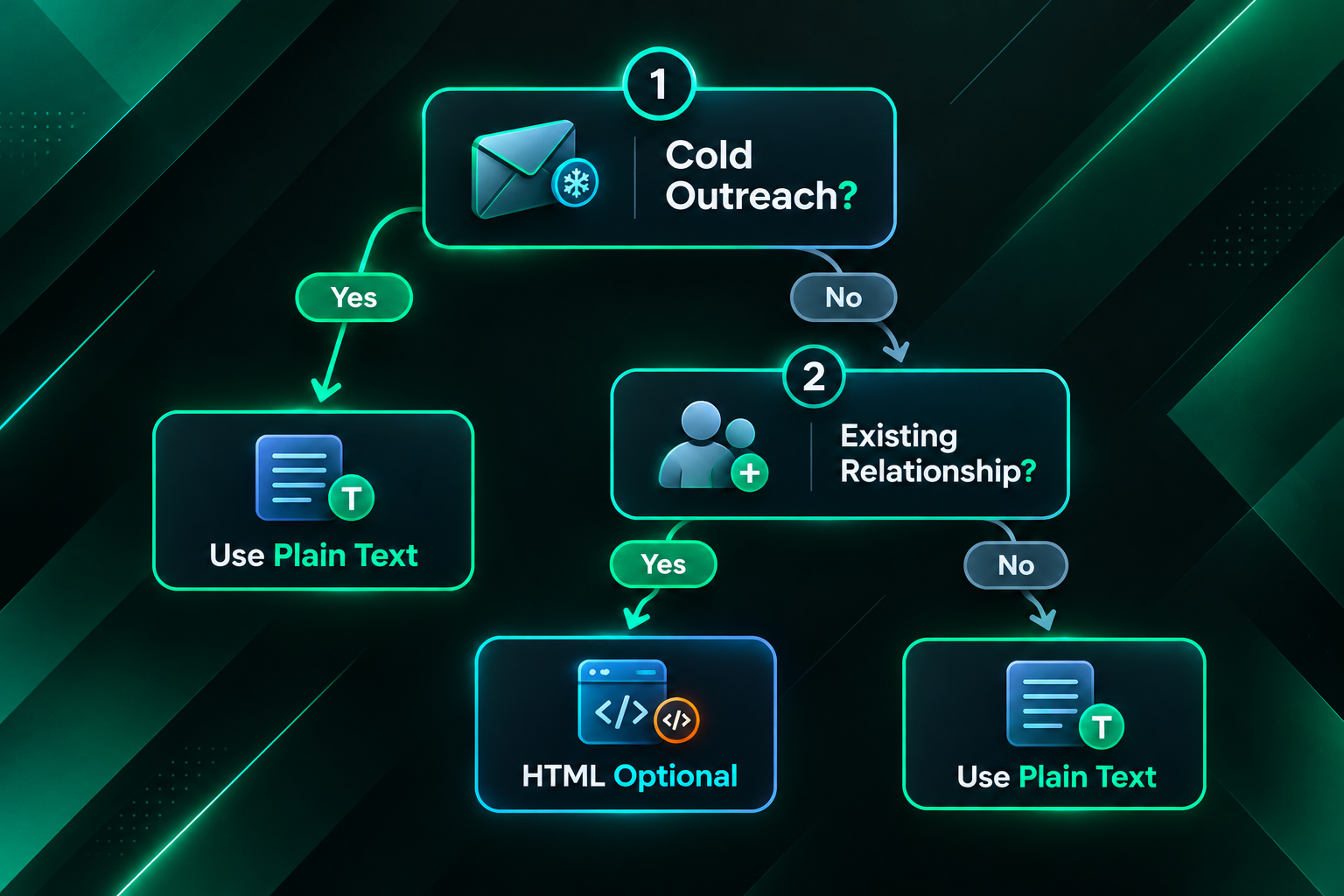
The key distinction is whether the recipient has a prior relationship with the sender and whether the email’s purpose is conversational or informational. Cold link building outreach is almost always conversational in intent, which makes plain text the more natural fit.
Practical Format Decisions for Link Building Campaigns
Most experienced link building practitioners and outreach specialists default to plain text for cold outreach, and the reasoning is consistent: plain text reduces deliverability friction, reads as more personal, and tends to generate more replies from publishers and editors who receive high volumes of outreach. This does not mean HTML is never used, but it means the burden of justification falls on HTML rather than plain text when the goal is a cold editorial link placement.
A few practical guidelines that reflect common outreach practice:
- Use plain text for initial cold outreach emails targeting guest post opportunities, niche edit requests, resource page inclusions, and broken link replacements.
- Keep plain text emails concise — typically three to five short paragraphs — with a clear, specific ask and genuine personalization that demonstrates familiarity with the recipient’s content.
- Avoid including multiple hyperlinks in cold outreach emails regardless of format, as multiple links increase spam filter risk and can make the email feel promotional.
- If using HTML for follow-up sequences or warm outreach, test rendering across major email clients before sending at scale, and ensure the text-to-HTML ratio is healthy.
- Authenticate your sending domain with SPF, DKIM, and DMARC records regardless of format — authentication has a greater impact on deliverability than format choice alone.
- Monitor reply rates and placement rates as primary performance indicators rather than open rates, which are increasingly unreliable due to privacy-related tracking blocks.
The Role of Multipart MIME Emails
Many outreach tools and email clients send multipart MIME emails by default, which means the message contains both a plain text version and an HTML version simultaneously. The recipient’s email client chooses which version to display based on its settings and capabilities. This approach can offer a middle ground: the HTML version provides formatting for clients that support it, while the plain text version serves as a fallback and may help with spam filtering by ensuring a readable text alternative exists.
However, multipart MIME is not a substitute for a deliberate format decision. If the HTML version of a multipart email contains heavy formatting, multiple images, and tracking pixels, spam filters will still evaluate those elements. The plain text fallback does not neutralize the HTML content’s spam signals. Teams that want the deliverability benefits of plain text should send genuinely plain text emails rather than relying on the text fallback within a multipart HTML message.
Testing Format Performance in Your Outreach Campaigns
Because outreach performance depends on the specific audience, niche, sending domain, and message quality, the most reliable way to determine which format works better for a given campaign is to test both systematically. A simple A/B test — sending plain text to one segment and HTML to a comparable segment, with all other variables held constant — can provide useful directional data within a few weeks of outreach activity.
When designing format tests, control for variables that could confound the results: use the same subject line, the same core message, the same level of personalization, and the same target audience segment. Measure reply rate and placement rate as primary outcomes. Open rate data from HTML campaigns may be available but should be interpreted cautiously given tracking pixel reliability issues. Run the test across a sufficient volume of contacts — typically at least 50 to 100 per variant — before drawing conclusions, and recognize that results from one niche or audience may not transfer to another.
Frequently Asked Questions
Does email format directly affect whether a link building pitch gets accepted?
Format is one factor among many. A well-researched, genuinely personalized pitch in plain text is more likely to receive a reply than a generic pitch in either format. However, plain text reduces deliverability friction and tends to read as more personal, which can improve the chances of the email being seen and considered in the first place.
Will HTML emails always land in spam for cold outreach?
Not always. Sender reputation, domain authentication, list quality, and content relevance all influence deliverability more than format alone. However, HTML emails do carry additional spam filter risk compared to plain text, particularly for cold outreach from newer or lower-reputation sending domains. The risk is real but not absolute.
Can I use HTML formatting for follow-up emails in a link building sequence?
Yes, and some practitioners find that a lightly formatted follow-up — for example, a brief plain-text-style message with minimal HTML — works well for second or third contact attempts. Heavily branded HTML templates are generally less appropriate for follow-ups in cold outreach sequences, as they reinforce the impression of an automated campaign rather than a genuine conversation.
How many links should a cold outreach email contain?
Keeping links to a minimum — ideally one or two at most — reduces spam filter risk regardless of format. Including your website URL and one relevant resource is generally sufficient for an initial cold outreach email. Multiple links increase the likelihood of triggering spam filters and can make the email feel promotional rather than conversational.
Does using a plain text email mean I cannot track whether it was opened?
Correct. Open tracking relies on an HTML tracking pixel, which cannot be embedded in a genuinely plain text email. Reply rate is the primary measurable engagement signal for plain text outreach. This is generally acceptable for link building campaigns, where a reply or placement is the meaningful outcome rather than an email open.
Should outreach emails be sent from a personal email address or a company domain?
This depends on the campaign context and the sender’s domain reputation. A personal-style email address on a properly authenticated company domain can combine the authenticity of a personal message with the credibility of an established domain. Generic company addresses (such as info@ or contact@) tend to perform less well in cold outreach because they signal an automated or bulk-sending context.
Choosing the Right Email Format for Your Outreach Goals
For most cold link building outreach — guest post pitches, niche edit requests, resource page inclusions, and similar editorial link acquisition — plain text is the more practical default. It reduces deliverability risk, reads as more personal, and tends to generate more replies from the publishers and editors who are the gatekeepers of editorial placements. These advantages are consistent with practitioner experience across a wide range of niches and campaign types, even though controlled, independently verified data comparing the two formats specifically in link building contexts remains limited.
HTML email is not without a place in outreach workflows. Warm follow-ups, client reporting, digital PR distribution, and branded communication with existing contacts can all benefit from structured formatting. The decision should be driven by the relationship context, the email’s purpose, and the audience’s likely expectations — not by the default setting of whichever outreach tool a team happens to use.
If you are managing outreach campaigns in-house and want to improve placement rates, reviewing your email format alongside your personalization approach, sending domain health, and target publisher quality is a reasonable starting point. If you are considering outsourcing link building outreach to a specialist provider, it is worth asking how they approach format decisions and what testing they conduct across different campaign types. A provider that makes deliberate, evidence-informed choices about outreach format — rather than applying a single template to every campaign — is more likely to deliver placements that reflect genuine editorial consideration.