
Referral spam in Google Analytics 4 can quietly distort your traffic data, inflate session counts, and make it harder to assess which channels are genuinely driving results. If your GA4 reports show unfamiliar domains sending bursts of sessions with zero engagement, or if your referral channel suddenly spikes without a corresponding change in leads or revenue, referral spam is a likely cause. This guide explains what referral spam is in a GA4 context, why it matters for SEO and marketing decisions, and the practical steps you can take to exclude it from your reports.
Key Takeaways
- Referral spam in GA4 typically appears as sessions from unfamiliar domains with very low or zero engagement, skewing your channel and traffic source data.
- GA4 offers a built-in unwanted referrals list that prevents legitimate internal tools and payment gateways from being counted as external referral sources.
- Data filters in GA4 allow you to permanently exclude internal traffic and developer traffic from your reports, reducing noise from known sources.
- Audience exclusions and custom channel groups can further refine how GA4 attributes sessions, helping you isolate genuine referral traffic.
- No single method eliminates every form of referral spam; combining multiple exclusion approaches gives you the most reliable data.
What Is Referral Spam in GA4?
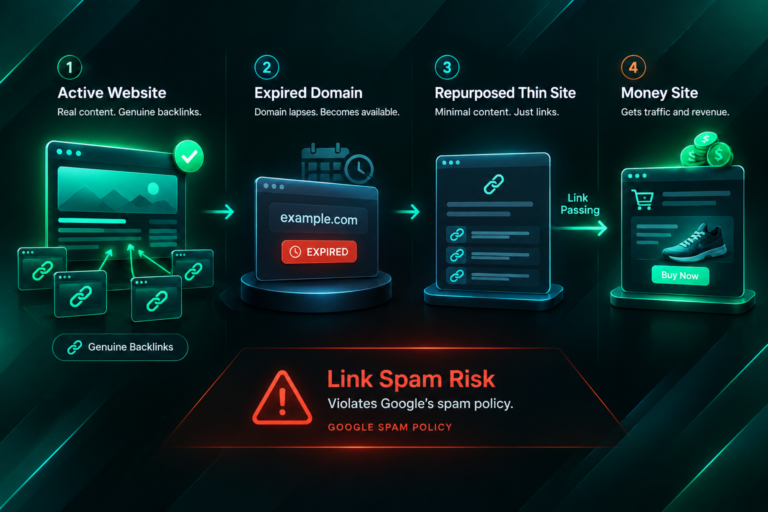
Referral spam refers to artificial or unwanted traffic that appears in your analytics as if it originated from an external website. In the older Universal Analytics platform, a common form involved bots sending fake hits directly to the Measurement Protocol without ever visiting your site. GA4’s architecture makes that specific attack less straightforward, but referral spam still occurs through several mechanisms. Automated bots and scrapers may visit your site briefly, registering sessions that look like referral traffic. Certain tools, payment processors, or third-party platforms redirect users through their own domains before returning them to your site, creating unintended referral sessions. Some spam operators use low-cost traffic services to send real browser sessions from irrelevant domains, inflating referral counts without any genuine user interest.
The practical consequence is that your referral channel data becomes unreliable. If you are using GA4 to evaluate which backlinks or partnerships are sending engaged visitors, or to report on organic versus referral traffic to stakeholders, contaminated data leads to poor decisions. For SEO teams assessing the value of link building campaigns, clean referral data is particularly important: a spike in referral sessions from a spammy domain can mask the genuine traffic contribution of a legitimate editorial link.
Why Referral Spam Affects SEO and Marketing Decisions
Accurate analytics data underpins almost every SEO and marketing decision. When referral spam inflates session counts, it can distort conversion rate calculations, making your site appear to perform worse than it does because spam sessions rarely convert. It can also skew average engagement time, pages per session, and bounce-equivalent metrics in GA4, all of which may influence how you prioritise content improvements or link building efforts. If your team uses GA4 data to attribute revenue or leads to specific channels, spam sessions in the referral channel can misrepresent the return on investment from legitimate outreach and link acquisition work.
For businesses that outsource link building or run manual outreach campaigns, clean referral data is essential for evaluating whether acquired placements are sending real, engaged visitors. A referral report polluted with spam makes it difficult to distinguish between a high-quality editorial link on a relevant publisher and a low-value or automated source. Keeping your GA4 data clean is therefore not just a housekeeping task; it directly affects the quality of decisions you make about SEO investment and campaign performance.
Understanding GA4’s Referral Exclusion Mechanisms
GA4 provides several distinct tools for managing unwanted referral traffic. Understanding what each one does, and what it does not do, helps you choose the right combination for your situation.
The Unwanted Referrals List
The unwanted referrals list in GA4 is designed primarily to prevent legitimate third-party domains from being counted as referral sources when they should not be. The most common use case is payment gateways: when a user leaves your site to complete a payment on a processor’s domain and then returns, GA4 may attribute the returning session to the payment processor as a referral, breaking the original session attribution. Adding the payment processor’s domain to the unwanted referrals list tells GA4 to ignore that referral and continue attributing the session to its original source.
This list is found in GA4 under Admin, then Data Streams, then your web data stream, and then Configure Tag Settings, where you will find the option to list unwanted referrals. You enter the domains you want excluded, and GA4 will treat traffic arriving from those domains as a continuation of the existing session rather than a new referral session. This mechanism is well suited to known, legitimate domains that create attribution noise, but it is not designed as a spam-blocking tool for unknown or rotating spam domains.
Data Filters for Internal and Developer Traffic
GA4 data filters allow you to exclude traffic from specific IP addresses or traffic marked with a developer traffic parameter. Internal traffic filters are useful for removing sessions generated by your own team, which might otherwise appear as referral or direct traffic depending on how staff access the site. To set up an internal traffic filter, navigate to Admin, then Data Filters, and create a filter that excludes traffic matching the traffic type parameter you have defined in your tag settings.
Developer traffic filters work similarly, excluding sessions where the debug mode parameter is active. These filters can be set to testing mode, which lets you preview their effect before applying them permanently, or to active mode, which removes the matching traffic from all reports going forward. It is worth noting that data filters in GA4 apply to data as it is collected; they cannot retroactively clean historical data that has already been processed. If you have months of contaminated data, you will need to use report-level comparisons or date range adjustments to account for the period before filters were applied.
Referral Exclusions via Google Tag Manager
If you implement GA4 through Google Tag Manager, you can configure referral exclusions at the tag level. Within your GA4 Configuration tag in Google Tag Manager, there is a field for referral exclusion domains. Adding domains here prevents GA4 from starting a new session when a user arrives from those domains, which serves the same purpose as the unwanted referrals list in the GA4 interface. Using Google Tag Manager for this configuration can be convenient if your team already manages tags there and prefers to keep exclusion logic centralised in one place.
Step-by-Step: Excluding Referral Spam in GA4
The following process covers the most practical combination of exclusion methods available in GA4. The right steps for your situation will depend on the type of spam you are seeing and how your GA4 property is configured.
Step 1: Identify the Spam Sources
Before making any configuration changes, review your GA4 referral traffic report to identify which domains are generating suspicious sessions. In GA4, navigate to Reports, then Acquisition, then Traffic Acquisition, and filter by the Session default channel group set to Referral. Look for domains with very high session counts but near-zero engagement time, zero conversions, and no recognisable brand or relevance to your industry. Note these domains carefully, as you will need them when configuring exclusions.
It is also worth checking whether the suspicious traffic correlates with specific time periods, which may indicate a targeted spam campaign rather than ongoing bot traffic. If the sessions appear only on certain dates and then stop, the source may have already moved on, and adding an exclusion may have limited ongoing benefit. Persistent, recurring domains are the higher priority for exclusion configuration.
Step 2: Add Known Domains to the Unwanted Referrals List
For domains that you can identify as consistently generating unwanted referral sessions, add them to the unwanted referrals list in GA4. Go to Admin, select your web data stream, open Configure Tag Settings, and find the List unwanted referrals option. Enter each domain you want to exclude. This step is most effective for known, stable spam domains and for legitimate third-party tools such as payment processors, booking platforms, or single sign-on providers that create attribution noise.
Keep in mind that this list requires manual maintenance. If new spam domains appear, you will need to return and add them. There is no automated detection or dynamic blocking built into this feature.
Step 3: Configure Internal Traffic Filters
If your own team’s visits are appearing in referral or other channel reports, set up an internal traffic filter. First, define your internal traffic by going to Admin, then Data Streams, then Configure Tag Settings, and then Define internal traffic. Enter the IP addresses or IP ranges used by your office or remote team. Then go to Admin, Data Filters, and create a filter that excludes the internal traffic type. Set it to active once you have confirmed it is working correctly in testing mode.
Step 4: Use Audience Exclusions for Persistent Spam Segments
For more persistent spam traffic that cannot be addressed through domain-level exclusions, GA4 audiences can be used to segment and isolate unwanted sessions. You can create an audience based on characteristics common to spam sessions, such as sessions from specific countries, sessions with zero engagement time, or sessions matching particular referral paths, and then use that audience as an exclusion in your explorations and custom reports. This approach does not remove the data from GA4 entirely but allows you to build reports that exclude the identified spam segment.
Audience-based exclusions are more flexible than data filters because they can be applied selectively to specific reports without affecting your overall data collection. However, they require more manual setup and ongoing review to remain effective as spam patterns change.
Step 5: Apply Hostname Filters in Explorations
GA4’s Explore section allows you to build custom reports with segment and filter controls that are not available in the standard reports. One useful technique is to filter your referral traffic by hostname, which shows only sessions where the landing page hostname matches your actual domain. This can help exclude ghost referral spam, where sessions are recorded without the user ever visiting your site, though this type of spam is less common in GA4 than it was in Universal Analytics.
To apply a hostname filter in an Exploration, add Hostname as a dimension and create a filter that includes only your verified domain or domains. This gives you a cleaner view of genuine referral traffic without permanently altering your property configuration.
Limitations of GA4 Referral Spam Exclusion
No configuration change in GA4 will eliminate all forms of referral spam permanently. Spam operators frequently rotate domains, making static exclusion lists less effective over time. GA4’s data filters are powerful but apply only to new data collected after the filter is activated; they cannot clean historical reports. The unwanted referrals list requires manual updates and does not offer pattern matching or wildcard domain exclusions, which limits its scalability when spam sources are numerous or unpredictable.
It is also worth understanding that some traffic that resembles spam may actually be legitimate. Aggressive exclusion configurations risk removing genuine referral sessions from tools, partners, or platforms that you want to track. Before applying any exclusion, verify that the domain in question is genuinely unwanted rather than a legitimate source you have not yet recognised. Checking the domain against your known partnerships, affiliate relationships, or third-party integrations before excluding it can prevent accidental data loss.
For websites with significant spam problems that cannot be resolved through GA4 configuration alone, server-level blocking using your web server or a web application firewall may reduce the volume of bot traffic reaching your site in the first place. This is a technical measure outside GA4 itself but can complement your analytics exclusion work by reducing the number of spam sessions that need to be filtered.
How Clean Referral Data Supports Better SEO Decisions
Once referral spam is excluded from your GA4 reports, the referral channel data becomes a more reliable indicator of which external sources are genuinely contributing to your site’s traffic. For businesses running link building campaigns, this matters because it allows you to assess whether specific placements are sending engaged visitors, not just improving domain-level authority metrics. A well-placed editorial link on a relevant, high-quality publisher may send a modest but consistent stream of genuinely interested visitors; clean referral data makes that contribution visible.
Clean analytics also improves the accuracy of conversion attribution. If spam sessions were previously inflating referral traffic without contributing conversions, removing them will typically improve the apparent conversion rate of the referral channel, giving you a more accurate picture of its value. This can be particularly useful when reporting to stakeholders or when making budget decisions about which acquisition channels to invest in further.
For SEO teams evaluating the impact of outreach campaigns, accurate referral data complements other signals such as ranking changes and organic traffic trends. While referral traffic from backlinks is not the primary goal of most link building campaigns, it provides a useful secondary indicator of placement quality and publisher audience relevance. Combining clean GA4 referral data with rank tracking and organic traffic analysis gives a more complete view of campaign performance than any single metric alone.
Referral Spam vs. Legitimate Referral Traffic: Key Differences
Distinguishing spam from legitimate referral traffic is not always straightforward, but several characteristics tend to separate them. Legitimate referral traffic typically shows meaningful engagement: visitors spend time on the page, navigate to other sections of the site, and in some cases complete a conversion action. Spam sessions, by contrast, usually show near-zero engagement time, a single pageview, and no conversion activity. The referring domain is often unrecognisable, unrelated to your industry, or associated with known spam networks.
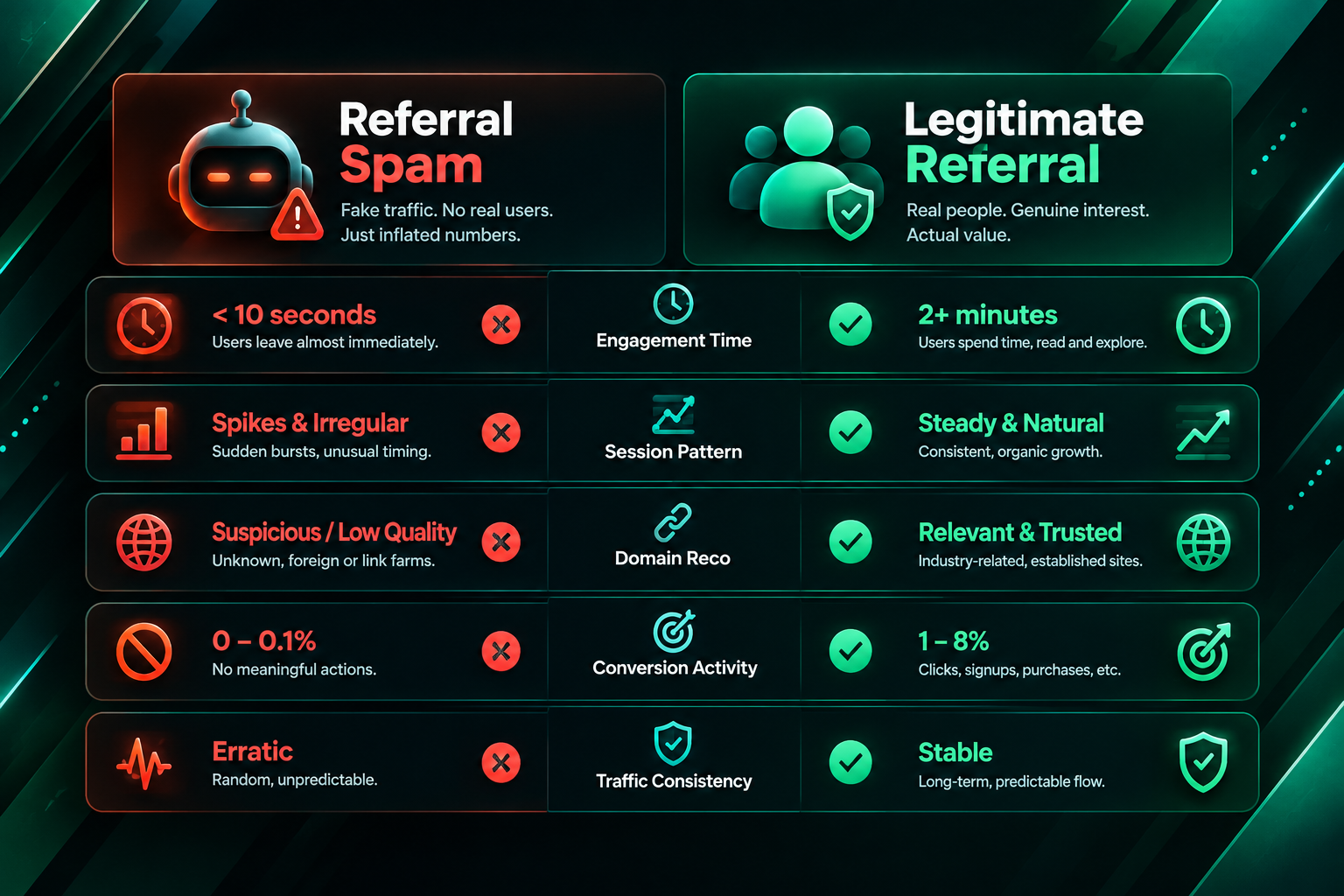
Legitimate referral sources are usually domains you can verify: publishers where you have editorial placements, partners who have linked to your resources, directories relevant to your industry, or platforms where your content has been shared. If a referring domain does not correspond to any known relationship or content placement, it warrants closer investigation before you decide whether to exclude it or investigate the source further.
Volume patterns also differ. Genuine referral traffic from a quality editorial link tends to arrive gradually and consistently, reflecting the ongoing readership of the publisher. Spam traffic often arrives in sudden bursts, sometimes concentrated within a few hours or days, before disappearing entirely. Monitoring your referral report for these patterns over time helps you develop a clearer picture of which sources deserve attention and which should be excluded.
Frequently Asked Questions
Does GA4 automatically block referral spam?
GA4 does not automatically block all forms of referral spam. It has some built-in bot filtering that excludes known bot and spider traffic based on the IAB/ABC International Spiders and Bots List, but this does not cover all spam sources. Manual configuration using the unwanted referrals list, data filters, and audience exclusions is still necessary for comprehensive spam management.
Can I retroactively remove referral spam from GA4 historical data?
Data filters in GA4 apply only to data collected after the filter is activated and cannot retroactively alter historical reports. To analyse historical data without spam, you can use Explorations with custom filters applied to the date range in question, or compare date ranges before and after your exclusion configuration was applied.
What is the difference between the unwanted referrals list and a data filter in GA4?
The unwanted referrals list prevents GA4 from starting a new session when a user arrives from a listed domain, preserving the original session attribution. A data filter excludes matching traffic from your reports entirely based on defined criteria such as IP address or traffic type. The two tools serve different purposes and can be used together.
Will excluding referral spam improve my SEO rankings?
Excluding referral spam from GA4 improves the accuracy of your analytics data but does not directly affect your search engine rankings. GA4 data is not a confirmed ranking factor. The benefit is better decision-making based on cleaner data, which may indirectly support more effective SEO and marketing strategies.
How often should I review my referral exclusion settings in GA4?
Reviewing your referral traffic report monthly is a reasonable starting point. Spam sources change frequently, so periodic checks allow you to identify new unwanted domains and add them to your exclusion list before they significantly distort your data. If you notice an unexpected spike in referral sessions, investigate promptly rather than waiting for your next scheduled review.
Can referral spam affect my Google Ads or conversion tracking?
If GA4 is linked to Google Ads and you are using GA4 conversions for bidding, spam sessions that trigger conversion events could theoretically affect your campaign optimisation. In practice, spam sessions rarely complete meaningful conversion actions, but it is worth auditing your conversion events to confirm that spam traffic is not being counted as a conversion source.
Keeping Your GA4 Data Reliable Over Time
Excluding referral spam from GA4 is not a one-time task. Spam patterns evolve, new domains emerge, and your site’s third-party integrations may change in ways that create new attribution noise. Building a regular review process into your analytics workflow, even a brief monthly check of your referral sources, helps you catch new spam sources before they accumulate enough sessions to meaningfully distort your reports.
Combining the unwanted referrals list, data filters for internal traffic, and audience-based exclusions in Explorations gives you a layered approach that addresses the most common sources of referral noise in GA4. No configuration eliminates every possible spam source, but a well-maintained set of exclusions keeps your referral data accurate enough to support reliable channel attribution, conversion analysis, and SEO performance assessment. For teams that rely on GA4 data to evaluate link building campaigns, content performance, or paid acquisition, that reliability is a practical business asset worth maintaining.