

Exporting backlinks from Ahrefs is one of the most common tasks in SEO research, competitor analysis, and link building campaign planning. Whether you are auditing your own backlink profile, analysing a competitor’s link acquisition strategy, or preparing a prospecting list for outreach, understanding how to pull and interpret this data accurately can save significant time and help you make better-informed decisions. This guide walks through the export process, explains the key data fields, and covers how to use the output effectively without overstating what the numbers can tell you.
Key Takeaways
- Ahrefs allows you to export backlink data from the Site Explorer tool in CSV or Excel format, with filters available before export to reduce file size and improve relevance.
- Exported backlink data includes link attributes, anchor text, referring page metrics, and indexing status, but these are Ahrefs-proprietary metrics, not Google signals.
- Filtering before export — by link type, DR range, traffic estimates, or dofollow status — produces more actionable data than exporting everything at once.
- Backlink exports are most useful when combined with a clear analytical goal, such as identifying link gaps, qualifying prospects, or auditing toxic links.
- Row limits apply depending on your Ahrefs subscription plan, so large-scale exports may require plan upgrades or phased approaches.
Where to Find the Backlink Export in Ahrefs
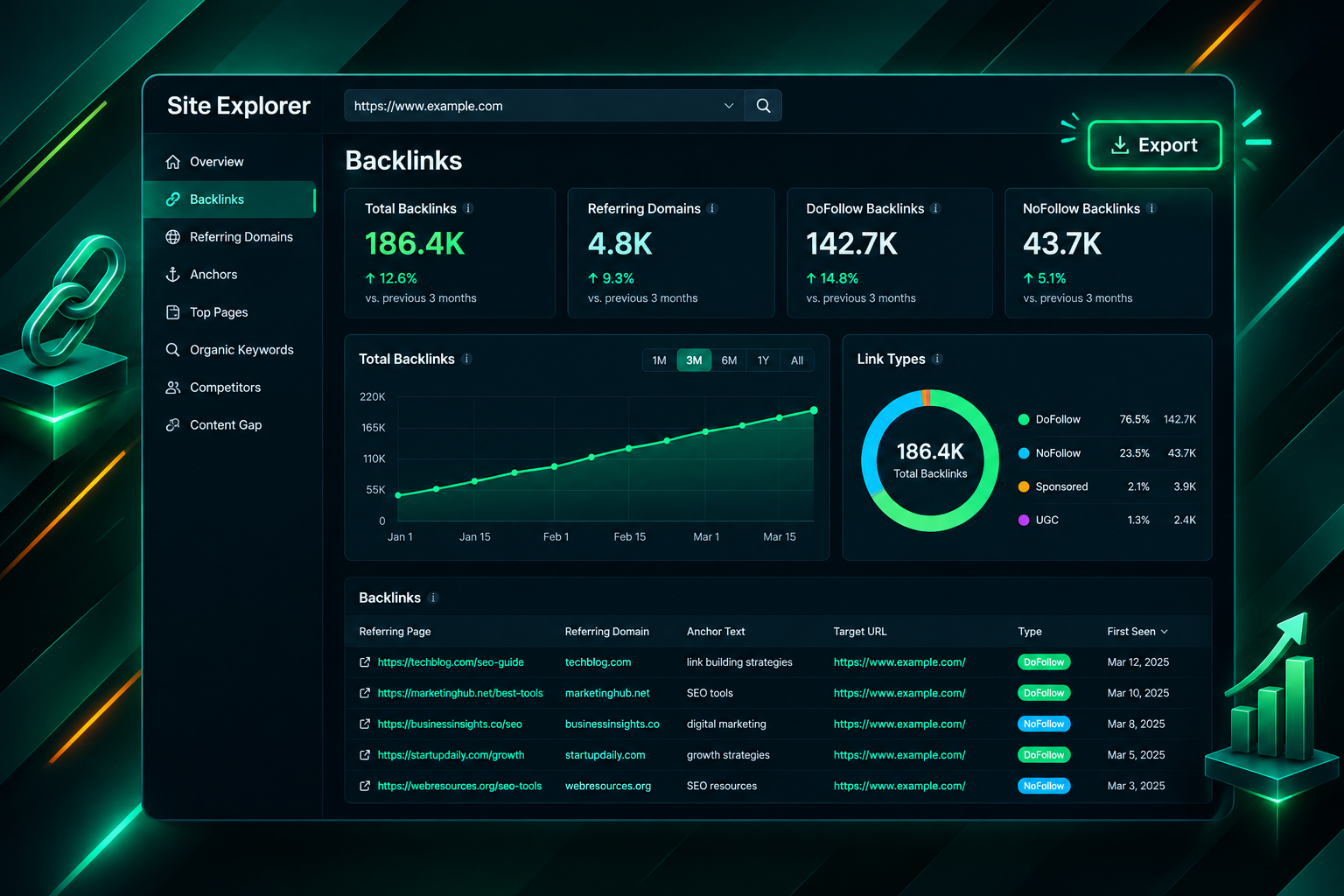
The backlink export function in Ahrefs is located inside the Site Explorer tool. To access it, enter the domain, subdomain, or specific URL you want to analyse into the Site Explorer search bar, then navigate to the Backlinks report in the left-hand sidebar. This report displays all backlinks Ahrefs has crawled pointing to the target, along with associated data for each linking page and domain.
Once you are inside the Backlinks report, an Export button appears in the upper-right area of the report interface. Clicking it gives you the option to download the data as a CSV file or, depending on your plan, as an Excel file. The export captures whatever rows are currently visible based on your active filters, so it is worth configuring those filters before initiating the download rather than exporting the full unfiltered dataset and sorting it manually afterwards.
Ahrefs also provides a separate Referring Domains report, which aggregates backlink data at the domain level rather than the individual link level. Exporting from Referring Domains gives you one row per linking domain, which is useful for understanding the breadth of your link profile rather than the total volume of individual links. Both reports have their own export function and serve different analytical purposes.
Step-by-Step: Exporting Backlinks from Ahrefs
The following sequence covers the standard export workflow for the Backlinks report in Ahrefs Site Explorer. The interface may vary slightly depending on your plan and any updates Ahrefs has made to its product since this was written, so treat this as a general guide rather than a pixel-perfect walkthrough.
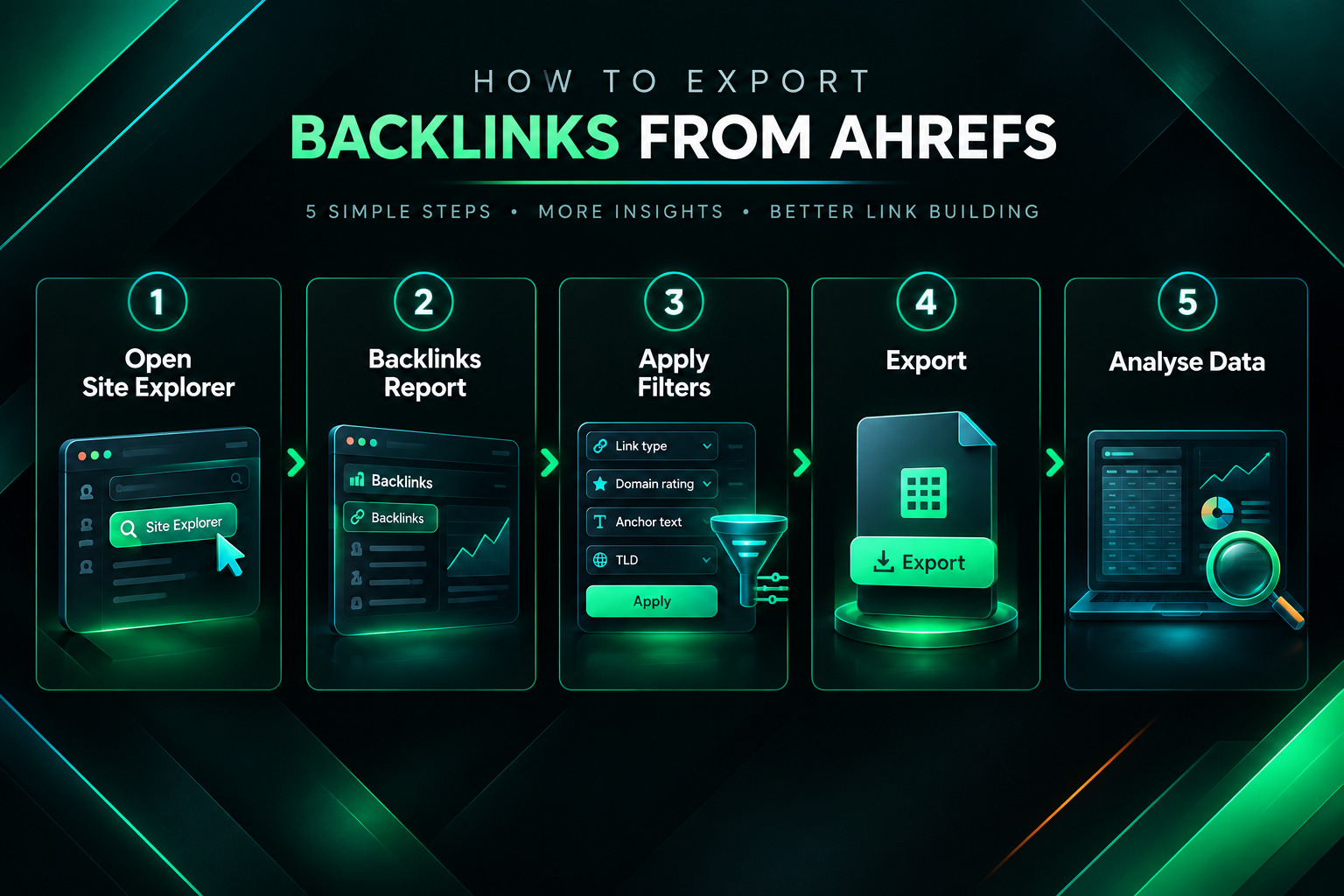
- Open Site Explorer and enter the target domain or URL. Use the mode selector (domain, exact URL, prefix, or subdomains) to control the scope of the analysis. For a full-site backlink profile, select the domain or subdomains mode.
- Navigate to the Backlinks report in the left sidebar. The report loads with all discovered backlinks listed in reverse chronological order by default, showing the most recently found links first.
- Apply filters before exporting. Common filters include: link type (dofollow or nofollow), DR (Domain Rating) range, referring page traffic, language, platform, and whether the link is live or lost. Filtering at this stage reduces the export to the rows most relevant to your goal.
- Click the Export button in the upper-right corner of the report. Select your preferred file format. Ahrefs will generate the file and either download it directly or send it to your registered email address, depending on file size and plan settings.
- Open the exported file in a spreadsheet application. Review the column headers to understand what each field represents before beginning analysis.
For the Referring Domains report, the process is identical: apply filters, then export. The resulting file will contain one row per linking domain with aggregated metrics rather than individual link-level detail.
Understanding the Exported Data Fields
An Ahrefs backlink export typically includes a range of columns covering both the linking page and the target page. Knowing what each field represents — and what it does not — is essential for using the data responsibly.
Domain Rating (DR)
Domain Rating is an Ahrefs-proprietary metric that estimates the relative strength of a website’s backlink profile on a logarithmic scale from 0 to 100. A higher DR generally indicates a site with more and stronger inbound links. DR is not a Google metric, is not used directly in Google’s ranking algorithms, and should not be treated as a guarantee of ranking power or link quality. It is a useful comparative signal for prioritising prospects or assessing profile composition, but it has known limitations, including susceptibility to manipulation and variation across different crawl periods.
URL Rating (UR)
URL Rating applies the same logarithmic scale to individual pages rather than whole domains. UR reflects the estimated link equity pointing to a specific page. When evaluating a potential link placement, UR can give a rough indication of how much link equity that page may pass, though the actual effect on your rankings depends on many other factors including content relevance, link placement, and crawl frequency.
Anchor Text
The anchor text column shows the visible, clickable text of each backlink. Reviewing anchor text distribution across your exported backlink profile can reveal over-optimisation patterns, brand versus keyword ratios, and potential areas of concern. For competitor analysis, anchor text data can indicate which keywords a site has been targeting through its link acquisition activity.
Link Type: Dofollow vs Nofollow
The export includes a column indicating whether each link carries a dofollow or nofollow attribute (and in some cases ugc or sponsored attributes). Dofollow links are generally considered to pass link equity, while nofollow links include a directive that historically instructed search engines not to follow the link for ranking purposes. Google has since described nofollow as a hint rather than a directive, meaning some nofollow links may still be evaluated. For most link building purposes, dofollow links from editorially relevant pages are the primary target, but a natural backlink profile typically includes a mix of link types.
First Seen and Last Checked
These date columns indicate when Ahrefs first discovered the link and when it last confirmed the link was still live. The gap between these dates can help identify links that have been live for a long time (suggesting stability) versus recently acquired links. Lost links — those no longer live — appear in the Lost Backlinks filter and can be exported separately to identify links worth attempting to reclaim.
Referring Page Traffic
Ahrefs estimates organic traffic to the referring page based on its own keyword ranking data. This figure is an estimate, not a verified traffic count, and should be treated as a directional indicator. Pages with meaningful estimated traffic may offer referral traffic value in addition to any link equity they pass, which can be relevant when evaluating link placements for business impact beyond rankings.
HTTP Status
The HTTP status column shows whether the linking page returned a 200 (live), 301 (redirect), 404 (not found), or other status code at the time of Ahrefs’ last crawl. Links on pages returning non-200 status codes may not be passing link equity as expected and may warrant further investigation.
Filtering Before You Export: Why It Matters
Exporting an unfiltered backlink dataset for a large or established domain can produce files with tens of thousands of rows, many of which may not be relevant to your specific analytical goal. Applying filters before export makes the resulting file more manageable and more immediately useful.
For competitor backlink prospecting, filtering to dofollow links from pages with a DR above a minimum threshold (such as DR 30 or DR 40, depending on your niche) and with some estimated referring page traffic can help surface the most valuable link opportunities. Filtering by language and platform (for example, excluding forum or social media links) further refines the list.
For a backlink audit of your own site, you may want to export all link types including nofollow and sponsored, and include lost links to understand profile changes over time. Filtering by HTTP status can help identify broken or redirected links that may need attention.
For link gap analysis, comparing referring domain exports from multiple competitors against your own domain helps identify sites that link to competitors but not to you. Ahrefs has a dedicated Link Intersect tool for this purpose, but exporting referring domain lists and comparing them in a spreadsheet is an alternative approach that gives you more control over the analysis.
Export Limits and Plan Considerations
Ahrefs applies row limits to backlink exports depending on your subscription plan. Lower-tier plans may cap exports at a few thousand rows, while higher-tier plans allow larger exports. If you are working with a domain that has a very large backlink profile and your plan’s export limit is lower than the total number of backlinks, you will need to use filters to segment the data into smaller, more targeted exports, or consider whether a plan upgrade is appropriate for your research volume.
It is worth checking Ahrefs’ current plan documentation for the specific limits that apply to your account, as these figures can change with product updates. Export limits apply per report, so exporting Backlinks and Referring Domains separately counts against the limit for each report independently.
For agencies or teams running frequent large-scale exports across multiple client domains, the cumulative data usage can be significant. Some teams use Ahrefs’ API for programmatic access to backlink data, which has its own credit-based pricing structure and is better suited to automated workflows than manual CSV exports.
Using Exported Backlink Data in Link Building Work
A backlink export from Ahrefs is a starting point for analysis, not a finished deliverable. The value of the data depends on what you do with it. The following use cases represent the most common applications in practical link building and SEO work.
Competitor Link Prospecting
Exporting the backlink profile of a competitor — particularly one that ranks above you for target keywords — can reveal the types of sites, content formats, and editorial contexts that have linked to them. This does not mean every link in that export is worth pursuing, but it provides a qualified starting list of domains that have demonstrated willingness to link to content in your niche. Filtering for dofollow links from pages with estimated traffic and reasonable DR scores narrows the list to higher-priority prospects for outreach.
Identifying Reclamation Opportunities
Exporting lost backlinks from your own domain — using the Lost filter in the Backlinks report — can surface links that were previously live but have since been removed or broken. Some of these may be recoverable through outreach to the linking site, particularly if the link was removed due to a page update rather than a deliberate editorial decision. Reclaiming lost links is generally more efficient than building entirely new ones, though success rates vary depending on the reason for removal.
Anchor Text Auditing
Reviewing the anchor text distribution in your exported backlink profile can help identify whether your link acquisition activity has produced an over-optimised anchor text pattern. A profile dominated by exact-match commercial anchor text may carry a higher risk of triggering algorithmic scrutiny, though the precise thresholds and signals Google uses are not publicly documented. An audit of this kind is most useful as one input into a broader backlink profile review rather than as a standalone diagnostic.
Outreach List Building
Exported referring domain data can be used to build outreach lists for guest posting, link insertion, or digital PR campaigns. After filtering for relevant domains, the list typically requires further manual qualification — reviewing each site’s content quality, editorial standards, topical relevance, and audience fit — before it is ready for outreach. Automated outreach to unqualified lists tends to produce poor results and can damage sender reputation.
Reporting and Client Communication
For agencies managing link building campaigns on behalf of clients, exported backlink data provides a verifiable record of acquired links, their attributes, and their status over time. Regular exports allow teams to track link retention, identify lost links that may need replacement, and demonstrate campaign progress in a format clients can review independently.
Limitations of Ahrefs Backlink Data
Ahrefs maintains one of the largest third-party backlink indexes available, but it does not index every link on the web. Some links that exist and are visible to Google may not appear in Ahrefs’ data, either because the linking page has not been crawled recently or because it falls outside Ahrefs’ crawl scope. Conversely, some links that appear in Ahrefs may no longer be live or may not be passing link equity in the way the metrics suggest.
Ahrefs’ proprietary metrics — DR, UR, and estimated traffic — are useful comparative tools but are not direct proxies for Google’s evaluation of a link. A high DR does not guarantee that a link from that domain will improve your rankings, and a low DR does not mean a link is without value. The actual SEO impact of any individual link depends on factors including content relevance, placement context, crawl frequency, the overall authority of the linking page, and the competitive landscape of the target keyword.
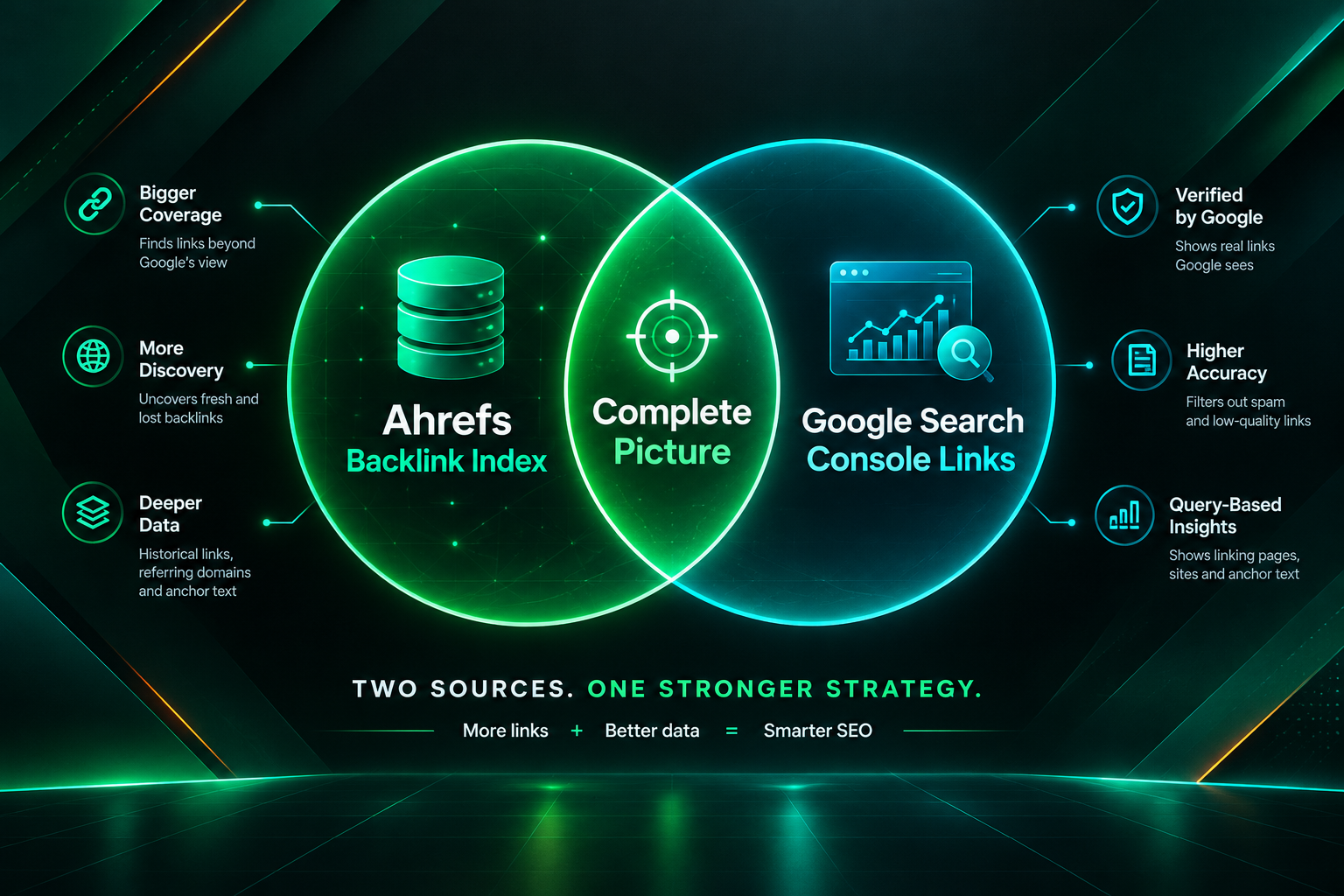
Backlink data from any third-party tool should be treated as directional intelligence rather than definitive truth. Cross-referencing Ahrefs data with Google Search Console’s Links report — which shows links Google has actually discovered and associated with your site — can provide a more complete picture of your actual backlink profile as Google sees it.
Frequently Asked Questions
Can I export backlinks for free in Ahrefs?
Ahrefs offers a limited free version called Ahrefs Webmaster Tools, which allows site owners to view and export backlink data for domains they have verified ownership of. Exporting competitor backlink data requires a paid Ahrefs subscription. The number of rows available for export varies by plan.
What is the difference between exporting Backlinks and Referring Domains?
The Backlinks export gives you one row per individual link, so a single domain linking to you ten times would appear as ten rows. The Referring Domains export gives you one row per linking domain, aggregating all links from that domain into a single entry. Use Backlinks for link-level analysis and Referring Domains for understanding the breadth of your link profile or building domain-level prospect lists.
How do I export only dofollow backlinks from Ahrefs?
In the Backlinks report, use the Link type filter and select Dofollow before clicking Export. The exported file will then contain only links with a dofollow attribute as detected by Ahrefs’ crawler at the time of its last crawl of each page.
Does exporting backlinks from Ahrefs show lost links?
Yes. In the Backlinks report, use the filter to switch from Live to Lost links. This shows links that Ahrefs previously detected but no longer finds live. You can export this filtered view to get a list of lost backlinks for reclamation analysis.
How accurate is Ahrefs backlink data compared to Google Search Console?
Ahrefs and Google Search Console use different crawling methodologies and report backlink data differently. Google Search Console shows links Google has discovered and associated with your site, while Ahrefs shows links its own crawler has found. Neither is a complete picture on its own. For your own domain, comparing both sources gives a more comprehensive view. For competitor analysis, Ahrefs is the primary option since Google Search Console only covers verified properties.
Can I use exported Ahrefs data to build an outreach list?
Exported referring domain or backlink data can serve as a starting point for outreach list building, but the raw export requires further qualification. Each domain should be reviewed for topical relevance, content quality, editorial standards, and audience fit before being added to an active outreach list. Sending outreach to unqualified lists typically produces low response rates and can affect sender reputation.
What should I do if my Ahrefs export is hitting the row limit?
If your export is capped by your plan’s row limit, apply more specific filters before exporting — for example, narrowing by DR range, link type, or date range — to segment the data into smaller, more targeted exports. Alternatively, review whether a higher-tier Ahrefs plan or API access is appropriate for your research volume.
Turning Backlink Data into Actionable Link Building Decisions
Knowing how to export backlinks from Ahrefs is a foundational skill, but the export itself is only as useful as the analysis and decisions that follow it. Raw backlink data becomes valuable when it is filtered for relevance, interpreted with an understanding of what the metrics do and do not represent, and connected to a clear goal — whether that is identifying link gaps, qualifying outreach prospects, auditing your own profile, or tracking campaign progress over time.
For businesses and agencies managing link building at scale, the volume and complexity of backlink data can make manual analysis time-consuming. Teams that outsource link building or campaign management often use Ahrefs exports as part of their briefing and reporting workflow, sharing filtered prospect lists with outreach specialists or using referring domain exports to verify that acquired links meet agreed quality criteria. In that context, understanding the data fields and their limitations helps you ask better questions of any provider you work with and evaluate their outputs more accurately.
If you are using backlink exports to inform a link building strategy and would like a second perspective on how to interpret the data or structure a campaign around it, speaking with an experienced link building specialist can help you move from data to decisions more efficiently. The export is the starting point; the strategy built around it determines the outcome.