
When a link building outreach campaign produces unusually low reply rates, the instinct is often to revise the pitch or adjust the target list. Before doing either, it is worth checking whether your emails are actually reaching recipients’ inboxes. Email headers contain a detailed record of every step a message takes from your mail client to the recipient’s server, and learning to read them can reveal authentication failures, routing problems, and spam-filter triggers that no amount of copy editing will fix.
Key Takeaways
- Email headers record the full delivery path of a message, including authentication results, server hops, and spam-filter verdicts that are invisible in the message body.
- Three authentication protocols — SPF, DKIM, and DMARC — are the most common causes of deliverability failures in outreach campaigns, and all three are readable directly from the raw header.
- A single failed authentication check can cause a message to be silently filtered or rejected before the recipient ever sees it, regardless of how well-written the pitch is.
- Reading headers is a diagnostic skill, not a fix in itself; the findings must be acted on by adjusting DNS records, sender configuration, or outreach infrastructure.
- Persistent deliverability problems that cannot be resolved through header analysis alone may indicate a deeper sender reputation issue that requires a more systematic review of the outreach setup.
What Email Headers Actually Are
Every email message consists of two parts: the body, which is the content the recipient reads, and the header, which is a block of structured metadata that mail servers write automatically as the message travels from sender to recipient. The header is hidden by default in most email clients but can be viewed in full by accessing the raw or original message view. It is not written by the sender; it is appended by each mail server the message passes through, making it a relatively reliable audit trail of the delivery process.
For outreach campaigns, the header is particularly valuable because it records outcomes that are not visible anywhere else. A message that appears to have been sent successfully from your outreach tool may have been rejected at the recipient’s gateway, quarantined by a spam filter, or flagged for a DMARC policy violation — and none of these outcomes will appear in a standard sent-mail confirmation. The header is where those outcomes are documented.
Headers are read in reverse chronological order. The most recent server action appears at the top, and the original sending event appears at the bottom. This can be counterintuitive at first, but it means that when you are diagnosing a delivery problem, you typically start at the top of the header and work downward to trace the message’s journey from the recipient’s server back to your sending infrastructure.
How to Access the Raw Header
The method for viewing a raw email header varies by client and platform. In Gmail, open the message, click the three-dot menu in the top-right corner of the message, and select Show original. This opens a new window displaying the full raw header alongside the decoded message body. In Microsoft Outlook, open the message, navigate to File, then Properties, and the header appears in the Internet headers box. In Apple Mail, open the message and select View, then Message, then All Headers. Most outreach platforms that offer a test-send or seed-account feature will allow you to retrieve the raw header from the test inbox using one of these methods.
If you are diagnosing deliverability for a campaign rather than a single message, it is useful to send a test message to a seed address — an inbox you control — and retrieve the header from there. This gives you a real-world delivery record under the same sending conditions as your live campaign, without relying on the outreach tool’s own reporting, which may not capture all filtering events.
The Key Fields to Examine
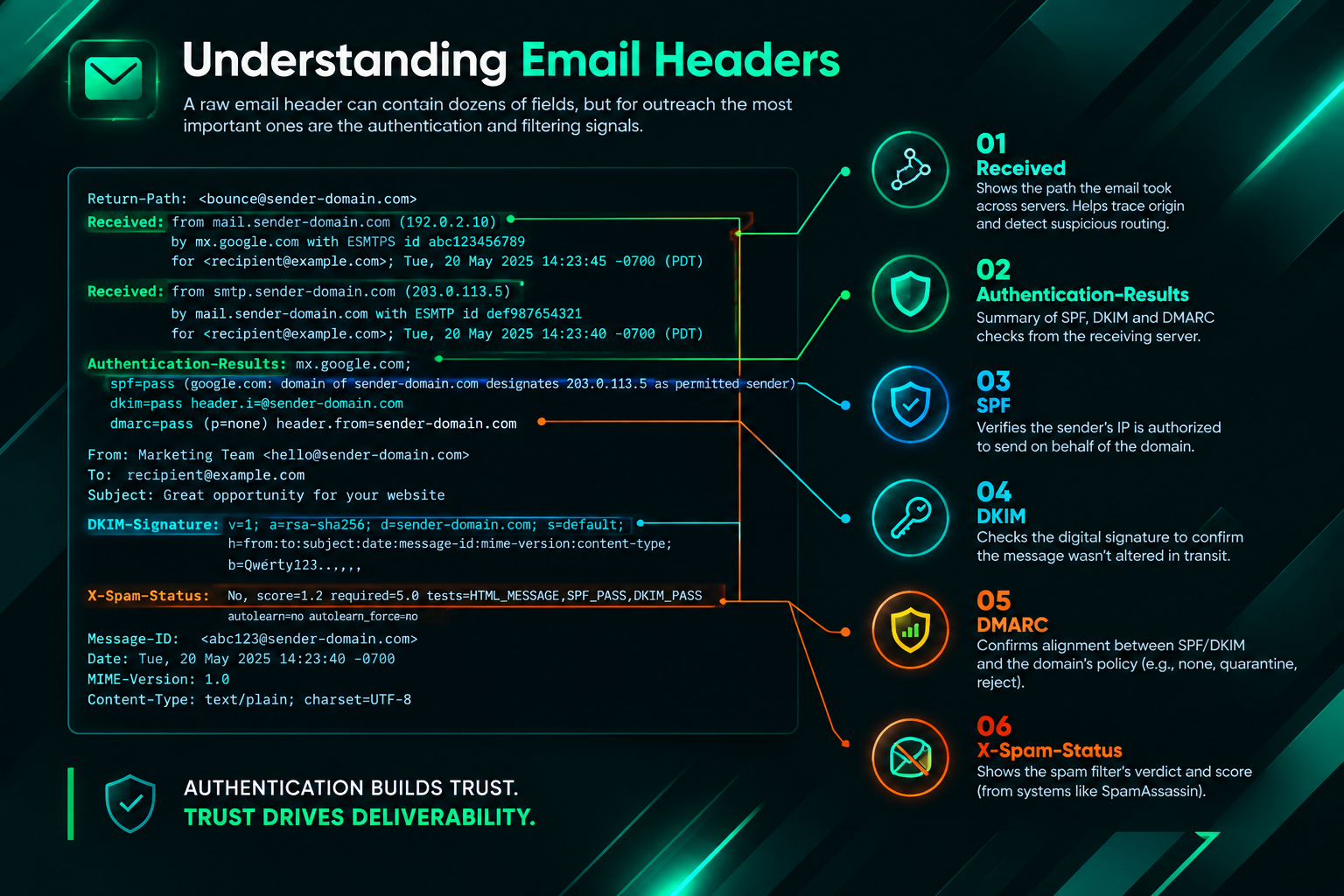
A raw email header can contain dozens of fields, but for outreach deliverability troubleshooting, a focused set of fields accounts for the majority of diagnosable problems. Understanding what each field records and what a healthy versus problematic value looks like is the practical core of header analysis.
Received Fields
The Received fields form the delivery chain. Each mail server that handles the message adds its own Received line, recording the server it received the message from, the server it is running on, the protocol used, and a timestamp. Reading these fields from bottom to top shows the complete routing path. Unusually long delays between timestamps in consecutive Received lines can indicate a server queue problem, a greylisting event, or a temporary rejection followed by a retry. A message that takes several hours to arrive when it should arrive in seconds may be experiencing greylisting, where the recipient’s server temporarily rejects unfamiliar senders and expects a retry — a behaviour that legitimate mail servers handle automatically but that some outreach tools may not manage correctly.
Authentication-Results
The Authentication-Results field is added by the recipient’s mail server and summarises the outcome of the three main email authentication checks: SPF, DKIM, and DMARC. A healthy outreach email will show a pass result for all three. A fail or softfail result for any of them is a significant deliverability risk and should be investigated immediately. This single field is often the fastest way to identify why outreach emails are being filtered or rejected.
SPF (Sender Policy Framework)
SPF is a DNS record that specifies which mail servers are authorised to send email on behalf of your domain. When the recipient’s server receives your message, it checks whether the sending server’s IP address is listed in your domain’s SPF record. If it is not, the result is an SPF fail or softfail. For outreach campaigns that use a third-party sending platform — a common setup — the platform’s sending servers must be explicitly included in your domain’s SPF record. If you recently switched outreach tools or added a new sending domain, an SPF misconfiguration is one of the first things to check. The header will show the result as spf=pass, spf=fail, or spf=softfail alongside the domain being evaluated.
DKIM (DomainKeys Identified Mail)
DKIM adds a cryptographic signature to outgoing messages, which the recipient’s server verifies against a public key published in your DNS records. A valid DKIM signature confirms that the message was sent by an authorised sender and that the message content was not altered in transit. The header will show dkim=pass or dkim=fail. A DKIM failure can occur if the private key used by your sending platform does not match the public key in your DNS, if the DNS record was recently changed, or if the message was modified after signing — for example, by a mailing list or forwarding service. For outreach campaigns, DKIM is particularly important because many spam filters weight DKIM pass results heavily when assessing sender trustworthiness.
DMARC (Domain-based Message Authentication, Reporting and Conformance)
DMARC builds on SPF and DKIM by specifying what the recipient’s server should do when either check fails. A DMARC policy can instruct the receiving server to do nothing (p=none), quarantine the message (p=quarantine), or reject it outright (p=reject). The header will show the DMARC result and the policy that was applied. If your domain has a strict DMARC policy and your outreach platform is not correctly aligned with your SPF and DKIM configuration, messages may be quarantined or rejected silently. DMARC alignment requires that the domain in the From header matches the domain validated by SPF or DKIM — a requirement that is easy to overlook when using a custom sending domain through a third-party platform.
X-Spam-Status and X-Spam-Score
Many mail servers add proprietary headers that record the outcome of their spam-filtering process. Common examples include X-Spam-Status, which shows whether the message was classified as spam, and X-Spam-Score, which shows the numerical score assigned by the filter. A high spam score does not always mean the message was blocked — the threshold varies by server configuration — but it indicates that the message triggered multiple filter rules. These headers are not standardised, so their format varies between mail server implementations, but they are usually readable as plain text and can identify specific rules that the message triggered, such as a suspicious link pattern, a flagged phrase in the subject line, or a sending IP with a poor reputation.
Message-ID and From Headers
The Message-ID field is a unique identifier assigned to each message, typically by the sending server. An unusual or malformed Message-ID — for example, one that does not contain a valid domain — can trigger spam filters. The From header records the address displayed to the recipient. If the From domain does not match the domain used for DKIM signing or SPF validation, DMARC alignment will fail. This mismatch is a common problem when outreach is sent from a custom domain through a platform that uses its own signing infrastructure.
Common Outreach Deliverability Problems Revealed by Headers
Header analysis tends to surface a predictable set of problems in outreach campaigns. Recognising these patterns makes diagnosis faster and reduces the time spent on ineffective fixes.
Third-Party Sending Platform Not Included in SPF
This is one of the most frequent causes of SPF failures in outreach campaigns. When a new sending tool is connected to a custom domain, the tool’s sending servers must be added to the domain’s SPF record. If this step is missed or incomplete, every message sent through the platform will produce an SPF fail result. The fix requires updating the DNS SPF record to include the platform’s authorised IP ranges or include mechanism, then waiting for DNS propagation before testing again.
DKIM Key Mismatch After a Platform Change
Switching outreach platforms without updating the DKIM DNS record for the new platform’s signing key will cause DKIM failures. The header will show dkim=fail with a note about the selector — the label used to identify which DKIM key was used. Checking the selector in the header against the selectors published in your DNS records will confirm whether the key is missing or incorrect.
Sending IP on a Blocklist
If the sending IP address used by your outreach platform appears on a widely used blocklist, many recipient servers will reject or heavily filter your messages regardless of authentication results. The X-Spam headers may reference a specific blocklist by name. You can verify this independently by looking up the sending IP — visible in the Received fields — against public blocklist lookup tools. If the IP is shared infrastructure used by the outreach platform, the platform’s support team should be notified. If it is a dedicated IP, the blocklist’s removal process will need to be followed.
Greylisting Causing Delayed Delivery
Greylisting is a spam-reduction technique where the recipient’s server temporarily rejects messages from unfamiliar senders with a 451 or similar temporary error code, expecting a legitimate mail server to retry. The Received timestamps in the header will show a gap of several minutes to an hour between the initial send and the eventual delivery. This is not a failure in itself — most legitimate mail servers retry automatically — but it can indicate that your sending IP is not yet recognised as a trusted sender by the recipient’s infrastructure, which may affect deliverability at scale.
Content-Triggered Spam Rules
X-Spam headers that list specific rule names can identify content patterns that are triggering filters. Common triggers in outreach emails include excessive use of links, certain phrases associated with commercial email, HTML formatting inconsistencies, or a mismatch between the plain-text and HTML versions of the message. These findings point toward message content or formatting as the deliverability problem rather than authentication or infrastructure.
Practical Steps for Diagnosing an Outreach Deliverability Problem
A structured approach to header analysis reduces the time spent on guesswork and makes it easier to identify whether the problem is in authentication configuration, sending infrastructure, or message content.
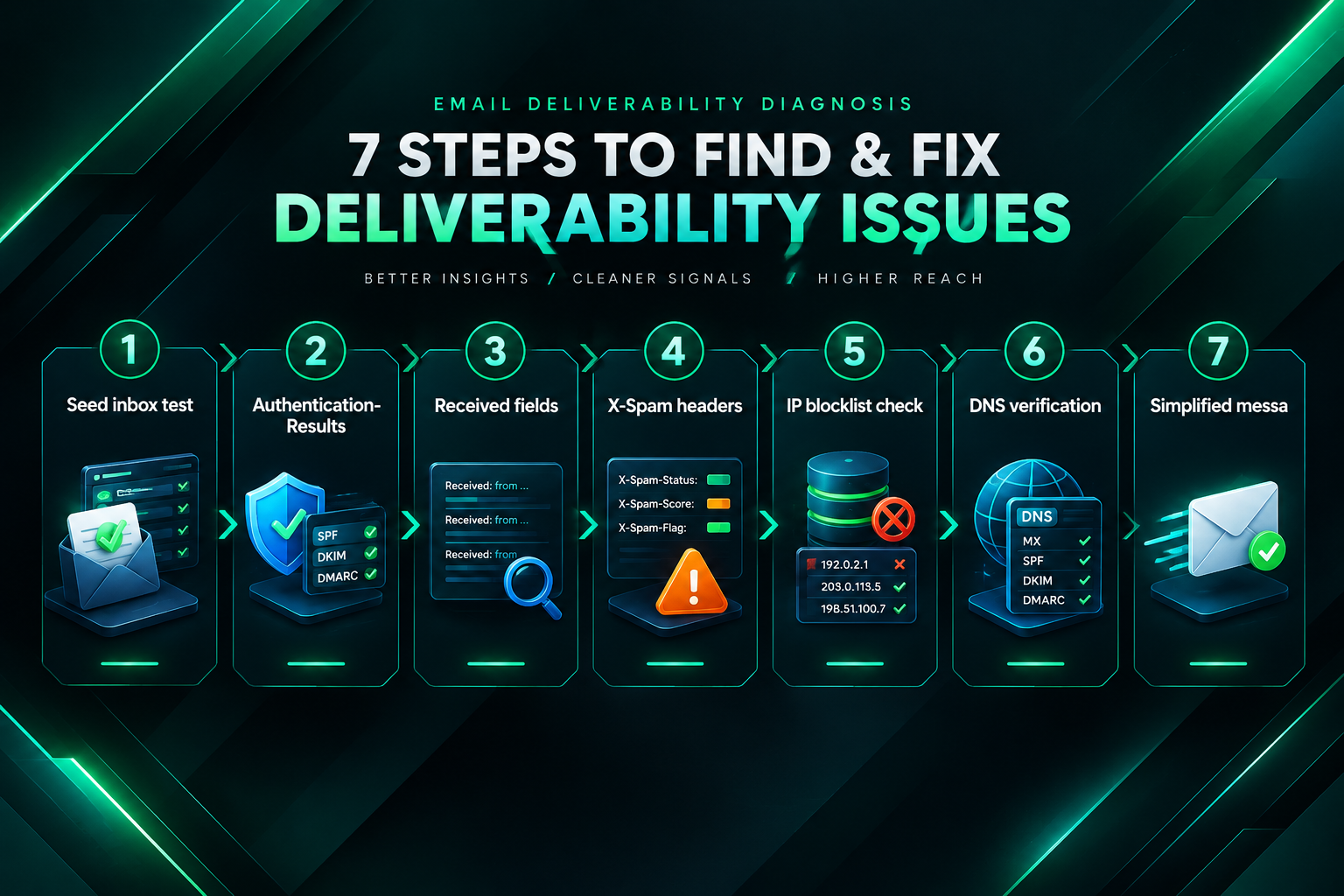
- Send a test message to a seed inbox using the same sending domain, platform, and message template as your live campaign. Retrieve the raw header from the seed inbox.
- Check the Authentication-Results field first. Confirm whether SPF, DKIM, and DMARC all show pass. Any failure here is the highest priority to resolve before investigating other factors.
- Read the Received fields from bottom to top to trace the delivery path and check for unusual delays or unexpected routing through unfamiliar servers.
- Review X-Spam headers if present. Note the score and any specific rule names that were triggered. A score close to or above the filtering threshold warrants attention even if the message was not blocked.
- Check the sending IP from the Received fields against public blocklist lookup tools to rule out a reputation problem at the IP level.
- Verify DNS records for SPF, DKIM, and DMARC using a DNS lookup tool, and compare them against the configuration required by your outreach platform. Confirm that all sending servers used by the platform are covered by your SPF record and that the correct DKIM selectors are published.
- Test with a simplified message — plain text, minimal links, no HTML formatting — to determine whether content or formatting is contributing to a high spam score.
Limitations of Header Analysis
Email header analysis is a useful diagnostic tool, but it has meaningful limitations that are worth understanding before drawing conclusions from the findings.
Headers only record what happened during delivery of a specific message to a specific recipient’s server. They do not tell you what happened to messages that were silently discarded before generating a header, and they do not provide aggregate data across a campaign. A single test message may pass all authentication checks and still have a low reply rate if the campaign is targeting inboxes with aggressive filtering configurations that are not reflected in the test seed’s headers.
Spam filter rules and blocklist criteria change frequently, and a sending IP or domain that passes all checks today may encounter problems after a change in the recipient’s filtering configuration or after the sending volume increases. Header analysis is a point-in-time diagnostic, not a continuous monitoring solution.
Some deliverability problems are not visible in headers at all. Sender reputation at the domain level, engagement signals such as open and reply rates, and the history of the sending domain are factors that influence deliverability but are not recorded in individual message headers. Addressing these factors requires a broader review of the outreach infrastructure and sending practices rather than header analysis alone.
When Header Analysis Is Not Enough
If header analysis confirms that authentication is correctly configured, the sending IP is not blocklisted, and spam scores are within acceptable ranges, but reply rates remain low, the deliverability problem may be at a level that headers cannot diagnose. Possible causes include domain-level sender reputation damage from previous high-volume sending, a sending domain that is too new to be trusted by recipient servers, or engagement-based filtering that deprioritises messages from senders with historically low open rates.

In these situations, a more comprehensive review of the outreach setup is appropriate. This might include evaluating the age and history of the sending domain, reviewing the volume and frequency of outreach sends, assessing whether the sending domain has been used for any practices that could have damaged its reputation, and considering whether a domain warm-up process is needed before resuming high-volume outreach. Some outreach campaigns benefit from using dedicated sending domains that are separate from the primary business domain, so that deliverability issues in the campaign do not affect transactional or business email sent from the main domain.
For link building campaigns specifically, persistent deliverability problems can significantly reduce the efficiency of the outreach process. If a meaningful proportion of outreach emails are not reaching inboxes, the effective reach of the campaign is lower than the send volume suggests, and the cost per acquired link increases accordingly. Identifying and resolving deliverability issues before scaling a campaign is generally more efficient than attempting to compensate for poor inbox placement by increasing send volume.
Frequently Asked Questions
How do I know if my outreach emails are going to spam?
The most reliable method is to send a test message to a seed inbox you control and retrieve the raw header. Check the Authentication-Results field for SPF, DKIM, and DMARC pass results, and review any X-Spam headers for the spam score and triggered rules. You can also use third-party inbox placement testing tools that send your message to a panel of test addresses across multiple email providers and report where the message landed.
What does SPF softfail mean in an email header?
An SPF softfail (~all) means the sending server is not explicitly authorised in the domain’s SPF record, but the domain owner has indicated that messages from unauthorised servers should be accepted with caution rather than rejected outright. Many spam filters treat a softfail as a negative signal and may increase the message’s spam score. For outreach campaigns, a softfail should be resolved by updating the SPF record to explicitly include all authorised sending servers.
Can a message pass SPF and DKIM but still fail DMARC?
Yes. DMARC requires that the domain authenticated by SPF or DKIM is aligned with the domain in the From header. If your outreach platform sends from a subdomain or a different domain than the one in the From address, DMARC alignment may fail even if SPF and DKIM individually pass. This is a common configuration issue when using third-party outreach platforms with custom sending domains.
How long does it take for DNS changes to fix a deliverability problem?
DNS propagation typically takes between a few minutes and 48 hours, depending on the TTL (time to live) settings of the existing records and the caching behaviour of DNS resolvers. After making changes to SPF, DKIM, or DMARC records, it is advisable to wait for propagation to complete before sending test messages to verify the fix. DNS lookup tools can confirm whether the updated records are visible before testing.
Should I use a separate domain for outreach campaigns?
Using a dedicated sending domain that is separate from your primary business domain is a common practice in outreach campaigns. It protects the primary domain’s sender reputation if the outreach domain encounters deliverability problems, and it allows the outreach domain to be warmed up independently. However, a dedicated outreach domain still requires correct SPF, DKIM, and DMARC configuration, and it needs to be warmed up gradually before being used for high-volume sending.
What is email greylisting and does it affect outreach campaigns?
Greylisting is a technique used by some mail servers to temporarily reject messages from unfamiliar senders, expecting a legitimate mail server to retry after a short delay. It can cause outreach emails to arrive later than expected but does not usually prevent delivery if the sending platform retries correctly. Repeated greylisting from the same recipient domain may indicate that the sending IP is not yet recognised as a trusted sender, which can be addressed through gradual volume increases and consistent sending patterns.
Can email header analysis tell me why a specific publisher never replied?
Not directly. A header from a test message sent to a seed inbox can tell you whether your emails are being delivered correctly under your current sending configuration, but it cannot tell you what happened to a specific message sent to a specific publisher. If you have access to a delivery receipt or bounce notification for that message, it may contain useful information. Otherwise, a follow-up sent from a different address or through a different channel is often the most practical way to determine whether the original message was received.
Fixing Delivery Problems Before Scaling Outreach
Email header analysis is most valuable when it is used proactively — before a campaign is scaled — rather than reactively after reply rates have already declined. Running a structured header check at the start of a new campaign, after switching outreach platforms, after adding a new sending domain, or after any change to DNS configuration can catch authentication misconfigurations before they affect a large number of outreach messages.
For link building campaigns, where each outreach contact represents a potential editorial relationship and a genuine opportunity to earn a relevant backlink, inbox placement matters in a way that is easy to underestimate. A campaign that achieves strong inbox placement with a well-targeted prospect list will generally produce better results than a higher-volume campaign where a significant proportion of messages are filtered before they are read. Resolving deliverability issues at the infrastructure level — correct SPF, DKIM, and DMARC configuration, a clean sending IP, and a properly warmed sending domain — creates a more reliable foundation for outreach than attempting to compensate for poor delivery through volume alone.
If your outreach deliverability issues persist after addressing the authentication and infrastructure factors identified through header analysis, it may be worth consulting with an email deliverability specialist or reviewing the outreach setup with your link building provider. Some deliverability problems require changes to sending infrastructure, domain configuration, or outreach practices that go beyond what header analysis alone can resolve, and addressing them systematically is generally more effective than continuing to send at scale while the underlying problem remains unresolved.