
A website migration—whether you are changing your domain, restructuring URLs, moving to HTTPS, or rebuilding your site architecture—carries a real risk of losing the backlink equity you have built over months or years. Backlinks pointing to URLs that no longer exist or that redirect incorrectly can lose much of their value, and recovering that equity after the fact is significantly harder than protecting it before the migration begins. This guide explains the practical steps involved in preserving backlinks during a website migration, what can realistically go wrong, and how to approach link reclamation when losses do occur.
Key Takeaways
- A thorough backlink audit before migration is the single most important step for protecting link equity; you cannot redirect what you have not mapped.
- 301 redirects from old URLs to their closest equivalent new URLs are the standard mechanism for passing link equity, but redirect chains and loops reduce that value and should be avoided.
- Not all backlinks carry equal weight; prioritise redirects and outreach for URLs with the strongest and most relevant referring domains.
- Post-migration monitoring through Google Search Console and crawl tools is essential for catching broken links, missed redirects, and indexing problems early.
- Some link loss is common after migrations; a structured reclamation outreach campaign can recover a meaningful portion of affected links, but results depend on publisher responsiveness and the age of the placements.
Why Backlinks Are at Risk During a Migration
When a URL changes, any backlink pointing to the old address effectively points to a dead or redirected destination. If no redirect is in place, the linking page delivers a 404 error, and the link equity associated with that placement is not passed to the new URL. Even when a redirect exists, a poorly configured chain of redirects—where the old URL redirects to an intermediate URL before reaching the final destination—can dilute the equity transferred. Search engines such as Google have confirmed that 301 redirects pass the majority of link equity, but the precise amount is not publicly quantified, and the effect of redirect chains is generally understood to be cumulative signal loss rather than a clean transfer.
Domain migrations introduce additional complexity. When an entire site moves to a new domain, every referring domain that has linked to any page on the old domain needs to be accounted for. A single overlooked subdirectory or a batch of legacy URLs that were never included in the redirect map can result in dozens or hundreds of backlinks delivering no equity to the new site. The risk is compounded when migrations are rushed, when the old site is taken offline before redirects are fully tested, or when the migration involves simultaneous changes to URL structure, domain, and CMS platform at the same time.
Step One: Conduct a Comprehensive Backlink Audit Before You Migrate
The foundation of any backlink preservation strategy is a complete picture of your existing link profile before a single URL changes. Export your backlink data from at least two sources—Google Search Console is the most authoritative for links Google has actually crawled, while tools such as Ahrefs, Semrush, or Majestic provide broader coverage of referring domains and anchor text distribution. Cross-referencing multiple data sources reduces the risk of missing significant placements that one tool may not have indexed.
Once you have your backlink data, identify which URLs on your current site are receiving external links. This is your priority list for redirect mapping. Not every URL will have backlinks, and not every backlink carries the same weight. Focus your most careful attention on pages with links from high-authority, topically relevant referring domains, as these are the placements most worth protecting. Pages with links from a large number of distinct referring domains also warrant careful handling, since losing equity from multiple sources simultaneously can have a more noticeable effect on rankings than losing a single low-quality link.
Document the full list of linked URLs in a spreadsheet alongside the number of referring domains, the estimated authority of those domains, and the anchor text used. This document becomes your redirect mapping reference and your post-migration monitoring checklist.
Step Two: Build a Complete Redirect Map
A redirect map is a structured document that pairs every old URL carrying backlinks with its correct new destination URL. For a straightforward URL restructure, the mapping is usually one-to-one: the old product page maps to the new product page at its updated address. For more complex migrations—such as consolidating multiple pages into one, splitting a page into several, or moving content to a new domain—the mapping requires editorial judgment about which new URL best represents the intent and content of the old one.
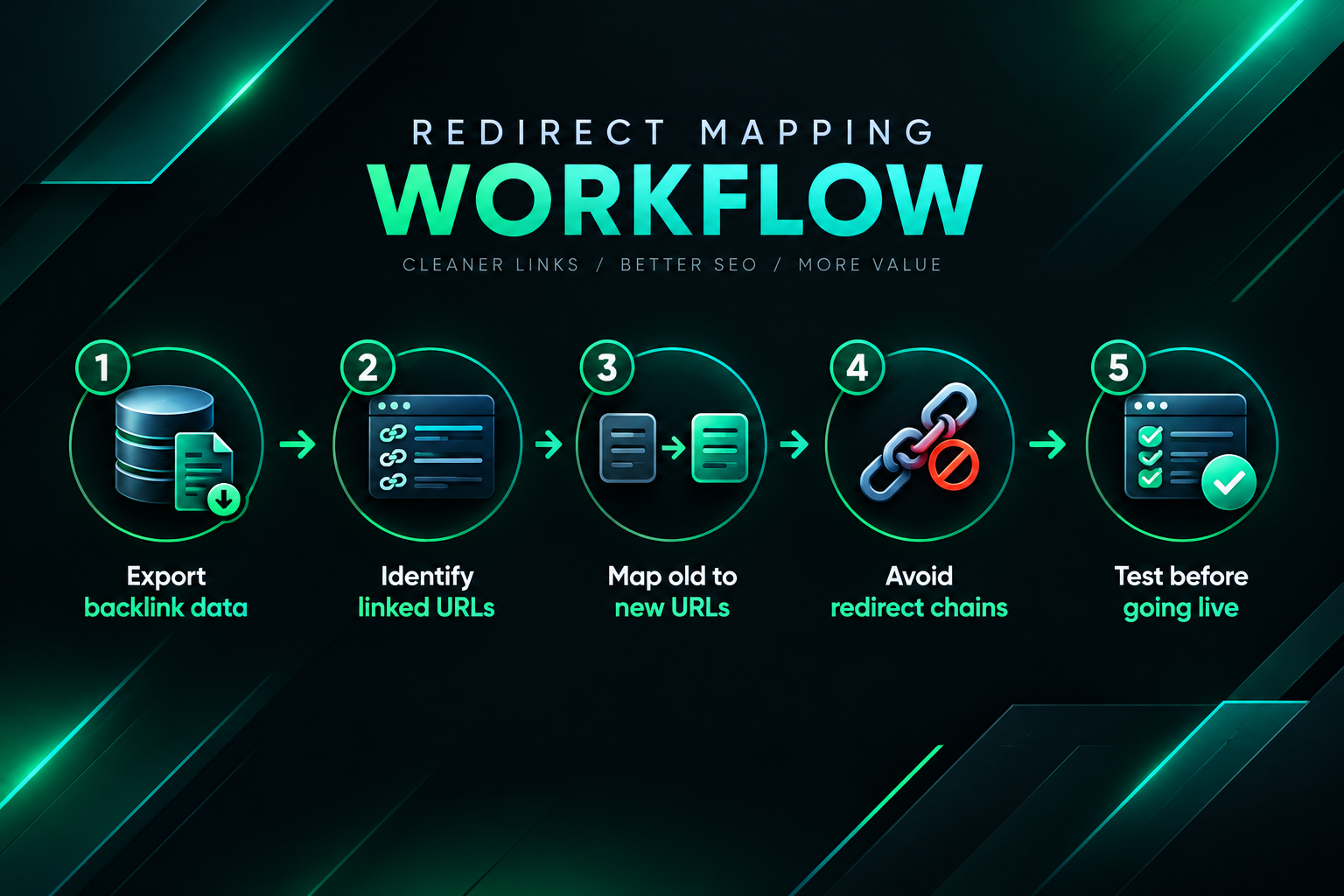
Several principles apply when building a redirect map for backlink preservation. First, redirect to the most relevant equivalent page, not simply to the homepage. A backlink pointing to a specific product or article carries topical relevance signals; redirecting it to a generic homepage discards that relevance context. Second, avoid redirect chains wherever possible. If an old URL already had a redirect in place from a previous migration, update it to point directly to the new final destination rather than adding another hop. Third, test every redirect before the migration goes live, using a staging environment or a crawl tool that can follow redirect paths and flag chains, loops, and incorrect destination URLs.
For large sites with thousands of URLs, automated pattern-based redirects—where URL structures follow a predictable rule—can handle the bulk of the mapping. However, the pages with the most valuable backlinks should always be reviewed manually to confirm the destination is genuinely the best match.
Step Three: Implement and Test Redirects Before Going Live
Redirect implementation varies by server environment and CMS. Apache servers typically use .htaccess rules, Nginx uses server block configuration, and most modern CMS platforms including WordPress offer redirect management through plugins or built-in tools. Regardless of the method, the implementation should be tested thoroughly before the old URLs are decommissioned.
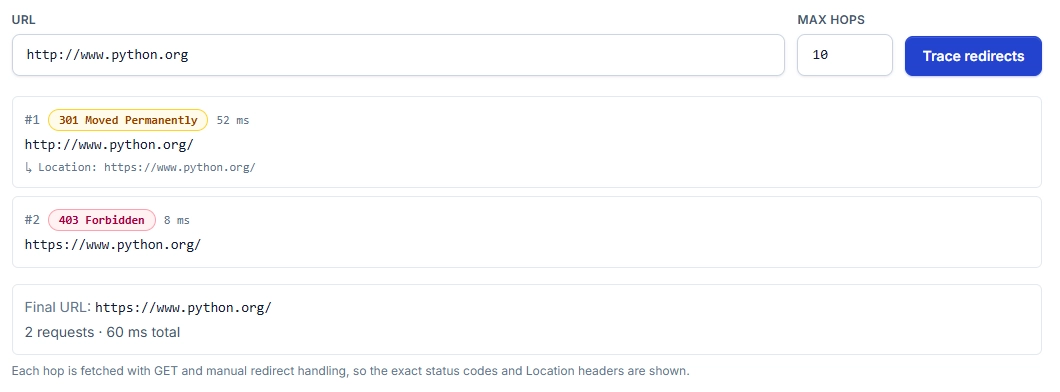
Use a crawl tool—Screaming Frog SEO Spider is widely used for this purpose—to crawl the list of old URLs and verify that each one returns a 301 status code and resolves to the correct new destination in a single hop. Flag any URLs returning 302 (temporary) redirects, as these are generally understood to pass less equity than permanent 301 redirects. Flag any chains, loops, or destinations returning error codes. Resolve all issues before the migration goes live.
It is also worth testing the redirects from the perspective of a search engine crawler by submitting a small batch of old URLs to Google Search Console’s URL Inspection tool after the migration, to confirm that Google is following the redirects and indexing the new destinations as expected. This step is particularly important for domain migrations, where Google needs to re-crawl and re-index the new domain before rankings stabilise.
Step Four: Update Internal Links and Canonical Tags
Backlink preservation is not only about external links. Internal links pointing to old URLs create unnecessary redirect hops that can slow crawling and dilute internal equity distribution. After implementing external redirects, update all internal links across the site to point directly to the new URLs. This reduces crawl budget waste and ensures that internal equity flows cleanly through the new site structure.
Canonical tags also require attention. If the old site used canonical tags to consolidate duplicate content, verify that the new URLs carry updated canonical references. A canonical tag pointing to an old URL that now redirects creates a confusing signal for search engines and may delay the consolidation of equity to the new destination. Similarly, XML sitemaps should be updated to reflect only the new URLs and submitted to Google Search Console after the migration.
Step Five: Monitor for Broken Links and Missed Redirects After Migration
Even a well-planned migration will occasionally produce missed redirects, particularly for URLs that were not captured in the pre-migration audit. Post-migration monitoring is essential for catching these gaps before they result in sustained link equity loss.
Set up regular crawls of the new site using a tool such as Screaming Frog or Sitebulb, and monitor Google Search Console’s Coverage and Pages reports for 404 errors. Any 404 that appears on a URL that previously had backlinks should be treated as a priority: implement a redirect to the appropriate new destination as quickly as possible. The longer a linked URL returns a 404, the more likely it is that search engines will stop crawling it and that the associated equity will decay.
Google Search Console’s Links report can also be used post-migration to verify that links are being attributed to the new URLs rather than the old ones. In the weeks following a domain migration, it is normal for the Links report to show a mix of old and new URLs as Google re-crawls the web; this should gradually resolve as crawlers follow the redirects and update their index.
Handling Link Equity Loss: When Redirects Are Not Enough
Redirects handle the technical side of backlink preservation, but they do not recover links that were lost before the migration was completed, links pointing to URLs that were missed in the audit, or links on pages where the publisher has since removed the placement. For these situations, a structured link reclamation outreach campaign may be appropriate.
Link reclamation involves identifying backlinks that are currently pointing to broken or redirected URLs and contacting the publishers of those pages to request that they update the link to point directly to the correct new URL. A direct link to the new destination is generally preferable to a redirect, as it removes the redirect hop and provides a cleaner equity signal. Publishers are often willing to make this update, particularly if the request is polite, specific, and accompanied by a clear explanation of the correct new URL.
Prioritise reclamation outreach for links from referring domains with strong topical relevance and authority, as these are the placements most likely to have a measurable effect on rankings if recovered. Links from low-quality or irrelevant domains are generally not worth the outreach effort. Keep a record of outreach attempts and responses, and follow up once if you do not receive a reply within two to three weeks.
It is worth setting realistic expectations for reclamation campaigns. Publisher responsiveness varies considerably, and some placements—particularly those on sites that are no longer actively maintained—may not be recoverable through outreach. A well-executed reclamation campaign can recover a meaningful proportion of affected links, but it is unlikely to recover all of them, and the timeline for seeing any ranking effect from recovered links depends on how quickly search engines re-crawl the updated pages.
Domain Migrations: Additional Considerations
A full domain migration—moving from one domain to another—requires all of the steps above plus several additional measures. Google provides a Change of Address tool in Google Search Console, which signals to Google that the site has moved and can help accelerate the re-crawling and re-indexing of the new domain. This tool should be used after the redirects are in place and the new domain is verified in Search Console.
Keep the old domain active with redirects in place for as long as practically possible—ideally for at least twelve months after the migration. Search engines and third-party tools take time to update their indexes, and referring domains may not update their links immediately. Decommissioning the old domain too early risks losing equity from links that have not yet been re-crawled and followed to the new destination.
Brand mentions and unlinked citations that reference the old domain name may also need attention after a domain migration. While these do not carry direct link equity, updating them to reference the new domain can support brand consistency and may contribute to referral traffic over time. Tools such as Ahrefs Content Explorer or Google Alerts can help identify mentions of the old domain that could be updated.
HTTPS Migrations and Protocol Changes
Moving from HTTP to HTTPS is a common migration type that is often underestimated in terms of its backlink implications. Backlinks pointing to HTTP URLs do not automatically benefit the HTTPS versions of those pages unless redirects are correctly configured. A site that has implemented HTTPS but left HTTP URLs accessible without redirects may find that its backlink equity is split between the two protocol versions, which can reduce the consolidated ranking signal for the HTTPS pages.
Ensure that all HTTP URLs redirect to their HTTPS equivalents with 301 redirects, and that the HTTPS versions are the canonical URLs referenced in sitemaps and internal links. Check that mixed content issues—where HTTPS pages load HTTP resources—are resolved, as these can affect how browsers and crawlers treat the page. After the migration, verify in Google Search Console that the HTTPS property is receiving the expected crawl activity and that the HTTP property is no longer being indexed.
What to Do When Significant Link Equity Has Already Been Lost
If a migration has already taken place without adequate backlink preservation measures, the situation is recoverable to a degree, but the process requires more effort than proactive protection would have. Begin with a gap analysis: compare the backlink profile of the new site against any historical data available for the old site, and identify referring domains that are no longer linking to the new domain. Tools such as Ahrefs allow you to compare referring domain counts over time and filter for lost links.
For lost links where the old URL still exists and returns a 404, implement a redirect immediately. For lost links where the old URL was on a domain that has since been decommissioned, outreach to the publisher is the only option. For links that were lost because the publisher removed the placement independently of the migration, outreach may or may not be productive depending on the reason for removal.
In cases where a significant volume of link equity has been lost and cannot be recovered through redirects or reclamation, a new link acquisition campaign targeting the same or equivalent pages on the new site may be appropriate. This is a longer-term investment and should be considered alongside a broader assessment of the site’s current technical SEO condition, content quality, and competitive landscape. Link building alone is unlikely to fully compensate for a poorly executed migration if other technical issues remain unresolved.
Frequently Asked Questions
How long do 301 redirects need to stay in place after a migration?
There is no universally agreed minimum, but keeping 301 redirects active for at least twelve months after a migration is a widely recommended practice. For domain migrations, a longer period is advisable because search engines and third-party sites take time to update their records. Removing redirects too early risks losing equity from links that have not yet been re-crawled.
Does a 301 redirect pass 100% of link equity to the new URL?
Google has stated that 301 redirects pass the majority of link equity, but the precise amount is not publicly confirmed. The general understanding among SEO practitioners is that some signal loss may occur, and that redirect chains—where a URL redirects through one or more intermediate URLs before reaching the final destination—can result in additional cumulative loss. Direct links to the new URL are preferable where they can be obtained through reclamation outreach.
Should I notify publishers of my new URLs after a migration?
Proactive outreach to publishers of your most valuable backlinks is worth considering, particularly for a domain migration. Asking publishers to update their links to point directly to the new URL removes the redirect hop and provides a cleaner signal. This is especially useful for high-authority referring domains where the placement is editorially maintained and the publisher is likely to be responsive.
What tools are most useful for backlink preservation during a migration?
Google Search Console is the most authoritative source for links Google has crawled and for monitoring post-migration indexing. Ahrefs, Semrush, and Majestic provide broader backlink data and historical comparisons. Screaming Frog SEO Spider is widely used for crawling redirect chains and identifying 404 errors. Using a combination of these tools gives the most complete picture of your link profile and migration health.
Can I run a link reclamation campaign at the same time as a new link building campaign?
Yes, and in many cases it makes sense to do so. Reclamation outreach targets existing placements that have already demonstrated editorial willingness to link to your site, which can make it more efficient than cold outreach for new placements. Running both in parallel allows you to recover lost equity while also building new referring domains, which may be particularly important if the migration resulted in a measurable drop in organic visibility.
How soon after a migration should I expect rankings to stabilise?
Rankings often fluctuate in the weeks immediately following a migration as search engines re-crawl and re-index the new URLs. For straightforward URL restructures with well-implemented redirects, stabilisation may occur within four to eight weeks. Domain migrations typically take longer—sometimes three to six months—before rankings fully reflect the new domain’s equity. Results vary depending on the size of the site, the quality of the redirect implementation, and how quickly Google re-crawls the affected pages.
Planning Your Migration with Backlink Equity in Mind
Backlink preservation during a website migration is not a single task but a structured process that spans the period before, during, and after the migration itself. The most effective approach begins with a thorough audit of your existing link profile, continues with careful redirect mapping and implementation, and extends into post-migration monitoring and reclamation outreach. Each stage reduces the risk of equity loss and gives you the information needed to respond quickly when gaps appear.
The effort required scales with the size and complexity of the migration and the value of the backlink profile being protected. For sites with a substantial number of referring domains or with rankings that depend heavily on link equity, investing in a careful migration process is likely to be significantly less costly than attempting to rebuild lost equity through new link acquisition after the fact. If your team lacks the bandwidth to manage both the technical migration and the backlink audit and outreach process simultaneously, working with an experienced SEO or link building partner to handle the link preservation and reclamation components may be worth considering as part of your overall migration plan.