
A catch-all email address is a mailbox configured to receive every message sent to a domain, regardless of whether the specific address in the “To” field actually exists. If someone sends an email to a misspelled or non-existent address at your domain, a catch-all setup ensures that message still arrives somewhere rather than bouncing back to the sender. For anyone running email outreach campaigns — including link building and guest post prospecting — understanding how catch-all addresses work can meaningfully affect deliverability rates, bounce management, and the quality of your contact lists.
Key Takeaways
- A catch-all email address receives all messages sent to any address at a domain, including misspelled or non-existent ones, preventing hard bounces at the server level.
- Catch-all domains are common among small businesses and custom-domain users, which means they appear frequently in outreach prospect lists.
- Email verification tools cannot confirm whether a catch-all address belongs to a real, active inbox — they can only identify that the domain accepts all mail.
- Sending to unverified catch-all addresses at scale increases the risk of soft bounces, spam complaints, and sender reputation damage.
- A measured, segmented approach to catch-all addresses — rather than blanket inclusion or exclusion — tends to produce better outreach outcomes.
How a Catch-All Email Address Works
When an email server receives an incoming message, it checks whether the recipient address exists in its list of configured mailboxes. On a standard server, if the address does not exist, the server returns a 550 error and the message bounces. A catch-all configuration changes this behaviour: the server accepts every incoming message for the domain and routes it to a designated fallback mailbox, regardless of what appears before the “@” symbol.
For example, if a company’s domain is example.com and they have configured a catch-all, messages sent to [email protected], [email protected], or even [email protected] will all arrive in the same designated inbox. The domain owner can then review, filter, or discard messages as they see fit. Some organisations use this setup to capture typos in their own published addresses, to consolidate departmental mail, or to ensure no customer enquiry is lost due to a formatting error.
From a technical standpoint, the catch-all rule is typically set at the DNS or mail server level. Hosting control panels such as cPanel refer to this as a “default address” or “catch-all address”. The configuration itself is straightforward, which is why it is common across small businesses, freelancers, and organisations that manage their own domain email rather than relying on a large hosted provider.
Why Catch-All Addresses Appear in Outreach Lists
Catch-all domains are disproportionately common among the types of websites that link builders and outreach specialists contact most frequently: independent publishers, niche bloggers, small agency sites, and local business owners. These organisations often use a single custom domain for all communication and may not have configured individual mailboxes for every role or department. Instead, a single catch-all inbox handles everything from sales enquiries to editorial pitches.
When you build a prospect list for a guest posting campaign or a manual link outreach effort, a significant proportion of the email addresses you find — whether through a tool like Hunter.io, Snov.io, or manual research — will belong to catch-all domains. The challenge is that standard email verification cannot tell you whether a specific address at a catch-all domain is actively monitored. The verification tool sends a test connection to the mail server, the server accepts it (because it accepts everything), and the tool returns a “catch-all” or “accept-all” status rather than a clean “valid” or “invalid” result.
This ambiguity is the core practical problem with catch-all addresses in outreach. An address flagged as catch-all might route to an actively read inbox, or it might route to an unmonitored folder that is never checked. There is no reliable way to determine which scenario applies without actually sending a message and observing the response.
The Difference Between Catch-All, Valid, and Invalid Email Addresses
Email verification services typically classify addresses into three broad categories, and understanding the distinction helps when deciding how to handle your prospect list.
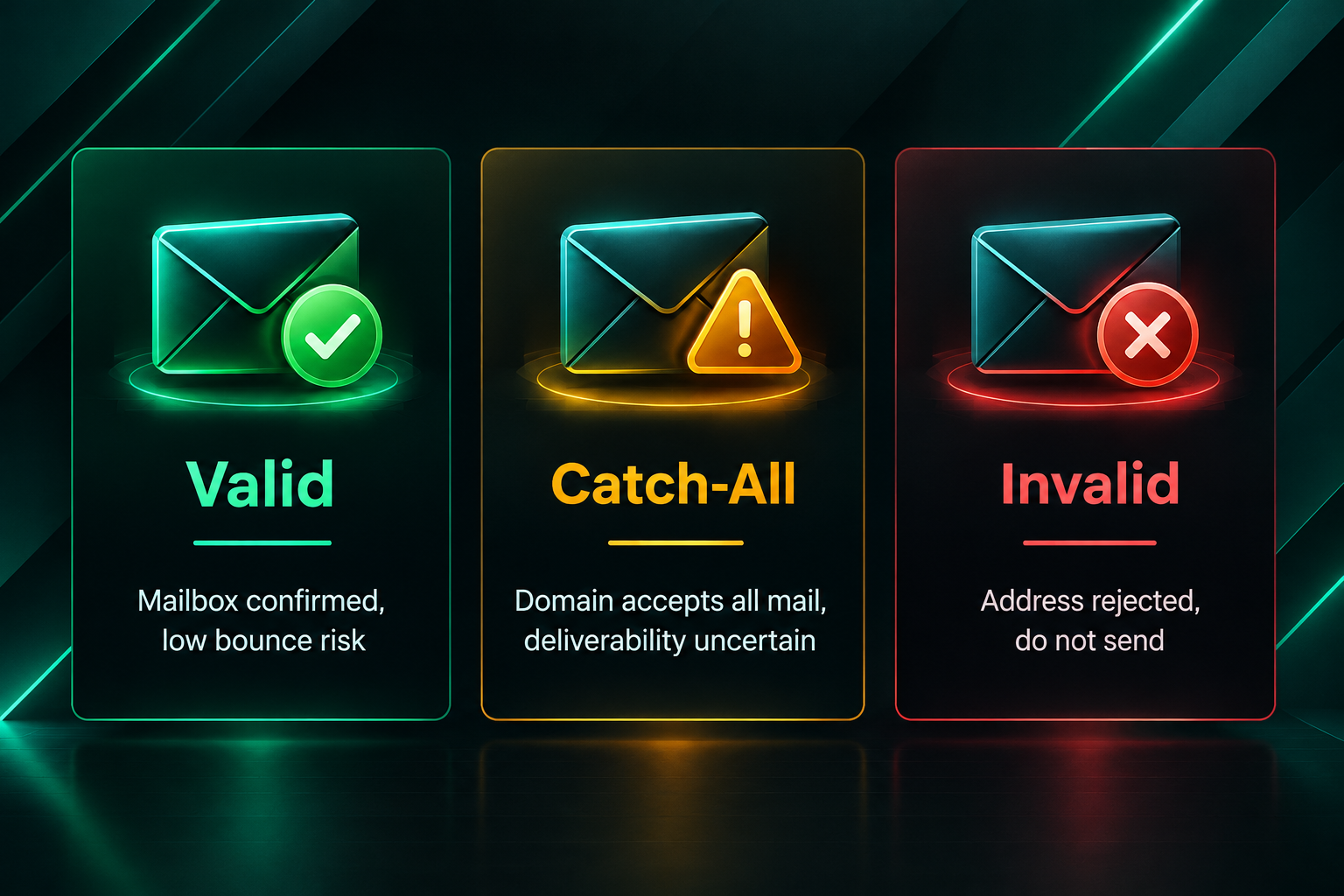
- Valid (deliverable): The mail server confirmed that the specific mailbox exists and is accepting messages. These addresses carry the lowest bounce risk.
- Invalid (undeliverable): The mail server returned a definitive rejection, indicating the address does not exist. Sending to these addresses produces hard bounces and should be avoided.
- Catch-all (accept-all): The domain accepts all incoming mail regardless of the local part. The verification tool cannot confirm whether the specific address is real or monitored. These addresses carry uncertain deliverability.
Some verification platforms further subdivide catch-all results into “risky” or “unknown” categories, but the underlying limitation remains the same: the tool cannot see inside the destination mailbox. A catch-all address is not the same as a confirmed valid address, and treating it as such will inflate your apparent list quality while potentially damaging your sender reputation when messages go undelivered or unread.
Risks of Sending to Catch-All Addresses at Scale
For outreach campaigns — whether for link building, digital PR, or general business development — the risks associated with catch-all addresses are practical rather than theoretical.
Soft bounces and sender reputation: Even though a catch-all domain accepts the message at the server level, the message may still bounce softly if the specific mailbox does not exist within the internal mail system. Repeated soft bounces from a sending domain signal poor list hygiene to receiving mail servers and inbox providers, which can reduce deliverability for your entire outreach domain over time.
Spam complaints: Messages that arrive in an unmonitored catch-all inbox may be bulk-deleted or marked as spam by an administrator who reviews the folder periodically. Spam complaints, even at low rates, can damage the reputation of your sending domain and IP address.
Wasted outreach effort: A personalised, well-researched outreach email takes time to write. If it lands in a catch-all inbox that nobody reads, the effort is lost. At scale, this represents a meaningful reduction in campaign efficiency.
No engagement signal: Catch-all addresses that are not actively monitored will never open, click, or reply. If your outreach tool tracks engagement metrics, a high proportion of catch-all addresses will suppress your open and reply rates, making it harder to assess campaign performance accurately.
How to Handle Catch-All Addresses in an Outreach Campaign
The practical question for anyone running a link building or guest posting campaign is not whether to include catch-all addresses, but how to manage them intelligently. A blanket exclusion of all catch-all addresses can remove a large proportion of otherwise legitimate prospects, particularly in niches where small independent publishers are common. A blanket inclusion without any additional filtering increases bounce risk and wastes outreach effort.
A segmented approach tends to work better in practice. Consider the following steps when building and cleaning your prospect list:
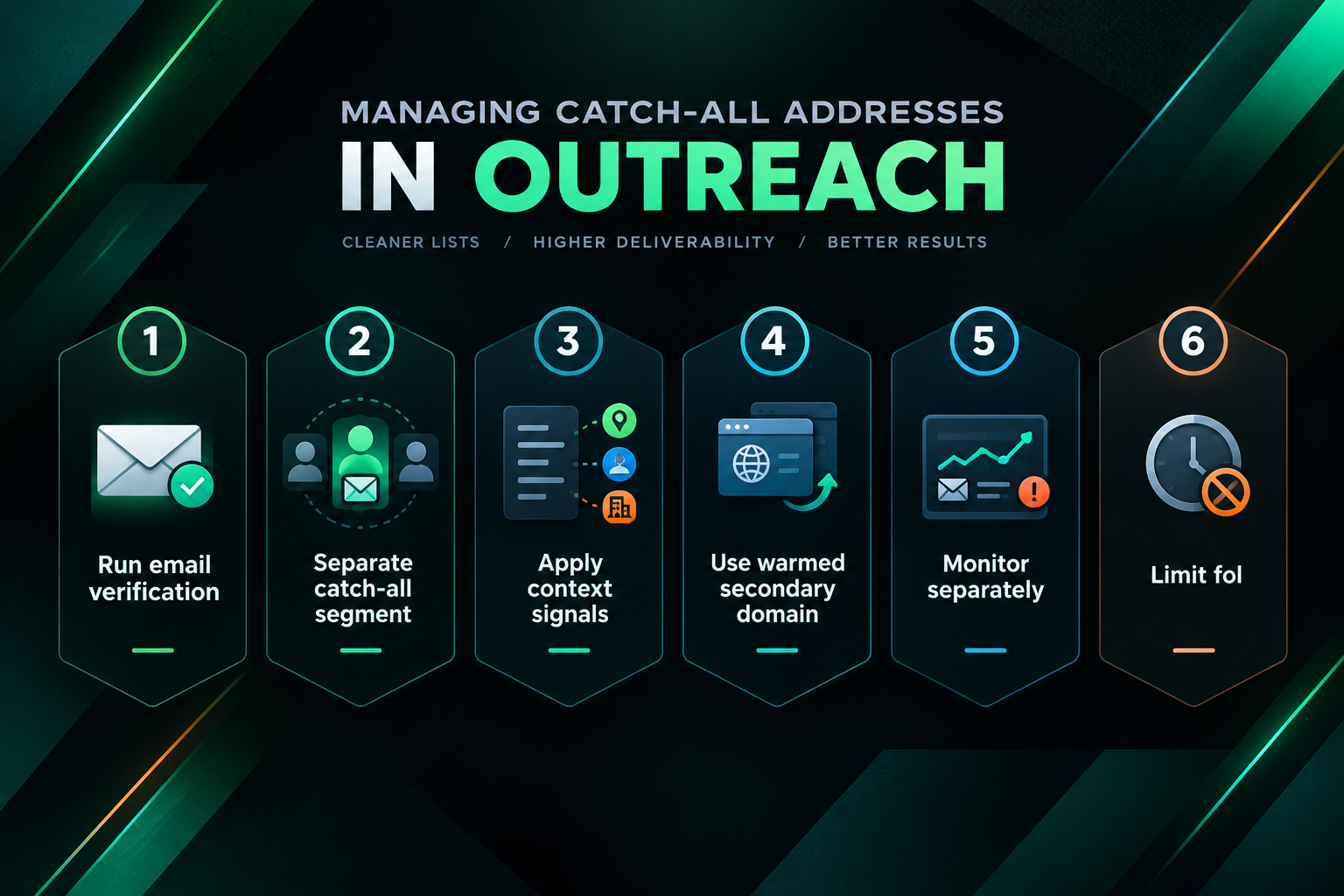
- Run email verification first. Use a reputable verification service to classify your list into valid, invalid, and catch-all categories. Remove all addresses classified as invalid before sending anything.
- Separate catch-all addresses into a distinct segment. Do not mix them with confirmed-valid addresses in your primary sending sequence.
- Apply additional signals to prioritise catch-all prospects. If the website has a contact form, a clearly published editorial email, or a LinkedIn profile for the editor or owner, these signals suggest the domain is actively managed and the catch-all address is more likely to reach someone. Prioritise these over addresses with no supporting context.
- Send to catch-all addresses from a warmed secondary domain. If your primary outreach domain has a strong sender reputation, protect it by routing catch-all sequences through a separate warmed domain. This limits the reputational impact of any bounce or complaint spikes.
- Monitor bounce and reply rates separately. Track the performance of your catch-all segment independently so you can assess whether the additional outreach effort is producing results proportionate to the risk.
- Limit follow-up sequences for non-responsive catch-all addresses. If an address produces no open or reply signal after one or two attempts, remove it from further sequences rather than continuing to send.
Catch-All Addresses and Link Building Outreach Quality
In the context of link building, the quality of your outreach list directly affects the quality of the placements you can realistically acquire. A well-managed outreach campaign for guest posts or editorial link placements depends on reaching real decision-makers — editors, site owners, content managers — who can evaluate your pitch and respond. A catch-all address that routes to an unmonitored inbox effectively removes that prospect from your reachable pool, regardless of how strong the target website might be as a link source.
This is one reason why experienced link building teams invest in list hygiene as a foundational step rather than an afterthought. Sending volume alone does not determine outreach success. A smaller, cleaner list of verified or high-confidence addresses will typically produce better reply rates and more editorial placements than a larger list padded with unverified catch-all addresses.
It is also worth noting that the websites most likely to use catch-all configurations — independent niche publishers, small editorial teams, local businesses — are often the same websites that represent genuine link building opportunities. They tend to have real editorial standards, topically relevant content, and audiences that align with specific niches. Dismissing all catch-all domains from your outreach list could mean overlooking some of the most relevant and accessible link prospects in a given niche.
Catch-All Addresses and Email Deliverability Best Practices
Managing catch-all addresses is one component of broader email deliverability hygiene. For outreach campaigns of any meaningful scale, several additional practices help protect sender reputation and improve the proportion of messages that reach active inboxes.
Domain and inbox warm-up: New sending domains and inboxes should be warmed gradually before high-volume outreach begins. Sending large volumes from a cold domain increases the likelihood of messages being filtered or rejected, regardless of list quality.
Authentication records: SPF, DKIM, and DMARC records should be correctly configured for every sending domain. These authentication standards help receiving mail servers verify that your messages are legitimate and reduce the likelihood of them being treated as spam.
Sending volume and cadence: Sudden spikes in sending volume are a common trigger for spam filters. Gradual, consistent sending patterns are generally safer than irregular bursts, particularly when a proportion of your list includes catch-all addresses with uncertain deliverability.
Unsubscribe and opt-out handling: Even in B2B outreach contexts, providing a clear way for recipients to opt out of further contact is both a legal consideration in many jurisdictions and a practical measure for reducing spam complaints.
List suppression: Maintain a suppression list of addresses that have bounced, complained, or opted out. Re-sending to these addresses compounds deliverability problems and can accelerate sender reputation damage.
Tools That Identify Catch-All Domains
Several email verification and prospecting tools identify catch-all or accept-all domains as part of their standard verification output. The specific terminology and classification logic varies between platforms, but the underlying detection method is broadly similar: the tool attempts a test connection to the mail server and observes whether the server accepts or rejects a randomly generated address at that domain.
Commonly used tools that include catch-all detection as part of their verification workflow include Hunter.io, NeverBounce, ZeroBounce, Snov.io, and Mailfloss, among others. Each platform has its own approach to classifying and reporting catch-all results, and the accuracy of their secondary signals — such as confidence scores or risk ratings — varies. No tool can definitively confirm that a specific catch-all address is actively monitored; they can only flag the domain-level configuration and provide a risk assessment based on available signals.
When evaluating verification tools for outreach use, it is worth checking how the tool handles catch-all results specifically, what additional signals it uses to assess risk within the catch-all category, and whether it allows you to export catch-all addresses as a separate segment for independent management.
When Catch-All Addresses Are Less of a Concern
Not every outreach scenario carries the same level of risk from catch-all addresses. In some contexts, the practical impact is limited enough that a more permissive approach may be reasonable.
If you are sending a small number of highly personalised outreach emails — for example, targeting ten to twenty specific websites for a niche link building campaign — the risk of sender reputation damage from a handful of catch-all addresses is relatively low. In this context, the additional effort of segmenting and separately managing catch-all addresses may not be proportionate to the benefit.
Similarly, if you have strong contextual evidence that a catch-all address is actively monitored — for example, you have previously received a reply from that domain, or the site owner is clearly active and responsive on other channels — the catch-all classification is less of a practical concern. The verification tool’s inability to confirm the address does not mean the address is unmonitored; it means the tool cannot confirm either way.
The risk calculus changes significantly at scale. Campaigns sending hundreds or thousands of outreach emails per week, where catch-all addresses represent a substantial proportion of the list, require more careful management to avoid compounding deliverability problems across the campaign.
Frequently Asked Questions
Does a catch-all email address mean my message will definitely be delivered?
Not necessarily. A catch-all configuration means the domain’s mail server accepts the message rather than returning an immediate bounce. However, the message may still be filtered, deleted, or routed to an unmonitored folder once it arrives. Acceptance at the server level does not guarantee the message reaches an active inbox or is read by a real person.
Should I remove all catch-all addresses from my outreach list?
Blanket removal is not always the best approach. Catch-all domains include many legitimate, actively managed inboxes, particularly among small publishers and independent website owners who are common targets for link building outreach. A segmented approach — separating catch-all addresses, applying additional context signals, and managing them with appropriate caution — tends to produce better results than wholesale exclusion.
Can email verification tools tell me if a catch-all address is real?
No. Email verification tools can identify that a domain has a catch-all configuration, but they cannot confirm whether a specific address at that domain routes to an actively monitored inbox. This is a fundamental limitation of the verification method, not a gap in any particular tool’s capability.
How does a catch-all address affect my sender reputation?
Sending to catch-all addresses that are not actively monitored can produce soft bounces and, in some cases, spam complaints if the catch-all inbox is periodically reviewed and bulk-deleted. Both outcomes can negatively affect your sending domain’s reputation over time, particularly at scale. Careful list segmentation and monitoring of bounce rates by segment can help limit this impact.
Is it legal to send outreach emails to catch-all addresses?
The legal considerations for B2B email outreach vary by jurisdiction and depend on factors such as the nature of the message, the relationship between sender and recipient, and applicable regulations such as GDPR in the European Union or CAN-SPAM in the United States. A catch-all address classification does not change the legal requirements that apply to your outreach. If you are uncertain about compliance in your target markets, seek appropriate legal guidance.
What is the difference between a catch-all address and a role-based address?
A role-based address is a specific, intentionally configured mailbox associated with a function rather than an individual — for example, info@, support@, or hello@. A catch-all address is a fallback that receives mail sent to any address at the domain, including addresses that were never intentionally created. Role-based addresses are generally more reliable for outreach than catch-all addresses, though they may be monitored by multiple people or filtered automatically by some inbox providers.
What to Consider Before Building Your Outreach List
Catch-all email addresses are a routine feature of the outreach landscape, not an exceptional edge case. Any team running link building campaigns, guest post outreach, or digital PR at meaningful scale will encounter them regularly. The practical question is not whether to engage with catch-all domains, but how to manage them in a way that protects deliverability, respects outreach effort, and maintains the quality of your sending infrastructure.
A well-structured approach — verifying your list, segmenting catch-all addresses, applying contextual signals to prioritise the most promising prospects, and monitoring performance separately — allows you to engage with catch-all domains without exposing your primary sending domain to unnecessary risk. For campaigns where outreach quality directly affects the calibre of link placements you can acquire, this kind of list hygiene is a foundational investment rather than an optional refinement.
If you are managing outreach as part of a broader link building programme and want to discuss how list quality, deliverability, and campaign structure interact with placement outcomes, speaking with an experienced link building team can help you assess the approach most appropriate for your specific goals and niche.