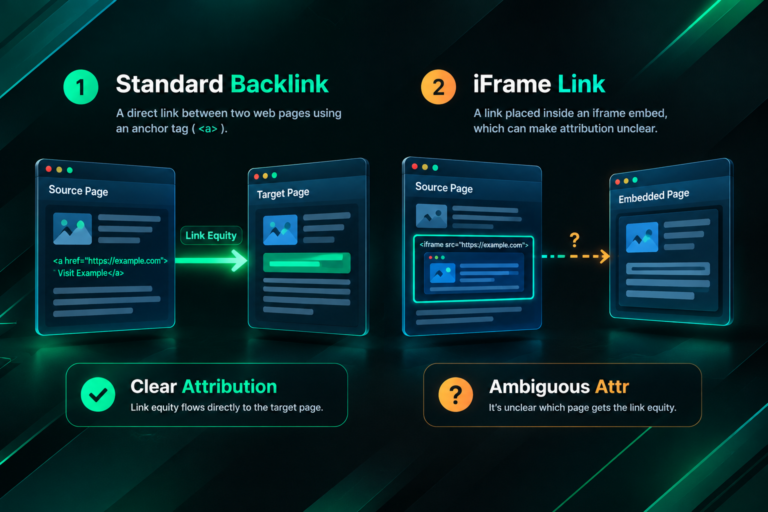

When a link building campaign delivers a placement, confirming that the backlink actually exists on the live page is a practical first step before drawing any conclusions about its value. Verifying a backlink in the page source means checking the underlying HTML of a webpage to confirm that a link pointing to your site is present, correctly formatted, and carries the attributes you expect. This guide explains how to do that manually, what to look for in the code, and how to interpret what you find.
Key Takeaways
- Page source verification lets you confirm a backlink exists, check its anchor text, and identify its link attributes such as rel=”nofollow”, rel=”sponsored”, or the absence of any restricting attribute.
- Browser-based inspection is free and immediate, but third-party SEO tools such as Ahrefs, Semrush, or Google Search Console provide broader backlink profile context that a single page check cannot.
- A link visible in the rendered page may not appear in the raw page source if it is loaded dynamically via JavaScript, which requires a different verification approach.
- Confirming a link exists in the source is only the first step; assessing its placement context, surrounding content, and the publishing domain’s quality are equally important for evaluating its likely SEO contribution.
- Manual page source checks are most useful immediately after a placement is reported, during campaign audits, or when a tool shows a link as lost and you want to confirm whether it has genuinely been removed.
What Page Source Verification Actually Tells You
The page source is the raw HTML that a web server delivers to a browser before the browser processes scripts, applies styles, or renders dynamic content. When you view the page source of a webpage, you are reading the document as it was sent from the server. For backlink verification purposes, this matters because a link that exists in the raw HTML is directly readable by search engine crawlers that process HTML, making it the most straightforward confirmation that a link is present and structured in a specific way.
Checking the page source tells you several things at once. You can confirm whether a hyperlink to your domain is present at all. You can read the exact anchor text used, which is the clickable text of the link. You can identify any rel attributes attached to the link, such as rel=”nofollow”, rel=”sponsored”, or rel=”ugc”, which communicate to search engines how they should treat the link. You can also see whether the link points to the correct destination URL, including whether it uses HTTP or HTTPS and whether any redirect parameters are attached.
What page source verification does not tell you is whether the link has been crawled and indexed by Google, whether it is contributing to your site’s authority in any measurable way, or how the publishing page ranks in its own right. Those questions require additional tools and a broader assessment of the backlink profile.
How to View the Page Source in a Browser
Viewing the raw HTML source of any webpage is straightforward in all major browsers and requires no specialist tools or software.
Using the Keyboard Shortcut
On most desktop browsers, pressing Ctrl + U on Windows or Linux, or Command + Option + U on macOS, opens the full page source in a new tab. The source appears as plain text HTML, which you can then search using the browser’s built-in find function. Press Ctrl + F (or Command + F on macOS) to open the search bar within the source view, then type your domain name or a portion of the destination URL you are looking for.
Using the Address Bar
Alternatively, you can type view-source: directly before the full URL of the page in the browser address bar. For example, entering view-source:https://example.com/article-title and pressing Enter will load the raw HTML source of that page. This method works in Chrome, Firefox, and most Chromium-based browsers.
Using Browser Developer Tools
Right-clicking anywhere on a webpage and selecting Inspect or Inspect Element opens the browser’s developer tools panel. The Elements tab in developer tools shows the rendered DOM, which is the page as the browser has processed it after executing scripts. This is useful for checking dynamically loaded content, but it is not the same as the raw page source. For standard backlink verification, the raw source view is usually sufficient and easier to read quickly.
Searching for Your Backlink in the Source Code
Once the page source is open, use the find function to search for your domain name. For example, if your website is yourdomain.com, search for that string. The browser will highlight every instance where that text appears in the source. In most cases, a backlink will appear as an HTML anchor element structured similarly to this:
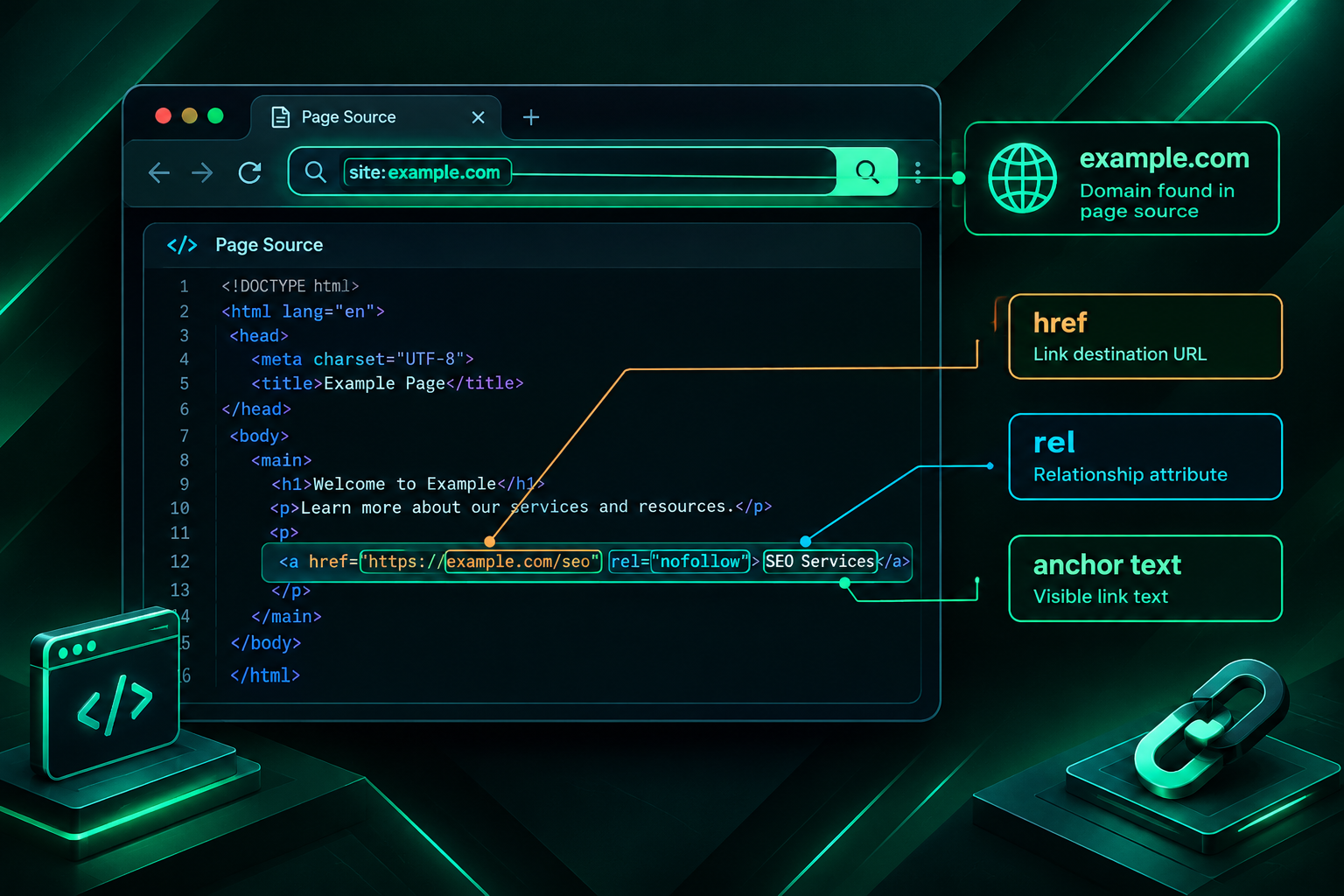
<a href=”https://yourdomain.com/target-page/”>Anchor Text Here</a>
The href attribute contains the destination URL. The text between the opening and closing anchor tags is the anchor text. Any additional attributes, such as rel values, appear within the opening tag alongside the href.
What to Check Once You Find the Link
When you locate the anchor element in the source, work through the following checks systematically.
- Destination URL accuracy: Confirm the href value points to the exact page you intended, including the correct protocol (HTTPS rather than HTTP where applicable) and the correct path. A link pointing to your homepage when the campaign targeted a specific product or service page may not deliver the intended SEO benefit to that page.
- Anchor text: Read the anchor text carefully. Confirm it matches what was agreed during outreach or campaign planning. Anchor text that is overly keyword-rich, mismatched to the surrounding content, or inconsistent with the rest of the article may attract editorial scrutiny over time.
- Rel attributes: Look for any rel attribute within the anchor tag. A link with no rel attribute, or with rel=”dofollow” (which is not a standard attribute but sometimes appears), is generally treated as a standard followed link by search engines. A link carrying rel=”nofollow”, rel=”sponsored”, or rel=”ugc” signals to Google that the linking site is qualifying its endorsement. Google’s documented guidance states that these attributes are treated as hints rather than directives, but their presence is still relevant to understanding the nature of the placement.
- Link wrapping or redirects: Some publishers route outbound links through tracking redirects or affiliate link wrappers. If the href value does not point directly to your domain but instead passes through a third-party URL, the link may not pass authority in the same way as a direct link, and the redirect chain is worth investigating further.
When the Link Does Not Appear in the Raw Source
A common source of confusion during backlink verification is finding that a link visible when browsing the page normally does not appear in the raw HTML source. This usually happens because the link is loaded dynamically using JavaScript rather than being present in the initial HTML document delivered by the server.
JavaScript-rendered content is increasingly common on modern websites, particularly those built with frameworks such as React, Vue, or Angular. In these cases, the raw page source may contain very little readable content, with the actual page content assembled by the browser after scripts execute. Search engines, including Google, have documented the ability to crawl and index JavaScript-rendered content, but the process involves a second crawl pass and is not guaranteed to be as immediate or complete as crawling static HTML.
To check whether a link exists in the rendered version of a page rather than the raw source, use the browser developer tools Elements tab rather than the view-source method. The Elements tab shows the DOM after JavaScript has executed. If the link appears there but not in the raw source, it is JavaScript-rendered. For SEO purposes, this distinction is worth noting when assessing how reliably and quickly the link may be discovered and processed by search engine crawlers.
Another reason a link may not appear is that it has been removed since the placement was reported. Publishers occasionally edit or update content, and links can be removed during those edits. If a tool such as Ahrefs or Semrush flags a link as lost, a manual page source check can confirm whether the link is genuinely absent or whether the tool’s crawl data is simply lagging behind the current state of the page.
Using SEO Tools Alongside Manual Verification
Manual page source checks are precise but narrow in scope. They confirm the state of one link on one page at a specific moment. For ongoing backlink monitoring across a full campaign, SEO tools provide broader coverage and historical data that manual checks cannot replicate efficiently.
Google Search Console
Google Search Console’s Links report shows the external links Google has discovered pointing to your site. Because this data comes directly from Google’s crawl, it reflects what Google has actually processed rather than what a third-party tool has estimated. However, the Links report does not update in real time, does not show every link Google has found, and does not display link attributes such as rel values in a granular way. It is most useful for understanding the overall pattern of your backlink profile from Google’s perspective rather than for verifying individual placements immediately after they go live.
Third-Party Backlink Tools
Platforms such as Ahrefs, Semrush, and Majestic maintain their own crawl indexes and can show individual backlinks with attributes including anchor text, rel values, first seen and last seen dates, and domain-level metrics. These tools are useful for tracking whether a newly placed link has been discovered by the tool’s crawler, monitoring for link loss over time, and assessing the broader quality context of the linking domain. It is important to understand that metrics such as Ahrefs’ Domain Rating, Semrush’s Authority Score, and Majestic’s Trust Flow are proprietary calculations produced by those tools, not signals provided by Google, and they should not be treated as direct indicators of how Google values a link.
The most reliable verification workflow combines both approaches: use the page source check immediately after a placement is confirmed to verify the link’s existence and attributes, then monitor the link over time using a backlink tool to track discovery, retention, and any changes to the linking page.
Assessing Link Quality Beyond the Source Check
Confirming that a link exists in the page source is a necessary first step, but it does not fully answer the question of whether the link is likely to contribute positively to your site’s search visibility. Several additional factors are worth assessing once the link’s existence is confirmed.
Placement Context Within the Page
A link embedded naturally within the body of a relevant, well-written article is generally considered more editorially meaningful than a link placed in a footer, sidebar, or author bio section. Within the page source, you can identify where in the document structure the link appears by looking at the surrounding HTML elements. A link inside a <p> tag within the main content area of the page is contextually different from one inside a <footer> or <aside> element.
Topical Relevance of the Surrounding Content
The text surrounding a backlink, sometimes referred to as the link’s context or co-citation environment, can influence how search engines interpret the link’s relevance. A link to a cybersecurity software page placed within an article about network security is more topically coherent than the same link placed within an unrelated lifestyle article. Reading a few sentences of surrounding text in the page source gives you a quick sense of whether the placement context is appropriate.
The Publishing Page’s Own Indexation Status
A backlink on a page that is not indexed by Google cannot contribute to your site’s backlink profile in the way an indexed page can. You can check whether a specific page is indexed by searching for it in Google using the site: operator, for example site:publishingdomain.com/article-url. If the page does not appear in results, it may not be indexed, which is worth investigating further before treating the placement as a confirmed SEO asset.
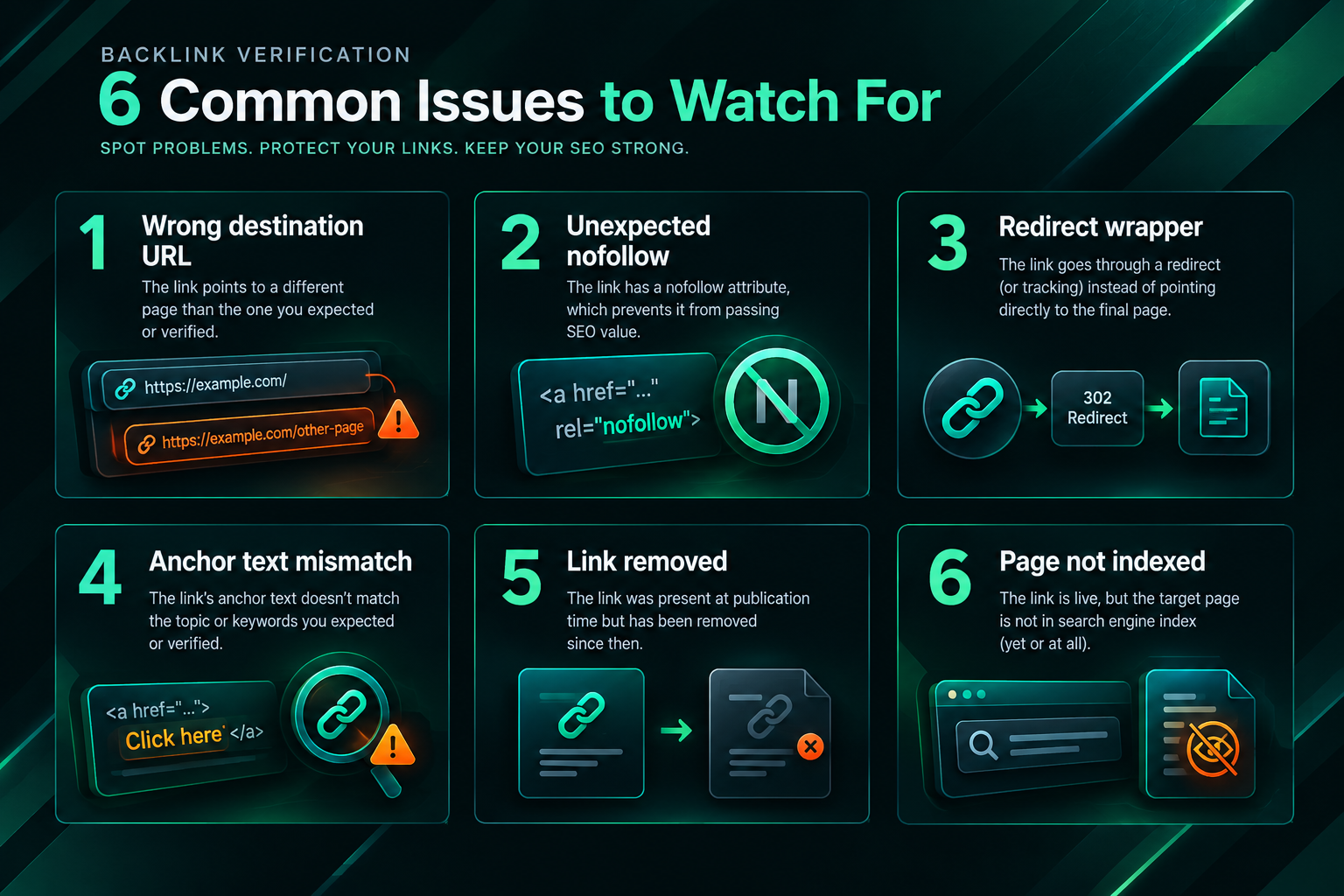
Common Issues Found During Page Source Verification
Practical experience with backlink verification reveals a set of issues that appear with some regularity and are worth knowing before you begin checking placements.
- Incorrect destination URL: The link points to the homepage or a different page rather than the intended target page. This is one of the most common discrepancies between what was agreed and what was published.
- Unexpected nofollow attribute: A placement agreed as a followed link carries a rel=”nofollow” or rel=”sponsored” attribute added by the publisher’s CMS or editorial policy without prior disclosure.
- Link wrapped in a redirect: The href routes through a tracking or affiliate redirect rather than linking directly to your domain.
- Anchor text mismatch: The published anchor text differs from what was agreed, either because the publisher edited the content or because the brief was interpreted differently.
- Link removed after initial publication: The link was present when first checked but has since been removed during a content update, CMS migration, or editorial review.
- Link present in source but not indexed: The page containing the link has not been crawled and indexed by Google, meaning the link may not yet be contributing to your backlink profile.
When Manual Verification Is Most Useful in a Campaign Context
For businesses and agencies managing link building campaigns, manual page source verification is most valuable at specific points in the campaign workflow rather than as a continuous activity.
Immediately after a placement is reported by an outreach team or link building provider, a page source check confirms the link is live, correctly formatted, and matches the agreed specifications before the placement is accepted and recorded. This is particularly relevant when working with outsourced link building providers, where the client may not have visibility into the outreach process and relies on delivery reports to track campaign progress.
During periodic campaign audits, checking a sample of previously confirmed links against the current page source can identify link loss that tool crawlers may not have flagged yet. Link loss can occur for various reasons including content updates, domain migrations, CMS changes, or publisher decisions, and catching it early allows for replacement requests where a provider’s terms include link replacement guarantees.
When a backlink tool reports a link as lost or changed, a manual page source check provides a definitive answer about the current state of the page rather than relying on the tool’s crawl schedule, which may lag behind the live page by days or weeks.
Frequently Asked Questions
Does a link appearing in the page source mean Google has indexed it?
Not necessarily. A link present in the raw HTML source means it exists on the page, but Google still needs to crawl that page and process the link before it appears in Google’s index. Crawling and indexing can take anywhere from a few days to several weeks depending on the publishing domain’s crawl frequency and the page’s position within the site’s internal linking structure.
What is the difference between viewing page source and using Inspect Element?
Viewing the page source shows the raw HTML delivered by the server before any JavaScript executes. The Inspect Element or Elements panel in browser developer tools shows the rendered DOM after scripts have run. For most standard HTML backlinks, both methods will show the same link. For JavaScript-rendered links, only the Elements panel will show the link after rendering.
If a link has rel=”nofollow”, does it have no SEO value at all?
Google’s documented guidance describes rel=”nofollow” as a hint rather than a directive, meaning Google may choose to follow and credit the link at its discretion. The practical SEO impact of nofollow links is debated among practitioners and the evidence is mixed. Nofollow links can still drive referral traffic and contribute to a natural-looking backlink profile, but they should not be assumed to pass the same authority signals as a standard followed link.
How do I verify a backlink if the page uses JavaScript rendering?
Use the browser developer tools Elements tab rather than the raw page source view. Open developer tools by right-clicking the page and selecting Inspect, then navigate to the Elements tab. Use the search function within the Elements panel to find your domain. Alternatively, tools such as Google’s URL Inspection tool in Search Console can show you how Google rendered a specific page, which may reveal whether a JavaScript-rendered link was processed.
Should I rely on a link building provider’s report or verify links myself?
Both approaches serve different purposes. A provider’s delivery report gives you a structured record of placements, but independently verifying a sample of reported links against the live page source is a reasonable quality control step. It confirms that links match the agreed specifications and helps identify any discrepancies early, before they affect campaign assessment or reporting to stakeholders.
How often should I check existing backlinks in the page source?
A full manual check of every link in a large backlink profile is not practical on a frequent basis. A more efficient approach is to use a backlink monitoring tool to flag links that have changed status, then use manual page source verification to investigate specific flagged links. For active campaigns, checking newly reported placements immediately and auditing a sample of older links quarterly is a reasonable starting point, though the appropriate frequency depends on campaign size and the importance of individual placements.
Putting Backlink Verification Into Your Quality Control Process
Verifying a backlink in the page source is a practical, low-cost quality control step that takes only a few minutes per placement and provides direct confirmation of what has actually been published. The process does not require specialist tools, and the information it reveals, including destination URL accuracy, anchor text, link attributes, and placement position within the document, is directly relevant to assessing whether a placement meets the standards agreed during campaign planning.
At the same time, page source verification is one part of a broader quality assessment rather than a complete evaluation on its own. Understanding whether the linking page is indexed, whether the publishing domain is topically relevant and editorially credible, and whether the link has been discovered by search engine crawlers requires additional steps using tools such as Google Search Console and third-party backlink platforms. Combining manual source checks with tool-based monitoring gives a more complete picture of a campaign’s link quality over time.
For businesses working with an outsourced link building provider, establishing a clear verification process from the outset, including what attributes each placement should carry, how placements will be reported, and what happens if a link does not meet agreed specifications, helps ensure that campaign delivery aligns with the intended SEO strategy. If you are reviewing a current campaign or planning a new one and want to discuss how link quality is assessed and monitored, speaking with a qualified link building specialist is a practical next step.