
If you have ever opened Ahrefs, Semrush, or Moz and found a backlink flagged as lost — only to visit the page and find the link still sitting there — you are not alone. False lost backlink reports are one of the most common sources of confusion in link building campaign management, and they can lead to unnecessary panic, wasted reclamation effort, and poor decisions about link quality. Understanding why these discrepancies occur helps you interpret your backlink data more accurately and focus your attention on links that genuinely need attention.
Key Takeaways
- Backlink tools rely on their own crawlers, which do not index the web in real time, so a link that appears lost may simply not have been recrawled recently.
- Temporary server errors, page redirects, JavaScript rendering issues, and crawler access restrictions can all cause a tool to incorrectly mark a live link as lost.
- Google Search Console provides a more authoritative signal of whether Googlebot has seen a link, but it also has its own reporting delays and coverage limitations.
- Verifying a flagged link manually — by visiting the page and inspecting the source — is the most reliable first step before treating any lost-link report as confirmed.
- Not every lost-link alert requires immediate action; distinguishing genuine link removals from tool-side reporting artefacts is essential for efficient campaign management.
How Backlink Tools Discover and Track Links
Backlink tools such as Ahrefs, Semrush, Majestic, and Moz do not have access to Google’s index. Each platform operates its own independent web crawler, which systematically visits URLs, reads the HTML on each page, and records any outbound links it finds. The data those crawlers collect is stored in a proprietary index that is updated on a rolling schedule — not continuously and not simultaneously across every URL in the database.
Because each tool’s crawler visits billions of pages on a rotating basis, the recrawl frequency for any individual URL depends on factors such as the page’s estimated importance, the domain’s crawl priority within that tool’s system, and available crawler capacity. A page on a mid-authority blog might be recrawled every few weeks or even less frequently. This means the backlink data you see in a tool’s dashboard reflects a snapshot from the last time that crawler visited the page — which may be days, weeks, or in some cases months ago.
When a tool marks a backlink as lost, it is reporting that the link was not present the last time its crawler visited that URL. It is not reporting that Google has stopped counting the link, that the link has been removed by the publisher, or that the link no longer exists. The distinction matters enormously for how you respond to the alert.
The Most Common Causes of False Lost Backlink Reports
Several technical and operational factors can cause a backlink tool to flag a live link as lost without the link having been removed at all. Recognising these causes helps you triage alerts more efficiently.
Temporary Server Errors and Downtime
When a backlink tool’s crawler attempts to visit a page and receives a 5xx server error — such as a 500 Internal Server Error or a 503 Service Unavailable response — it cannot read the page content. If the crawl attempt coincides with a period of server downtime, maintenance, or overload on the publisher’s website, the tool may record the link as unverifiable and subsequently flag it as lost. Once the server recovers and the page is recrawled, the link typically reappears in the tool’s index. This is one of the most frequent causes of temporary false lost reports, particularly for links hosted on shared hosting environments or smaller publisher sites.
Crawler Access Restrictions
Publishers sometimes update their robots.txt file, add noindex directives, or implement bot-blocking measures that prevent specific crawlers from accessing certain pages. If a publisher’s site blocks the Ahrefs bot, the Semrush crawler, or another tool’s spider — either intentionally or as a side effect of a security plugin or CDN configuration — the tool will be unable to verify the link and may report it as lost. The link itself may remain fully intact and visible to Googlebot, but the third-party tool has no way to confirm this without crawler access.
JavaScript-Rendered Links
Many modern websites use JavaScript frameworks to render page content dynamically. If a backlink is embedded in content that is loaded via JavaScript rather than present in the initial HTML response, some crawlers may not execute the JavaScript and therefore will not detect the link. Tools vary in their ability to render JavaScript, and a crawler that does not fully execute a page’s scripts may report a link as absent even when it is visible to a browser — and potentially to Googlebot, which does render JavaScript, though with its own processing delays.
Page-Level Redirects and URL Changes
If the page containing your backlink has been redirected to a new URL, the tool may flag the original URL as returning a redirect response rather than a live page with the link. Depending on how the tool handles redirect chains, it may report the link as lost from the original URL even if the link is now accessible via the destination URL. Similarly, if the publisher has restructured their site and the linking page has moved, the tool’s index may not yet reflect the updated URL structure.
Crawl Scheduling and Index Lag
Index lag is perhaps the most straightforward cause of false lost reports. A link that was live when the tool last crawled the page will remain in the tool’s index until the next successful crawl. If the tool’s crawl schedule means a page is revisited infrequently, a link that was added recently may not yet appear, and a link that was temporarily removed and then restored may show a gap in the tool’s historical data. The tool’s reported link status is always a function of its most recent successful crawl, not the current live state of the page.
Soft 404 and Thin Content Responses
Some pages return a 200 OK HTTP status code while displaying a “page not found” or error message in the body content — a situation known as a soft 404. If a publisher’s CMS generates a soft 404 for a page that previously contained your backlink, the tool’s crawler may visit the page, receive a 200 status, but find no meaningful content and therefore no link. The page may later be restored, but the tool will have recorded the link as absent during that window.
Link Attribute Changes Without Removal
Some tools track changes to link attributes such as the rel attribute. If a publisher adds a nofollow, sponsored, or ugc attribute to a previously unattributed link, certain tools may reclassify or separately report the link in a way that appears as a loss in one category even though the link itself remains on the page. This is a reporting classification issue rather than a genuine link removal, but it can appear alarming in a dashboard alert.
Why Different Tools Report Different Results for the Same Link
It is common to find that Ahrefs reports a link as lost while Semrush still shows it as active, or vice versa. This happens because each tool maintains a separate crawler with its own crawl schedule, index size, URL prioritisation logic, and JavaScript rendering capability. No two tools crawl the same pages at the same time or with the same frequency. A link that one tool’s crawler encountered last week may not have been visited by another tool’s crawler for a month.
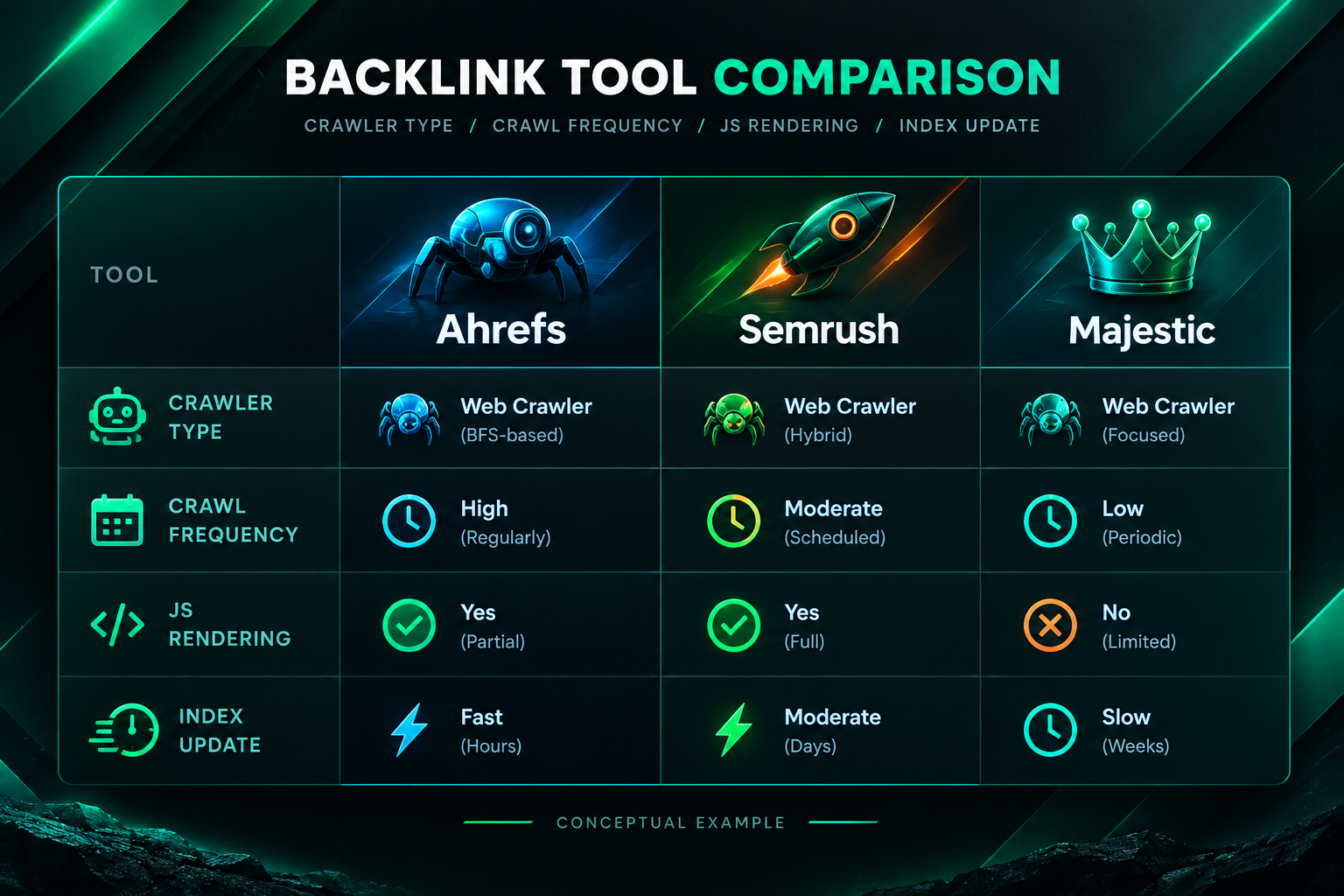
Majestic, for example, uses its own Historic Index and Fresh Index, which have different update frequencies and coverage. Moz’s Link Explorer operates on a different crawl infrastructure from Ahrefs’ crawler. When you compare lost-link reports across tools, discrepancies are expected rather than exceptional. A link that appears lost in one tool and active in another is a strong signal that the loss may be a crawl artefact rather than a genuine removal.
Third-party authority metrics — including Ahrefs’ Domain Rating, Semrush’s Authority Score, Moz’s Domain Authority, and Majestic’s Trust Flow — are proprietary calculations based on each tool’s own index. Changes in these metrics following a lost-link alert may reflect index updates rather than any change in how Google evaluates the link. These metrics are useful for relative comparison and campaign monitoring, but they are not Google-provided signals and should not be treated as direct indicators of ranking impact.
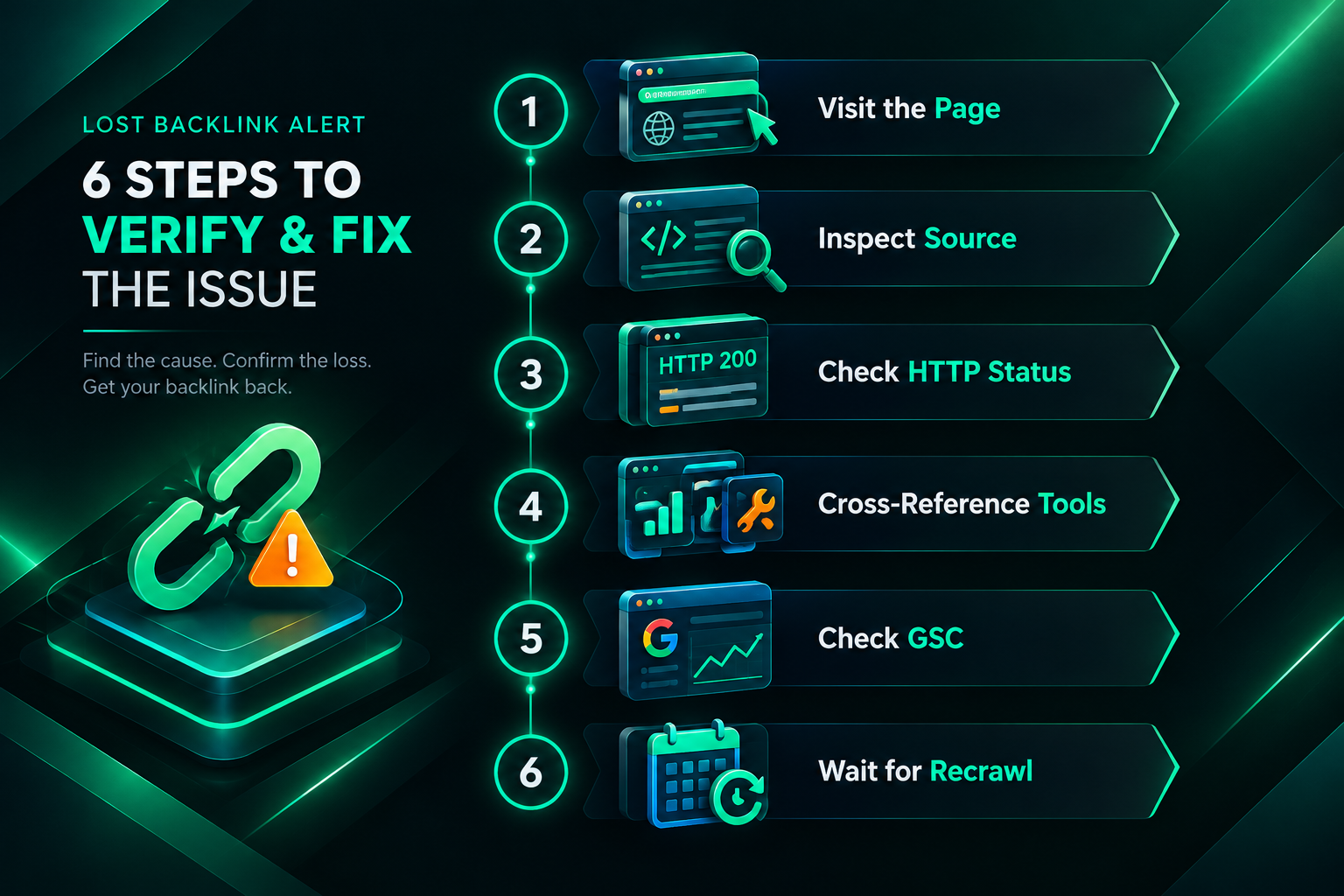
How to Verify Whether a Lost Link Is Genuinely Gone
Before treating any lost-link alert as confirmed, a straightforward verification process can save significant time and prevent unnecessary outreach.
- Visit the page directly. Open the URL of the linking page in a browser and check whether the link to your site is still present. This is the most reliable immediate check and takes less than a minute.
- Inspect the page source. Use your browser’s “View Page Source” function to check whether the link appears in the raw HTML. If the link is JavaScript-rendered, it may be visible in the browser but absent from the source — which explains why some crawlers miss it.
- Check the HTTP status of the linking page. Use a tool such as a browser extension or an HTTP status checker to confirm whether the page returns a 200 OK, a redirect, or an error response. A 5xx or 4xx response explains why the tool could not verify the link.
- Cross-reference with another backlink tool. If Ahrefs reports the link as lost but Semrush or Majestic still shows it as active, the discrepancy is likely a crawl scheduling difference rather than a genuine removal.
- Check Google Search Console. Google Search Console’s Links report shows links that Googlebot has discovered. While GSC does not provide real-time link data and has its own coverage limitations, a link that appears in GSC is one that Google has seen. Note that GSC does not show every link Google knows about, so absence from GSC does not confirm a link is gone.
- Wait for the next crawl cycle. If the page was temporarily unavailable due to server issues, the link will typically reappear in the tool’s index after the next successful crawl. Monitoring the link over the following one to two weeks before taking action is often the most efficient approach.
When a Lost Link Report Is Genuine
Not every lost-link alert is a false positive. Genuine link removals do occur, and distinguishing them from crawl artefacts is important for maintaining a healthy backlink profile. A link is more likely to have been genuinely removed when the linking page returns a 200 OK status, the link is absent from both the rendered page and the page source, multiple tools independently report the link as lost within a similar time window, and the loss coincides with a known site redesign, content update, or editorial change on the publisher’s site.
Publishers occasionally remove links during content refreshes, CMS migrations, or editorial policy changes. In some cases, a page may be deleted entirely, returning a 404 response. In others, the content surrounding the link may be rewritten and the link omitted. These are genuine losses that may warrant a polite outreach message to the publisher, depending on the link’s value to your campaign.
Links acquired through manual outreach and guest posting campaigns are generally more stable than links from directories, comment sections, or automated placements, because they are embedded in editorial content that the publisher has invested in. However, no backlink is guaranteed to remain live indefinitely, and link retention monitoring is a standard part of responsible campaign management.
The Role of Google Search Console in Link Verification
Google Search Console provides a Links report that reflects links Googlebot has discovered and associated with your site. Because GSC data comes from Google’s own crawling activity rather than a third-party crawler, it offers a more authoritative signal about whether Google has seen a link. However, GSC has its own limitations that are important to understand.
GSC does not show every link Google knows about — it shows a sample. The Links report is not updated in real time, and there can be a lag between when a link is placed or removed and when the change is reflected in GSC. GSC also does not distinguish between followed and nofollowed links in the same way that third-party tools do, and it does not provide the granular link attribute data that tools like Ahrefs or Majestic offer. Using GSC alongside third-party tools gives a more complete picture than relying on either source alone.
If a link appears in GSC but is flagged as lost in a third-party tool, the most reasonable interpretation is that the tool’s crawler has not yet recrawled the page since the link was placed, or that the tool encountered a temporary access issue. GSC data generally takes precedence as an indicator of Google’s awareness of the link, though it should not be treated as a guarantee of ranking impact.
Practical Implications for Link Building Campaign Management
Understanding the difference between genuine link losses and tool-side reporting artefacts has direct practical implications for how link building campaigns are monitored and managed.
Reacting to every lost-link alert with immediate publisher outreach wastes time and can damage relationships with publishers who have not actually removed anything. A triage process — starting with manual verification before any outreach — is more efficient and more professional. For campaigns managed at scale, this means building a verification step into the lost-link monitoring workflow rather than treating tool alerts as confirmed facts.
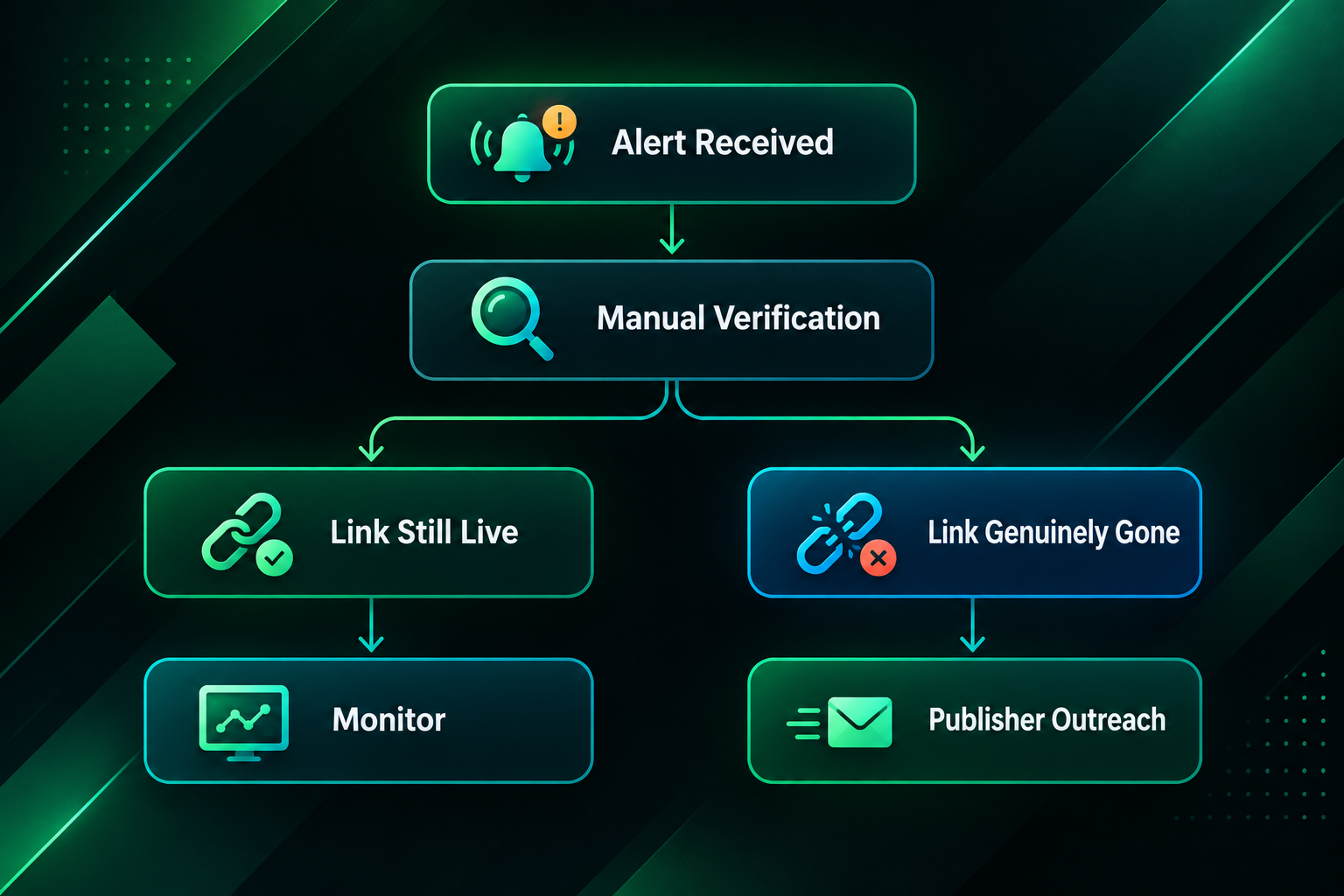
Link replacement policies offered by some link building service providers are typically triggered by confirmed link removals rather than tool alerts alone. Understanding this distinction helps clients set realistic expectations about when a replacement link is warranted and when a monitoring period is more appropriate. If a provider’s reporting shows a link as lost, asking whether the loss has been manually verified is a reasonable and important question.
For in-house SEO teams and agencies managing outsourced link building campaigns, establishing a clear protocol for lost-link verification — including which tools are used, how cross-referencing is handled, and what constitutes a confirmed loss — reduces confusion and improves the accuracy of campaign reporting. Documenting the verification steps taken for each flagged link also creates a useful audit trail for client reporting.
How Crawl Frequency Affects Backlink Reporting Accuracy
The recrawl frequency that a backlink tool assigns to a given URL is influenced by several factors, including the domain’s overall authority within the tool’s index, the page’s historical link activity, and the tool’s internal resource allocation. High-authority domains with frequently updated content tend to be recrawled more often than low-traffic blogs or niche publisher sites.
This means that backlinks placed on smaller or newer publisher sites — which may still be editorially relevant and valuable — are more likely to experience reporting delays and temporary false lost alerts than links on high-authority domains that are crawled frequently. A link on a domain with a lower crawl priority in a tool’s system may not be reverified for several weeks, creating a window during which the tool’s reported status does not reflect the live state of the page.
For campaign monitoring purposes, this suggests that lost-link alerts on lower-authority domains should be treated with particular caution and verified manually before any action is taken. Conversely, a lost-link alert on a high-authority domain that is crawled frequently is more likely to reflect a genuine change, though manual verification remains the appropriate first step.
Frequently Asked Questions
Does a lost-link alert in Ahrefs mean Google has stopped counting the link?
No. Ahrefs operates its own independent crawler and index, which is separate from Google’s. A lost-link alert in Ahrefs means Ahrefs’ crawler did not find the link during its most recent crawl of that page. It does not indicate anything about how Google currently evaluates or counts the link. Checking Google Search Console and visiting the page directly are more reliable ways to assess whether the link is still live.
How long does it take for a restored link to reappear in a backlink tool?
This depends on the tool’s recrawl schedule for that specific URL. For frequently crawled pages on high-authority domains, a restored link may reappear within days. For pages on smaller sites with lower crawl priority, it may take several weeks. There is no fixed timeline that applies universally across tools or domains.
Should I contact a publisher every time a backlink tool reports a link as lost?
No. Contacting a publisher before verifying the link manually risks unnecessary friction and can damage the relationship if the link is still live. Always verify the link by visiting the page, checking the page source, and cross-referencing with another tool before reaching out. Reserve publisher outreach for confirmed removals.
Why does one tool show a link as active while another shows it as lost?
Each backlink tool uses its own crawler with its own crawl schedule, index, and URL prioritisation logic. Discrepancies between tools are common and usually reflect differences in when each tool last crawled the linking page. A link that appears active in one tool and lost in another is often a crawl timing difference rather than a genuine removal.
Can a nofollow attribute change cause a link to appear as lost?
Some tools track followed and nofollowed links separately and may reclassify a link when its rel attribute changes. This can appear as a loss in one reporting category even though the link itself remains on the page. Checking the current link attributes on the live page clarifies whether the link has been removed or simply reclassified.
Is Google Search Console more reliable than third-party tools for tracking lost links?
GSC reflects Googlebot’s own crawling activity, which makes it a more authoritative source for understanding what Google has seen. However, GSC shows only a sample of known links, has its own reporting delays, and does not provide the same granular attribute data as third-party tools. Using both GSC and third-party tools together gives a more complete picture than relying on either alone.
Treating Lost-Link Alerts as a Starting Point, Not a Conclusion
Backlink tools are valuable for monitoring link profiles and identifying potential issues, but their lost-link alerts are best understood as prompts for investigation rather than confirmed facts. The crawl-based nature of third-party backlink indexes means that temporary server errors, crawler access restrictions, JavaScript rendering limitations, redirect changes, and simple crawl scheduling gaps can all produce false lost reports for links that remain fully live.
A disciplined verification workflow — visiting the page, inspecting the source, checking HTTP status, cross-referencing tools, and consulting Google Search Console — takes only a few minutes per link and prevents wasted outreach effort and unnecessary concern. For teams managing link building campaigns at scale, building this verification step into standard operating procedures improves both reporting accuracy and publisher relationship management.
If you are managing an outsourced link building campaign and have questions about how lost-link monitoring and verification should be handled, discussing the provider’s verification process and replacement policy before a campaign begins is a practical step that sets clearer expectations for both sides.