

If your outreach emails are landing in spam folders or being silently rejected, a missing or misconfigured SPF record is one of the most common causes. SPF, which stands for Sender Policy Framework, is a DNS-based email authentication standard that tells receiving mail servers which IP addresses and sending services are authorised to send email on behalf of your domain. Setting it up correctly is a foundational step for any link building outreach campaign, cold email sequence, or agency-managed email programme, because even well-crafted, personalised emails cannot perform if they never reach the inbox.
Key Takeaways
- SPF is a DNS TXT record that authorises specific mail servers to send email from your domain, reducing the likelihood of your outreach being flagged as spam or rejected outright.
- A correctly configured SPF record works alongside DKIM and DMARC to form a complete email authentication stack; SPF alone is not sufficient for strong deliverability.
- Each domain should have exactly one SPF TXT record; multiple SPF records on the same domain will cause authentication failures.
- SPF has a hard limit of ten DNS lookups per evaluation; exceeding this limit causes a PermError that can break authentication even when the record appears correct.
- Outreach email deliverability depends on more than authentication — sender reputation, list quality, sending volume, and email content all contribute to inbox placement.
What SPF Does and Why It Matters for Outreach
SPF works by allowing a domain owner to publish a list of authorised sending sources in the domain’s DNS records. When a recipient’s mail server receives a message claiming to come from your domain, it checks the sending IP address against your SPF record. If the IP is listed as authorised, the check passes. If it is not, the receiving server may mark the message as suspicious, send it to spam, or reject it entirely, depending on how the recipient’s mail policy is configured.
For link building outreach, this matters in a direct and practical way. Publishers, editors, and webmasters who receive outreach emails often have strict spam filters, particularly those managing high-traffic websites that receive large volumes of unsolicited contact. An email that fails SPF authentication is more likely to be filtered before it is ever read. Even if the message is well-targeted and genuinely relevant, a failed authentication check undermines the sender’s credibility at the infrastructure level before any human judgement is applied.
SPF also protects your domain’s sending reputation. Without it, other senders can more easily spoof your domain — sending email that appears to come from your address — which can damage your domain’s reputation with mail providers and make future outreach harder to deliver. Establishing SPF is therefore both a protective and a performance measure for any sustained outreach programme.
Understanding the SPF Record Structure
An SPF record is a DNS TXT record published at the root of your domain. Its syntax follows a defined format that specifies which servers are permitted to send mail and what should happen when a check fails. A typical SPF record looks like this:
v=spf1 include:_spf.google.com include:sendgrid.net ~all
Breaking this down: v=spf1 identifies the record as an SPF version 1 record. The include: mechanisms reference the SPF records of third-party sending services, such as Google Workspace or SendGrid, effectively inheriting their authorised IP ranges. The final qualifier — in this case ~all — defines what happens to mail that does not match any authorised source.
The four possible qualifiers for the all mechanism are:
- +all — passes all mail regardless of source; effectively disables SPF enforcement and should never be used.
- ~all (softfail) — mail from unauthorised sources is accepted but marked as suspicious; commonly used during testing or transition periods.
- -all (hardfail) — mail from unauthorised sources should be rejected; the strictest and most protective setting once your configuration is confirmed correct.
- ?all — neutral; no policy is stated; provides no meaningful protection.
For most outreach senders who have confirmed their sending infrastructure, -all is the recommended final qualifier. Using ~all is reasonable during initial setup while you verify that all legitimate sending sources are included, but it should not remain indefinitely if your goal is strong authentication.
Step-by-Step: How to Set Up SPF for Outreach Email
Setting up SPF correctly requires access to your domain’s DNS management panel, which is typically provided by your domain registrar or hosting provider. The process involves identifying your sending sources, constructing the record, publishing it, and then verifying it.

Step 1: Identify All Sending Sources
Before writing any DNS record, list every service or server that sends email using your domain. Common outreach sending sources include Google Workspace, Microsoft 365, dedicated outreach platforms such as Lemlist, Instantly, or Mailshake, transactional email services such as SendGrid or Mailgun, and any custom SMTP servers your team or agency operates. Missing even one legitimate sending source from your SPF record will cause authentication failures for email sent through that source, so this audit step is critical.
Step 2: Check Whether an SPF Record Already Exists
Before creating a new record, check whether your domain already has an SPF TXT record published. You can do this using free DNS lookup tools such as MXToolbox, Google Admin Toolbox, or the command-line tool nslookup or dig. Search for TXT records on your root domain. If an SPF record already exists, you must edit it rather than add a second one. Having two SPF TXT records on the same domain causes a PermError, which means SPF evaluation fails entirely regardless of what either record contains.
Step 3: Construct the SPF Record
Using the list of sending sources identified in Step 1, build a single SPF TXT record. For each third-party service, use the include: mechanism with the SPF hostname that the service documents in its own setup instructions. For example, Google Workspace uses include:_spf.google.com, and SendGrid uses include:sendgrid.net. If you send from a specific IP address or IP range that you control directly, you can use the ip4: or ip6: mechanisms instead of an include.
Keep the DNS lookup count in mind as you build the record. Each include:, a:, mx:, and redirect: mechanism that requires a DNS lookup counts toward the ten-lookup limit defined in the SPF specification (RFC 7208). If your record exceeds ten lookups during evaluation, receiving servers will return a PermError. If you use many third-party sending services, you may need to use an SPF flattening tool or service to consolidate IP addresses and stay within the limit.
Step 4: Publish the Record in DNS
Log in to your domain registrar or DNS management panel. Navigate to the DNS settings for your domain and add a new TXT record. Set the host or name field to @ (which represents the root domain) or leave it blank, depending on your provider’s interface. Paste your completed SPF record into the value field. Save the record. DNS propagation typically takes between a few minutes and 48 hours, though most changes are visible within an hour for major DNS providers.
Step 5: Verify the Record
After propagation, use an SPF validation tool to confirm the record is published correctly and passes syntax checks. MXToolbox’s SPF Record Lookup, Google Admin Toolbox’s Check MX tool, and Kitterman’s SPF validator are commonly used options. These tools will show you the parsed record, flag syntax errors, count DNS lookups, and indicate whether the record is valid. Send a test email to a tool such as Mail Tester or use Google Postmaster Tools to check how your authentication is being evaluated by real mail infrastructure.
The DNS Lookup Limit: A Common SPF Failure Point
The ten DNS lookup limit is one of the most frequently misunderstood aspects of SPF configuration, and it is a particularly common problem for outreach senders who use multiple platforms simultaneously. Each include: statement in your SPF record triggers at least one DNS lookup, and the SPF records of the services you include may themselves contain further includes, each of which counts toward your total. A record that appears simple on the surface can easily exceed ten lookups once nested includes are counted.
When the lookup limit is exceeded, the receiving server returns a PermError result. Depending on the recipient’s DMARC policy, this can cause messages to be treated as if SPF failed entirely, even though the record exists and the sending IP is technically authorised. This is a silent failure mode: your emails may be delivered inconsistently or filtered without any obvious error message on the sending side.
If you use more than three or four third-party sending services, it is worth using an SPF lookup counter tool to audit your current record before publishing it. Some outreach teams use SPF record flattening services that automatically resolve include chains into direct IP addresses and update the record dynamically as those IP ranges change. This approach reduces lookup count but requires ongoing maintenance to remain accurate as sending service IP ranges evolve.
SPF, DKIM, and DMARC: How They Work Together
SPF is one component of a three-part email authentication framework. Understanding how SPF interacts with DKIM and DMARC helps clarify why SPF alone is not sufficient for reliable outreach deliverability.
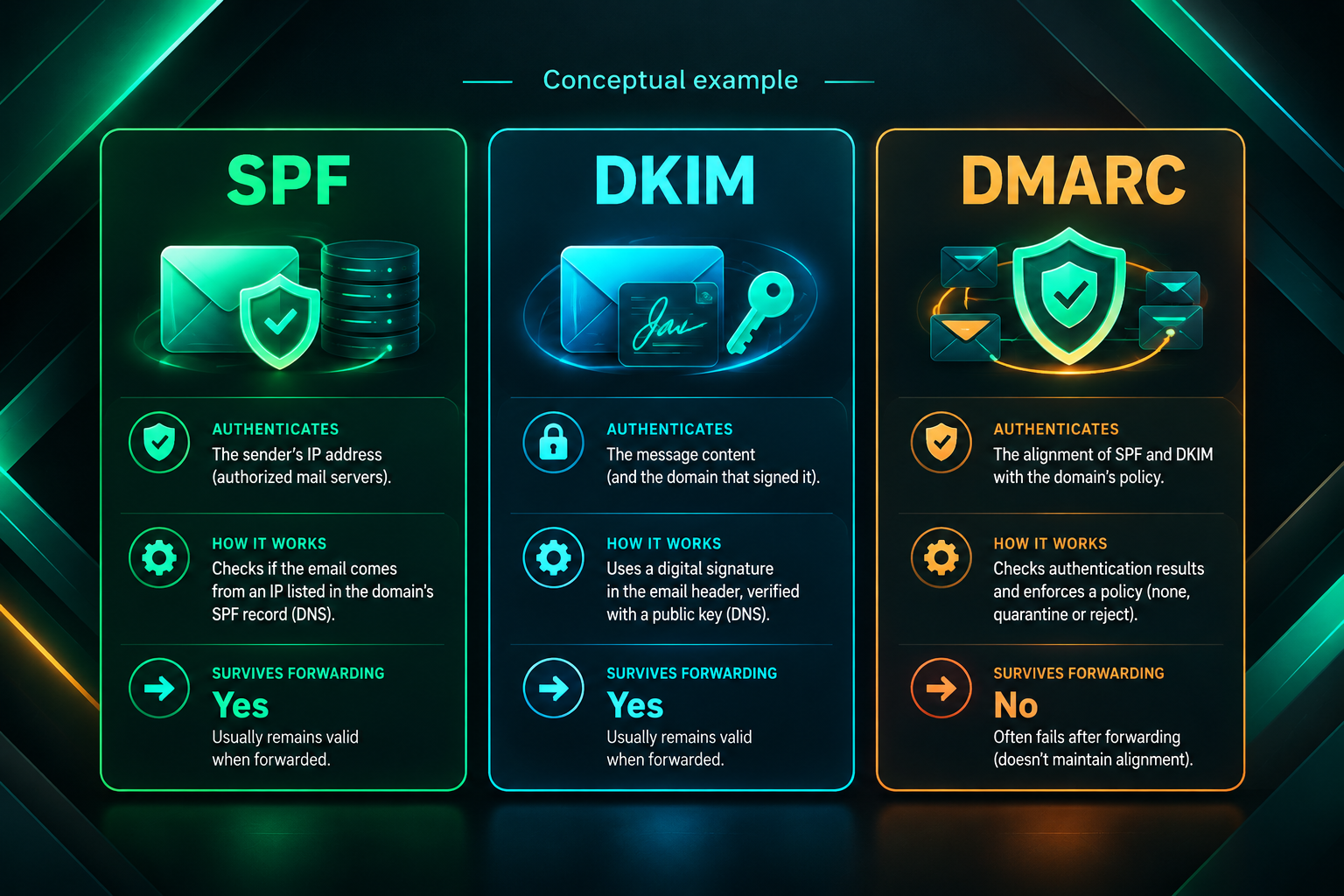
DKIM (DomainKeys Identified Mail) adds a cryptographic signature to outgoing messages. The signature is generated using a private key held by the sending server and verified by the recipient using a public key published in the sender’s DNS. DKIM authentication is tied to the message content and headers, which means it survives email forwarding in a way that SPF does not. When an email is forwarded, the sending IP changes, which can cause SPF to fail even for legitimate messages. DKIM remains valid as long as the message content is not altered.
DMARC (Domain-based Message Authentication, Reporting and Conformance) builds on SPF and DKIM by allowing domain owners to specify a policy for what should happen when authentication checks fail. A DMARC record also enables alignment checking, which verifies that the domain in the visible From header matches the domain authenticated by SPF or DKIM. DMARC policies can instruct receiving servers to do nothing (p=none), quarantine suspicious messages (p=quarantine), or reject them outright (p=reject). DMARC also enables aggregate and forensic reporting, which gives senders visibility into how their domain’s email is being authenticated across the internet.
For outreach email, the practical implication is that SPF, DKIM, and DMARC should all be configured before running a campaign at meaningful volume. Major inbox providers including Gmail and Outlook have strengthened their authentication requirements in recent years, and senders who lack a complete authentication stack are more likely to face deliverability problems, particularly when sending to large lists or using shared sending infrastructure.
Common SPF Mistakes in Outreach Email Setups
Several recurring configuration errors cause SPF to fail or underperform in outreach contexts. Being aware of these before you publish your record can save significant troubleshooting time later.
- Publishing multiple SPF records: As noted above, a domain must have exactly one SPF TXT record. If your domain already has one from a previous setup, edit it rather than adding a new one.
- Forgetting to include all sending services: If you add a new outreach platform after your SPF record is published, update the record to include the new service’s SPF hostname. Emails sent through an unlisted service will fail authentication.
- Using +all: This qualifier authorises all senders and provides no protection. It should never appear in a production SPF record.
- Exceeding the ten-lookup limit: As described above, this causes a PermError that silently breaks authentication for some or all recipients.
- Applying SPF only to the primary domain while ignoring sending subdomains: If you send outreach from a subdomain such as outreach.yourdomain.com, that subdomain needs its own SPF record unless it inherits one through a wildcard or redirect mechanism.
- Not verifying after changes: DNS changes can introduce syntax errors or unintended conflicts. Always validate the record after any modification using a dedicated SPF checker.
Sending Domains and Subdomain Strategy for Outreach
Many outreach practitioners and link building agencies send campaigns from dedicated subdomains or secondary domains rather than the primary business domain. This approach is intended to protect the main domain’s sending reputation if a campaign generates spam complaints or triggers filtering. For example, a business operating from company.com might send outreach from outreach.company.com or from a separate domain such as company-outreach.com.
If you use this strategy, each sending domain or subdomain requires its own SPF record. A subdomain does not automatically inherit the SPF record of the parent domain. You will need to publish a TXT record at the subdomain level with the appropriate authorised senders. Similarly, if you use multiple secondary domains for outreach, each one needs its own complete authentication setup including SPF, DKIM, and DMARC.
Using a dedicated sending domain also means warming it up before running campaigns at volume. A new domain with no sending history will be treated with more suspicion by mail providers than an established domain with a clean reputation. Sending small volumes initially, gradually increasing over several weeks, and maintaining low complaint rates are standard practices for building a positive sender reputation on a new domain.
SPF and Outreach Deliverability: Realistic Expectations
Correct SPF configuration is a necessary baseline for outreach email deliverability, but it is not a guarantee of inbox placement. Mail providers use a wide range of signals to evaluate incoming messages, and authentication is one input among many. Other factors that influence whether outreach emails reach the inbox include the sender’s IP and domain reputation, the volume and frequency of sending, the quality and relevance of the email content, the ratio of engaged to unengaged recipients, spam complaint rates, and the presence or absence of spam trigger phrases in the subject line or body.
A domain with a correctly configured SPF record but a poor sending reputation, a high bounce rate from invalid addresses, or content that resembles known spam patterns will still face deliverability problems. Conversely, a well-maintained sender reputation with clean lists and relevant content will generally perform better even if authentication is imperfect, though this is not a reason to skip authentication setup.
For link building outreach specifically, list quality is particularly important. Sending to verified, relevant contacts — editors, content managers, and webmasters at topically appropriate websites — reduces bounce rates and complaint rates compared to sending to broad, unverified lists. Combining correct authentication with a disciplined approach to list building and personalisation gives outreach campaigns the best practical foundation for deliverability.
Frequently Asked Questions
How long does it take for an SPF record to take effect?
DNS changes typically propagate within a few minutes to a few hours for most providers, though the technical maximum is 48 hours depending on the TTL (time to live) setting on your DNS records. You can check propagation progress using a DNS lookup tool such as MXToolbox or Google Admin Toolbox. It is advisable to verify the record is live before sending outreach at volume.
Can I have more than one SPF record on my domain?
No. The SPF specification requires exactly one SPF TXT record per domain. If two SPF records exist, receiving mail servers will return a PermError and SPF authentication will fail. If you need to add a new sending service, edit the existing record to include it rather than creating a second record.
What is the difference between ~all and -all?
The ~all qualifier (softfail) instructs receiving servers to accept mail from unauthorised sources but mark it as suspicious. The -all qualifier (hardfail) instructs receiving servers to reject mail from unauthorised sources. For outreach senders who have confirmed all legitimate sending sources are included in their record, -all provides stronger protection. Using ~all is reasonable during initial setup and testing.
Does SPF protect against all email spoofing?
SPF authenticates the envelope sender address — the address used during the SMTP transaction — but it does not directly authenticate the visible From header that recipients see in their email client. A complete anti-spoofing setup requires DMARC, which enforces alignment between the authenticated domain and the visible From address. SPF alone provides meaningful protection but is most effective as part of a full SPF, DKIM, and DMARC configuration.
Do I need a separate SPF record for each outreach subdomain?
Yes. Subdomains do not automatically inherit the parent domain’s SPF record. If you send outreach from a subdomain, publish a separate SPF TXT record at that subdomain level. This applies to any dedicated sending domain or subdomain used in your outreach programme.
Will setting up SPF guarantee my outreach emails reach the inbox?
No. SPF is a necessary authentication baseline, but inbox placement depends on many additional factors including sender reputation, list quality, sending volume, email content, and recipient engagement. SPF reduces the risk of authentication-related filtering but does not override other deliverability signals.
What tools can I use to check my SPF record?
Commonly used SPF validation tools include MXToolbox SPF Record Lookup, Google Admin Toolbox Check MX, Kitterman SPF Validator, and Mail Tester. These tools parse your record, count DNS lookups, flag syntax errors, and indicate whether the record is valid. Google Postmaster Tools provides ongoing visibility into how Gmail evaluates your domain’s authentication and reputation.
Getting SPF Right Before Your Next Outreach Campaign
SPF configuration is a one-time technical task that has a lasting effect on every outreach email your domain sends. Getting it right before launching a link building campaign, a guest post outreach sequence, or any sustained cold email programme means your messages have a better chance of being evaluated on their merits rather than filtered at the authentication stage. The setup process — auditing sending sources, constructing a single valid record, publishing it in DNS, and verifying it with a dedicated tool — is straightforward for most domains, though it requires care around the DNS lookup limit and the need to keep the record updated as your sending infrastructure changes.
SPF is most effective when combined with DKIM and DMARC. If you have not yet configured all three, treating them as a package rather than optional extras is a reasonable approach for any domain used in professional outreach. Once authentication is in place, the factors that most influence outreach success shift to list quality, personalisation, relevance, and the strength of the content and link opportunities you are presenting to publishers. If you are managing outreach campaigns at scale or working with an agency that handles link acquisition on your behalf, confirming that authentication is correctly configured on all sending domains is a practical first checkpoint before any campaign begins.