
The Google Search Console links report is one of the most direct sources of backlink data available to website owners, because it reflects what Google itself has crawled and associated with your site. Understanding how to read and act on this report can help you assess your current link profile, identify potential issues, and make more informed decisions about future link acquisition. This guide walks through every section of the report, explains what the data means in practice, and covers how to use the insights alongside other SEO tools.
Key Takeaways
- The Google Search Console links report shows the external and internal links Google has discovered for your site, including top linked pages, top linking sites, and anchor text distribution.
- The data reflects Google’s own crawl index, making it a reliable but incomplete picture — not every backlink on the web will appear here.
- The report is most useful for identifying your strongest linked pages, spotting unusual anchor text patterns, and understanding which external domains link to you most frequently.
- Combining Search Console link data with third-party tools such as Ahrefs, Semrush, or Majestic gives a more complete view of your backlink profile.
- The links report alone cannot tell you whether a link is helping or harming your rankings — context, relevance, and the broader profile all matter.
What the Google Search Console Links Report Contains
The links report in Google Search Console is found under the main left-hand navigation menu. It is divided into two primary categories: External links and Internal links. Each category contains sub-sections that break down the data in different ways. Accessing the report requires a verified Search Console property, and the data shown reflects what Google has crawled — it is not a real-time feed and may lag behind recent link acquisitions or removals by days or weeks.
External Links
The external links section covers backlinks pointing to your site from other domains. It contains three sub-reports: top linked pages, top linking sites, and top linking text. Each sub-report can be expanded to show a fuller list by clicking the link at the bottom of the summary card.
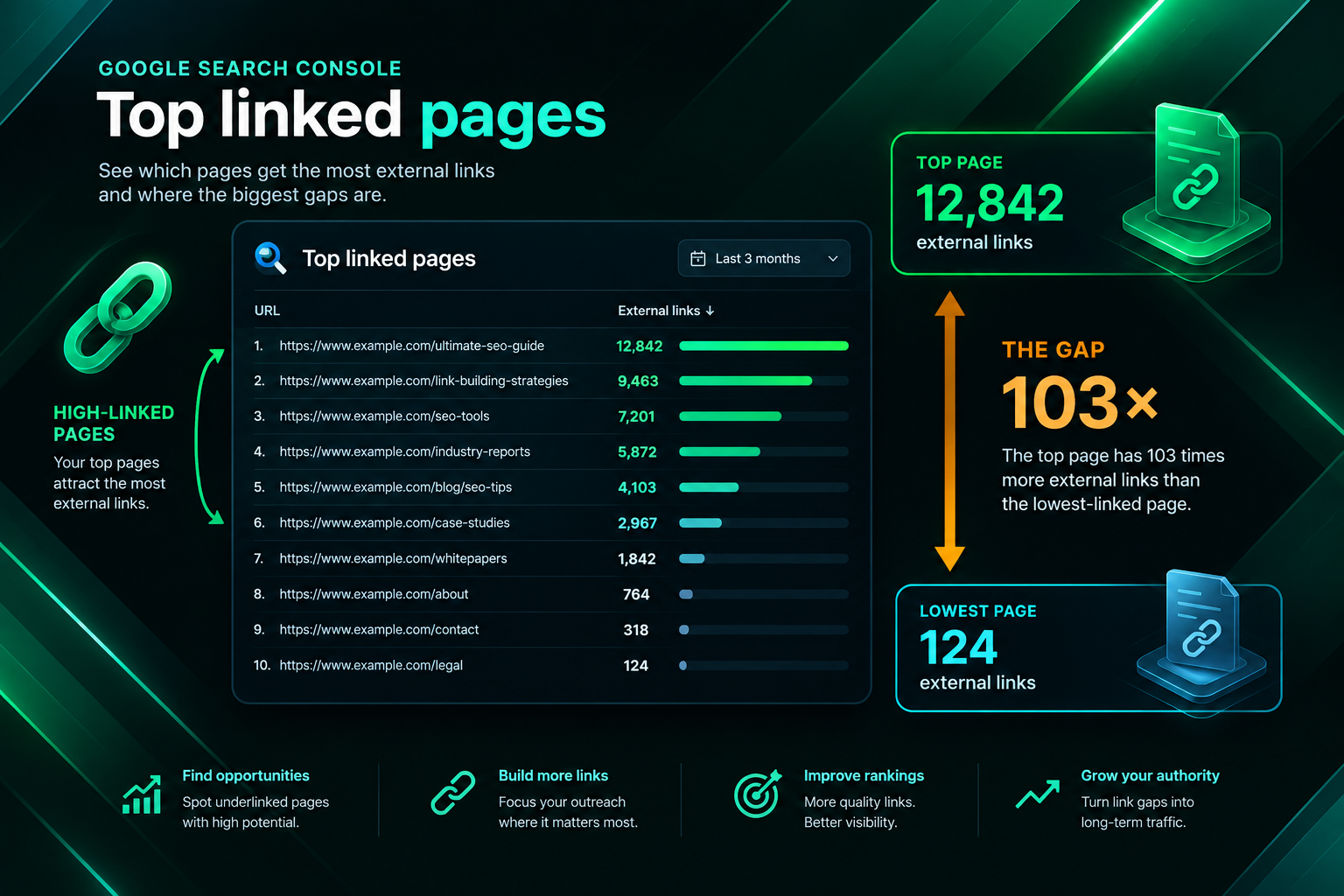
- Top linked pages: Shows which pages on your site receive the most external backlinks. The count reflects the number of unique external links pointing to each URL, not the number of unique referring domains.
- Top linking sites: Lists the external domains that link to your site most frequently. A single domain linking to you many times will appear high on this list even if the links all come from one or two pages.
- Top linking text: Displays the anchor text used most often across all external links pointing to your site. This is sometimes called anchor text distribution in SEO practice.
Internal Links
The internal links section shows which pages on your own site receive the most links from other pages within the same domain. This data is useful for understanding how link equity is distributed internally and whether important pages are well-supported by your site architecture. Pages with very few internal links may be harder for Google to discover and may receive less internal authority signal, though the relationship between internal link counts and rankings is not straightforward and depends on many other factors.
How to Read the Top Linked Pages Report
The top linked pages sub-report is often the most immediately actionable section. It tells you which URLs on your site have attracted the most external links, which can indicate where your site’s perceived authority is concentrated. In many cases, the homepage will appear at or near the top, followed by popular blog posts, resource pages, or product pages that have earned links organically over time.
When you click on a specific URL in this list, Search Console shows you the linking sites for that page. This lets you see which external domains are contributing links to a particular URL, which is useful when you want to understand the source quality behind a page’s link count. However, the report does not show individual link-level attributes such as whether a link carries a nofollow, sponsored, or ugc attribute. For that level of detail, third-party backlink tools are necessary.
A practical use of this data is identifying which pages are already well-linked and which important pages — such as key service pages, high-value product categories, or conversion-focused landing pages — have relatively few external links pointing to them. This gap between where links currently land and where you want link equity to flow is a useful starting point for planning a link building campaign.
How to Read the Top Linking Sites Report
The top linking sites report lists external domains by the number of links they send to your site. It is important to understand that this count reflects total links from a domain, not unique pages or unique referring domains. A news site that has linked to you in ten different articles will appear with a count of ten, even though it represents a single referring domain.
When you click on a domain in this list, Search Console shows which of your pages that domain links to. This is useful for understanding whether a high-frequency linking domain is pointing to a range of your pages or concentrating all its links on one URL. It can also help you spot patterns — for example, a domain you do not recognise sending an unusually high number of links may warrant further investigation using a third-party tool to assess the nature of those links.
The top linking sites report does not provide domain-level quality signals such as Domain Rating, Domain Authority, Trust Flow, or Authority Score. These are proprietary metrics calculated by third-party tools — Ahrefs, Moz, Majestic, and Semrush respectively — and are not provided by Google. To assess the quality of a linking domain, you need to review the site directly or use one of these tools alongside the Search Console data.
How to Read the Top Linking Text Report
The top linking text report shows the anchor text phrases used most frequently across all external links pointing to your site. Anchor text is the visible, clickable text of a hyperlink, and it has historically been considered a relevance signal by search engines. The distribution of anchor text across your backlink profile — the mix of branded terms, generic phrases, exact-match keywords, and partial-match variations — is sometimes referred to as anchor text diversity or anchor text profile.
A healthy anchor text profile typically includes a significant proportion of branded anchors (your company or domain name), a mix of natural phrases, and a smaller proportion of keyword-rich anchors. An unusually high concentration of exact-match keyword anchors — particularly for competitive commercial terms — can be a signal worth investigating, as it may reflect an unnatural link pattern. However, Search Console’s top linking text report shows only the most frequent anchors and does not provide a percentage breakdown or flag any anchor as problematic. Interpreting the data requires judgement and, where necessary, comparison with third-party tools that offer more granular anchor text analysis.
If you notice anchor text that is irrelevant to your site’s topic, or phrases associated with industries you do not operate in, this may indicate links from unrelated or low-quality sources. It does not automatically mean a penalty is imminent, but it is worth investigating the linking pages to understand the context.
Exporting and Working with the Data
Each section of the links report includes an export option, accessible via the export button in the top right of the expanded view. You can export the data as a Google Sheets file or a CSV. Exporting is particularly useful when you want to analyse more than the top entries shown in the interface, compare data across time periods, or share the information with a team member or SEO provider.
Search Console does not currently offer a built-in historical comparison for the links report in the same way it does for performance data. The links data shown reflects a snapshot of what Google has indexed at the time of viewing. If you want to track changes in your backlink profile over time — for example, to monitor whether new links from a campaign have been discovered, or whether previously identified links have been removed — you will need to export the data at regular intervals and compare the exports manually, or use a third-party tool that maintains historical backlink records.
Limitations of the Google Search Console Links Report
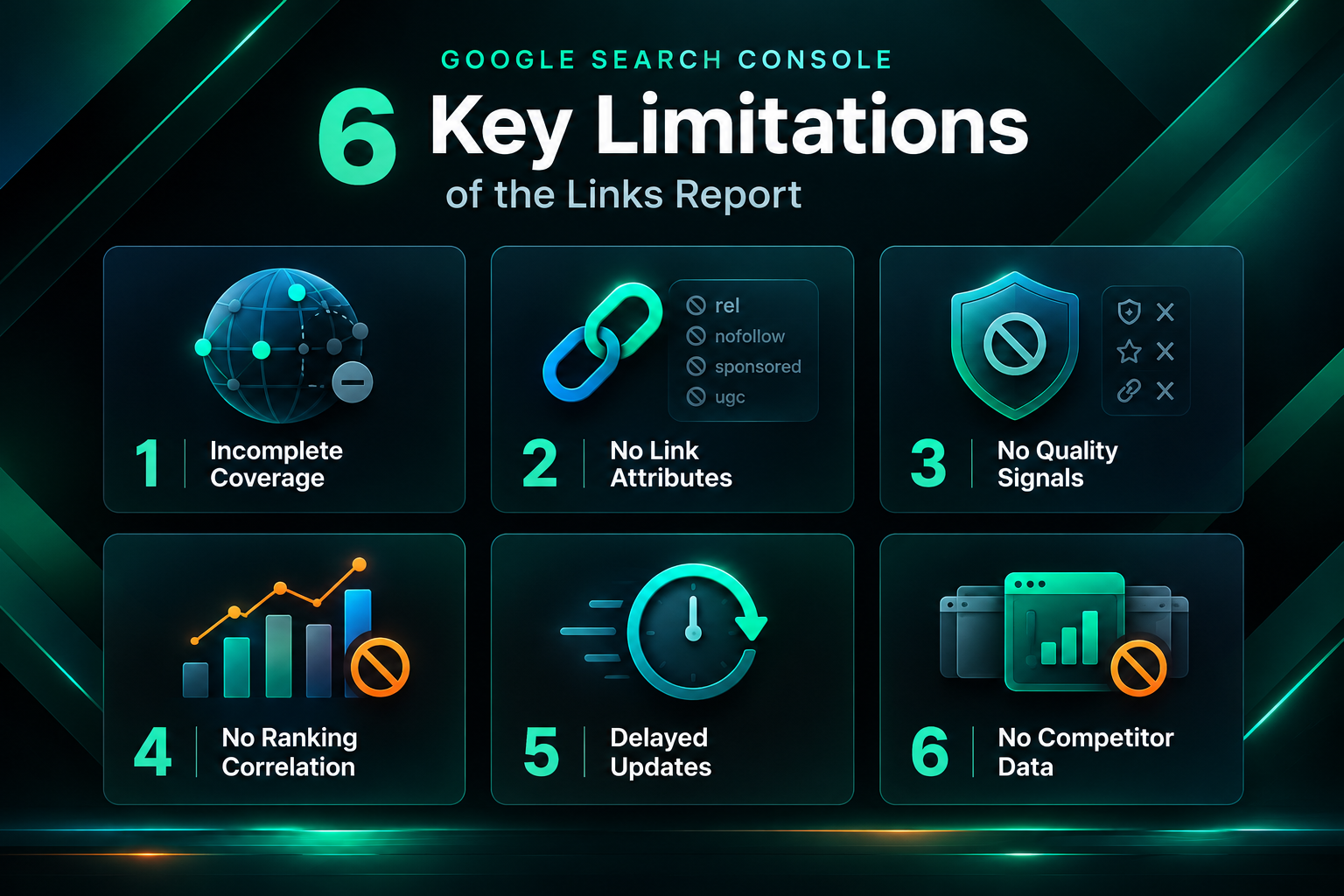
The Search Console links report is a valuable starting point, but it has meaningful limitations that affect how it should be used in practice.
- Incomplete coverage: The report shows only the links Google has crawled and chosen to include. Many backlinks that exist on the web may not appear, either because Google has not crawled the linking page recently, because the page is blocked from crawling, or because Google has chosen not to count the link. Third-party tools typically show a larger number of backlinks because they crawl the web independently.
- No link attribute detail: The report does not indicate whether individual links are followed, nofollowed, sponsored, or carry the ugc attribute. This matters when assessing the likely SEO value of a link.
- No quality signals: Search Console does not provide domain authority scores, spam scores, or any other quality indicator for linking sites. Quality assessment requires manual review or third-party tools.
- No ranking correlation: The report does not show which links are contributing to your rankings or traffic. A page may have many external links and rank poorly, or rank well with relatively few. Rankings depend on many factors beyond backlink count.
- Delayed updates: New links may take days or weeks to appear in the report after Google crawls and processes them. Removed links may also persist in the report for some time after they have been taken down.
- No competitor data: The report covers only your verified property. To understand how your backlink profile compares to competitors, you need a third-party tool.
Using Search Console Link Data Alongside Third-Party Tools
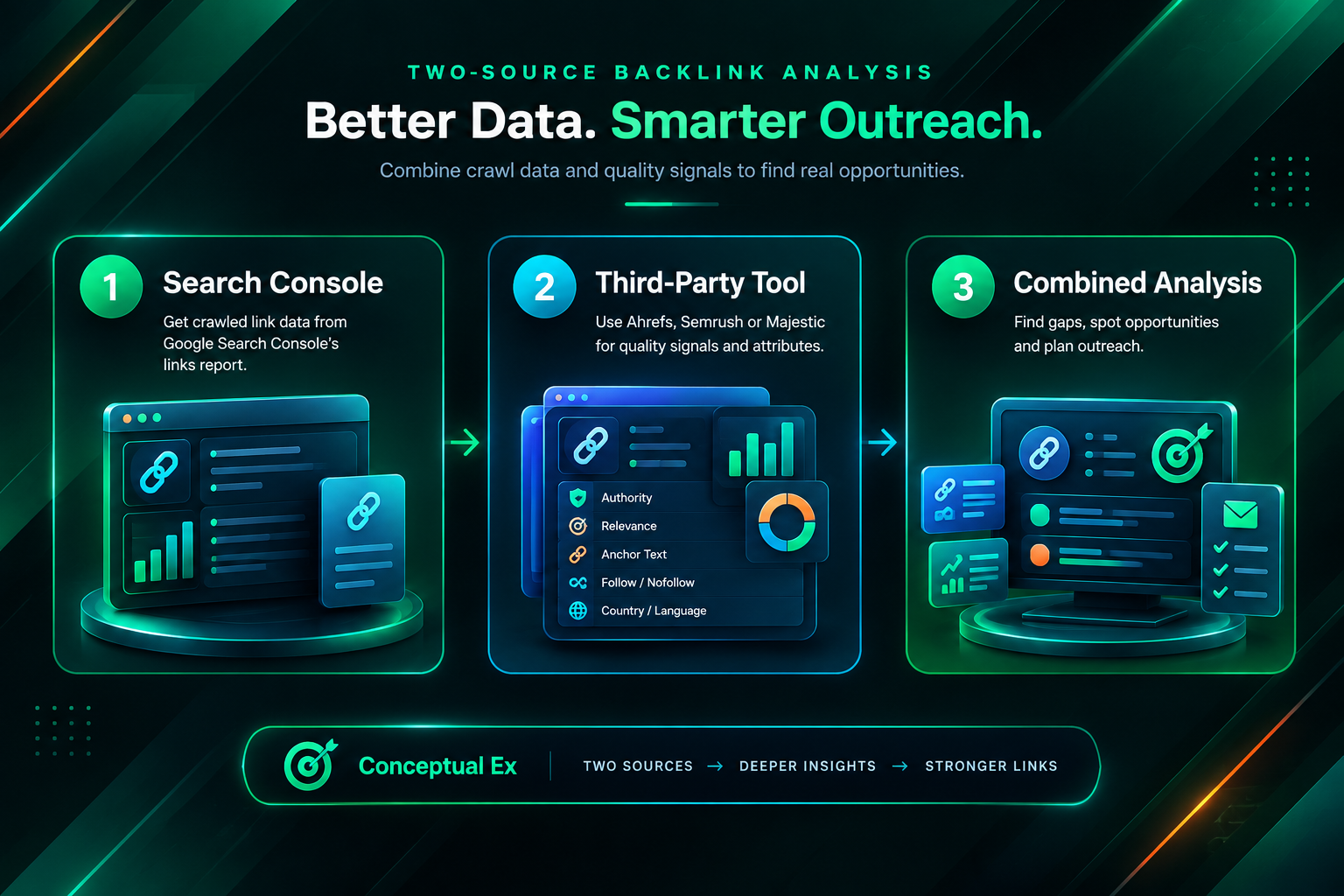
The most effective approach to backlink analysis combines the Search Console links report with data from tools such as Ahrefs, Semrush, Majestic, or Moz. Each tool crawls the web independently and maintains its own link index, which means they often surface links that Search Console does not show, and vice versa. Using multiple sources reduces the risk of acting on an incomplete picture.
Third-party tools add several capabilities that Search Console lacks. They typically show individual link attributes (followed versus nofollowed), the specific anchor text for each link, the page-level and domain-level authority metrics for linking sites, historical link data, and competitor backlink profiles. Ahrefs and Semrush also allow you to filter links by attribute, date range, or domain metric, which makes it easier to identify patterns or anomalies in a large backlink profile.
A practical workflow is to use the Search Console links report as a quick, authoritative reference for which pages Google has associated with external links, and then use a third-party tool to investigate the quality, attributes, and context of those links in more detail. When planning a link building campaign, the combination of both data sources helps identify which target pages need more external links, what anchor text is already in use, and which types of referring domains are currently linking to the site.
Identifying Link Building Opportunities from the Report
The links report can inform link building strategy in several practical ways, even though it is primarily a diagnostic tool rather than a prospecting tool.
Finding Underlinked Priority Pages
By reviewing the top linked pages list, you can identify which important pages on your site have few or no external links. Service pages, product category pages, and conversion-focused landing pages often receive fewer organic links than blog content, yet they may be the pages most important to your business goals. This gap is a common starting point for a targeted link building campaign — acquiring links that point directly to these pages rather than only to the homepage or blog.
Spotting Anchor Text Gaps or Imbalances
The top linking text report can reveal whether your backlink profile is heavily weighted toward a single anchor type. If almost all external links use your brand name and very few use any topically relevant phrases, there may be an opportunity to diversify through editorial outreach or guest posting. Conversely, if keyword-rich anchors dominate, a more cautious approach to future anchor text selection may be appropriate. Neither situation automatically indicates a problem, but both are worth understanding before planning new link acquisition.
Recognising High-Value Referring Domains
The top linking sites report can help you identify which types of external sites are already linking to you. If you notice that industry publications, relevant directories, or authoritative organisations in your niche are among your top linking sites, this gives you a clearer picture of the editorial environment your site operates in. It can also suggest the types of sites worth targeting in future outreach, since sites in similar categories have already found your content worth linking to.
When to Consider the Disavow Tool
Google’s disavow tool allows you to ask Google to ignore specific links when assessing your site. It is a separate feature from the links report, accessible through Google Search Console, and it should be used with caution. Google’s own guidance states that the disavow tool is generally only necessary if you have a manual action related to unnatural links, or if you have strong reason to believe that low-quality or manipulative links are harming your site.
The links report can help you identify domains that look unfamiliar or potentially problematic, but the presence of a low-quality link in the report does not automatically mean it is causing harm. Google’s algorithms are designed to ignore links they consider low-quality rather than penalise sites for receiving them. Disavowing links unnecessarily — particularly links that may be neutral or even beneficial — carries its own risks. If you are uncertain whether a disavow file is appropriate for your situation, a qualified SEO professional should review your full backlink profile before any action is taken.
Internal Links: A Frequently Overlooked Section
The internal links section of the Search Console links report is often given less attention than the external links data, but it provides useful information about how your site’s own pages support each other. Pages that appear at the top of the internal links list are receiving the most internal link equity from the rest of your site. Pages that appear rarely or not at all may be poorly connected to the rest of your site architecture.
If a page is important to your business — a key service page or a high-priority product category — but receives very few internal links, adding relevant internal links from other well-linked pages on your site may help Google discover and assess it more effectively. Internal linking is a technical SEO factor that is entirely within your control and does not require outreach or external relationships. It is often worth addressing internal link gaps before or alongside an external link building campaign.
Frequently Asked Questions
How often is the Google Search Console links report updated?
Google does not publish a fixed update schedule for the links report. In practice, the data tends to reflect a rolling snapshot of what Google has crawled and processed, which can lag behind real-world link changes by days or several weeks. New links from a recent campaign may not appear immediately, and removed links may persist in the report for some time.
Why does Search Console show fewer backlinks than Ahrefs or Semrush?
Search Console shows only the links Google has crawled and chosen to include in its index. Third-party tools such as Ahrefs and Semrush maintain their own independent web crawls and link indexes, which typically cover a broader range of URLs. Neither source is definitively complete — each reflects a different crawl methodology and update frequency.
Can the links report tell me which backlinks are helping my rankings?
No. The links report shows which external links Google has associated with your site, but it does not indicate which links are contributing to specific rankings or organic traffic. Rankings depend on many factors including content quality, technical SEO, search intent alignment, and competition. Attributing a ranking change to a specific link or set of links requires careful analysis and is rarely straightforward.
Should I be concerned if I see unfamiliar domains in the top linking sites list?
Not necessarily. It is worth investigating unfamiliar domains by visiting them directly or reviewing them in a third-party tool, but the presence of an unknown domain in the report does not automatically indicate a problem. Many sites accumulate links from sources they were not aware of. If a domain appears to be a spam site, a link farm, or completely unrelated to your industry, it may be worth noting, but a single low-quality link is unlikely to cause harm on its own.
How do I use the links report to plan a link building campaign?
Start by identifying which important pages have few external links in the top linked pages section. Then review the top linking sites to understand which types of domains are already linking to you. Use the top linking text data to understand your current anchor text distribution. This information helps you define which pages need more links, what anchor text variety may be appropriate, and which types of referring domains are realistic targets for outreach.
Does the links report show nofollow links?
The links report does not distinguish between followed and nofollowed links. It shows links that Google has crawled and associated with your site regardless of their link attribute. To identify which links carry nofollow, sponsored, or ugc attributes, you need to inspect the linking pages directly or use a third-party backlink tool that records link attributes.
Making Practical Use of Your Search Console Link Data
The Google Search Console links report is a reliable, first-party reference point for understanding which pages on your site have attracted external links, which domains are linking to you, and what anchor text is being used. Its value lies in the fact that it reflects Google’s own crawl data rather than a third-party estimate — but that also means it is not a complete picture of your backlink profile, and it lacks the quality signals and historical depth that dedicated SEO tools provide.
Used regularly, the report can help you spot underlinked priority pages, monitor whether new links from outreach campaigns are being discovered by Google, identify unusual anchor text patterns worth investigating, and understand how your internal link structure supports your most important pages. These insights are most useful when combined with data from tools such as Ahrefs, Semrush, or Majestic, and when interpreted alongside your broader SEO goals rather than in isolation.
If your analysis of the links report reveals significant gaps — particularly a lack of external links to commercially important pages — it may be worth discussing a structured link acquisition strategy with an experienced SEO provider. A targeted campaign focused on relevant, editorially placed links to your priority pages is one approach that some businesses use to address these gaps, though the right strategy depends on your site’s current condition, competitive landscape, and overall SEO priorities.